The Deadline Has Already Passed for Some of You
PostgreSQL 13 reached community end of life in November 2025. On Amazon RDS, its standard support ended on February 28, 2026, and every PostgreSQL 13 instance still running has been billed for Extended Support since March 1, 2026. PostgreSQL 14 is next. The community stops patching it on November 12, 2026, and RDS starts charging for it on March 1, 2027.
| Major | Community EOL | RDS Extended Support billing |
|---|---|---|
| 13 | Nov 13, 2025 | Mar 1, 2026 |
| 14 | Nov 12, 2026 | Mar 1, 2027 |
| 15 | Nov 11, 2027 | Mar 1, 2028 |
| 16 | Nov 9, 2028 | Mar 1, 2029 |
| 17 | Nov 8, 2029 | Mar 1, 2030 |
RDS standard support ends the day before billing starts. The price doubles two years later.
Upgrade straight to 16 or 17. RDS accepts 13 or 14 to 16 or 17 in a single hop, and each step up buys a year of support.
What Extended Support Costs
In US East (N. Virginia), Extended Support costs $0.100 per vCPU-hour in years 1 and 2, then $0.200 from year 3, on top of the instance. Multi-AZ standbys and read replicas are billed too, and Reserved Instance discounts do not apply.
A db.r6g.xlarge (4 vCPU) in Multi-AZ on PostgreSQL 13, 730 hours a month:
- Instance: $0.899/hour, about $656/month.
- Extended Support: 8 vCPU (primary plus standby) × $0.100 × 730 = $584/month.
- From March 1, 2028: $1,168/month.
The charge stops the day you upgrade to a version under standard support.
What a Major Upgrade Does on RDS
An in-place upgrade runs pg_upgrade. With backup retention above 0, RDS takes a snapshot before and after. The database is unavailable while it runs, Multi-AZ included, because primary and standby upgrade together. Plan for several minutes of downtime. You cannot downgrade afterwards, only restore the pre-upgrade snapshot to a new instance.
Each of these blocks the upgrade if left unchecked:
SELECT count(*) FROM pg_prepared_xacts;            -- must be 0
SELECT slot_name FROM pg_replication_slots
  WHERE slot_type = 'logical';                      -- drop unused slots
SELECT extname, extversion FROM pg_extension;       -- check target support
Extensions are not upgraded with the engine. Run ALTER EXTENSION ... UPDATE afterwards (PostGIS before the jump if you skip a major). Planner statistics are lost too, so run ANALYZE VERBOSE; in every database as soon as the upgrade finishes, or queries run on poor plans until autovacuum reaches each table.
Cut the Downtime With Blue/Green
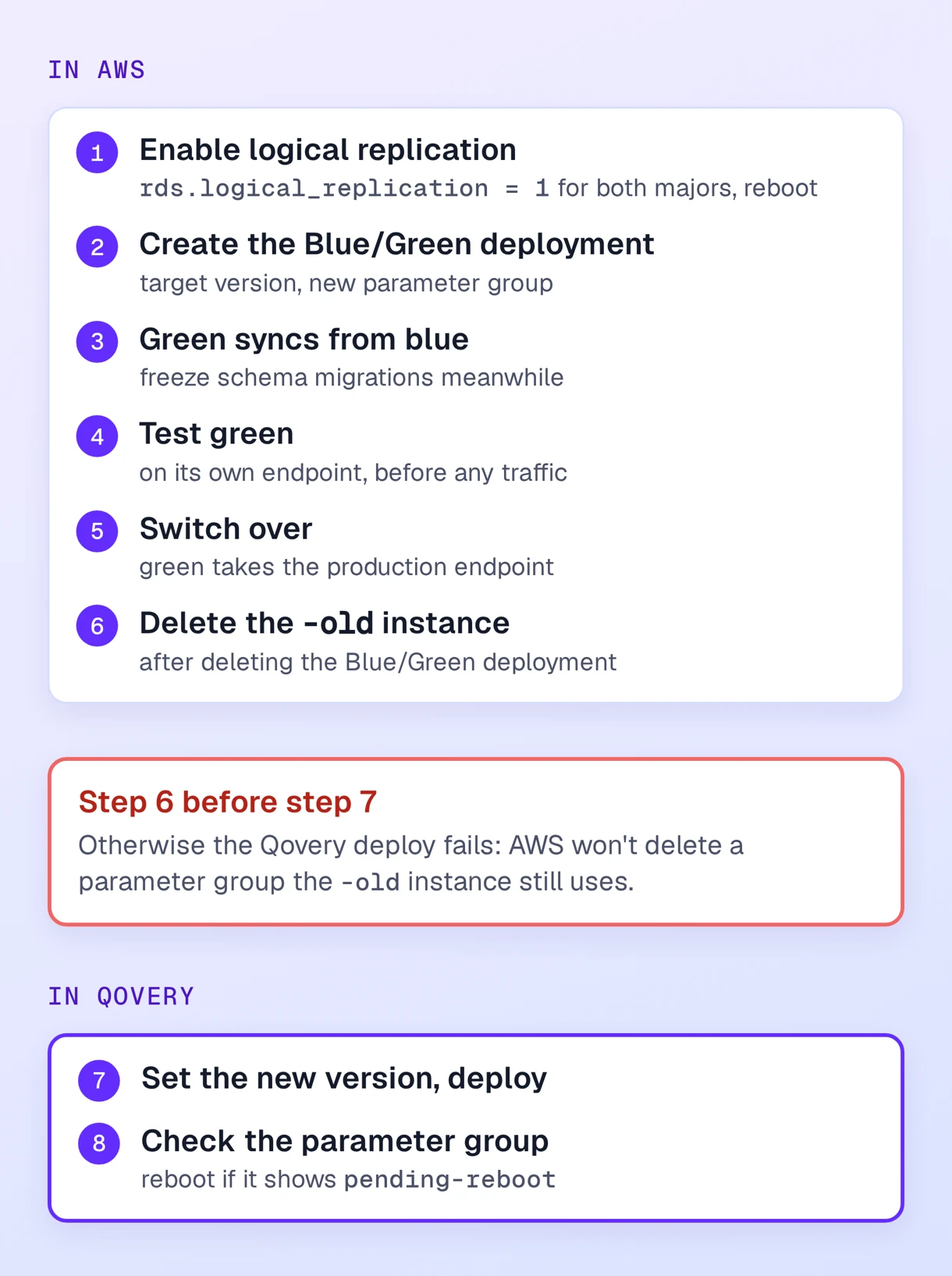
If several minutes of downtime is too much, use an RDS Blue/Green deployment. AWS builds an upgraded copy of the instance (the green environment), keeps it in sync with production through logical replication, and switches over when you ask, typically in under a minute. You validate the new major on green before any traffic reaches it.
It comes with prerequisites:
rds.logical_replication = 1in a custom parameter group for the current major, attached and applied with a reboot, plus a second parameter group with the same setting for the target major.- No DDL and no large object changes while green is syncing, so freeze schema migrations for the duration.
- A primary key on every table that receives updates or deletes.
pg_partmanandpg_crondisabled during the sync.
Create the Blue/Green deployment from the AWS console with the target version and the new parameter group, wait until every instance is Available, test against green, then select Switch over. Green takes the production endpoint, so applications reconnect without a configuration change. Delete the Blue/Green deployment, then the old instance AWS renamed with an -old suffix.
Rehearse on a Copy First
Restore last night's snapshot to a throwaway instance, upgrade it and time it. Clone your Qovery environment (cloning copies configuration, not data), point the clone's database connection variables at the restored instance and run your tests. You get the real downtime, the precheck failures and plan regressions, away from production.
How Each Path Works on Qovery
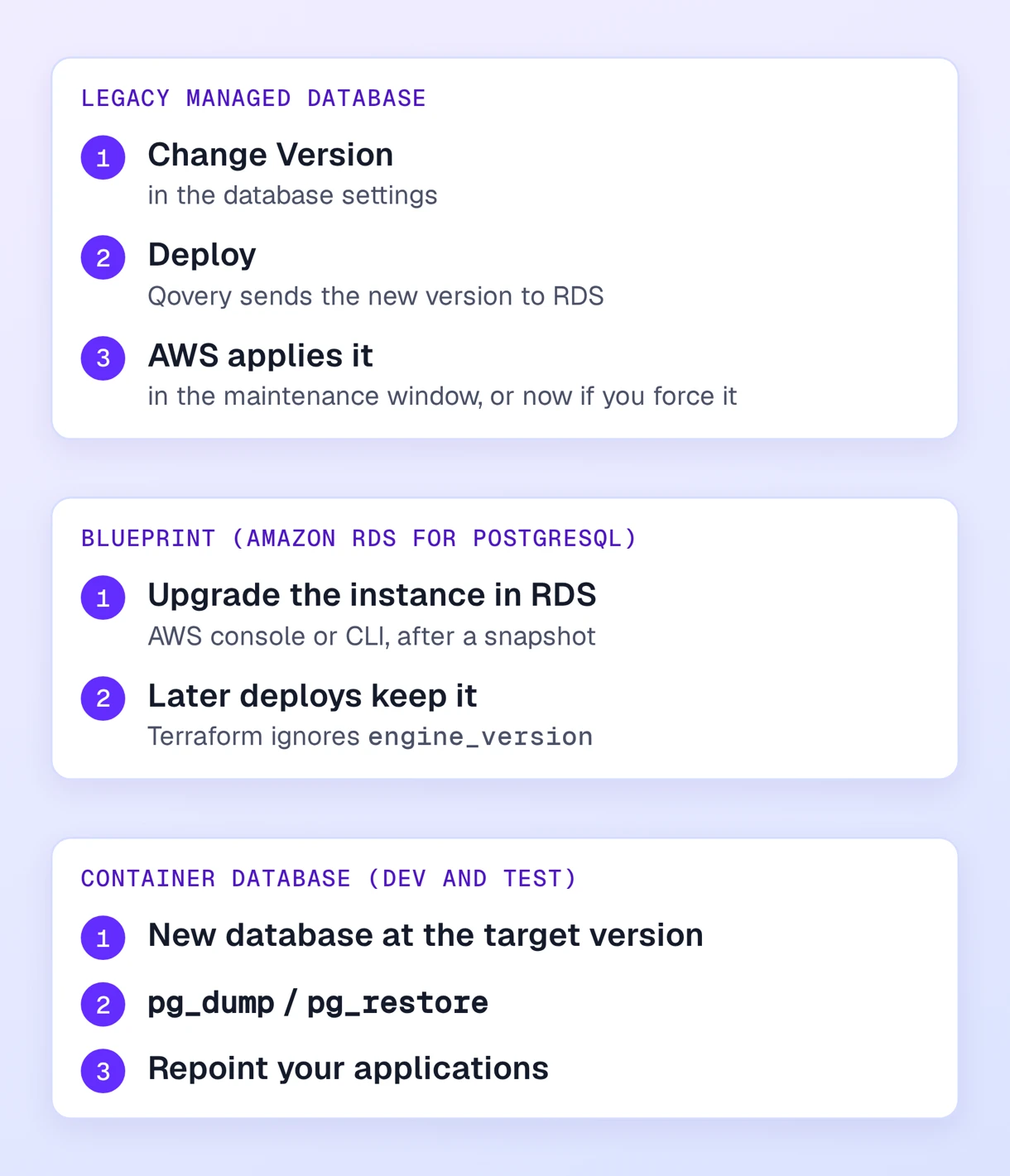
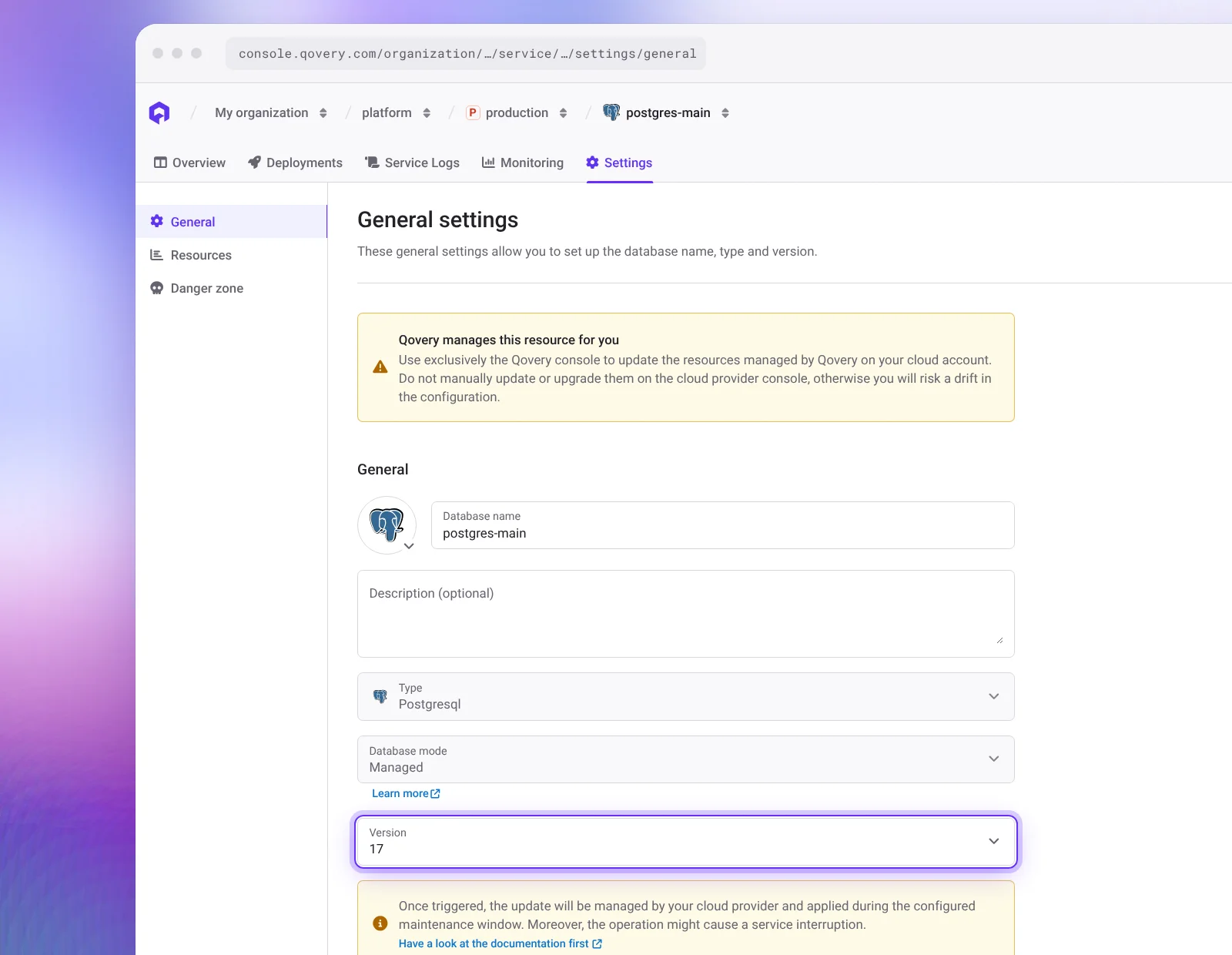
Legacy managed databases. Change Version in the database settings and deploy. RDS applies it in the maintenance window, or earlier if you force it in the AWS console after the Qovery deploy. Qovery does not run ANALYZE for you.
With Blue/Green, switch over in AWS, delete the -old instance, and only then set the new version in Qovery and redeploy. If the old instance still exists, the deploy fails, because Qovery replaces the parameter group for the new engine family, and AWS refuses to delete one that an instance still uses. After the deploy, check that the parameter group status is not pending-reboot, and reboot if it is. The RDS upgrade tutorial walks through every step.
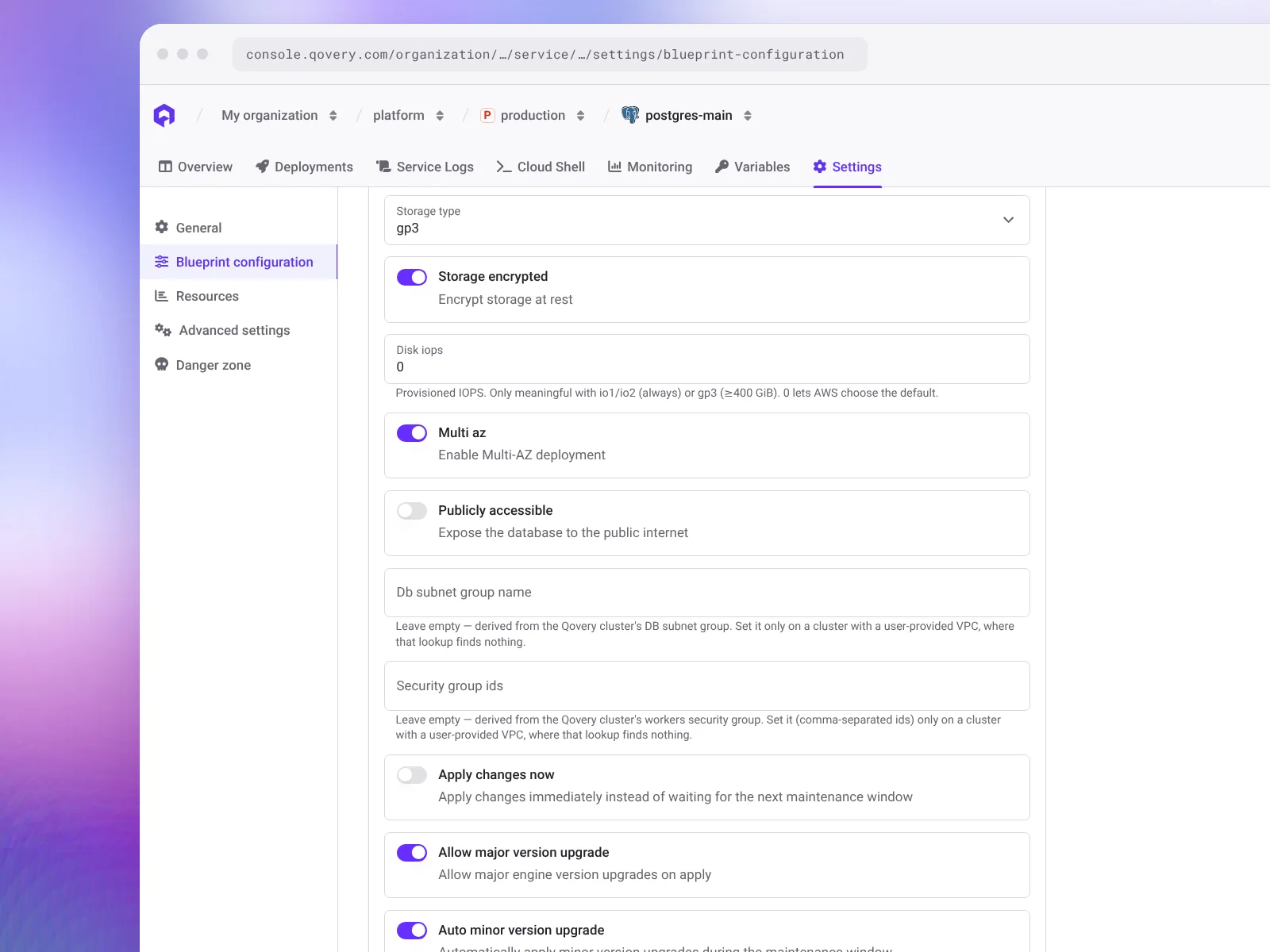
Blueprint databases. New RDS instances on Qovery come from the Amazon RDS for PostgreSQL blueprint, available for majors 14 to 18. The blueprint never changes the running engine version (engine_version is ignored by its Terraform), so run the major upgrade on the instance itself, from the RDS console or the AWS CLI. Qovery deploys that follow leave the new version in place. Defaults include a Tue:02:00-Tue:04:00 UTC maintenance window and 14 days of backups, which makes the pre-upgrade snapshot automatic.
Container databases. They are for dev and test, with no automated backups. For a major jump, create a new container database at the target version, pg_dump and pg_restore into it, and repoint your applications.
Related Fixes While You Are in There
- Extensions. Put
CREATE EXTENSION IF NOT EXISTS vector;in your migrations so preview environments get it too, or open a psql session throughqovery port-forward. Extensions loaded throughshared_preload_libraries, such aspg_cron, need a custom parameter group. - Master password. On a blueprint, change
db_passwordand setapply_changes_now, otherwise RDS waits for the maintenance window while apps already use the new value. Legacy managed databases need a support request. Give applications their own role so a master rotation causes no downtime. - Multi-AZ in non-production. Set
multi_azto false in the blueprint configuration. A Single-AZ db.r6g.xlarge costs $0.45/hour against $0.899 in Multi-AZ. - Storage.
storage_typedefaults to gp3. On RDS it costs the same per GB as gp2 and gives a 3,000 IOPS baseline below 400 GB, where a 100 GB gp2 volume gets 300.