Installing the Operator Exposes Nothing
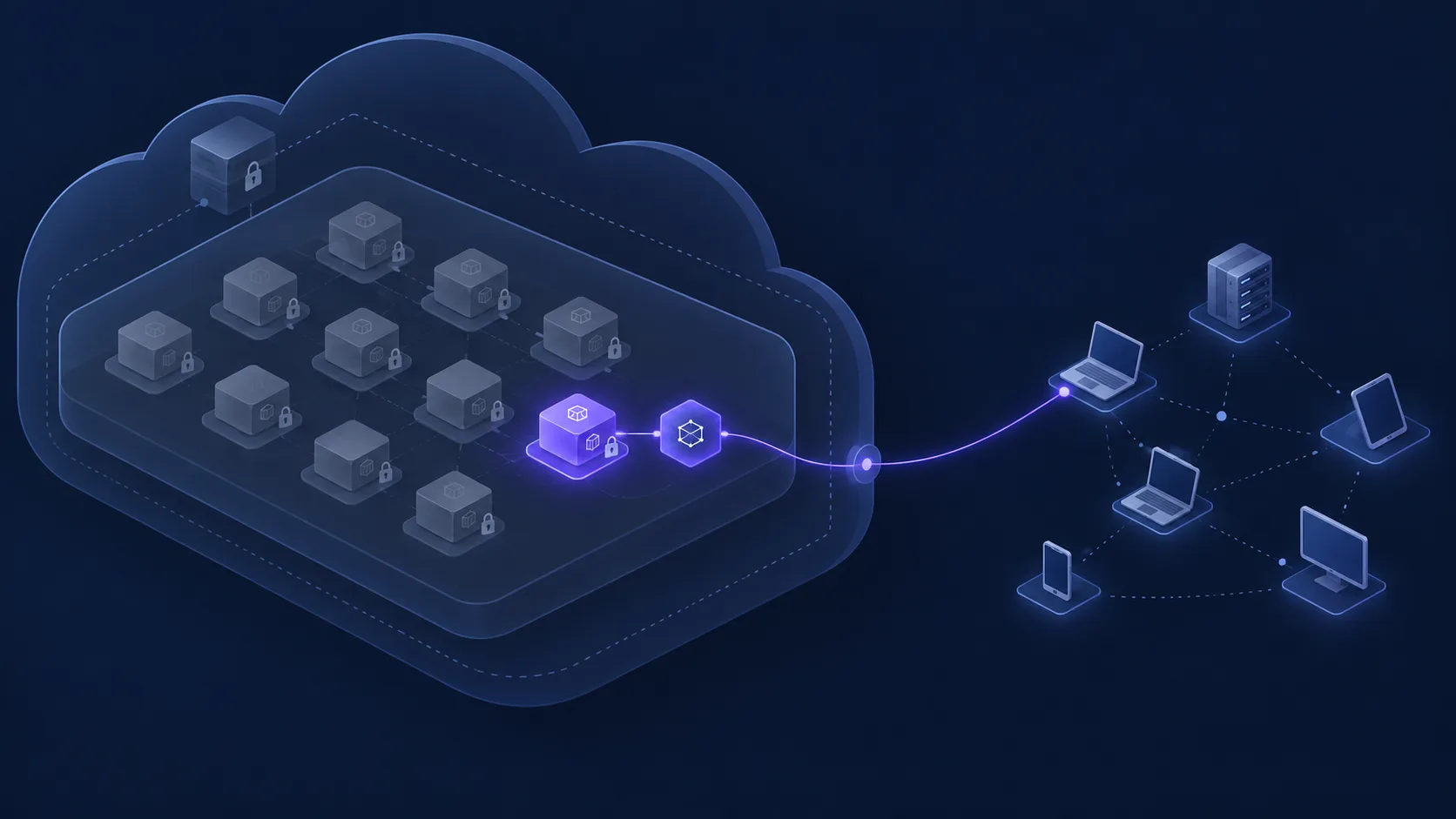
The Tailscale Kubernetes Operator does nothing visible when you install it. It watches the cluster and waits. What your tailnet can reach depends on the resources you create next: an annotation on one Service, a Connector that advertises a whole CIDR, or an egress Service.
Two choices decide whether this setup stays safe. The first is using a subnet router when one service was enough, which puts every IP in the advertised CIDRs on the tailnet, pods and databases included. The second is keeping the default allow-all policy, which lets every device on the tailnet reach every proxy the operator creates.
The running example is a platform team with one Qovery-managed EKS cluster per region. The guide uses us-east-1. By the end, one Qovery application is reachable at a stable tailnet hostname, only on its declared ports, and only by the group you choose.
Step 1: Pick the Pattern Before You Install Anything
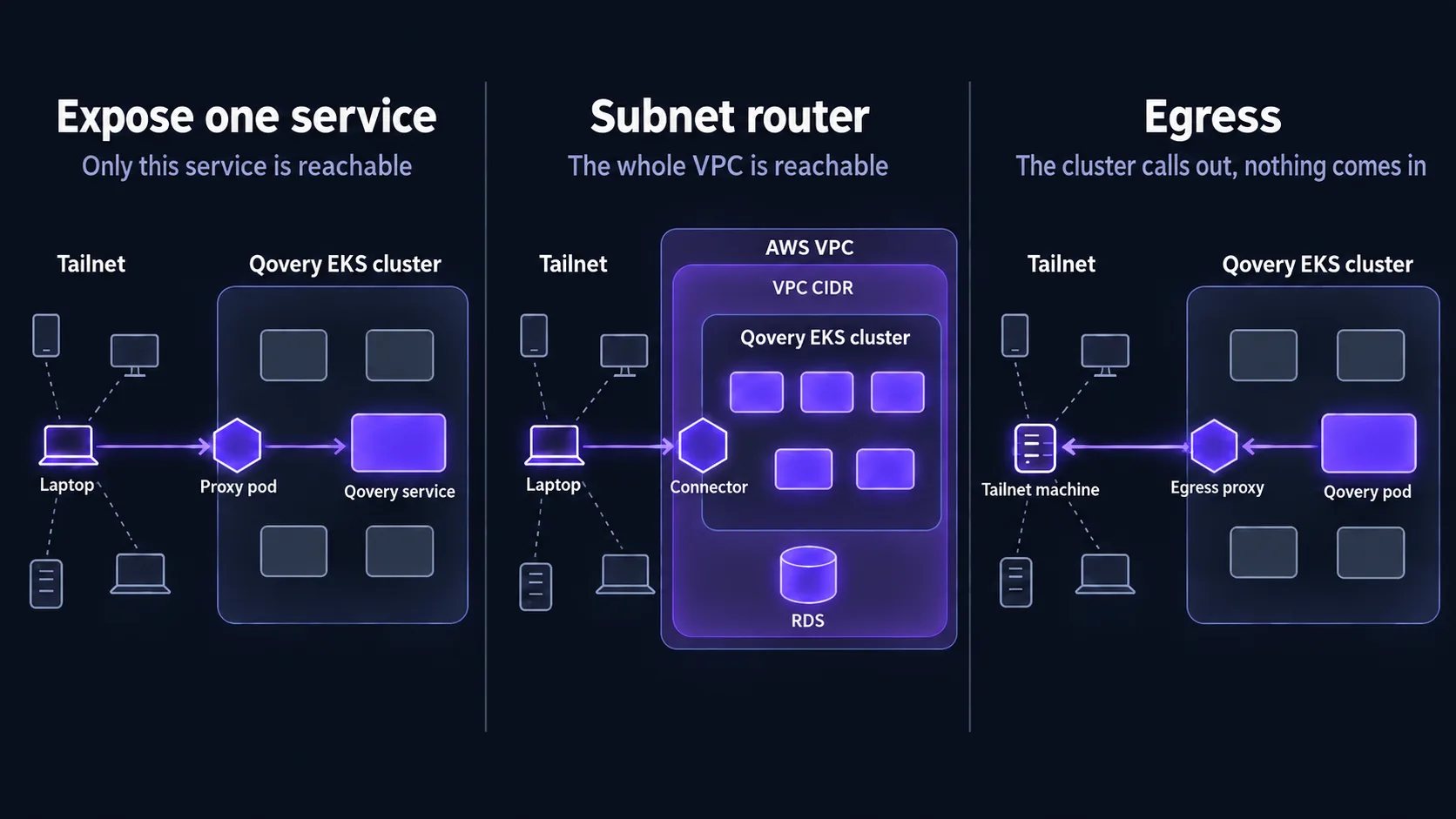
The operator supports three patterns. Each one exposes a different surface, so choose it first and design the access policy around it.
| Goal | Kubernetes resource | What the tailnet can reach |
|---|---|---|
| Reach one service (the default in this guide) | The tailscale.com/expose: "true" annotation on that service's Kubernetes Service | Only that service, on its declared ports |
| Reach the whole VPC or cluster | A Connector with a subnet router | Every IP in the advertised CIDRs: pods, RDS, and any peered VPC you add |
| Let the cluster call a tailnet machine (egress) | A Service with the tailscale.com/tailnet-fqdn annotation | Nothing is exposed. Pods can call the tailnet target |
Install one operator per cluster. With one Qovery cluster per region, you repeat the operator installation and the service exposure on every cluster that needs Tailscale. The tailnet setup in the next step happens once, except for the OAuth client, which you create per cluster.
Step 2: Prepare the Tailnet
The operator authenticates with an OAuth client and tags every device it creates. Both must exist before the first deployment, or the operator pod fails at startup.
Declare the Tag Owners
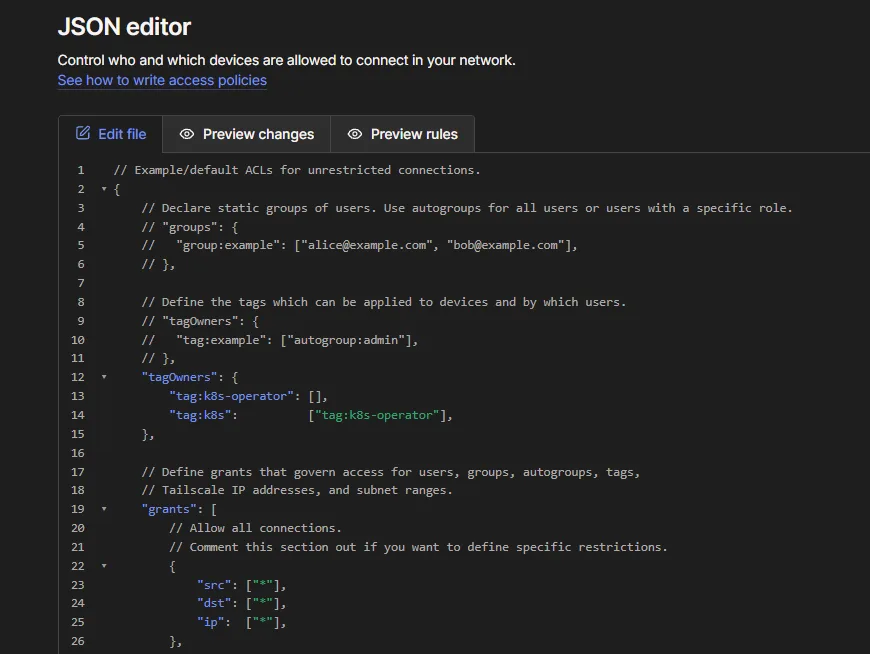
In the Tailscale admin console, open Access controls and merge these entries into the tagOwners block of the tailnet policy file:
"tagOwners": {
  "tag:k8s-operator": [],
  "tag:k8s": ["tag:k8s-operator"]
}
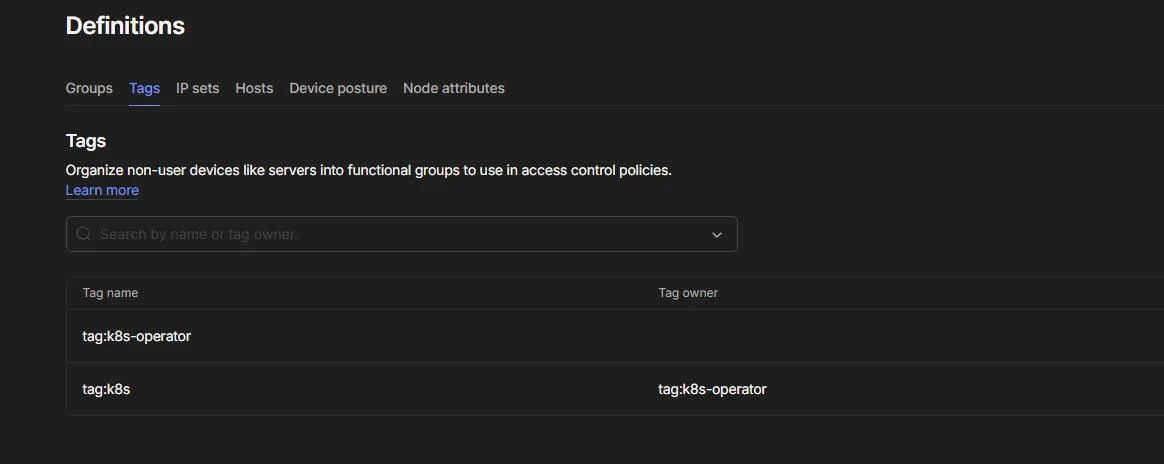
tag:k8s-operator is the operator's own device. tag:k8s goes on every proxy the operator creates. The operator can apply tag:k8s because tag:k8s-operator owns it.
Create One OAuth Client per Cluster
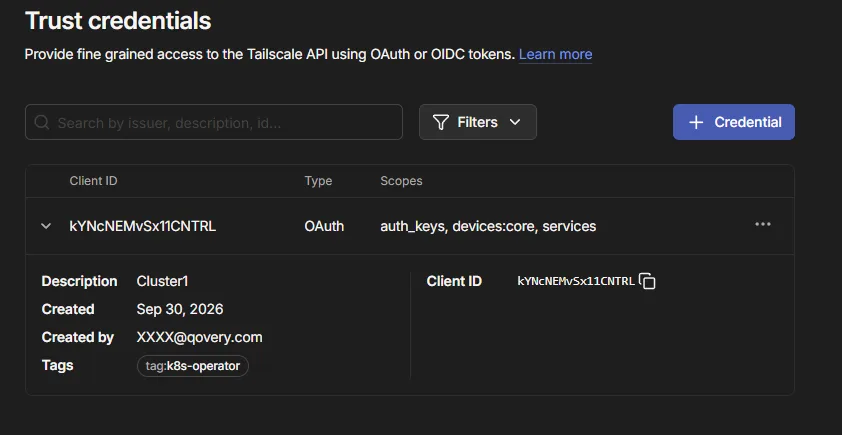
Open Settings → Trust credentials and create an OAuth client with write scope on these three permissions, each with the tag:k8s-operator tag:
- General / Services
- Devices / Core
- Keys / Auth Keys
The operator uses these credentials to call the Tailscale API and to mint auth keys for itself and for its proxies. Create a separate client for each cluster, with a name such as CLUSTER_NAME-operator (for example us-east-1-operator). You can then revoke one cluster without touching the others. Keep the client ID and secret for Step 3.
If you would rather not store a long-lived secret, Tailscale also supports installing the operator with workload identity federation. This guide uses an OAuth client.
Step 3: Install the Operator as a Qovery Helm Service
Add the Helm Repository Once per Organization
In the Qovery console, open Organization settings → Helm Repositories → Add repository and enter:
- Kind: HTTPS
- Repository URL: https://pkgs.tailscale.com/helmcharts
This is Tailscale's stable repository. Tailscale also publishes https://pkgs.tailscale.com/unstable/helmcharts with changes released between official versions. Keep it out of production.
Create the Helm Service
I put the operator in a dedicated environment, for example tailscale in a platform or tooling project, one environment per cluster. Qovery installs the release in that environment's namespace. The operator then creates its proxy pods in the same namespace, so everything Tailscale runs in one place you can inspect.
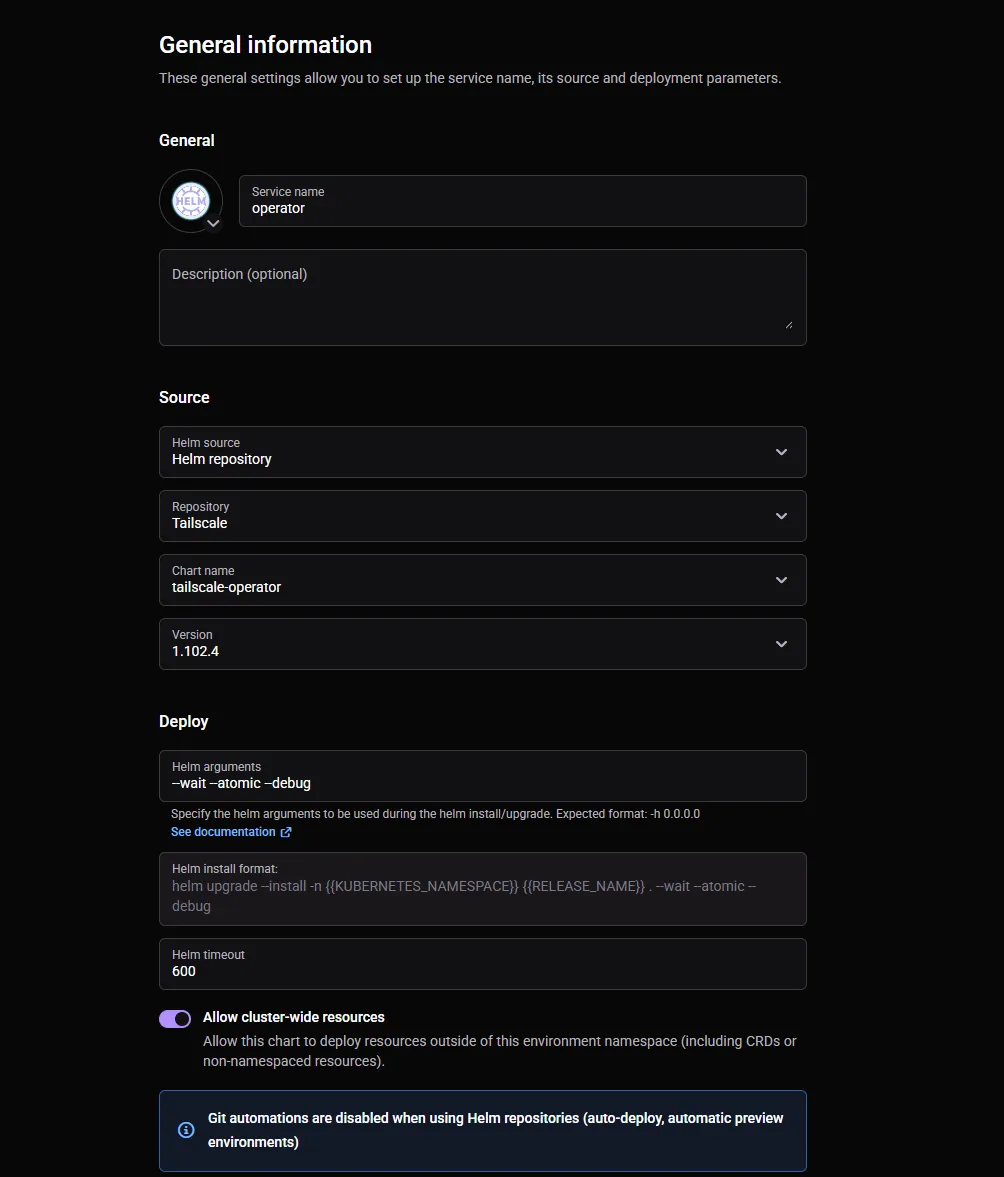
Click Create → Helm Chart and fill in:
- Helm source: Helm repository, then the repository added above
- Chart name: tailscale-operator
- Version: TAILSCALE_CHART_VERSION. Pin an explicit version and never track the latest one. An operator upgrade can change CRDs and proxy images, so it should be a reviewed change.
- Allow cluster-wide resources: enabled. The chart installs CRDs, ClusterRoles and an
IngressClass, and the operator watchesServiceobjects in every namespace.
Store the OAuth Credentials as Secrets
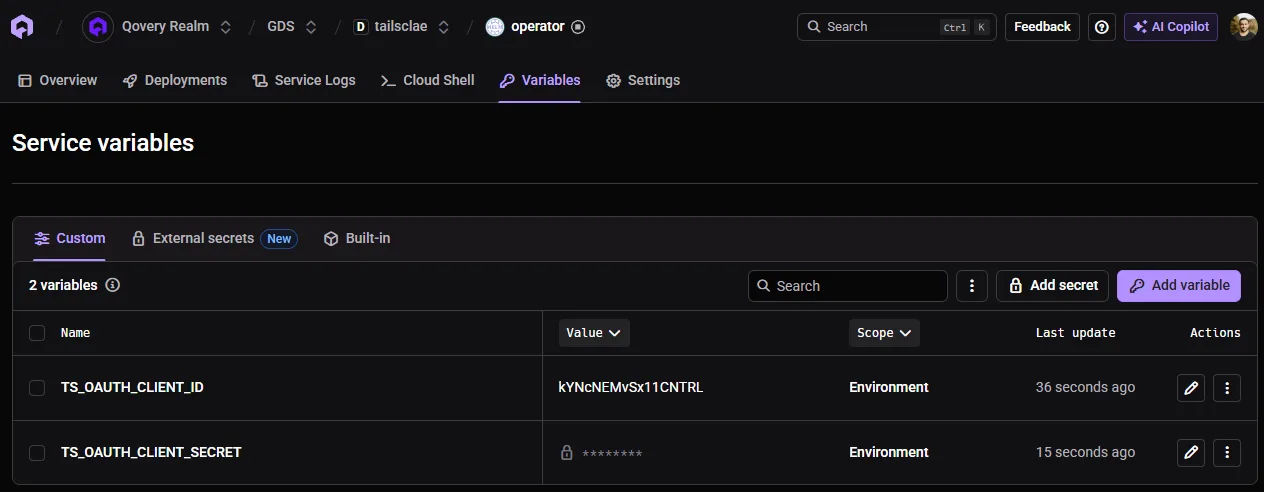
In the Helm service's Variables tab, after the values override, add two secret variables with the service scope:
TS_OAUTH_CLIENT_IDTS_OAUTH_CLIENT_SECRET
Write the Values Override
In Values override as file, choose Raw YAML:
oauth:
  clientId: qovery.env.TS_OAUTH_CLIENT_ID
  clientSecret: qovery.env.TS_OAUTH_CLIENT_SECRET

operatorConfig:
  # device name on the tailnet, unique per cluster
  # e.g. tailscale-operator-us-east-1
  hostname: OPERATOR_HOSTNAME
Qovery replaces each qovery.env.* reference at deploy time, so the secret never appears in the Qovery UI or in the override. The chart then stores it in a Kubernetes Secret in the operator's namespace.
Deploy and Check
Deploy the service, then check two things:
- In Qovery, the operator pod reaches Running in the service status and logs.
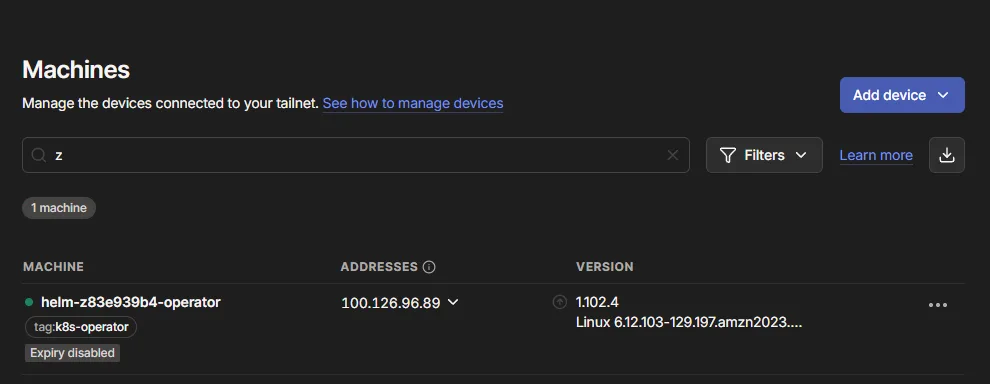
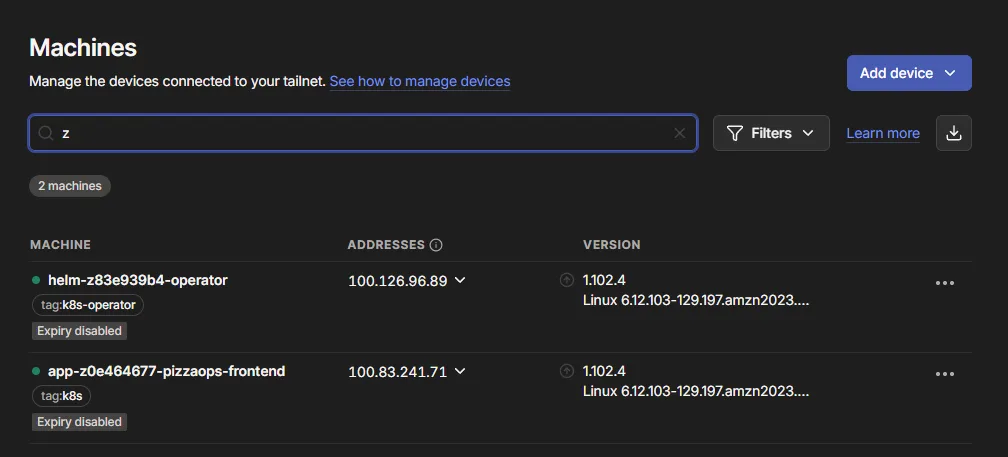
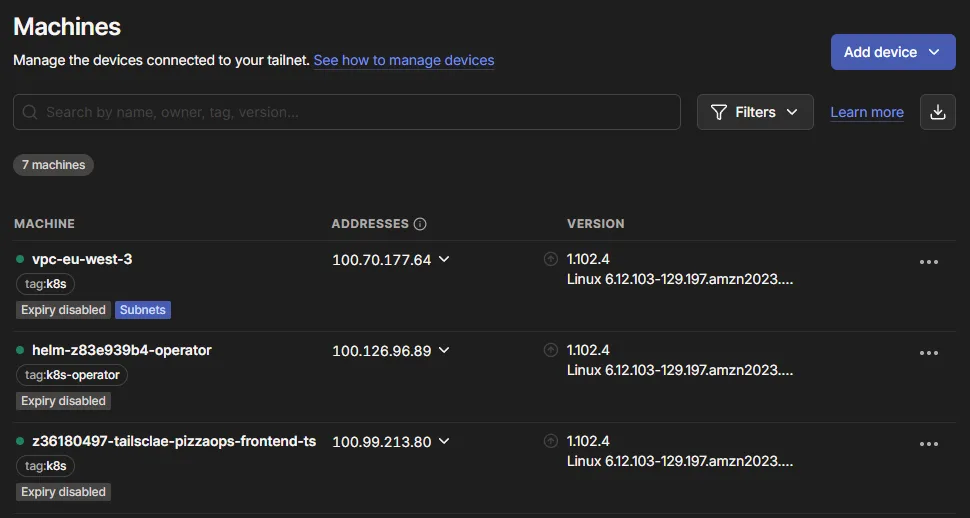
- In the Tailscale admin console, Machines lists OPERATOR_HOSTNAME with the
tag:k8s-operatortag.
Expected result: one new machine, tagged tag:k8s-operator, and no other new device. The operator exposes nothing until you create a resource for it.
Step 4: Expose One Qovery Service on the Tailnet
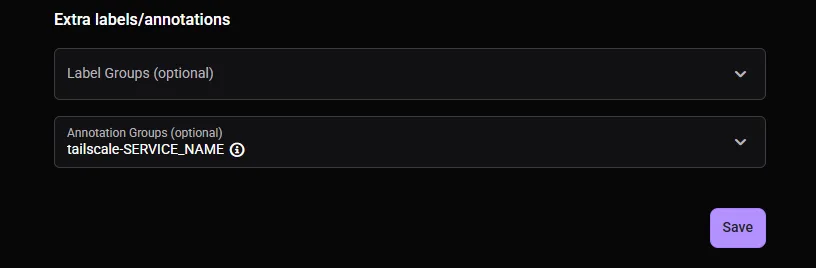
The operator watches for Service objects annotated with tailscale.com/expose: "true". In Qovery, you set annotations on an application's Kubernetes Service through annotation groups.
Create an Annotation Group
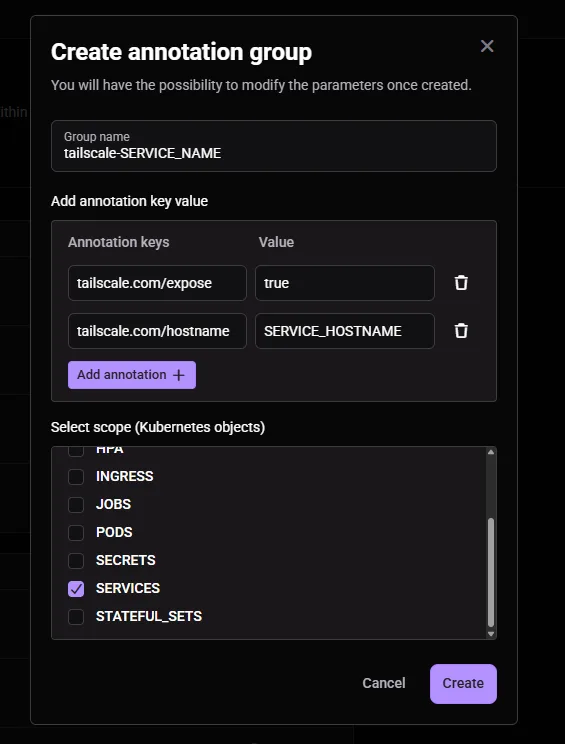
Open Organization settings → Labels & Annotations → Add annotation and fill in:
- Name: tailscale-SERVICE_NAME
- Annotations:
tailscale.com/expose=truetailscale.com/hostname= SERVICE_HOSTNAME, the device name on the tailnet, for example billing-api-us-east-1
- Scope: Services only. The operator reads the
Serviceobject, so annotations on Pods or Deployments have no effect.
Attach It to the Application
Open the application's settings, attach the annotation group, and redeploy. Qovery applies annotation changes only on the next deployment.
Three Constraints to Know
The application must declare at least one port. Qovery creates the Kubernetes Service only when the application has a port, and without a Service the operator has nothing to expose. The Service carries every port declared in Qovery, so every declared port is reachable from the tailnet. Nothing else in the cluster or the VPC is.
tailscale.com/hostname must be unique on the tailnet, so create one annotation group per exposed service. Without that annotation, the operator names the device NAMESPACE-SERVICE, and Qovery's generated namespace names make that hard to read.
This annotation runs the proxy in standalone mode: one proxy pod per exposed Service. Tailscale recommends a ProxyGroup with several replicas for production traffic. You deploy a ProxyGroup the same way as the Connector in Step 6, then reference it with the tailscale.com/proxy-group annotation.
Check the Result
A new device SERVICE_HOSTNAME with the tag:k8s tag appears under Machines. From a machine on the tailnet that the policy allows (Step 5):
# SERVICE_PORT: a port declared in Qovery
curl http://SERVICE_HOSTNAME.TAILNET_NAME.ts.net:SERVICE_PORT/
Expected result: the same HTTP response the application returns inside the cluster. A timeout usually means the access policy blocks you, so check Step 5 first.
Remove Access
Detach the annotation group and redeploy the application. The redeploy strips the annotation, and the operator deletes the proxy and its tailnet device.
Step 5: Restrict Who Can Reach the Proxy
Tailscale's policy engine is deny-by-default, but a new tailnet ships with an allow-all rule in its policy file. Until you replace that rule, anyone on the tailnet can reach every proxy the operator creates.
Every device tagged tag:k8s is a proxy, so grant access to that tag explicitly. This example lets one group reach the exposed services on two ports:
"grants": [
  {
    "src": ["group:GROUP_NAME"],   // e.g. group:platform-ops
    "dst": ["tag:k8s"],
    "ip":  ["tcp:443", "tcp:8080"]
  }
]
Give Each Service Its Own Tag
A single tag:k8s grant covers every exposed service at once. For per-service control, add the tailscale.com/tags annotation to the service's annotation group, for example tailscale.com/tags = tag:k8s-billing. That tag replaces tag:k8s on the proxy.
Declare the new tag with the operator as its owner, then target it in a dedicated grant:
"tagOwners": {
  "tag:k8s-billing": ["tag:k8s-operator"]
}
The operator applies these tags when it creates the proxy's auth key, so add the tag annotation before the first exposure.
Step 6 (Optional): Subnet Router and Egress
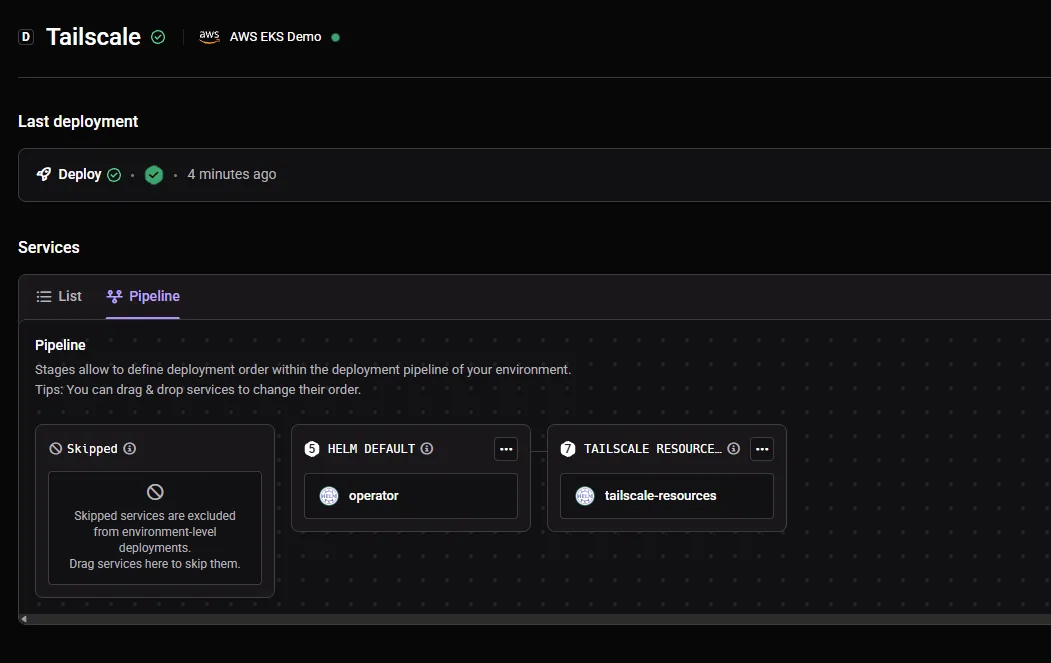
The chart has no values for these two patterns. Both need Kubernetes resources that you ship in a small Helm chart stored in Git, one template file per resource. Create a second Qovery Helm service with Git repository as the source, in the same environment as the operator.
Subnet Router for the Whole VPC
Use this only when people need network-level access to everything: pods, RDS, and peered VPCs.
apiVersion: tailscale.com/v1alpha1
kind: Connector
metadata:
  name: CONNECTOR_NAME  # e.g. vpc-us-east-1
spec:
  # device name on the tailnet, e.g. vpc-us-east-1
  hostname: CONNECTOR_HOSTNAME
  subnetRouter:
    advertiseRoutes:
      # the cluster VPC CIDR, e.g. 10.0.0.0/16
      - "VPC_CIDR"
Connector is a cluster-scoped resource, so enable Allow cluster-wide resources on this second Helm service too. For high availability, set spec.replicas and replace hostname with hostnamePrefix; the operator appends each replica's index to the prefix.
A route works only after four things line up:
- The Connector advertises it.
- You approve it under Machines, or you add an auto approver for the tag (see the snippet below).
- A grant allows your users to the CIDR, with
"dst": ["VPC_CIDR"]. Route approval and access control are separate layers. - The client accepts routes. On Linux, run
tailscale up --accept-routes.
Auto approver for step 2:
"autoApprovers": {
  "routes": {
    "VPC_CIDR": ["tag:k8s"]
  }
}
Peered VPCs are reachable only if you add their CIDRs to advertiseRoutes and the VPC peering routes exist on the AWS side.
Expected result: a device CONNECTOR_HOSTNAME with tag:k8s, its route marked as approved, and a pod IP reachable from a tailnet client.
Egress to a Tailnet Machine
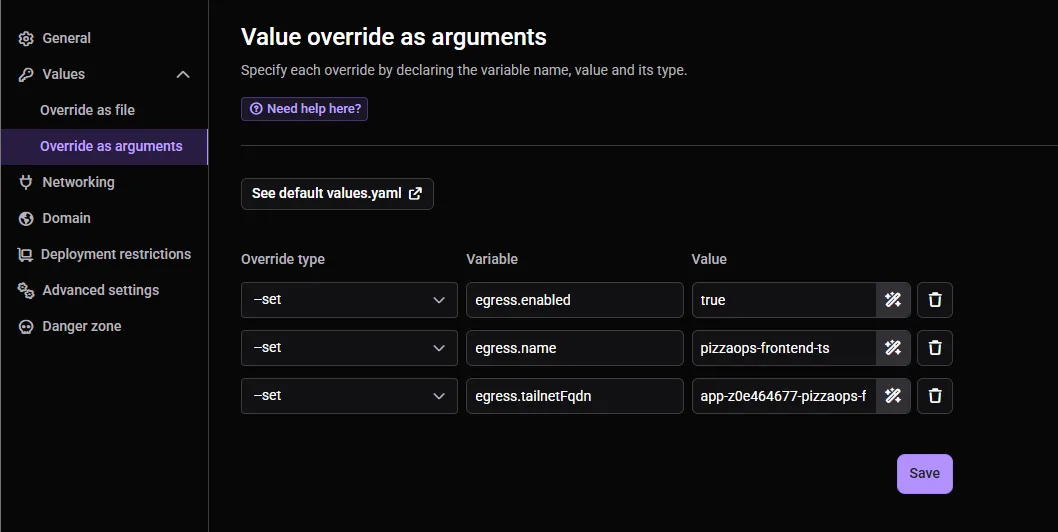
To let a Qovery application call a machine that exists only on the tailnet, add this Service to the same Git chart:
apiVersion: v1
kind: Service
metadata:
  name: EGRESS_SERVICE_NAME  # e.g. legacy-db
  annotations:
    # MagicDNS name of the target
    tailscale.com/tailnet-fqdn: TAILNET_MACHINE.TAILNET_NAME.ts.net
spec:
  type: ExternalName
  externalName: placeholder  # the operator rewrites this field
The operator creates an egress proxy and points the Service at it. Applications in other Qovery environments call it by its full in-cluster name, EGRESS_SERVICE_NAME.OPERATOR_NAMESPACE.svc.cluster.local.
The egress proxy is a tailnet device tagged tag:k8s, so the policy must also allow tag:k8s to reach the target machine on the ports you need.
Troubleshooting
| Symptom | Check |
|---|---|
| Operator pod crash-loops with an auth error | The OAuth client has write on all three scopes and the tag:k8s-operator tag. Variable names in the override match the Qovery variables exactly, otherwise the chart receives the literal qovery.env.* string |
requested tags [tag:k8s] are invalid or not permitted | tagOwners contains "tag:k8s": ["tag:k8s-operator"] |
| Annotation group attached, but no proxy appears | The group scope is Services, the application declares a port, and the application was redeployed after the group was attached |
| Device visible, connection times out | A grant allows your user or group to tag:k8s (or the per-service tag) on the right port |
| Subnet routes do not work | The route is approved, a grant covers the CIDR, and the client accepts routes |
| Egress calls hang | A grant allows tag:k8s to reach the target machine |
Sources and Further Reading
- Tailscale Kubernetes Operator
- Install the Tailscale Kubernetes Operator
- Tailscale Ingress
- Tailscale L3 ingress with a ProxyGroup
- tailscale-operator chart values
- Connector CRD
- Tailscale grants syntax
- Tailscale grant examples
- Tailscale route injection
- Qovery Helm charts
- Qovery Datadog integration (qovery.env in Helm values)
- Qovery Labels & Annotations
- Qovery Terraform provider: qovery_annotations_group