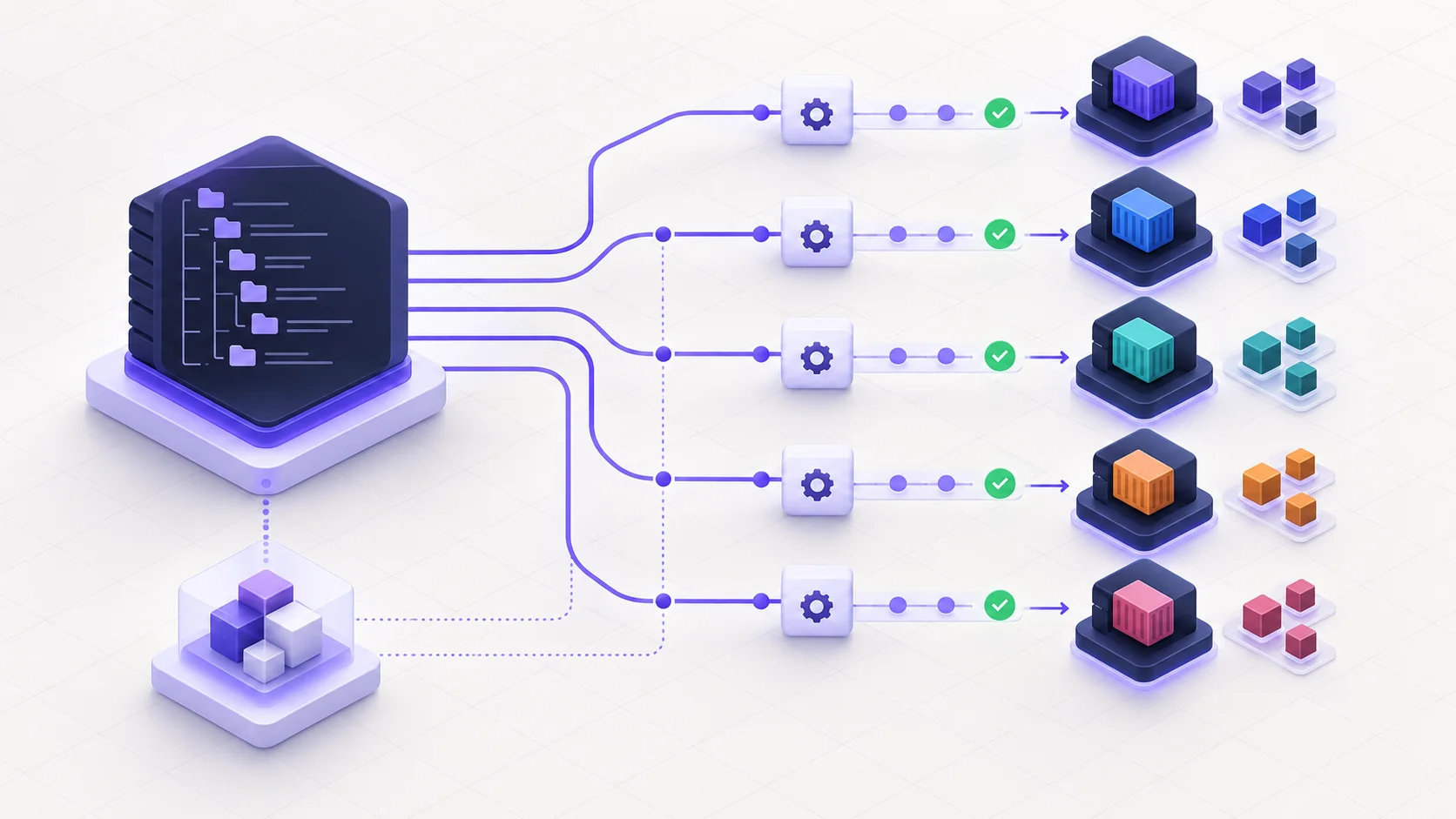
A Microservices Monorepo Needs an Explicit Dependency Graph
A microservices monorepo can simplify refactoring, contract changes, dependency upgrades, and developer onboarding. It can also give you the worst parts of a monolith and microservices at the same time: tightly coupled code, long CI pipelines, and twenty services redeployed for a one-line frontend change.
The repository, the build system, and Qovery must agree on the same dependency boundaries.
Two configuration mistakes cause most of the wasted work I see: setting the Qovery application root path to the service subfolder, which removes shared packages from the Docker build context, and omitting MATCH deployment restrictions, which lets every commit trigger every service.
I will use four services as a running example: an API gateway, orders, payments, and a web frontend. The model scales because each service keeps its own deployment path even though the source lives in one repository. By the end, you will have four change tests that prove whether selective deployment works before you migrate the second service.
The Target Architecture
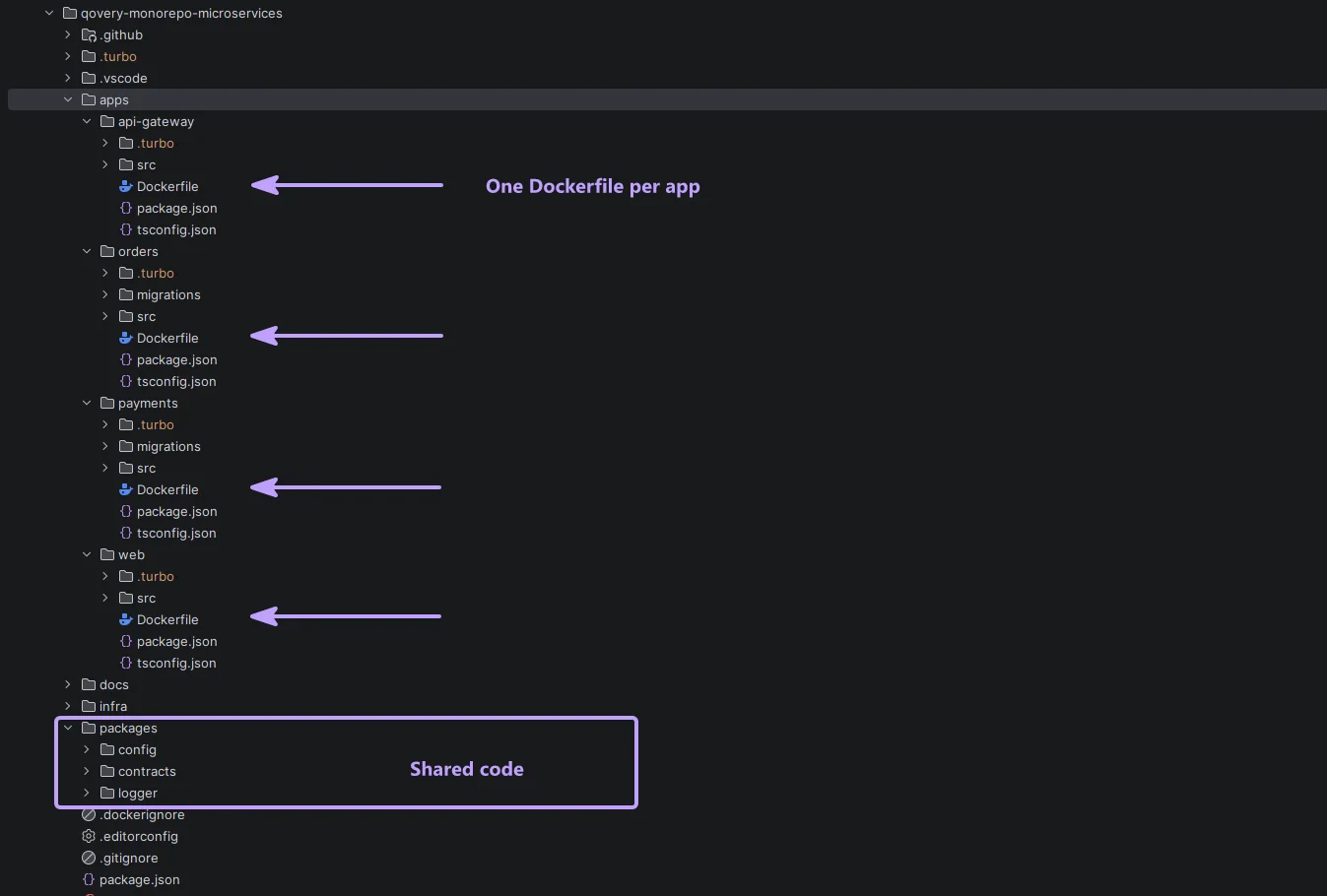
Start by separating deployable units from reusable code. A directory under apps/ is allowed to become a Qovery application or job. A directory under packages/ is not deployed by itself.
.
├── apps/
│ ├── api-gateway/
│ │ ├── Dockerfile
│ │ └── src/
│ ├── orders/
│ │ ├── Dockerfile
│ │ ├── migrations/
│ │ └── src/
│ ├── payments/
│ │ ├── Dockerfile
│ │ ├── migrations/
│ │ └── src/
│ └── web/
│ ├── Dockerfile
│ └── src/
├── packages/
│ ├── contracts/
│ ├── config/
│ └── logger/
├── infra/qovery/
│ ├── modules/service/
│ └── environments/
├── .github/
├── .dockerignore
├── turbo.json
├── package.json
└── pnpm-lock.yaml
The import rule is deliberately boring: apps may import packages; an app must not import another app. If orders needs a capability owned by payments, it calls an API or consumes an event. It does not reach into apps/payments.
Enforce this rule in CI with Nx tags, ESLint boundaries, dependency-cruiser, or an equivalent graph check. The exact tool matters less than making a forbidden edge fail before merge.

Rule 1: Keep the Docker Build Context at the Repository Root
Qovery separates the application root path from the Dockerfile path. For a service that imports shared workspace packages, point the application root to the repository root and the Dockerfile to the service:
- Console Root Application Path: leave empty (repository root)
- Dockerfile path: apps/orders/Dockerfile
- Terraform root_path: /
The console and the Terraform provider express the repository root differently. Leave Root Application Path empty in the console. In Terraform, set git_repository.root_path to /. The provider defines dockerfile_path relative to that root, so apps/orders/Dockerfile can still access packages/contracts, packages/logger, the root lockfile, and the workspace manifest.

Prune Before You Install
Pruning keeps the root build context from bloating the final image. Use turbo prune --docker to reduce install and build inputs to the target application and its transitive dependencies. Nx can generate package metadata or bundle an application, but it does not provide a direct equivalent to turbo prune.
FROM node:22-alpine AS base
ARG TURBO_VERSION=2.5.6
RUN corepack enable && npm install -g turbo@${TURBO_VERSION}
WORKDIR /repo
FROM base AS pruner
COPY . .
RUN turbo prune @acme/orders --docker
FROM base AS builder
COPY --from=pruner /repo/out/json/ .
RUN pnpm install --frozen-lockfile
COPY --from=pruner /repo/out/full/ .
RUN pnpm turbo run build --filter=@acme/orders
FROM node:22-alpine AS runner
WORKDIR /app
ENV NODE_ENV=production
RUN addgroup -S app && adduser -S app -G app
COPY --from=builder --chown=app:app /repo/apps/orders/dist ./dist
USER app
CMD ["node", "dist/main.js"]
Reference: Qovery Image Mirroring, Qovery deployment pipeline guidance and Turborepo's Docker guide.
Rule 2: Create One Qovery Service per Deployable
Do not create one giant "monorepo" service that starts every process. Create one Qovery application per long-running service and one lifecycle job per migration workflow. Each Qovery service keeps its own runtime ownership.
- apps/api-gateway → Qovery application
- apps/orders → Qovery application + migrations lifecycle job
- apps/payments → Qovery application + migrations lifecycle job
- apps/web → Qovery application
This keeps scaling, health checks, secrets, rollbacks, and deployment history independent. A frontend change should not create a new orders runtime. A payment rollback should not touch the API gateway.
Rule 3: Make Deployment Triggers Follow the Dependency Graph
Qovery supports multiple services connected to the same Git repository. Deployment Restrictions in MATCH mode let each service react only to changes in its own code and the shared packages it actually consumes.
For orders, I would start with these MATCH paths:
- apps/orders/
- packages/contracts/
- packages/logger/
- pnpm-lock.yaml
Qovery's documented behavior is precise: paths must not start with a slash, wildcards are not supported, folder prefixes are supported, and one matching condition is enough to trigger the deployment.
Give the migrations lifecycle job its own MATCH list instead of copying the application list:
- apps/orders/migrations/
- pnpm-lock.yaml
Add another shared-package path only when the migration code imports it. Do not include packages/logger/ merely because the orders application uses it. The current qovery_job provider schema exposes deployment_restrictions for lifecycle jobs.

Audit Restrictions as Code Evolves
Restrictions drift when a developer adds an import from packages/logger but nobody updates Qovery. Treat this as a graph consistency problem. A small CI job can read the Turbo or Nx dependency graph, calculate each app's runtime package dependencies, and compare them with the MATCH paths declared in Terraform.
Run that check on every infrastructure change and schedule a broader audit quarterly. A missing path causes stale deployments; an unnecessary path causes wasted builds. Both are configuration defects.
Reference: Qovery's Deployment Restrictions documentation.
Encode the Deployment Contract in a Terraform Module
The current Qovery provider exposes the repository root, Dockerfile path, deployment stage, skipped state, and deployment restrictions on qovery_application. That is enough to encode the monorepo contract once and reuse it.
resource "qovery_application" "orders" {
environment_id = qovery_environment.staging.id
name = "orders"
git_repository = {
url = "https://github.com/acme/platform.git"
branch = "main"
root_path = "/"
}
build_mode = "DOCKER"
dockerfile_path = "apps/orders/Dockerfile"
deployment_stage_id = qovery_deployment_stage.core_services.id
auto_deploy = true
deployment_restrictions = [
{ mode = "MATCH", type = "PATH", value = "apps/orders/" },
{ mode = "MATCH", type = "PATH", value = "packages/contracts/" },
{ mode = "MATCH", type = "PATH", value = "packages/logger/" },
{ mode = "MATCH", type = "PATH", value = "pnpm-lock.yaml" }
]
}
This is a focused excerpt, not a production-complete application resource. Add ports, health checks, resources, variables, secrets, and storage for your service.
My opinionated recommendation is to manage staging and production through Terraform and restrict ad-hoc console changes with RBAC. Qovery does not require this operating model; it is a governance choice. At twenty services, however, mixing Terraform and manual edits makes drift a routine incident source.
Reference: qovery_application provider resource.
Rule 4: Design the Deployment Pipeline Around Dependencies
Each Qovery service belongs to one deployment stage. Stages run in order; independent services in the same stage can deploy in parallel. Replace generic stages with names that explain the dependency chain:
- databases
- migrations
- core-services: orders and payments
- edge: API gateway and web
A migration lifecycle job belongs before the application that depends on the new schema. The gateway belongs after core services when it needs their endpoints to become healthy first. Services with no dependency between them belong in the same stage so Qovery can deploy them concurrently.
Do not turn the pipeline into a serialized list of every service. Stages should express ordering constraints, not team ownership or alphabetical preference.
Contract changes need their own order inside this pipeline. Use expand, deploy consumers, deploy producers, then contract. Old and new instances can overlap during a rollout, and services in one stage may deploy in parallel.

Measure the Pipeline You Actually Have
Use the Qovery CLI deployment explanation to see where time is spent:
qovery environment deployment explain --level step
Look for a stage that serializes unrelated work, repeated image builds, or migrations that dominate the critical path. Optimize from evidence, not intuition.
Reference: Qovery's Deployment Pipeline documentation.
Rule 5: Use Preview Environments Deliberately
A Qovery Preview Environment is created from a fully configured Blueprint Environment when a pull request targets the configured base branch. The deployment pipeline and skipped-service state are inherited.
For a monorepo, this is powerful and easy to make expensive. The environment topology is cloned for the pull request, so decide which services are useful for PR validation and which should remain skipped. Qovery documents both automatic previews and a manual on-demand workflow triggered by the /qovery preview command in a pull-request comment. The manual workflow is a useful cost control for large stacks.
- Run previews on a cluster separate from production.
- Keep the Blueprint deployable and test it regularly.
- Use smaller resource sizes where production parity is not required.
- Seed test data with lifecycle jobs; never copy production secrets.
- Automatically clean up the environment when the pull request closes.

Reference: Qovery Preview Environments documentation.
General Monorepo Rules That Keep the Architecture Honest
Use One Lockfile and One Task Graph
A single lockfile makes dependency resolution reproducible across the workspace. Turbo or Nx should model build dependencies explicitly. For example, an app build depends on the builds of the packages it consumes. CI can then run only affected tasks.
{
"tasks": {
"build": {
"dependsOn": ["^build"],
"outputs": ["dist/**"]
}
}
}
pnpm turbo run lint test build --affected
The --affected flag works from Git history, so shallow CI checkouts must still contain the comparison base. Add a remote cache when repeated builds across developer machines and CI runners justify it; protect the cache credentials like any other CI secret.
Reference: Turborepo --affected documentation.
Make Ownership Visible
Add CODEOWNERS entries for apps and critical shared packages. A change to packages/contracts should be reviewed by the owners of its consumers, not only by the team that owns the schema file.
Keep application-to-application imports forbidden. A monorepo makes internal source paths tempting; the architecture should still communicate through versioned APIs or events.
Treat Contracts as Products
Store OpenAPI, protobuf, or GraphQL schemas in packages/contracts and generate clients consistently. Test backward compatibility in CI. A shared repository makes atomic contract changes easier, but it does not remove the need for compatibility during rolling deployments.
Keep Data Ownership at the Service Boundary
My default is one database per service, or at least one independently owned schema and credential boundary per service. A service runs its own migrations through a lifecycle job. Other services consume its API or events instead of joining its tables.
Qovery does not impose this data boundary. I use it to prevent the monorepo from quietly becoming a distributed monolith.
Build Once, Identify Immutably
A Rollout Process That Limits Blast Radius
Start with orders: it imports shared packages, owns migrations, and sits before the gateway. Prove the path on that service, run the four selective-deployment tests below, and only then migrate the second service.
Phase 1: Repository Foundations
- Move deployables under apps/ and shared code under packages/.
- Adopt one lockfile and make the task graph explicit with Turbo or Nx.
- Add import-boundary checks and CODEOWNERS.
- Run affected builds in CI and establish a baseline duration.
pnpm turbo run build --affected --dry-run
Exit criterion: the dry run selects the changed app, its dependencies, and its dependents, with nothing unrelated.
Phase 2: One Production-Shaped Dockerfile
- Choose a service that imports at least one shared runtime package.
- Build it from the repository root.
- Verify the runtime image contains no source tree, package manager cache, or root user requirement.
docker build -f apps/orders/Dockerfile -t orders:test .
Exit criterion: shared packages resolve correctly and the container passes its health check locally.
Phase 3: Staging as Code
- Create the Qovery application with root_path = /.
- Add the per-service Dockerfile path and MATCH restrictions.
- Assign the service and its migration job to explicit stages.
- Import existing resources before applying if this is a migration.
terraform -chdir=infra/qovery/environments/staging plan
Exit criterion: the plan contains no unintended replacement or deletion.
Phase 4: Prove Selective Deployment
- Change only apps/orders and confirm only orders is triggered.
- Change packages/logger and confirm only its consumers are triggered.
- Change packages/config and confirm CI runs while runtime services remain untouched, if that is your intended policy.
- Change pnpm-lock.yaml and confirm every application is eligible to rebuild.
Exit criterion: observed deployments match the declared dependency graph in all four cases.
Phase 5: Preview, Then Production
- Clone a known-good environment as the Preview Blueprint.
- Move heavy or irrelevant services to Skipped and test on-demand preview creation.
- Recreate the same Terraform module for production with a dedicated cluster and stricter RBAC.
- Roll out service by service; keep the previous deployment path available until the new one is proven.
Exit criterion: a pull request creates and deletes a usable preview, and a production plan is reviewed with no console-only drift.