
Hey Team,
If you are in Paris on November 12, join us at Alan's office for Agents in production: beyond the demo, an evening with Alan and AWS on what it takes to run AI agents in production. Romaric will talk about who should give an agent access to production. If you missed our October 20 sessions, both replays are online: Infrastructure for AI agents and The migration takes 2 weeks, deciding takes 6 months.
The biggest change in this release is that Qovery can now install and update itself on a Kubernetes cluster you already run.
🔌 Bring Your Own Kubernetes: plug Qovery into your cluster
Bring Your Own Kubernetes (BYOK) has been possible for a while, but you installed Qovery with the CLI and a Helm chart, and every update after that was on you. Clusters fell behind on fixes, and settings saved in the Console had no supported way to reach a cluster you installed yourself.
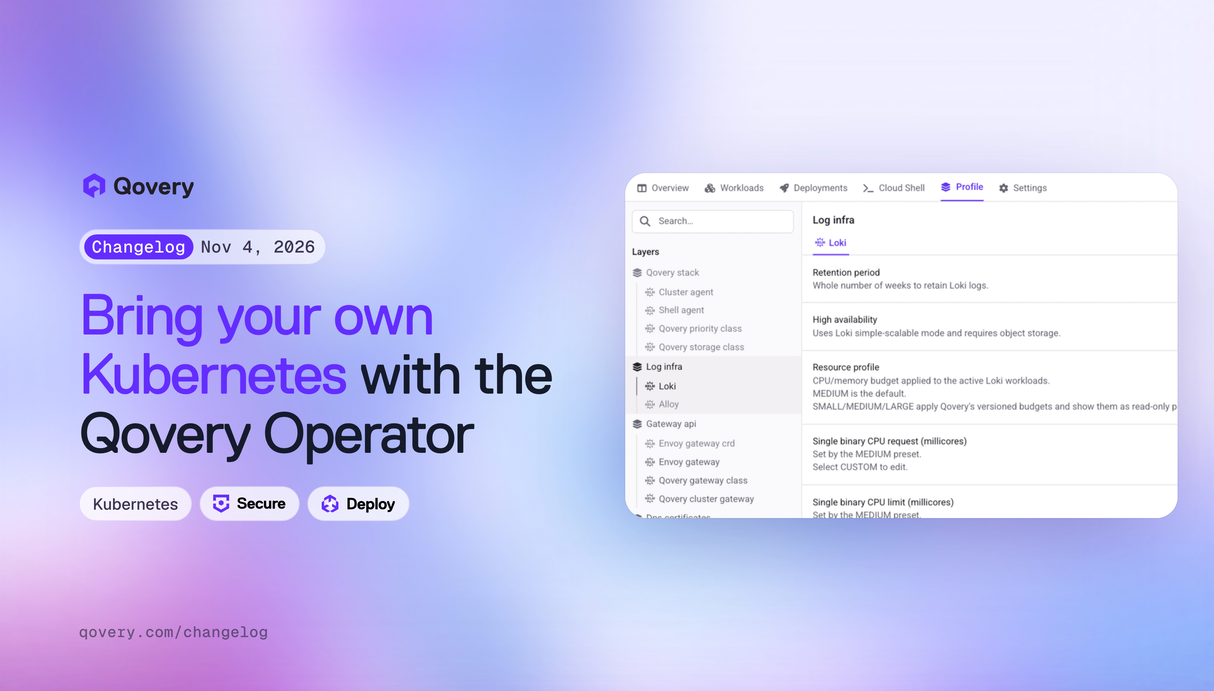
BYOK now runs through the Qovery Operator. In the Console, go to Add cluster, pick AWS, GCP or Scaleway under Connect existing cluster (BYOK), and run the Helm command the Console gives you. When the Operator connects, the cluster's platform profile lists every component Qovery installs (Loki, Alloy, Envoy Gateway, cert-manager, ExternalDNS and the Qovery agents) and you deploy it from there. Updates to those components, and to the Operator itself, now come from Qovery. Qovery never stores your kubeconfig, the Operator only opens outbound connections, and checks run before each cluster deployment so a misconfigured cluster stops before anything changes.
BYOK with the Operator is in Preview for every organization on the Enterprise plan, on EKS, GKE and Kapsule clusters that don't already run cert-manager, ExternalDNS or Envoy Gateway. Pierre, Benjamin, Théo and Romain Billard built it. Read the launch post and the BYOK documentation.
🔐 Secrets: cross-account roles, JSON keys, and nothing in your Terraform state
Teams that keep secrets in a dedicated AWS account, or store several values in one JSON secret, had to work around Qovery's secret manager integration. Three changes close those gaps:
- Cross-account access. An AWS Secrets Manager or Parameter Store access can now assume a second role, with an optional external ID, so a cluster can read secrets held in another AWS account. Set it in the cluster's secret manager settings, or with
assume_role_arnandassume_role_external_idin Terraform. - JSON keys. An external secret can point to one key inside a JSON secret, for example
accounts.0.password, withjson_target_keyin Terraform or the API. - Write-only secrets in Terraform. With Terraform 1.11 or later, provider v1.3.0 accepts
value_woon service, environment and project secrets, andpassword_woon registries and Helm repositories. The value is sent to Qovery and never written to your Terraform state.
secrets = [{
  key              = "DB_PASSWORD"
  value_wo         = ephemeral.vault_kv_secret_v2.db.data["password"]
  value_wo_version = "1"
}]
Secret values are also no longer written to audit logs or to the stored output of jobs and Terraform services. See AWS Secrets Manager and the Terraform guide keeping secrets out of the state.
🛡️ Access Control: remote access permissions and a stricter AWS trust policy
Until now, any custom role allowed to deploy to an environment could also open a shell in its services and port-forward to its databases. For production, that is often more access than a deployer needs.
Custom roles have a new Remote access group with separate Shell and Port-forward permissions, set per project and environment type, in Organization settings > Roles. You can let a role deploy to production without opening a shell there, or give read-only users port-forward access to a staging database. Existing roles keep their current behavior. The same permissions are available in Terraform (shell and port_forward on qovery_custom_role) and in the API. Alessandro built it.
On the AWS side, Qovery now sends your organization ID as the sts:ExternalId when it assumes the IAM role in your account, and the role's trust policy only accepts calls made on behalf of your organization. Your role is already updated. If you manage it with the qovery-role-creation CloudFormation stack, update the stack to the latest template so a future stack update doesn't remove the condition. Romain explains the change and the steps in Strengthening the security of Qovery's access to your AWS account.
🧩 Variable Overrides: create one from a conflict, see which scope wins
Adding a variable that already exists on the environment or project used to fail with a bare conflict error, and once you had overrides, the variable list didn't show which value a service ended up with.
Now the error offers Create an override, which opens the override form with the key already filled in. In the service's variable list, the parent variable is dimmed and marked Overridden in service, and the override is marked Overrides environment or Overrides project. Click either label to jump to the other. Deleting a variable no longer deletes its overrides. The CLI has the same shortcut:
qovery application env create -n api --key DATABASE_URL --value "postgres://..." --override-if-exists
Guillaume built this. See environment variables.
🛠️ Minor updates
- Agent Tasks can use any Anthropic-compatible gateway, such as LiteLLM or OpenRouter, with a new Anthropic-compatible provider type and a base URL. If you already route Agent Tasks through a gateway, switch it to this provider type. Agent jobs on EKS now run on on-demand nodes and are protected from eviction. See Agent Tasks.
- AWS PostgreSQL blueprints accept a parameter group (
db_parameters), gp3 storage throughput, storage autoscaling and CloudWatch log export. JSON fields such asdb_parametersopen in a code editor that flags invalid JSON before you deploy. - Blueprint output aliases are now prefixed with the service name, so you can run several databases in one environment without their variables colliding.
- When a deployment fails, its status report now shows the Kubernetes evidence for the failure and an excerpt of the service's errors, which Copilot can read too.
- Preview environments now deploy to the cluster of the environment they are cloned from. Before, they went to your organization's oldest cluster.
- In the deployment pipeline, each service has a switch to include it in or skip it from environment deployments. Skipped services stay in their stage.
- A new
Nonevalue fordeployment.antiaffinity.podlets Kubernetes place several replicas on the same node, which suits queue workers. See service advanced settings. - New trials start on the Scale plan. You can pick Starter, Growth or Scale when you add a credit card during the trial, and switch until the trial ends. See pricing.
- Onboarding now offers two choices: create a cluster, or test the platform in the Console demo. The local
qovery demo upstep was removed from onboarding. - The Amazon MQ for RabbitMQ blueprint 2.0.0 opens the Prometheus ports and prefixes its outputs with
RABBITMQ_. If your services read the old output names, update them when you move to 2.0.0. - The Terraform provider (v1.2.0 to v1.5.0) supports IAM roles for ECR registries and OCI Helm repositories, rejects malformed IDs at plan time, and warns about deprecated
build.*advanced settings. - Builds now reject certificates from the compromised eMudhra certificate authorities. A registry served with one of those certificates will fail TLS.
- A service status no longer gets stuck, for example on Stopping, when a Console tab stays open for a long time.
- Auto start and stop schedules are kept when the cluster is stopped.
As always, let us know what you think and what you would like to see next.
Talk soon, The Qovery Team 🚀