Strengthening the Security of Qovery's Access to Your AWS Account
Qovery now sends your organization ID as the sts:ExternalId when it assumes the IAM role in your AWS account, and the role's trust policy only accepts it on behalf of your organization. Your role is already updated. If you manage it with the qovery-role-creation CloudFormation stack, update the stack to the latest template.
What changes. When Qovery assumes the IAM role in your AWS account, the sts:ExternalId now carries the ID of the Qovery organization making the call, and the role's trust policy only accepts calls made on behalf of your organization.
Why. The guarantee that only your organization can use your role used to be enforced by Qovery alone. It is now also enforced by AWS, in your account.
What to do. Your role is already updated and nothing was interrupted. If you manage the role with the qovery-role-creation CloudFormation stack, update the stack to the latest template so a future stack update does not roll the condition back.
We are strengthening the security of how Qovery accesses AWS accounts through STS role assumption.
What changes
When Qovery's control plane assumes the IAM role in your AWS account, it now sends the ID of the Qovery organization making the call in the sts:ExternalId.
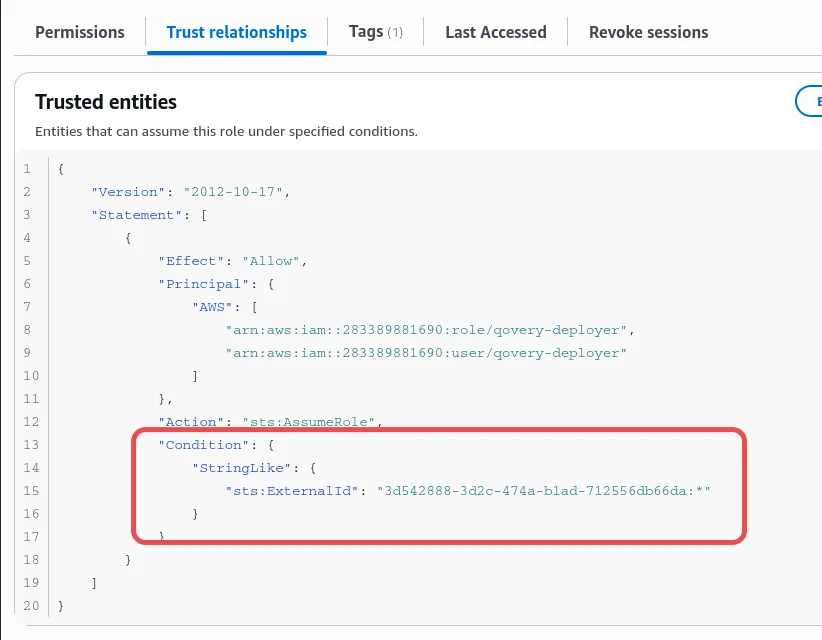
We have also added a condition to the trust relationship of the IAM role created for Qovery. By default, the role can now only be assumed on behalf of your Qovery organization.
The Trust relationships tab of the qovery-user-role IAM role in the AWS Console: the qovery-deployer principals are allowed to call sts:AssumeRole only when sts:ExternalId matches the Qovery organization ID followed by :*
Why we are doing this
Until now, the guarantee that only your organization could use your role was enforced by our application code and by uniqueness constraints in our database. The guarantee was already in place, but it relied entirely on Qovery's side.
With this change, the guarantee is also enforced by AWS itself, in your account. Even if a check failed on our side, the Qovery control plane could not be used by another organization to access your AWS account. This is defense in depth: two independent layers protecting the same boundary.
Need help updating your stack?
Our support team can check your IAM role with you and walk you through the CloudFormation update.
Your role has already been updated. As part of our standard upgrade process, the new trust condition is already applied to your IAM role. Nothing has been interrupted and no action is required for Qovery to keep working.
One case requires action: if you manage this role with our CloudFormation stack (qovery-role-creation), update the stack to our latest template. This keeps the stack in sync with the role, so that a future update of the stack does not roll back the new condition.
How to update your CloudFormation stack
Log in to your AWS account and open CloudFormation, in the region where you created the stack.
Go to Stacks and select qovery-role-creation.
Click Update stack, then Make a direct update.
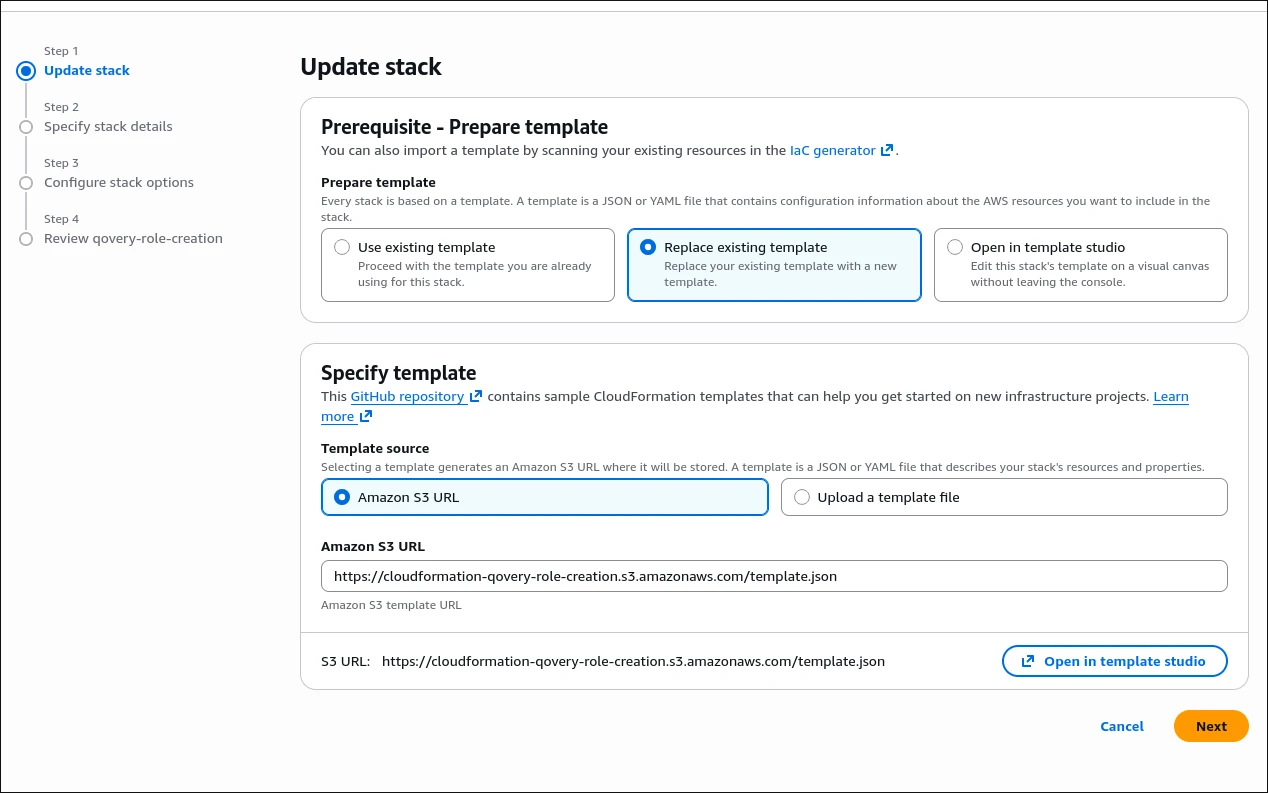
Under Prepare template, select Replace existing template.
Under Template source, choose Amazon S3 URL and enter:
https://cloudformation-qovery-role-creation.s3.amazonaws.com/template.json
Click Next and fill in your Qovery Organization ID.
Click Next, review the changes, and submit the update.
The Update stack screen of the AWS CloudFormation Console for qovery-role-creation: Replace existing template is selected, with Amazon S3 URL as the template source set to https://cloudformation-qovery-role-creation.s3.amazonaws.com/template.json
If you have any questions, or need help updating your stack, reach out to our support team. We are happy to help.
Thank you for trusting Qovery with your infrastructure.
P.S. If your clusters still connect to AWS with static credentials (an access key and a secret key), we strongly recommend migrating to STS role assumption. A static key is long-lived: if it leaks, it keeps working until someone revokes it. With STS, Qovery only ever receives short-lived credentials that expire on their own, and your role benefits from the trust condition described above. Create the IAM role with our CloudFormation stack by following the AWS installation guide, then update your cluster's cloud credentials in Qovery. Our support team can help you migrate.
Romain is a staff engineer at Qovery working on the control plane and AI integrations. He writes about distributed systems, incident response, and MCP-based tooling.
Next step
Need help updating your stack?
Our support team can check your IAM role with you and walk you through the CloudFormation update.