How to Stop Secrets Leaking From Your Deployment Platform, and How Qovery Stores Yours
Railway's disclosure of leaked customer environment variables is a reminder that deployment platforms hold the keys to everything. Here is how secrets leak from platforms, the practices that prevent it or limit the damage, and exactly how Qovery stores secrets across its control plane and your data plane, with AWS Secrets Manager, Parameter Store, GCP Secret Manager, Doppler and Infisical.
Why now. On 21 October 2026, Railway disclosed that an unauthorized party accessed encrypted customer environment variables and decrypted some of them, and asked all users to rotate their variables. CircleCI in 2023 and Heroku in 2022 went through comparable incidents. Any platform that deploys your code holds your secrets at some point.
Secrets leak from platforms in four ways: the systems that decrypt them are compromised, a stolen session or token reads them back, they end up in logs, or copies spread to places nobody tracks.
Most of the damage is preventable. Keep one source of truth in your own secret manager, give platforms references instead of values, use short-lived credentials and IAM roles, scope every key, rehearse rotation, and watch for unusual use.
At Qovery, the control plane holds configuration and the secrets you choose to store in it, encrypted with a key unique to your organization, write-only, delivered only to the deployment that needs them, and masked in deployment logs. Your workloads, data, logs, metrics and TLS keys run and stay in your own cloud account.
Audited, not just claimed. Qovery is SOC 2 Type II certified, ISO 27001 certified, HDS certified, and compliant with HIPAA, DORA and GDPR, and two independent security firms pentest it twice a year.
You can keep secret values out of Qovery entirely: reference them from AWS Secrets Manager, AWS Parameter Store or GCP Secret Manager and let the External Secrets Operator fetch them in your cluster, or let your application load them at runtime with an IAM role. Doppler and Infisical sync into Qovery if they are your source of truth.
On Wednesday 21 October, Railway published a security disclosure: "an unauthorized third party may have accessed encrypted environment variables and, for some of them, obtained the decrypted contents. Environment variables may contain secrets such as API keys or database and registry credentials." Railway paused deployments, asked upstream providers to revoke keys, and asked its users to "immediately roll all environment variables." Its investigation is ongoing, and a full postmortem has been promised.
It is a serious leak of customer secrets, and it is why we are writing this now. The question it raises applies to every platform, including ours: where do my secrets live, who can read them, and what can I do so a leak like this costs me as little as possible?
This article answers it in two parts. First, practical steps any team can take, whatever platform it uses. Then, exactly how Qovery stores and delivers secrets, including the parts where we hold them.
How do secrets leak from deployment platforms?
A deployment platform has to give your application its secrets, so at some point it holds them, decrypts them, or both. Past incidents show four ways they get out.
The decryption path is compromised. Platforms encrypt secrets at rest, but something has to decrypt them to deploy your application. In CircleCI's January 2023 incident, "though all the data exfiltrated was encrypted at rest, the third party extracted encryption keys from a running process." Railway's disclosure describes the same outcome: encrypted variables, some of them decrypted.
A stolen session or token reads them back. If a platform's UI or API can display a secret value, so can whoever steals an employee's session, a customer's session, or an API token. Heroku's April 2022 incident started with a stolen machine-account token.
Secrets land in logs. Build output, deployment logs, crash reports and debug prints copy secrets into systems that were never meant to store them.
Copies multiply. The same key sits in a secret manager, a deployment platform, a CI system, a .env file on a laptop and a Slack message from two years ago. Every copy is another place to leak from and another place to rotate.
How can companies prevent secret leaks, or limit the damage?
No setup makes a leak impossible. These practices make it rarer, smaller and faster to recover from.
Keep fewer copies
Pick one source of truth. Store production secrets in a secret manager in your own cloud account (AWS Secrets Manager, Parameter Store, GCP Secret Manager) or a dedicated tool such as Doppler or Infisical. Everything else gets the secret from there.
Give platforms references, not values. When your deployment platform supports it, store the path to the secret and let something inside your own infrastructure fetch the value. A platform that only holds prod/payments/stripe has nothing useful to leak.
Load the most sensitive secrets at runtime. An application can read its secrets from the secret manager itself, with an IAM role, so the value never passes through your deployment platform at all.
Limit what a leaked secret can do
Prefer short-lived credentials. Use IAM roles, workload identity and OIDC federation instead of long-lived access keys wherever the provider supports it. A token that expires in an hour is worth little to an attacker who steals it.
Scope every key. One key per service and per environment, with the minimum permissions. Staging keys should not work in production.
Cap spending on keys that cost money. AI provider and payment keys are what attackers monetize first. Most providers let you set budgets, rate limits or IP restrictions per key, so a leaked key has a ceiling.
Be able to rotate fast
Know where each secret is used. Keep an inventory that maps every secret to the services that consume it and the people who own it.
Rehearse rotation. Rotating everything in a hurry is when outages happen. Run the drill before you need it, and know whether a rotation needs a redeploy. Secrets loaded at runtime can be rotated without one.
Make secrets write-only. Once saved, a secret should not be readable in the UI or the API. Your team updates it, nobody displays it.
Detect early
Audit who changes and who reads secrets. Keep audit logs for secret changes, and use your secret manager's access logs (CloudTrail for AWS) to see every read.
Plant canary credentials. Fake credentials that alert when someone uses them are a cheap way to learn that a store was read.
Watch usage on the provider side. Unusual spikes on an AI or payment key are often the first signal of a leak.
Never log secrets. Mask them in CI and deployment logs, and review what your application prints on errors.
How does Qovery separate the control plane from the data plane?
Now for our side. Qovery is built on a strict split between a control plane, which decides what should run, and a data plane, which runs it.
The control plane is Qovery's SaaS, hosted on AWS. It holds your organization's configuration (projects, environments, services, deployment rules, RBAC), the audit log, and the variables and secrets you choose to store in Qovery. It schedules deployments and serves the Console, API, CLI, Terraform provider and MCP server.
The data plane is your Kubernetes cluster, in your own AWS, GCP, Azure or Scaleway account, or a cluster you already run. It holds:
your containers and their runtime memory,
your databases and their data,
the Kubernetes Secrets your services read at runtime,
your application logs and metrics, stored in a Loki and Prometheus stack inside the cluster,
your TLS certificates, issued by a cert-manager in your cluster, with private keys that never leave it.
Qovery's components in your cluster run in a dedicated qovery namespace and connect outbound to Qovery over TLS, authenticated with a token specific to the cluster. When you open logs or metrics in the Console, Qovery queries your cluster on demand and relays the result. We don't keep a copy of your application logs, usage data or metrics.
On AWS, Qovery acts in your account with short-lived STS credentials. For clusters Qovery manages, the deployment engine runs in Qovery's infrastructure with those credentials. In BYOK mode, where you bring your own cluster, it runs inside your infrastructure. The engine and every component Qovery installs in your cluster are open source, so you can read the code that handles your secrets.
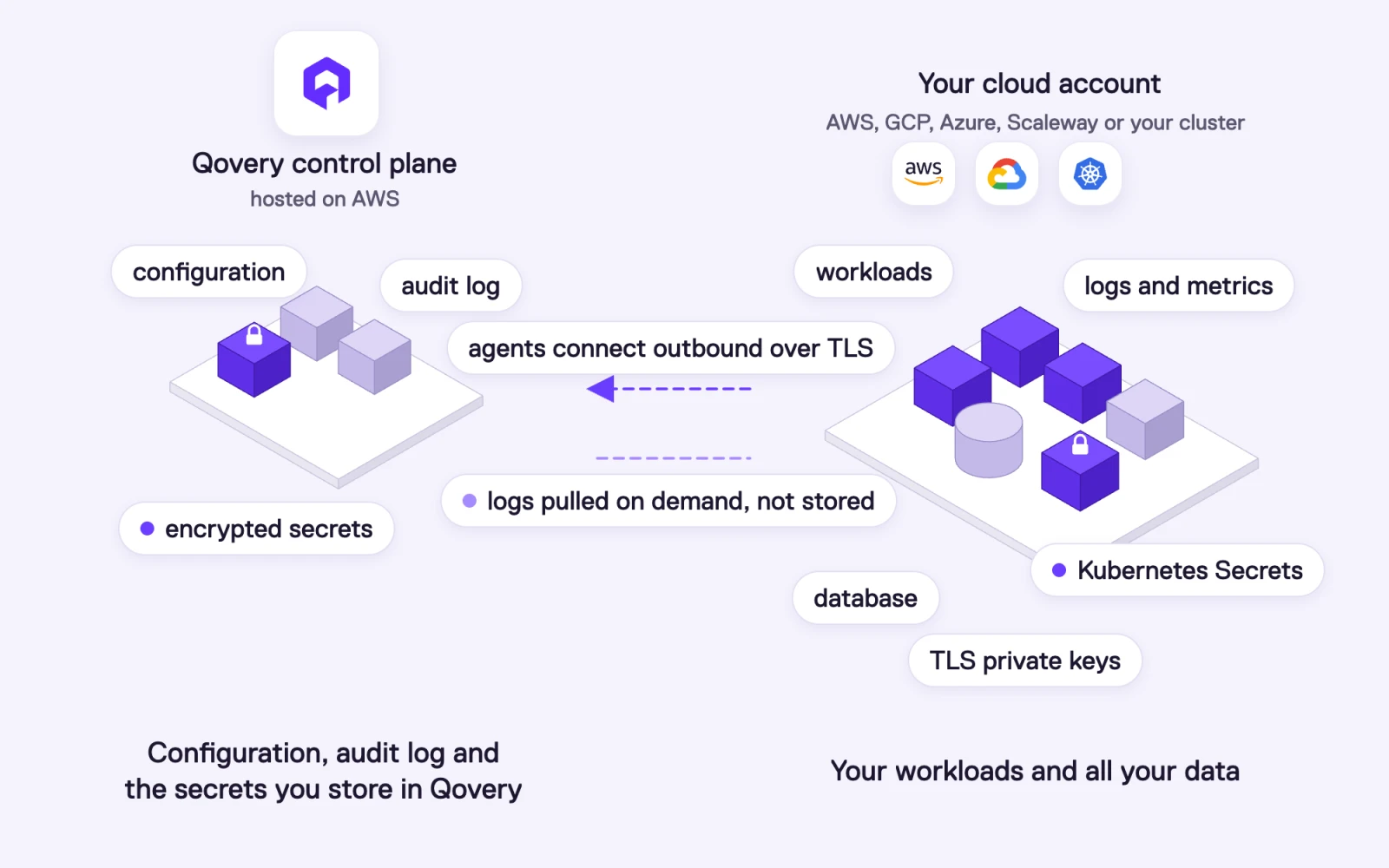
Qovery control plane and data plane: the control plane holds configuration, the audit log and the secrets you store in Qovery, while your cloud account holds workloads, databases, logs, metrics, TLS keys and the Kubernetes Secrets your services read
Because your applications run in your cluster, they don't depend on Qovery at runtime. If Qovery were unavailable, your services and certificate renewals would keep running, and only new deployments would wait.
How does Qovery store the secrets you add in the Console?
When you create a secret in Qovery (in the Console, the API, the CLI or Terraform), it is stored in the control plane, encrypted:
A key per organization. Each Qovery organization has its own encryption key, derived with PBKDF2 and a salt unique to the customer, and secrets are encrypted with salted AES-256. AWS KMS, with HSM-generated keys, protects the key material. A compromise of one customer's account cannot decrypt another customer's secrets.
Encrypted storage. The Qovery database runs on Amazon RDS with AES-256 encryption at rest.
Write-only values. Once saved, a secret value cannot be read back through the Console or the API. You can update it or delete it. Exports show secret values as ***. A stolen session or API token cannot extract the values.
Scoped and audited. Secrets follow the project, environment and service scopes of variables, RBAC decides who can manage them, and every change is recorded in the audit log with who made it and when.
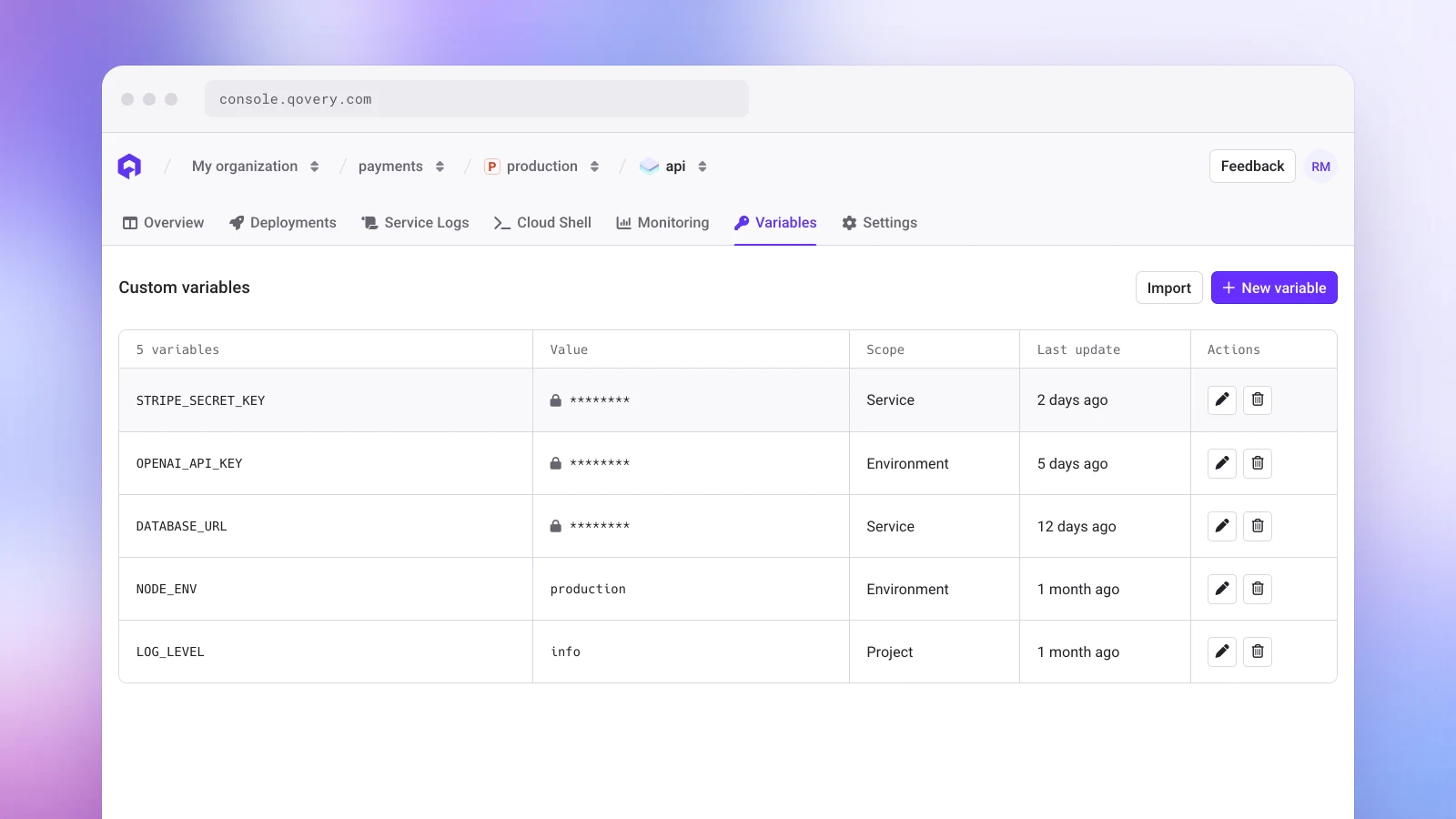
The Variables tab of a service in the Qovery Console: STRIPE_SECRET_KEY, OPENAI_API_KEY and DATABASE_URL are secrets shown masked with a lock, next to plain variables NODE_ENV and LOG_LEVEL, each with its scope
How does a secret reach the running application?
A secret only leaves the control plane when a deployment needs it:
A deployment job receives the subset of secrets required for the services it deploys, nothing more.
The deployment engine creates a Kubernetes Secret for each service, in the environment's own namespace in your cluster, and the container reads it as environment variables or as a mounted file.
During the deployment, the engine masks every secret value in the deployment logs, and it redacts sensitive attributes such as passwords and tokens from Terraform outputs.
On EKS, you can add envelope encryption of Kubernetes Secrets with your own KMS key through a cluster advanced setting, so the values are encrypted in etcd with a key you control.
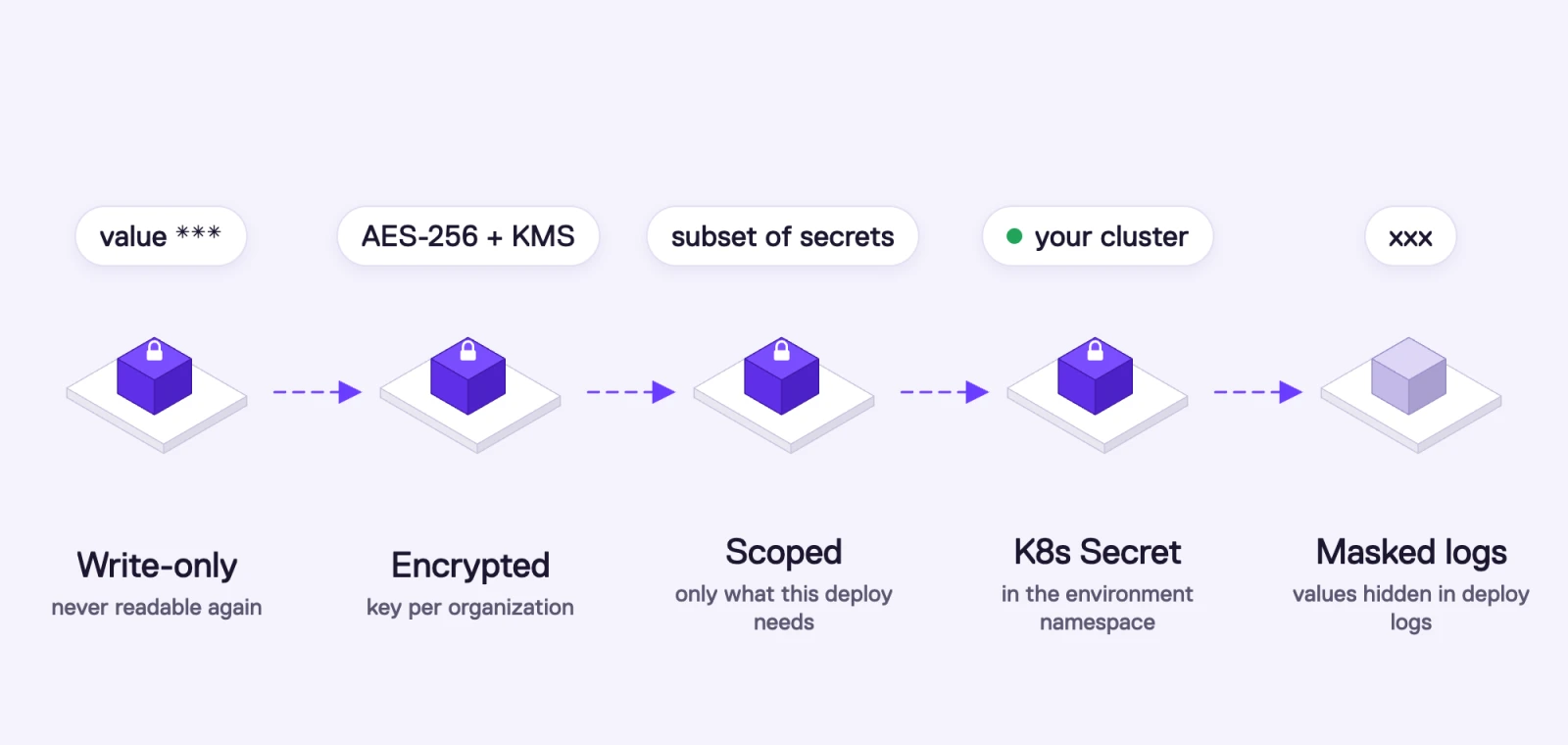
The lifecycle of a secret stored in Qovery: written once and never readable again, encrypted with a key unique to the organization, sent only to the deployment that needs it, written as a Kubernetes Secret in the environment namespace, masked in deployment logs
What are the limits of storing secrets in a platform?
We want to be precise here. Secrets stored in Qovery are encrypted, and the keys are isolated per organization and access-restricted. But, as CircleCI's incident showed, an attacker who reaches the systems that decrypt secrets can read what those systems can read. That holds for any platform that stores and decrypts secret values, Qovery included.
What is never in Qovery: your application data, your database contents, your application logs and metrics, your TLS private keys, and the values of secrets you keep in your own secret manager. For the production secrets that matter most (payment keys, database credentials for personal data, AI provider keys), we recommend the next two options.
Keep your secrets in your own cloud account.
Qovery deploys your workloads into your own AWS, GCP, Azure or Scaleway account and can resolve secrets straight from your secret manager, inside your cluster.
How do you keep secret values out of Qovery entirely?
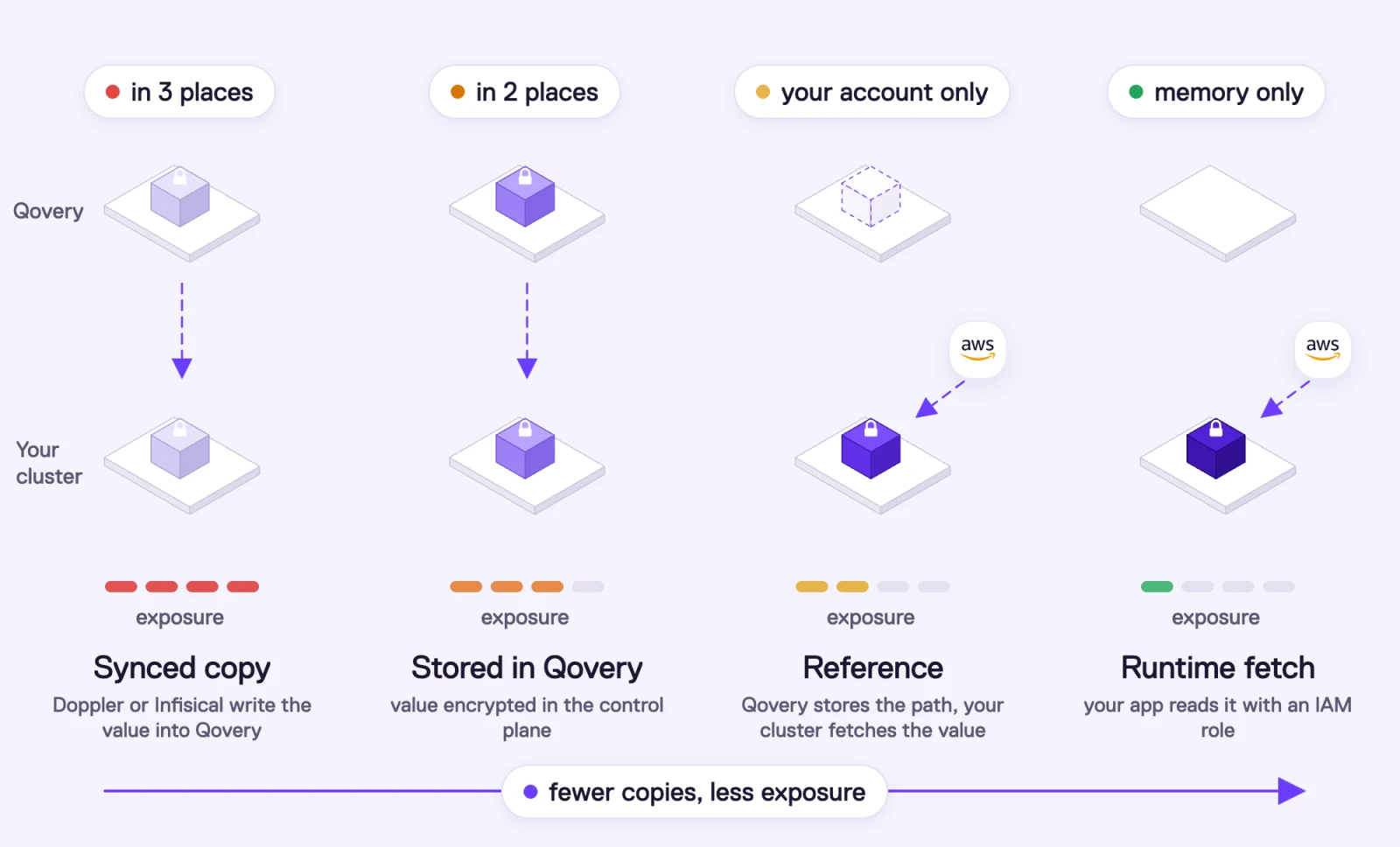
Qovery supports four ways to manage secrets. They differ in one thing: where the value lives. From the first to the last, the value exists in fewer places.
Model
Providers
Where the value lives
What Qovery stores
Value fetched by
Sync from a secret manager
Doppler, Infisical
Your secret manager, synced into Qovery
A synced, encrypted copy
Same as Qovery secrets
Qovery secrets
Built in
Qovery control plane, encrypted per organization
The encrypted value
The deployment, then a Kubernetes Secret in your cluster
The External Secrets Operator, inside your cluster
Runtime fetch by your application
AWS Secrets Manager with an IAM role
Your secret manager, in your cloud account
Nothing about the secret (only which ServiceAccount the service runs as)
Your application, at runtime, with the AWS SDK
Four ways to manage secrets with Qovery, from most to least exposed: a synced copy from Doppler or Infisical lives in three places, a secret stored in Qovery in two, a reference keeps the value in your cloud account only, and a runtime fetch with an IAM role keeps it in process memory only
How does the native Secret Manager integration work?
The reference model runs on the External Secrets Operator, an open-source Kubernetes project that Qovery installs and manages in your cluster as an add-on.
Connect the secret manager at the cluster level. Choose AWS Secrets Manager, AWS Parameter Store or GCP Secret Manager. With automatic authentication, Qovery sets up workload identity (an IAM role on EKS, a service account on GKE), so there are no static credentials. Static credentials and assumed roles are also supported.
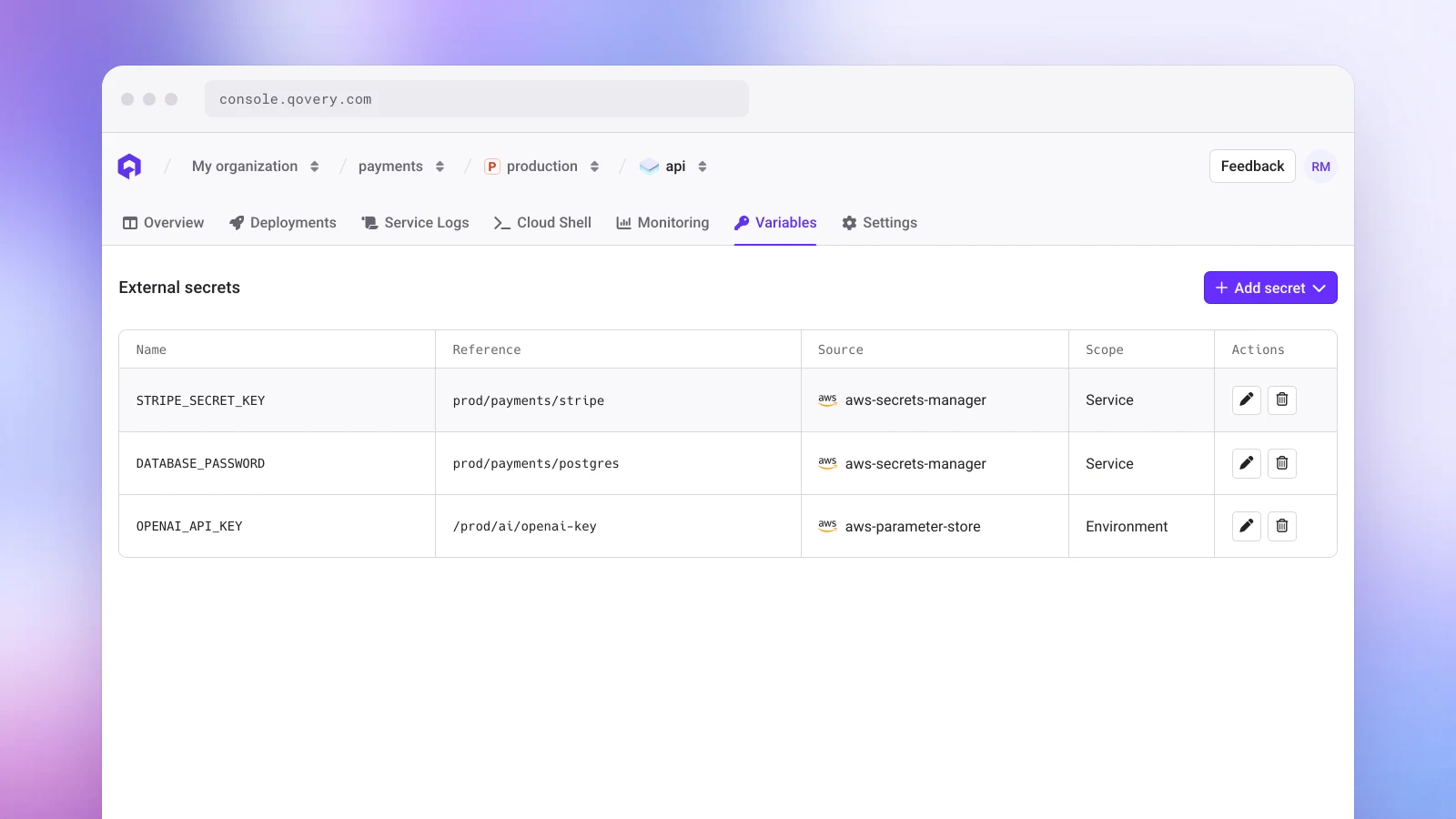
Add the secret to a service or an environment. In the External secrets section of the Variables tab, add a secret as a variable or as a file and pick it by its reference. From the CLI, use qovery application external-secret create with --reference. Qovery stores the reference, not the value.
Deploy. The engine renders an ExternalSecret resource for the service. The operator, running in your cluster with your cloud identity, reads the value from your secret manager and writes the Kubernetes Secret the container uses. The value is refreshed on each deployment.
The External secrets section of a service in the Qovery Console: STRIPE_SECRET_KEY, DATABASE_PASSWORD and OPENAI_API_KEY bound to references in AWS Secrets Manager and AWS Parameter Store, with their scope
The value travels from your secret manager to your cluster, inside your cloud account, and never passes through Qovery's control plane. Rotation, access policies and access logs stay in AWS or GCP, where your security team already audits them. This also works well for AI agents: an agent deploying through the Qovery MCP server or the API only handles references, so a credential never enters its context.
How do you load secrets at runtime with an IAM role?
The strictest setup keeps the value out of every layer between your secret manager and your code. The application reads the secret from AWS Secrets Manager when it needs it, with an IAM role attached to its pod.
Create an IAM role that can read only this service's secrets, for example secretsmanager:GetSecretValue on arn:aws:secretsmanager:eu-west-3:123456789012:secret:prod/payments/*.
Bind the role to a Kubernetes ServiceAccount, with IAM Roles for Service Accounts (an annotation with the role ARN) or EKS Pod Identity.
Run the service as that ServiceAccount with the security.service_account_name advanced setting in Qovery.
Read the secret from your code with the AWS SDK, which picks up the role's temporary credentials automatically.
The value then exists outside AWS only in your process's memory: not in Qovery, not in a Kubernetes Secret, not in the pod's environment. Secrets Manager can rotate it without a redeploy, if your application refreshes its cache (AWS publishes caching clients for several languages), and every read is logged in CloudTrail with the role that made it.
The trade-offs: your code depends on the AWS SDK and on Secrets Manager being reachable at startup, AWS bills each read, and every service has to be written this way. Many teams use it for their most sensitive credentials and the reference model for the rest. On GCP, the same pattern works with Workload Identity and the Secret Manager client library.
How do Doppler and Infisical work with Qovery?
Doppler and Infisical both sync secrets into Qovery. You manage secrets, environments and rotation in Doppler or Infisical, and their sync writes the values to your Qovery projects, applications, containers or jobs whenever they change. Qovery then stores and delivers them like any Qovery secret.
This fits teams that already use Doppler or Infisical as the source of truth across many tools. Because the value is copied into Qovery, the section on Qovery-stored secrets applies to it. If values must stay strictly inside your cloud account, use the reference or runtime models with AWS or GCP. We are working on more native providers for the reference model.
How is Qovery's security audited?
Security and transparency are what our customers trust us with, so they are checked by people outside Qovery:
SOC 2 Type II. An independent auditor tests our security controls over time, not only at a point in time.
ISO 27001. Our information security management system is certified against the international standard.
HDS. Qovery holds the French Hébergeur de Données de Santé certification required to host health data in France.
HIPAA, DORA and GDPR. Qovery is compliant with HIPAA for healthcare organizations, DORA for financial services in the EU, and GDPR as a French company subject to EU law.
Penetration tests twice a year, by two independent firms. Two separate security companies pentest Qovery, evaluating the source code, the running application and the deployed infrastructure. Two firms means two different teams and two different methods looking for what we missed.
The details, reports and documents are available on our trust center. Transparency is part of the same effort: the engine and every component we install in your cluster are open source, and this article describes where your secrets live, including the parts where we hold them.
What should you do if a platform you use discloses a secrets breach?
Rotate in order of risk. AI provider keys, payment keys, cloud credentials and registry tokens first, then database credentials, then the rest.
Check that rotation reaches production. If your platform paused deployments, secrets injected at deploy time keep their old values until you can redeploy. Secrets loaded at runtime from your own secret manager don't have that problem.
Review usage on the provider side. Look at billing, rate-limit and access logs for the keys you rotated, for the days before the disclosure.
Look for persistence. Check for new API keys, users, SSH keys, OAuth apps or webhooks created with the leaked credentials.
Write down what you learned. Which secrets were copied where, which rotations broke something, how long the whole rotation took. That is the input for the next drill.
Frequently asked questions
How do I prevent secrets from leaking through my deployment platform?
Keep one source of truth in a secret manager in your own cloud account, give the platform references instead of values, use short-lived credentials and IAM roles, scope each key to one service and environment, cap spending on AI and payment keys, make secrets write-only, rehearse rotation, and monitor usage and access logs.
Where does Qovery store secrets?
Secrets you create in Qovery are stored encrypted in Qovery's control plane, with salted AES-256 encryption and a key unique to your organization, protected by AWS KMS. At deploy time they are written as Kubernetes Secrets in the environment's namespace in your own cluster. Secrets referenced from AWS Secrets Manager, AWS Parameter Store or GCP Secret Manager are never stored in Qovery: only the reference is, and the External Secrets Operator in your cluster fetches the value.
What is the difference between Qovery's control plane and data plane?
The control plane is Qovery's SaaS, which holds your configuration, schedules deployments and records the audit log. The data plane is your Kubernetes cluster in your own cloud account, which runs your workloads and keeps your data, databases, logs, metrics, TLS keys and runtime secrets. Qovery's components in your cluster connect outbound to the control plane over TLS.
Can anyone read my secret values in Qovery?
Secret values cannot be read back through the Qovery Console or API once saved. They are encrypted with a key unique to your organization, and access to the keys is restricted. Like any platform that decrypts secrets to deploy them, the systems that perform the deployment can access the values they deliver. To remove that exposure for sensitive secrets, reference them from your secret manager or load them at runtime with an IAM role, so the value never enters Qovery.
What is the most secure way to handle secrets with Qovery on AWS?
Let the application load secrets at runtime from AWS Secrets Manager with an IAM role. Bind the role to a Kubernetes ServiceAccount (IRSA or EKS Pod Identity), set the service's security.service_account_name advanced setting in Qovery, and read the secret with the AWS SDK. The value never passes through Qovery and is never written to a Kubernetes Secret, and every read is logged in CloudTrail.
Does Qovery integrate with Doppler, Infisical, AWS Secrets Manager and GCP Secret Manager?
Yes. AWS Secrets Manager, AWS Systems Manager Parameter Store and GCP Secret Manager are integrated natively through the External Secrets Operator, which Qovery manages in your cluster and which fetches values at deploy time. Doppler and Infisical sync secrets into Qovery from their side. Applications can also read AWS Secrets Manager directly at runtime with an IAM role. More providers will be supported natively.
Which security certifications and audits does Qovery have?
Qovery is SOC 2 Type II certified, ISO 27001 certified and HDS certified, and compliant with HIPAA, DORA and GDPR. Two independent security firms run penetration tests on Qovery twice a year. Reports and documents are available on the Qovery trust center at trust.qovery.com.
Are secrets visible in Qovery deployment logs?
No. The deployment engine masks secret values in deployment logs and redacts sensitive Terraform attributes such as passwords and tokens. Your application's own runtime logs stay in your cluster, so if your code prints a secret by mistake, it stays in your infrastructure.
Are Kubernetes Secrets encrypted in my cluster?
Kubernetes Secrets are stored in the cluster's etcd. On EKS, Qovery supports envelope encryption of Secrets with your own AWS KMS key through a cluster advanced setting. On other providers, encryption follows the managed Kubernetes service's defaults and your own configuration.
Romaric founded Qovery to make Kubernetes accessible to every engineering team. He writes about platform strategy, developer experience, and the future of cloud infrastructure.
Next step
Keep your secrets in your own cloud account.
Qovery deploys your workloads into your own AWS, GCP, Azure or Scaleway account and can resolve secrets straight from your secret manager, inside your cluster.