Sandbox Environments for AI Agents: A Full, Isolated Stack for Every Task
A code sandbox like Daytona or E2B isolates a process. A sandbox environment isolates a whole stack: services, databases, queues and configuration, cloned for one agent task and destroyed when it is done. Here is how sandbox environments work, what they are good for, and how to run them on Qovery.
A code sandbox isolates a process. A sandbox environment isolates a stack. Daytona, E2B, Modal or Vercel Sandbox give an agent one microVM or container to run code in, usually for minutes to 24 hours. A sandbox environment gives the agent a complete copy of your application: every service, its databases and queues, its configuration and its URLs, running on real infrastructure.
Coding agents already hit the limits of a single VM. Claude Code's cloud environment ships PostgreSQL and Redis but does not keep them running between sessions. Codex cloud has internet off by default and removes secrets before the agent phase. GitHub Copilot's agent sits behind a firewall. The agent ends up testing against mocks or guessing.
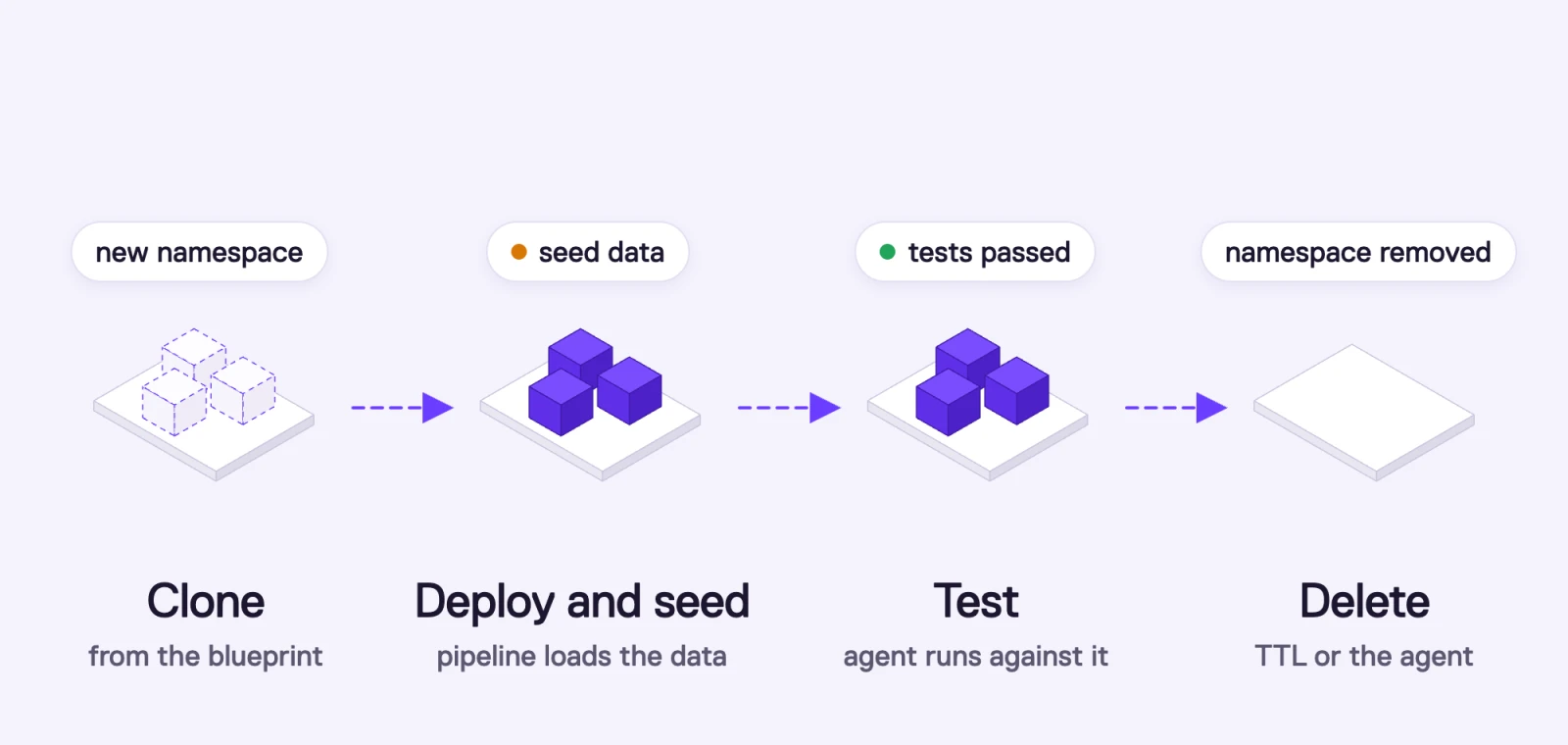
On Qovery, a sandbox environment is an environment cloned for one task. It runs in its own Kubernetes namespace in your cloud account, starts from a blueprint environment, seeds its data through the deployment pipeline, and is stopped or deleted automatically by a built-in TTL, or by the agent with DELETE /environment/{id}.
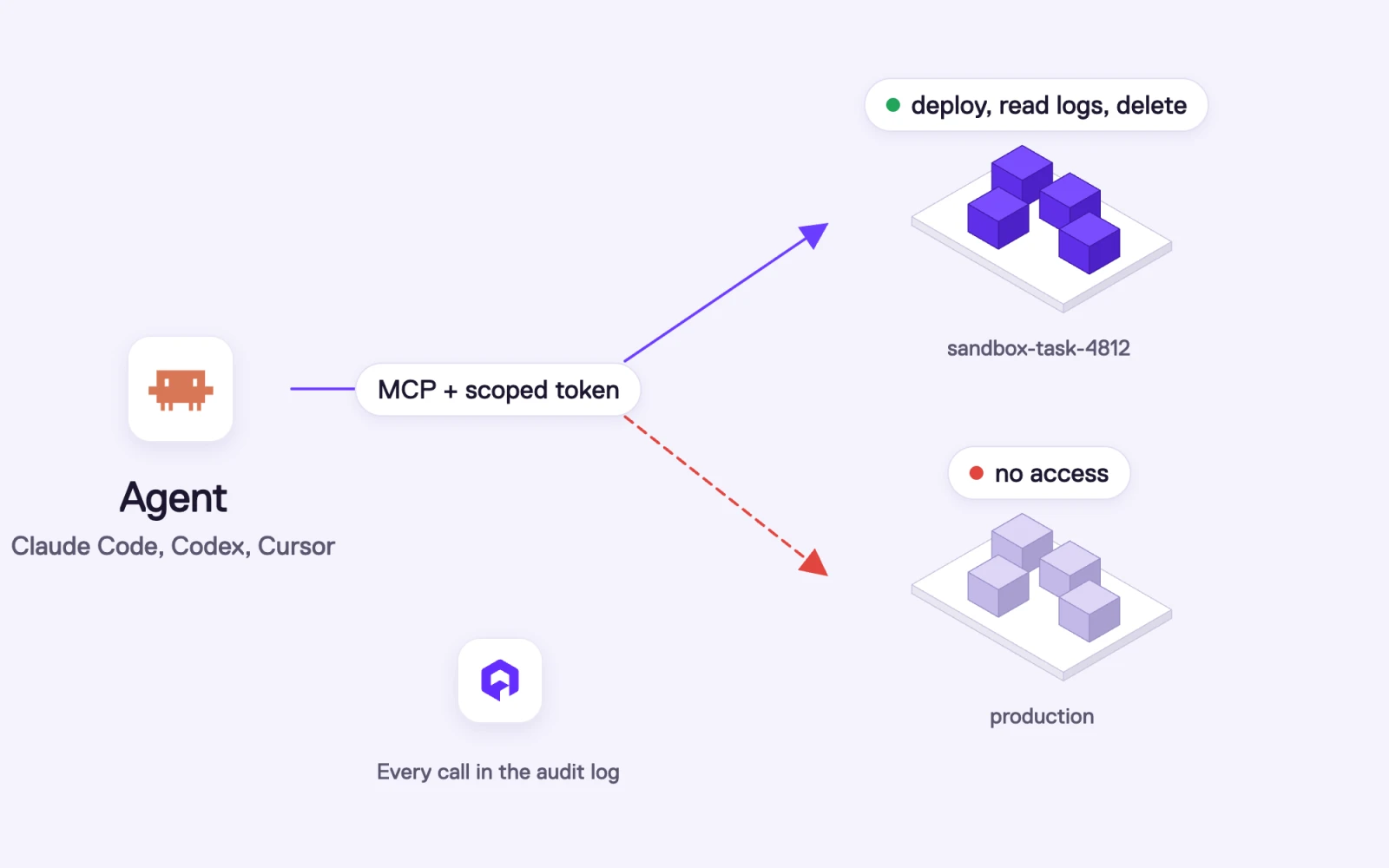
Agents operate it through governed access. The Qovery MCP server is read-only by default. Write access is opt-in, API policy tokens can scope an agent to a single environment, and every API call lands in the audit log.
It is slower and more expensive than a code sandbox. A full environment takes minutes to deploy and costs real compute. Use a code sandbox for the edit-run loop and a sandbox environment when the agent has to prove its change works against the whole system.
The word "sandbox" now means one thing in AI infrastructure: an isolated place to execute code an agent wrote. Daytona, E2B, Modal, Vercel Sandbox and Cloudflare's Sandbox SDK all sell a variation of it, and they are good at it. You get a microVM in milliseconds, you run the code, you throw it away.
That covers the moment an agent needs to run a script. It does not cover the moment the agent needs to know whether its change works. Your checkout API talks to an inventory service, a Postgres database, a Redis cache, a queue and a payment provider sandbox. A microVM with the repository cloned into it has none of those. The agent can run unit tests and hope.
At Qovery we have been running environments for teams for years: preview environments per pull request, staging, production, all on Kubernetes in the customer's own cloud account. As more of the code we deploy comes from agents, we have started calling the per-task version of those environments by a different name, because it serves a different purpose. This article is about that idea, the sandbox environment, and how it works technically.
What is a sandbox environment?
A sandbox environment is a complete, isolated copy of an application stack that an agent (or a developer) creates for one task, works against on its own, and destroys when the task is done.
Four properties define it:
Complete. It contains every service the feature touches: APIs, workers, frontends, databases, caches, queues, and the configuration that wires them together. The agent tests against the real topology, not a mock.
Isolated. It has its own runtime boundary, its own database instances, its own variables and secrets, and its own URLs. Nothing the agent does in it reaches staging or production.
Ephemeral. It exists for the length of a task, from a few minutes to a few days, and it is deleted afterwards. Nobody maintains it.
Agent-operable. The agent can create it, deploy to it, read its logs, run tests against it and delete it through an API, a CLI or an MCP server, within permissions someone set in advance.
If you have used preview environments, this will look familiar. A sandbox environment is a preview environment whose trigger is an agent task instead of a pull request, and whose consumer is an agent instead of a reviewer. The mechanics are the same. The difference is who drives it and how often it gets created.
How is a sandbox environment different from a code sandbox like Daytona or E2B?
They isolate at different layers. A code sandbox isolates a process. A sandbox environment isolates infrastructure.
Here is how code sandbox vendors describe their own products:
Vercel Sandbox: "Each sandbox runs in a secure Firecracker microVM with its own filesystem and network." The default timeout is 5 minutes, and sessions are capped at 45 minutes on Hobby and 24 hours on Pro and Enterprise (docs).
E2B: "Sandboxes can run continuously for up to 24 hours (Pro) or 1 hour (Hobby)" (docs).
Modal: sandboxes have a "default maximum lifetime" of 5 minutes, extendable up to 24 hours (docs).
Daytona: sandboxes default to 1 vCPU, 1 GB of RAM and 3 GiB of disk (docs).
Cloudflare Sandbox SDK: "A sandbox is an isolated place to run code", and when the instance stops, its processes, terminals and network connections end with it (docs).
Code sandbox
Sandbox environment
Isolation unit
One microVM, gVisor sandbox or container
A set of services in its own Kubernetes namespace
What runs inside
The agent's code, a shell, maybe Docker Compose
Every service of the app, built and deployed as in production
Databases
Whatever the agent installs in the VM
Real database instances, container or managed, per environment
Networking
Sandbox network, sometimes peered to a VPC
Your cluster's network, with service DNS, ingress and public URLs
Startup time
Milliseconds to seconds
Minutes (build and deploy)
Typical lifetime
Minutes, capped at hours
A task, from minutes to days
Where it runs
The vendor's infrastructure
Your cloud account (AWS, GCP, Azure, Scaleway) or your cluster
Best for
Running untrusted code, quick edit-run loops, data analysis
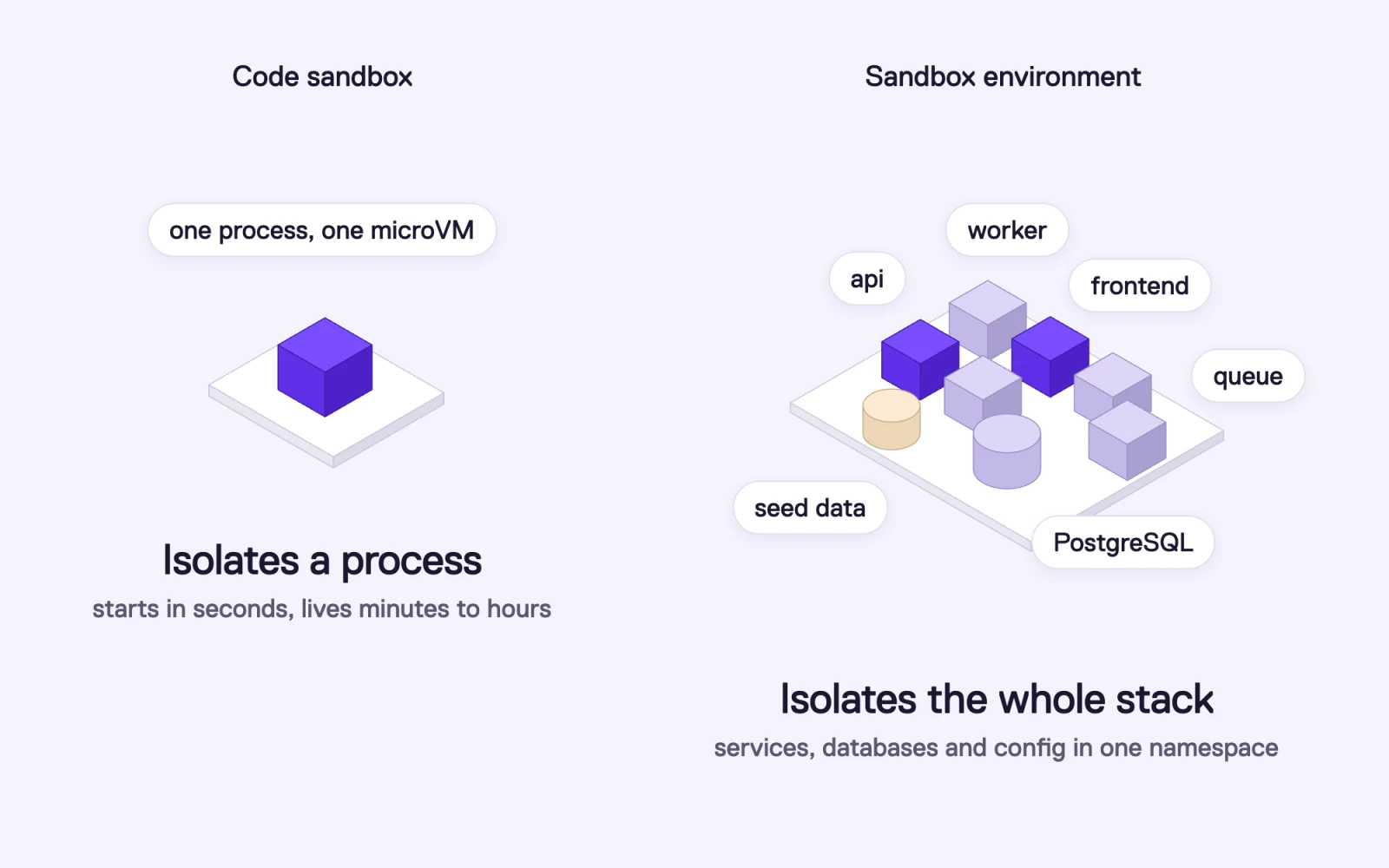
A code sandbox isolates one process in one microVM. A sandbox environment isolates the whole stack: api, worker, frontend, queue, PostgreSQL and seed data in one namespace
A coding agent should still run its inner loop (edit, run, read the error, edit again) in a code sandbox, because it is fast and cheap. The sandbox environment comes in when the agent has to verify the change against the system it will ship into.
Why do AI agents need more than a code sandbox?
Because the agent's output is only as good as what it can check it against.
The Stack Overflow 2025 Developer Survey put "AI solutions that are almost right, but not quite" at the top of developers' frustrations with AI tools, cited by 66% of respondents, and 45.2% said debugging AI-generated code takes more time. Code that is almost right usually passes unit tests. It breaks at the boundaries: a column that doesn't exist in the real schema, a queue message the consumer doesn't expect, an environment variable that is only set in staging.
The coding agents themselves show where a single VM stops:
Claude Code on the web runs tasks in a cloud environment that includes PostgreSQL 16 and Redis 7, which are "pre-installed but not running by default". Its cache "keeps what the setup script writes to disk and loses anything that was only running", including "a docker compose up stack". The VM has 4 vCPUs and 16 GB of RAM (docs).
OpenAI Codex cloud has "internet access off by default", and secrets "are only available to setup scripts. For security reasons, secrets are removed before the agent phase starts" (docs).
GitHub Copilot coding agent prepares its environment in copilot-setup-steps.yml with a timeout of at most 59 minutes, and "by default, Copilot's access to the internet is limited by a firewall" (docs).
Each of these choices is reasonable for security, and each one means the agent cannot reach a realistic copy of your system from inside its VM. You can try to rebuild your stack in Docker Compose at the start of every task, but your production stack is rarely only Compose: it has managed databases, a message broker, Helm charts from third parties, Terraform-provisioned buckets.
Teams that run many agents in parallel hit a second problem: shared staging. If five agents test against the same staging environment, their changes, data and migrations collide. VirtusLab's engineering maturity matrix describes the target state as "multiple agents can work concurrently without interference: each agent's changes, tests, and service state are fully isolated." A sandbox environment per task is the straightforward way to get there.
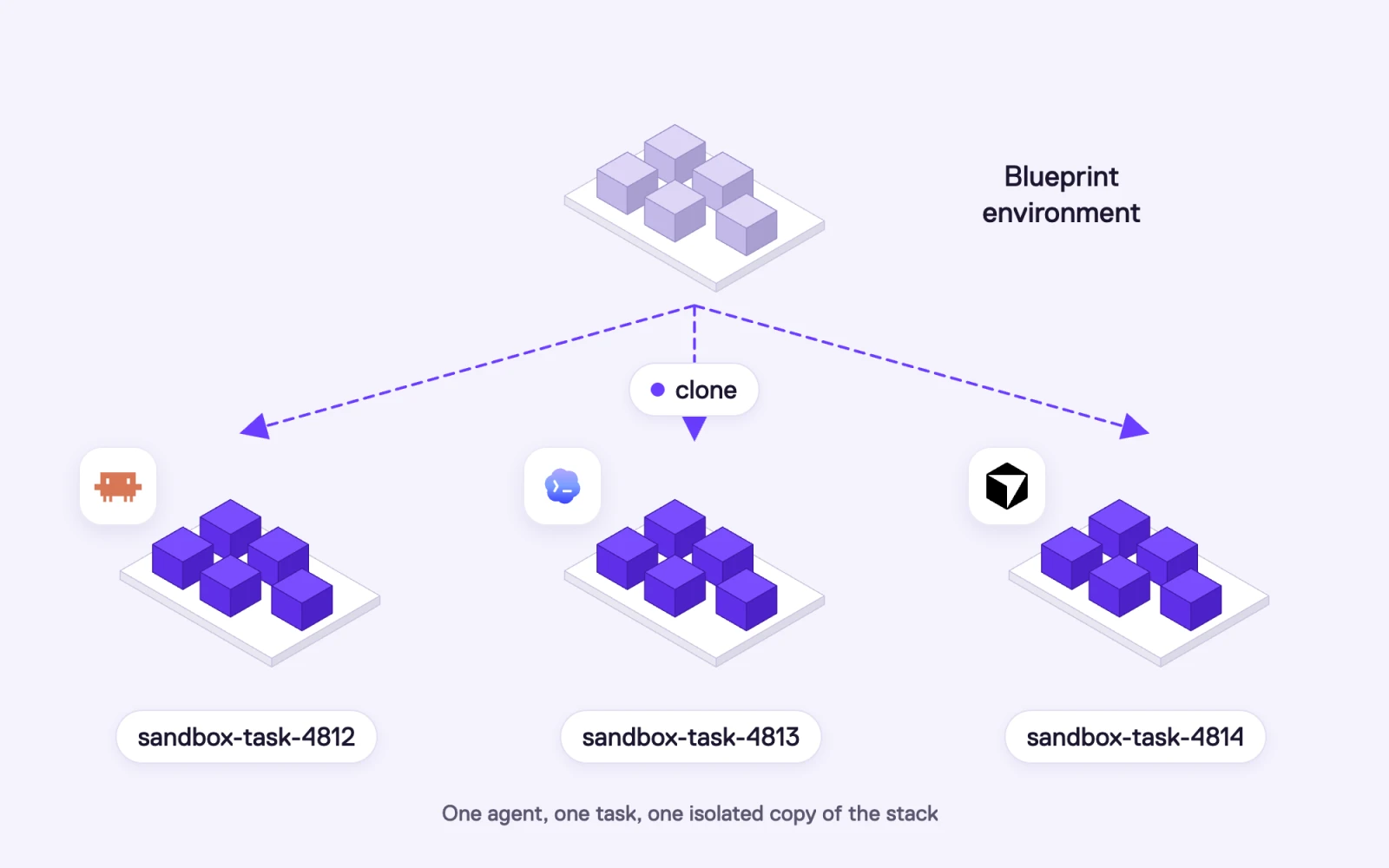
A blueprint environment cloned into three sandbox environments, one per agent task, for Claude Code, Codex and Cursor
What can an agent do with a sandbox environment?
Anything that needs more than one process to be true:
Build a feature across services. The agent changes the API and the worker, deploys both into its environment, and calls the public URL to check the end-to-end flow.
Run a database migration for real. It applies the migration to a seeded database, runs the app against the new schema, and checks that the old code path still reads the data.
Run integration and end-to-end tests. Playwright, contract tests or load tests point at the environment's URLs, not at mocks.
Reproduce a production bug. The agent clones the environment with the same versions as production, seeds the data that triggers the bug, reads the logs, and verifies the fix in the same place.
Test infrastructure changes. A new Helm chart version, a Terraform module change or a new service gets deployed into the sandbox before anyone touches staging.
Hand over proof. The pull request links to a running environment where a human can click through the change, then the environment is deleted.
How do sandbox environments work on Qovery?
Qovery is an Agentic DevOps platform that deploys and runs applications on Kubernetes in your own cloud account. Environments are the core primitive, so a sandbox environment uses features that already exist. Here is what happens at each step.
What is a Qovery environment?
In Qovery, an organization contains projects, a project contains environments, and an environment contains services. The documentation defines an environment as "a group of applications, databases, and services running within the same Kubernetes namespace."
An environment can hold every kind of service your stack needs:
Applications built from a Git repository, and containers from an image registry.
Databases in container mode (a container with persistent storage on the cluster, fast and cheap for testing) or managed mode (for example Amazon RDS, provisioned and managed by Qovery).
Jobs, both cron jobs and lifecycle jobs that run on environment events.
Helm charts, for third-party components such as a message broker or a search engine.
Terraform services and blueprints, for cloud resources like S3 buckets, managed Redis or Kafka.
Each environment has its own environment variables and secrets, which override project-level values. Qovery also injects built-in variables such as QOVERY_ENVIRONMENT_ID and the connection details of each database, so services find each other without hard-coded hosts.
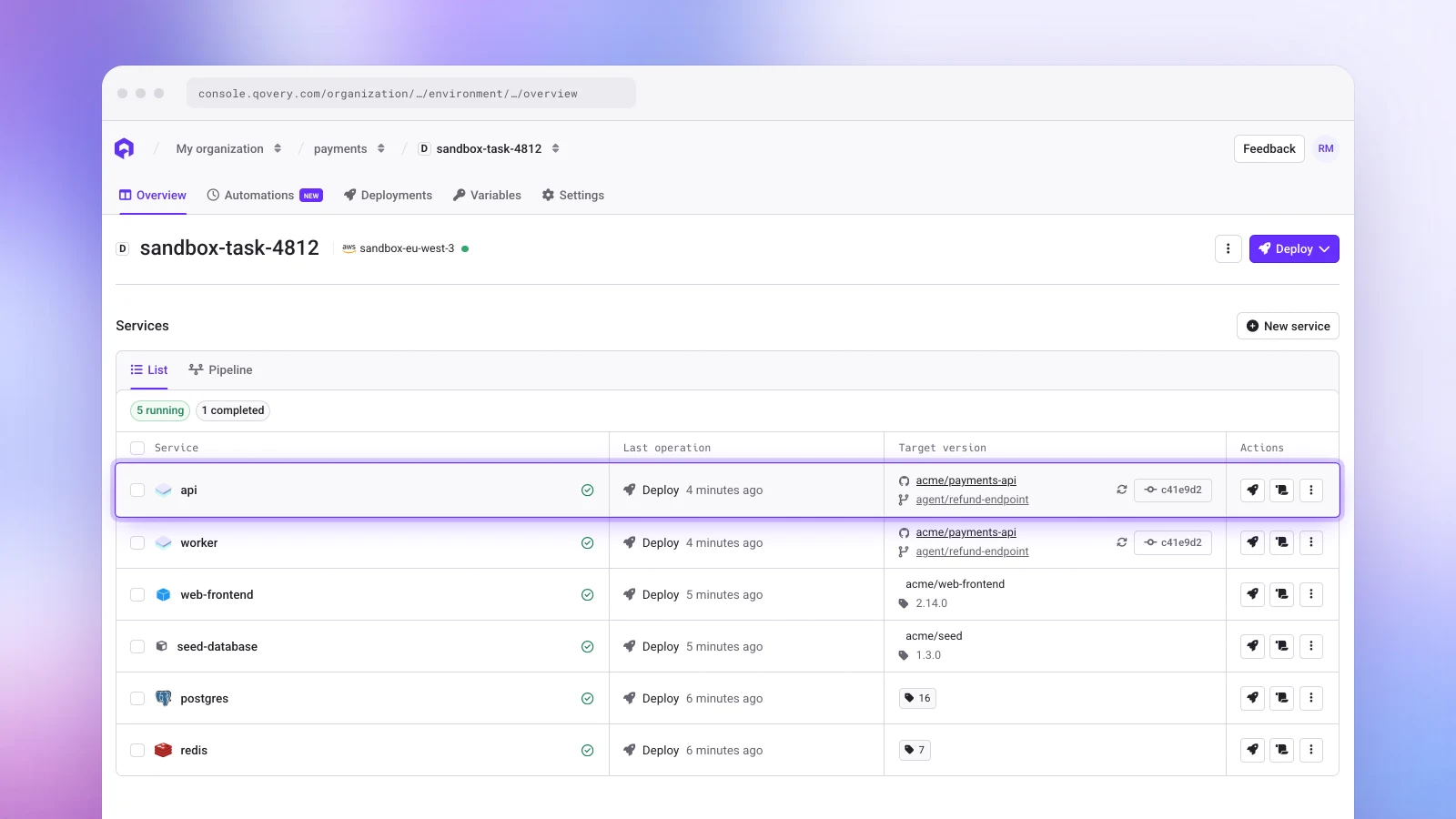
A sandbox environment in the Qovery Console: the API and worker deployed from the agent's branch, a frontend, a seed job, PostgreSQL and Redis, all running for one agent task
Where does a sandbox environment start?
From a blueprint environment. This is a working environment that serves as the template: same services, same configuration, same pipeline as the environment you want to test against, usually staging. Qovery's preview feature already works this way: when a pull request opens, Qovery clones the blueprint environment, switches the services to the branch, and deploys it.
For agents, the same clone is available on demand through the API:
The clone copies the services, their configuration, the variables and secrets, and the deployment pipeline, including which services are skipped. Custom domains are not copied, and the new environment gets its own generated URLs. With apply_deployment_rule, the clone also picks up the project's deployment rules, such as an auto-stop schedule. You can target a different cluster, which is how we recommend running sandboxes: on a cluster separate from production.
Developers can also trigger the same thing from a pull request, by default on every PR or on demand by commenting /qovery preview.
How does the agent get realistic data?
By default, a clone gets fresh database instances with the same configuration and no rows. You decide what goes in them by adding a seeding step to the environment's deployment pipeline.
The seeding step is a lifecycle job: a container that runs on the environment's deploy event, in the pipeline stage you choose (typically after the databases and before the applications), and executes your migrations and seed scripts. What it loads is up to you:
Synthetic data generated by a script or a fixture library, which is the safest choice for agents.
A curated dataset from a SQL dump or snapshot in object storage. Qovery's docs walk through seeding PostgreSQL from a SQL file this way.
An anonymized copy of production, produced by your own tooling or an external system, then restored into the sandbox.
Data from external services, such as a test account in your payment provider or a sandbox tenant in a third-party API, set up by the same job.
Because the seeding step lives in the blueprint's pipeline, every sandbox starts from the same known state, and an agent that breaks its data can redeploy and start over.
How is a sandbox environment isolated?
Each environment runs in its own Kubernetes namespace, which the engine creates on deploy with labels identifying the environment and project. Its services, pods, persistent volumes and configuration live in that namespace, and its databases are separate instances. Helm charts deployed by Qovery are restricted to the environment's namespace and cannot install cluster-wide resources.
Network isolation between environments can be turned on and customized, so you choose how strict it is: from sandboxes that can reach shared test services to sandboxes that can only talk to their own services. For the strongest boundary, run sandbox environments on a dedicated cluster, or in a dedicated cloud account, which keeps agent-created workloads away from production nodes, credentials and data entirely.
Secrets follow the same logic. A sandbox gets the secrets of its blueprint, so the blueprint should hold sandbox credentials: a test key for the payment provider, a sandbox account for the email service, never production keys.
How does the agent operate the environment?
Through the same interfaces your team uses, with tighter permissions:
The Qovery MCP server (https://mcp.qovery.com/mcp) lets Claude Code, Cursor, Codex or any MCP client list environments, read service configuration, check deployment status and read logs. It is read-only by default. Write actions such as triggering deployments require opting in with read_write=true, and Qovery's docs recommend read-only mode "to limit the blast radius of unintended AI actions."
API policy tokens scope what a token can do with an Open Policy Agent policy evaluated on every request. A sandbox token can be limited to one environment (the policy sees the environment ID of each request), allowed to deploy and read, and denied delete on anything else. Denied requests fail before they run.
RBAC per environment type lets you give agents Deploy or Manage rights on Development and Preview environments and Read-only, or nothing, on Production.
Audit logs record every API call, so each environment an agent created, deployed or deleted is attributed and searchable.
An agent connects through MCP with a scoped token: it can deploy, read logs and delete in its sandbox environment, has no access to production, and every call lands in the Qovery audit log
With that in place, an agent can deploy a fix, read the logs of a failing worker, adjust a variable and redeploy, all inside its sandbox, without being able to touch anything else.
How does a sandbox environment get destroyed?
Deleting the environment (DELETE /environment/{id}, or qovery environment delete) uninstalls its services in reverse deployment order and deletes the Kubernetes namespace. A lifecycle job can run on the delete event to clean up anything outside the cluster, such as a bucket or an external test account.
You rarely need to delete a sandbox by hand. Qovery has built-in TTLs for environments, so a sandbox stops automatically after a period you set, which caps its cost even if the agent forgets about it, and gets deleted when it is no longer needed. Other triggers work alongside the TTL:
The agent deletes it at the end of the task, when its permissions allow delete on its own sandbox.
The pull request closes. Preview environments created from a PR are deleted when it is merged or closed.
Qovery's Copilot schedules it. The Copilot can create a task to stop or delete an environment, for example "delete every sandbox older than two days".
What does it cost?
A sandbox environment uses real compute, so cost control matters more than for a code sandbox. The levers:
Container-mode databases for sandboxes instead of managed instances, which start faster and cost much less.
Spot instances on the sandbox cluster. Qovery's EKS clusters support Spot, which can cost up to 90% less, with stateful sets kept on on-demand nodes.
Karpenter autoscaling on AWS, so nodes appear when sandboxes deploy and consolidate when they are deleted.
TTLs and auto-stop rules, which Qovery estimates can cut environment costs by up to 60% for non-production environments.
Skipped services, to leave heavy services the task doesn't touch out of the clone.
Give every agent task its own environment.
Qovery clones a full environment (services, databases, configuration) inside your own cloud account, gives your agent scoped access through MCP, and deletes it when the task is done.
What does a sandbox environment workflow look like for an agent?
Here is the full loop for one task:
The agent receives a task, for example "add a refund endpoint to the payments API".
It works on the code in its own sandbox (Claude Code, Codex, Cursor or a code sandbox) and runs unit tests there.
It clones the blueprint environment into sandbox-task-4812 and deploys its branch to the services it changed.
The seeding step in the pipeline runs migrations and loads the dataset.
The agent runs integration tests against the environment's URLs, reads the logs of the services involved through MCP, fixes what fails and redeploys.
When the tests pass, it opens a pull request that links to the running environment.
A reviewer checks the change in the environment. After merge, the sandbox is deleted, and the namespace goes with it.
The sandbox environment lifecycle: clone from the blueprint into a new namespace, deploy and seed through the pipeline, test, then delete by TTL or by the agent
The same flow works with Qovery's own agent features. Agent tasks run on your infrastructure with your environments and services as context, so a task can be pointed at a sandbox environment instead of staging.
What are the trade-offs?
Sandbox environments cost time and money, and four trade-offs decide whether they are worth it.
Startup time. Building and deploying a multi-service environment takes minutes, not milliseconds. Agents should not create one for every edit. Create it once per task and redeploy into it.
Compute cost. Ten agents with ten full environments means ten copies of your stack running. Container databases, Spot nodes, skipped services and aggressive deletion keep it reasonable.
Data. Someone has to own the seeding step and keep the dataset realistic as the schema changes.
Isolation settings. Decide up front how strict network isolation should be, whether sandboxes get a dedicated cluster, and which sandbox-only secrets the blueprint carries.
Some tools take a lighter approach: deploy only the services a change touches and route the rest of the traffic to a shared staging environment. That starts faster and costs less. It also means the agent's changes share databases and downstream services with everyone else's, which is the collision problem sandbox environments exist to avoid. Pick based on what your agents change. If they mostly edit one stateless service, request routing is enough. If they change schemas, workers and several services at once, give them the full copy.
When should you use a code sandbox, a sandbox environment, or both?
Situation
Code sandbox
Sandbox environment
Run agent-generated code or untrusted scripts
Yes
No
Edit-run-debug loop on one repository
Yes
No
Change touches several services
No
Yes
Database migration or schema change
No
Yes
Integration or end-to-end tests
No
Yes
Reproduce a production bug with real dependencies
No
Yes
Test a Helm chart or Terraform change
No
Yes
Give reviewers a live link to the change
No
Yes
Many agents working in parallel without collisions
A sandbox environment is a complete, isolated copy of an application stack (services, databases, queues and configuration) that an AI agent creates for one task, works against autonomously, and destroys when the task is done. It differs from a code sandbox, which isolates a single process or microVM for running code.
What is the difference between a sandbox environment and a code sandbox like Daytona or E2B?
A code sandbox such as Daytona, E2B, Modal or Vercel Sandbox isolates one process in a microVM or container, starts in milliseconds, and usually lives for minutes to 24 hours. A sandbox environment isolates a whole stack in its own Kubernetes namespace, with real databases and service networking, takes minutes to deploy, and lives for the length of a task. Code sandboxes suit the edit-run loop. Sandbox environments suit integration tests, migrations and multi-service changes.
Is a sandbox environment the same as a preview environment?
They use the same mechanics. A preview environment is created per pull request for human reviewers. A sandbox environment is created per agent task, on demand through an API or MCP, and operated by the agent itself. On Qovery, both are clones of a blueprint environment.
Does Qovery copy production data into a sandbox environment?
Not by default. A clone gets new database instances with the same configuration and no data. You add a seeding step to the deployment pipeline that loads synthetic data, a curated dump, an anonymized copy of production or data from external systems, so you control exactly what an agent can see.
How do I stop an AI agent from touching production when it uses sandbox environments?
Run sandboxes on a separate cluster or cloud account, give the blueprint sandbox-only secrets, connect the agent through the Qovery MCP server in read-only mode unless it needs to deploy, and use an API policy token scoped to the sandbox environment. Set RBAC so agents have deploy rights on Development and Preview environments and no access to Production. Every action is recorded in the audit logs.
How long does it take to create a sandbox environment on Qovery?
It depends on the stack. Cloning is immediate, then Qovery builds and deploys the services, which typically takes minutes for a multi-service application. Create one sandbox per task and redeploy into it as the agent iterates, rather than creating a new environment for each change.
How are sandbox environments cleaned up?
Qovery's built-in TTLs stop and delete sandbox environments automatically after the period you set. The agent can also delete its sandbox at the end of the task, preview environments are deleted when their pull request closes, and Qovery's Copilot can create tasks to clean up environments. Deleting an environment removes all its services and its Kubernetes namespace, and an optional lifecycle job can clean up external resources.
Romaric founded Qovery to make Kubernetes accessible to every engineering team. He writes about platform strategy, developer experience, and the future of cloud infrastructure.
Next step
Give every agent task its own environment.
Qovery clones a full environment (services, databases, configuration) inside your own cloud account, gives your agent scoped access through MCP, and deletes it when the task is done.