

Overview
Service Advanced Settings allow you to fine-tune infrastructure and deployment parameters for your Qovery services. These settings provide granular control over build processes, networking, security, and resource allocation without requiring direct Kubernetes configuration.Advanced settings are available for Applications, Containers, Cronjobs, Jobs, and Helm charts.
Accessing Advanced Settings
1
Navigate to Service
Open your service (Application, Container, Cronjob, Job, or Helm) in Qovery Console
2
Open Settings
Click on the Settings tab
3
Access Advanced Settings
Scroll to the Advanced Settings section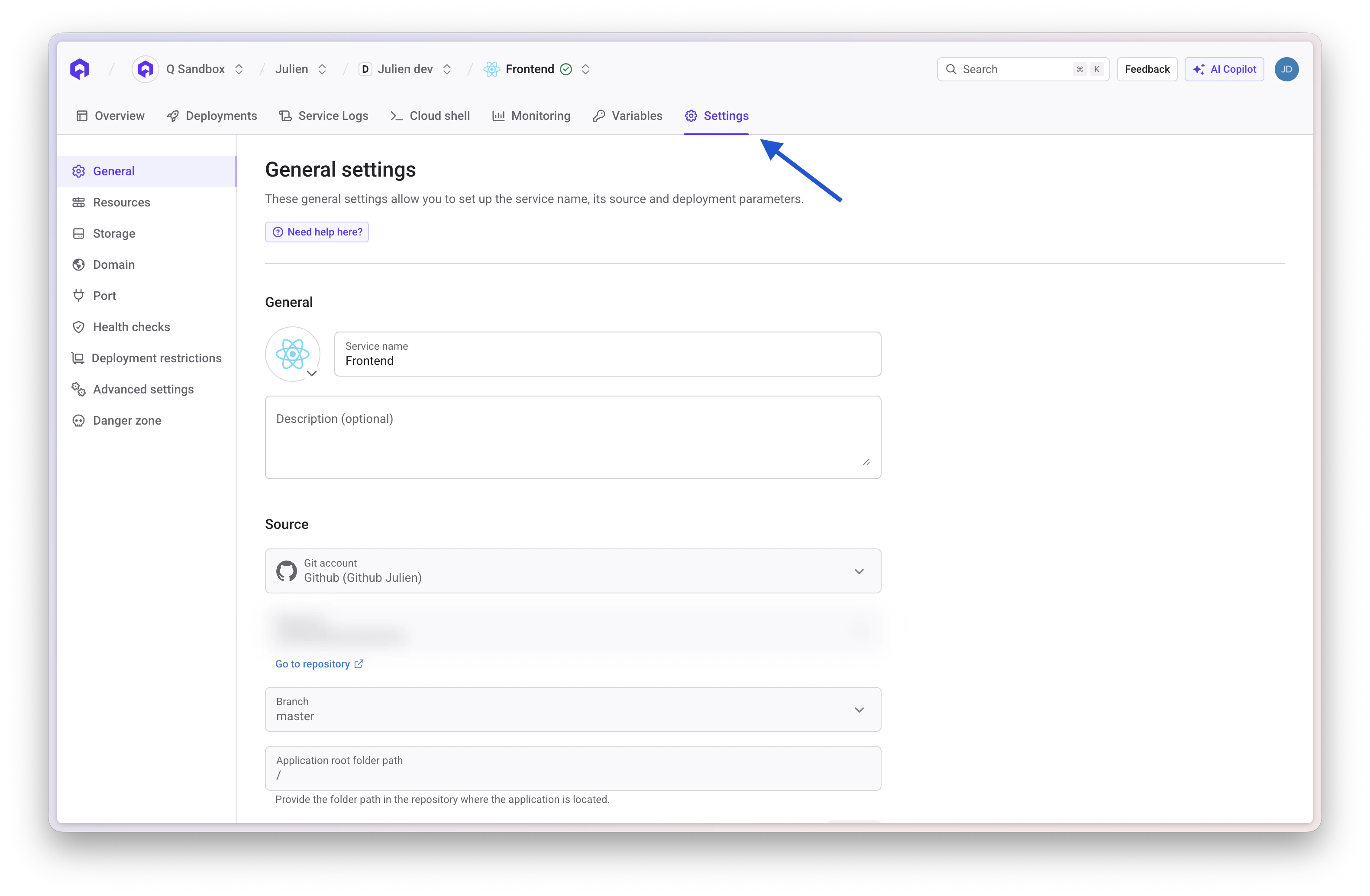
4
Configure Settings
Click on a setting to modify its value. You can toggle to show only overridden settings.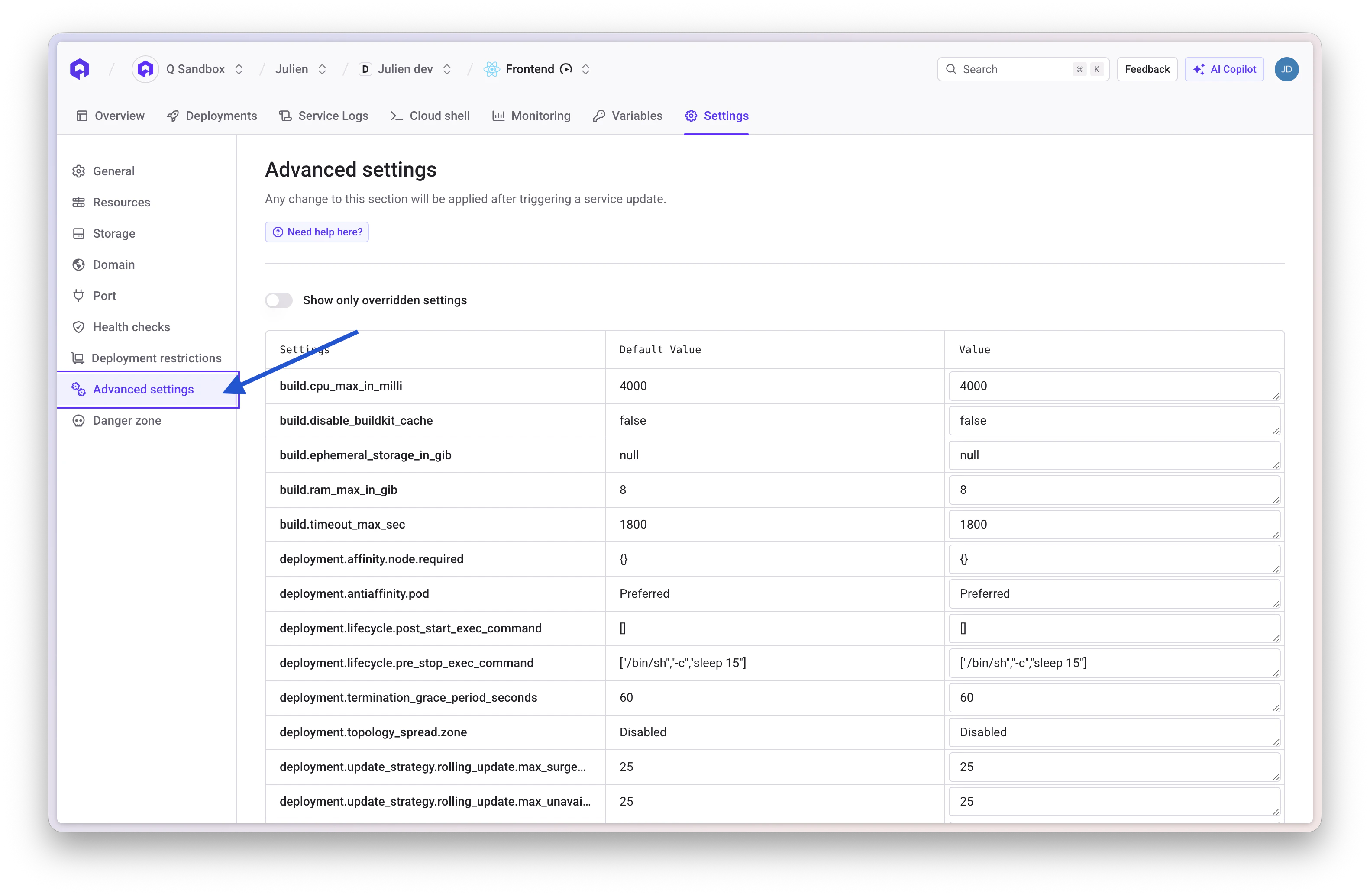
Build Settings
build.timeout_max_sec
Application Cronjob Job Type:integer
Description: Allows you to specify an interval, in seconds, after which the application build times out.
Default Value: 1800
build.cpu_max_in_milli
Application Cronjob Job Type:integer
Description: Allows you to specify the maximum CPU allocation for the build process in millicores (1000m = 1 vCPU).
Default Value: 4000
build.ram_max_in_gib
Application Cronjob Job Type:integer
Description: Allows you to specify the maximum RAM allocation for the build process in gibibytes.
Default Value: 8
build.ephemeral_storage_in_gib
Application Cronjob Job Type:integer
Description: Allows you to specify the ephemeral storage allocation for the build process in gibibytes.
Default Value: null
build.disable_buildkit_cache
Application Cronjob Job Type:boolean
Description: Allows you to disable BuildKit registry cache (--cache-from and --cache-to flags) during Docker builds.
Default Value: false
Use Case: Enable this setting when your build tool (such as Turbo, Bazel, or Nx) has its own caching mechanism. In these cases, BuildKit’s registry cache import/export operations add overhead without benefit, as the application-level cache is more effective. Disabling BuildKit cache can significantly reduce build times for projects using these tools. This setting does not force a Docker rebuild: if the generated image tag already exists, Qovery still reuses that image.
build.skip_git_submodules
Application Cronjob Job Type:boolean
Description: Allows you to skip the Git submodules retrieval when Qovery clones your repository. By default, when a .gitmodules file is present, Qovery clones every submodule defined in it before building your service.
Default Value: false
Use Case: Enable this setting when your repository contains submodules that are not required to build your service — for example, a private submodule used only for infrastructure workflows. Without it, the deployment fails if Qovery has no credentials for the private submodule, forcing you to configure SSH keys for code that is never used in the build.
Changing this setting changes the generated image tag. Switching it can therefore cause Qovery to build a new image.
Deployment Settings
deployment.termination_grace_period_seconds
Application Container Cronjob Job Type:integer
Description: Allows you to specify the time in seconds that Kubernetes waits for a pod to gracefully shut down before forcefully terminating it. This timer starts as soon as the pod receives a SIGTERM signal (or the pre_stop hook begins, if configured). If the pod is still running after this period, Kubernetes sends a SIGKILL.
Use Case: Increase this value for services that need extra time to drain connections, finish background jobs, or flush data to disk. Keep it low for stateless workers that can restart quickly.
Default Value: 60
deployment.affinity.node.required
Application Container Cronjob Job Type:Map<String, String>
Description: Allows you to define Kubernetes node affinity requirements to control pod placement on specific nodes based on labels. Each key/value pair maps to a Kubernetes nodeAffinity.requiredDuringSchedulingIgnoredDuringExecution rule — pods will not be scheduled unless a node matches all the specified labels.
Use Case: Use this to pin services to specific node pools, instance families, architectures, or capacity types.
Default Value: {}
- AWS — Karpenter on-demand stable pool
- AWS — Graviton (ARM64)
- GCP Autopilot — ARM64 Performance
Force pods onto the
stable Karpenter NodePool using on-demand instances only:deployment.antiaffinity.pod
Application Container Type:string
Description: Allows you to define pod anti-affinity to control how pods are distributed across nodes. Options are Preferred or Required.
Use Case: Use Required to guarantee that no two replicas of the same service land on the same node — critical for high-availability setups where a single node failure must not take down the entire service. Use Preferred (default) when you want Kubernetes to spread pods across nodes on a best-effort basis without blocking scheduling if not enough nodes are available.
With
Required, you need at least as many nodes as replicas. If your cluster doesn’t have enough nodes, excess pods will stay Pending.Preferred
deployment.topology_spread.zone
Application Container Type:string
Description: Controls how pods are spread across availability zones using Kubernetes topologySpreadConstraints. This setting generates a constraint with maxSkew: 1 and topologyKey: topology.kubernetes.io/zone.
Options:
Recommendation: Use
ScheduleAnyway for most production workloads — it provides zone spreading on a best-effort basis without risking pods stuck in Pending. Reserve DoNotSchedule for critical services where strict zone distribution is mandatory and you are confident that your cluster has enough capacity in each zone. Keep Disabled for dev/staging environments or workloads where zone spreading adds no value (e.g., single-replica services, batch jobs).
This setting is a prerequisite for properly leveraging multi-AZ clusters for high availability. It complements
deployment.antiaffinity.pod which spreads pods across nodes — this setting spreads pods across zones.Disabled
Common patterns
These settings work together to cover different high-availability strategies. Here are recommended combinations depending on your use case:- Critical production service
- Standard production service
- Stateful with zone pinning
Maximum resilience: pods pinned to stable on-demand nodes, strictly spread across zones, and never co-located on the same node.
deployment.update_strategy.type
Application Container Type:string
Description: Allows you to specify the deployment update strategy type. Options are RollingUpdate or Recreate.
Use Case:
RollingUpdate(default) — gradually replaces pods for zero-downtime deployments. Best for stateless services.Recreate— terminates all existing pods before creating new ones. Use this when:- Your service uses a ReadWriteOnce (RWO) volume that cannot be mounted by two pods simultaneously.
- You need to run a database migration at startup and cannot have two versions of the schema running at the same time.
- Your application does not support running two versions concurrently.
RollingUpdate
deployment.update_strategy.rolling_update.max_unavailable_percent
Application Container Type:integer
Description: Allows you to specify the maximum percentage of pods that can be unavailable during a rolling update.
Use Case: Lower values ensure more availability during updates but slower rollout speed. Higher values speed up deployments but reduce availability.
Default Value: 25
deployment.update_strategy.rolling_update.max_surge_percent
Application Container Type:integer
Description: Allows you to specify the maximum percentage of pods that can be created above the desired number during a rolling update.
Use Case: Higher values speed up deployments by creating more new pods at once, but require more cluster resources.
Default Value: 25
deployment.lifecycle.post_start_exec_command
Application Container Type:string
Description: Allows you to specify a command to execute immediately after a container starts. The command runs in parallel with the container’s main process and the readiness probe — it does not block traffic on its own.
Use Case: Use this for initialization side-effects like warming a local cache, registering the instance with a service mesh, or writing a marker file that a readiness probe checks.
Default Value: ""
Examples:
deployment.lifecycle.pre_stop_exec_command
Application Container Type:string
Description: Allows you to specify a command to execute before a container is terminated. Kubernetes calls this hook when a pod is about to be stopped (scale-down, deployment, node drain). The main process receives SIGTERM at the same time as the hook starts.
Use Case: Use this to give your service time to drain in-flight requests, close database connections, or deregister from a load balancer before the pod disappears.
The default
sleep 15 gives Kubernetes networking time to remove the pod from service endpoints before the process exits. If your service handles its own graceful shutdown, you may still want a short sleep to avoid receiving traffic after SIGTERM.["/bin/sh", "-c", "sleep 15"]
Examples:
Network Settings
network.ingress.enable_cors
Application Container Helm Type:boolean
Description: Allows you to enable Cross-Origin Resource Sharing (CORS) for your service.
Default Value: false
network.ingress.cors_allow_origin
Application Container Helm Type:string
Description: Allows you to specify the allowed origins for CORS requests. Use * to allow all origins or specify specific domains.
Default Value: *
network.ingress.cors_allow_methods
Application Container Helm Type:string
Description: Allows you to specify the HTTP methods allowed for CORS requests.
Default Value: GET, PUT, POST, DELETE, PATCH, OPTIONS
network.ingress.cors_allow_headers
Application Container Helm Type:string
Description: Allows you to specify the HTTP headers allowed for CORS requests.
Default Value: DNT, Keep-Alive, User-Agent, X-Requested-With, If-Modified-Since, Cache-Control, Content-Type, Range, Authorization
network.ingress.force_ssl_redirect
Application Container Helm Type:boolean
Description: Allows you to enforce HTTPS by automatically redirecting HTTP requests to HTTPS.
Use Case: Enable this to ensure all traffic to your service uses encrypted connections.
Default Value: true
network.ingress.proxy_body_size_mb
Application Container Helm Type:integer
Description: Allows you to set, in megabytes, a maximum size for request bodies sent to your service.
Use Case: By default, users can upload files or send requests up to 100 MB. You can use this advanced setting to lower or increase this limitation.
Default Value: 100
network.ingress.proxy_buffer_size_kb
Application Container Helm Type:integer
Description: Allows you to set the size of the buffer used for reading the first part of the response received from the proxied server, in kilobytes.
Use Case: Increase this if you have large response headers.
Default Value: 4
network.ingress.proxy_connect_timeout_seconds
Application Container Helm Type:integer
Description: Allows you to set the timeout in seconds for establishing a connection with a proxied server.
Default Value: 60
network.ingress.proxy_read_timeout_seconds
Application Container Helm Type:integer
Description: Allows you to set the timeout in seconds for reading a response from the proxied server.
Use Case: Increase this for long-running requests or slow backend responses.
Default Value: 60
network.ingress.proxy_send_timeout_seconds
Application Container Helm Type:integer
Description: Allows you to set the timeout in seconds for transmitting a request to the proxied server.
Default Value: 60
network.ingress.proxy_buffering
Application Container Helm Type:string
Description: Allows you to enable or disable buffering of responses from the proxied server. Options are on or off.
Use Case: Disable buffering for streaming responses or server-sent events.
Default Value: on
network.ingress.proxy_request_buffering
Application Container Helm Type:string
Description: Allows you to enable or disable buffering of client request bodies. Options are on or off.
Use Case: Disable for streaming uploads or when handling large file uploads incrementally.
Default Value: on
network.ingress.proxy_set_headers
Application Container Helm Type:Map<String, String>
Description: Allows you to define custom headers to add to requests forwarded to your service.
Default Value: {}
network.ingress.add_headers
Application Container Helm Type:string
Description: Allows you to attach supplementary headers to outgoing responses from your service.
Use Case: Use this to inject custom HTTP headers into responses, commonly useful for security headers like X-Frame-Options, X-Content-Type-Options, Content-Security-Policy, etc.
Default Value: {}
Example:
network.ingress.whitelist_source_range
Application Container Helm Type:string
Description: Allows you to specify IP CIDR ranges allowed to access your service. Use this for IP whitelisting.
Use Case: Restrict access to your service to specific IP addresses or ranges for enhanced security.
Default Value: 0.0.0.0/0
network.ingress.denylist_source_range
Application Container Helm Type:string
Description: Allows you to specify IP CIDR ranges denied access to your service. Use this for IP blacklisting.
Default Value: null
network.ingress.basic_auth_env_var
Application Container Helm Type:string
Description: Allows you to specify the environment variable name containing Basic Auth credentials in the format username:encrypted_password. Generate encrypted password using htpasswd -nb user password.
Use Case: Add HTTP Basic Authentication to protect your service endpoints.
Default Value: null
network.ingress.enable_sticky_session
Application Container Helm Type:boolean
Description: Allows you to enable session affinity (sticky sessions) to route requests from the same client to the same pod.
Use Case: Enable this when your application maintains session state in memory rather than in a shared data store.
Default Value: false
network.ingress.keepalive_time_seconds
Application Container Helm Type:integer
Description: Allows you to set the time in seconds during which a keep-alive client connection will stay open on the server side.
Use Case: Adjust this to optimize connection reuse and reduce overhead of creating new connections.
Default Value: 3600
network.ingress.keepalive_timeout_seconds
Application Container Helm Type:integer
Description: Allows you to set the timeout in seconds during which a keep-alive client connection will remain idle before being closed.
Default Value: 60
network.ingress.send_timeout_seconds
Application Container Helm Type:integer
Description: Allows you to set the timeout in seconds for transmitting a response to the client.
Use Case: Increase this for slow clients or large response payloads.
Default Value: 60
network.ingress.grpc_send_timeout_seconds
Application Container Helm Type:integer
Description: Allows you to specify the timeout in seconds for gRPC send operations.
Default Value: 60
network.ingress.grpc_read_timeout_seconds
Application Container Helm Type:integer
Description: Allows you to specify the timeout in seconds for gRPC read operations.
Default Value: 60
network.ingress.nginx_controller_configuration_snippet
Application Container Helm Type:string
Description: Allows you to inject custom NGINX configuration snippets into the location block of the ingress controller.
Use Case: Use this for advanced NGINX customization that isn’t available through other settings.
Default Value: null
network.ingress.nginx_controller_server_snippet
Application Container Helm Type:string
Description: Allows you to inject custom NGINX configuration snippets into the server block of the ingress controller.
Use Case: Use this for server-level NGINX configuration that applies to all locations.
Default Value: null
network.ingress.nginx_limit_burst_multiplier
Application Container Helm Type:string
Description: Allows you to set the burst multiplier for NGINX rate limiting.
Use Case: Control how many requests can exceed the rate limit in short bursts.
Default Value: null
network.ingress.nginx_limit_connections
Application Container Helm Type:integer
Description: Allows you to limit the number of concurrent connections from a single IP address.
Use Case: Protect your service from connection-based attacks or excessive connection usage.
Default Value: null
network.ingress.nginx_limit_rpm
Application Container Helm Type:string
Description: Allows you to set NGINX-specific rate limiting in requests per minute.
Default Value: null
network.ingress.nginx_limit_rps
Application Container Helm Type:string
Description: Allows you to set NGINX-specific rate limiting in requests per second.
Default Value: null
network.ingress.nginx_custom_http_errors
Application Container Helm Type:string
Description: Allows you to specify custom HTTP error codes that should be intercepted and handled by NGINX.
Use Case: Define custom error pages for specific HTTP status codes.
Default Value: null
Example:
network.gateway_api.enable_sticky_session
Application Container Helm Type:boolean
Description: Enables session affinity (sticky sessions) to ensure that requests from the same client are always routed to the same backend pod. Sticky session behavior is controlled by network.gateway_api.sticky_session_type (default: Cookie).
Use Case: Enable for stateful applications that store session data in memory or local storage.
Default Value: false
network.gateway_api.sticky_session_type
Application Container Helm Type:string
Description: Defines how session affinity is computed when network.gateway_api.enable_sticky_session is enabled.
Default Value: "Cookie"
Valid values:
Cookie: use cookie-based affinity.SourceIP: use client source IP affinity.{"Header":{"name":"X-Header"}}: use a specific HTTP header for affinity.- Legacy header name string (for backward compatibility), for example:
X-Header.
- The gateway uses the configured header name to identify a session key.
- Requests carrying the same header value are consistently routed to the same backend pod (while that backend remains available).
- If the header is missing, stickiness cannot be derived from that header for the request.
- Value cannot be empty.
- Header names (legacy string or JSON
Header.name) must match[-a-zA-Z0-9]+.
- Sticky session type is now explicitly configurable.
- Existing services with sticky sessions enabled and no type set are automatically backfilled to
"Cookie"to preserve previous behavior.
network.gateway_api.force_ssl_redirect
Application Container Helm Type:boolean
Description: Forces automatic redirection from HTTP to HTTPS for all incoming requests. When enabled, any HTTP request will receive a 301 redirect to the HTTPS equivalent URL.
Use Case: Enforce secure connections for all traffic to your application.
Learn More: See Envoy Gateway HTTP Redirect Documentation.
Default Value: true
network.gateway_api.enable_cors
Application Container Helm Type:boolean
Description: Enables Cross-Origin Resource Sharing (CORS) headers in responses. When enabled, the gateway will add CORS headers based on the configured cors_allow_origin, cors_allow_methods, and cors_allow_headers settings.
Use Case: Enable when your application needs to be accessed from web browsers on different domains.
Learn More: See Envoy Gateway CORS Documentation.
Default Value: false
network.gateway_api.cors_allow_origin
Application Container Helm Type:string
Description: Specifies which origins are allowed to access the resource when CORS is enabled. Sets the Access-Control-Allow-Origin header.
Learn More: See Envoy Gateway CORS Documentation.
Default Value: "*" (allows all origins)
Example:
network.gateway_api.cors_allow_methods
Application Container Helm Type:string
Description: Specifies which HTTP methods are allowed when CORS is enabled. Sets the Access-Control-Allow-Methods header.
Learn More: See Envoy Gateway CORS Documentation.
Default Value: "GET, PUT, POST, DELETE, PATCH, OPTIONS"
network.gateway_api.cors_allow_headers
Application Container Helm Type:string
Description: Specifies which HTTP headers are allowed in CORS requests. Sets the Access-Control-Allow-Headers header.
Learn More: See Envoy Gateway CORS Documentation.
Default Value: "DNT,Keep-Alive,User-Agent,X-Requested-With,If-Modified-Since,Cache-Control,Content-Type,Range,Authorization"
network.gateway_api.whitelist_source_range
Application Container Helm Type:string
Description: Comma-separated list of IP addresses or CIDR ranges that are allowed to access the service. All other IP addresses will be denied. Use this for IP-based access control.
Use Case: Restrict access to your service to specific IP ranges (e.g., corporate VPN, trusted partners).
Learn More: See Envoy Gateway IP Access Restriction Documentation.
Default Value: "0.0.0.0/0, ::/0" (allows all IPv4 and IPv6 addresses)
Example:
network.gateway_api.denylist_source_range
Application Container Helm Type:string
Description: Comma-separated list of IP addresses or CIDR ranges that are explicitly denied access to the service. All other IP addresses will be allowed.
Use Case: Block specific IP addresses or ranges that are known to be malicious or unwanted.
Learn More: See Envoy Gateway IP Access Restriction Documentation.
Default Value: "" (no IPs are blocked)
Example:
network.gateway_api.basic_auth_env_var
Application Container Helm Type:string
Description: Set the name of an environment variable containing htpasswd credentials for HTTP Basic Auth. The environment variable value must be plain htpasswd content (for example username:{SHA}...), not base64. Multiple users can be provided by adding one username:{SHA}... entry per line.
Password Generation Example (recommended {SHA} format):
"" (Basic Auth disabled)
Example:
network.gateway_api.route_limit_rpm
Application Container Helm Type:integer (unsigned)
Description: Maximum number of requests per minute (RPM) allowed to the service. When exceeded, requests will be rejected with HTTP 429 (Too Many Requests).
Use Case: Protect your service from excessive traffic or implement rate-based access control.
Learn More: See Envoy Gateway Global Rate Limit Documentation.
Default Value: null (no limit)
Example:
network.gateway_api.route_limit_rps
Application Container Helm Type:integer (unsigned)
Description: Maximum number of requests per second (RPS) allowed to the service. When exceeded, requests will be rejected with HTTP 429 (Too Many Requests).
Use Case: Enforce fine-grained rate limiting on a per-second basis for high-traffic services.
Learn More: See Envoy Gateway Global Rate Limit Documentation.
Default Value: null (no limit)
Example:
network.gateway_api.route_limit_source_cidrs
Application Container Helm Type:string
Description: Comma-separated list of IP addresses or CIDR ranges to which rate limiting applies. When specified, only traffic from these sources will be subject to the configured rate limits.
Use Case: Apply rate limiting selectively to specific IP ranges while allowing unlimited access from trusted networks.
Learn More: See Envoy Gateway Global Rate Limit Documentation.
Default Value: "" (rate limiting applies to all sources)
Example:
network.gateway_api.route_limit_headers
Application Container Helm Type:string
Description: Comma-separated list of HTTP headers to use for rate limiting. When specified, rate limits are applied per unique combination of header values rather than per source IP.
Use Case: Implement per-user or per-API-key rate limiting by using authentication headers.
Learn More: See Envoy Gateway Global Rate Limit Documentation.
Default Value: "" (rate limiting is per source IP)
Example:
network.gateway_api.add_headers
Application Container Helm Type:map<string, string>
Description: Map of custom HTTP headers to add to responses sent to clients. Header names must be valid HTTP header names, and values must contain only valid ASCII characters.
Use Case: Add custom headers for security policies (e.g., CSP, HSTS) or application-specific metadata.
Learn More: See Envoy Gateway HTTP Response Header Modifier Documentation.
Default Value: {} (no headers added)
Example:
network.gateway_api.proxy_set_headers
Application Container Helm Type:map<string, string>
Description: Map of custom HTTP headers to set on requests forwarded to backend pods. This overwrites existing headers with the same name. Header names must be valid HTTP header names, and values must contain only valid ASCII characters.
Use Case: Pass additional context to your application (e.g., original client IP, authentication context) or override default headers.
Learn More: See Envoy Gateway HTTP Request Header Modifier Documentation.
Default Value: {} (no headers modified)
Example:
network.gateway_api.custom_http_errors
Application Container Helm Type:string
Description: Comma-separated list of HTTP status codes for which Envoy Gateway should serve custom error pages. When you specify a status code in this list, Envoy Gateway will intercept that error and serve a hardcoded HTML error page instead of passing through the upstream error response. Valid status codes must be between 100 and 599.
Use Case: Provide consistent error pages for specific HTTP errors across your services.
Learn More: See Envoy Gateway Response Override Documentation.
Default Value: null (no custom error pages)
Example:
The hardcoded error pages cannot be customized at this time. If you need to customize error pages for your use case, please contact us and we can extend this feature.
network.gateway_api.circuit_breaker.max_connections
Application Container Helm Type:integer (unsigned)
Description: Maximum number of concurrent connections that Envoy will establish to all backend pods for this service. When this limit is reached, new connection attempts will be rejected immediately with HTTP 503.
Use Case: Protect backend services from connection exhaustion and prevent cascading failures during traffic spikes.
Learn More: See Envoy Gateway Circuit Breaker Documentation.
Default Value: null (no limit)
Example:
network.gateway_api.circuit_breaker.max_pending_requests
Application Container Helm Type:integer (unsigned)
Description: Maximum number of requests that can be queued while waiting for a connection to become available. When this limit is reached, new requests will be rejected with HTTP 503.
Use Case: Prevent queue buildup during backend slowdowns and maintain predictable latency.
Learn More: See Envoy Gateway Circuit Breaker Documentation.
Default Value: null (no limit)
Example:
network.gateway_api.circuit_breaker.max_parallel_requests
Application Container Helm Type:integer (unsigned)
Description: Maximum number of parallel requests (both active and queued) that can be outstanding to backend pods. When this limit is reached, new requests will be rejected with HTTP 503.
Use Case: Set an overall cap on total inflight requests to protect backend services from overload.
Learn More: See Envoy Gateway Circuit Breaker Documentation.
Default Value: null (no limit)
Example:
network.gateway_api.tcp_keepalive_idle_time_seconds
Application Container Helm Type:integer (unsigned)
Description: Sets the idle time in seconds before TCP keepalive probes are sent on backend connections. This is the duration a connection must be idle before the first keepalive probe is sent.
Use Case: Configure TCP keepalive idle time to detect dead connections earlier or to keep connections alive through firewalls/load balancers that have aggressive idle timeouts. A lower value (e.g., 60s) helps detect dead connections faster, while a higher value reduces keepalive overhead.
Learn More: See Envoy Gateway TCPKeepalive API Reference.
Default Value: null (uses Envoy Gateway default)
Example:
network.gateway_api.tcp_keepalive_interval_seconds
Application Container Helm Type:integer (unsigned)
Description: Sets the interval in seconds between TCP keepalive probes on backend connections. This is the time between consecutive keepalive probes after the idle time has elapsed.
Use Case: Control how frequently keepalive probes are sent once the connection becomes idle. A shorter interval (e.g., 30s) provides faster failure detection, while a longer interval reduces network overhead.
Learn More: See Envoy Gateway TCPKeepalive API Reference.
Default Value: null (uses Envoy Gateway default)
Example:
network.gateway_api.http_request_timeout_seconds
Application Container Helm Type:integer (unsigned)
Description: Sets the maximum time in seconds that Envoy Gateway will wait for a complete HTTP response from backend pods. Requests exceeding this timeout will be terminated with HTTP 504 Gateway Timeout.
Use Case: Configure request timeouts to match your application’s expected response times. Increase for long-running operations (e.g., batch processing, large file uploads) or decrease to fail fast for quick operations. This prevents clients from waiting indefinitely for unresponsive backends.
Learn More: See Envoy Gateway HTTPTimeout API Reference.
Default Value: null (uses Envoy Gateway default)
Example:
network.gateway_api.http_connection_idle_timeout_seconds
Application Container Helm Type:integer (unsigned)
Description: Sets the maximum idle time in seconds for HTTP connections between Envoy Gateway and backend pods. If no data is exchanged during this period, the connection is closed.
Use Case: Control how long idle backend connections stay open to balance performance and resource usage. Increase it for long-lived or bursty traffic patterns; decrease it to reclaim resources faster and reduce stale connections.
Learn More: See Envoy Gateway HTTPTimeout API Reference.
Default Value: null (uses Envoy Gateway default)
Example:
network.gateway_api.http_max_stream_duration_seconds
Application Container Helm Type:integer (unsigned)
Description: Sets the maximum stream duration in seconds for HTTP streams proxied through the Gateway API route. When exceeded, the stream is terminated. This maps to Envoy max_stream_duration behavior. Learn more in the Envoy timeout documentation.
Use Case: Add a hard cap for very long streams while still allowing long active responses like exports or server-sent events.
Default Value: null (uses cluster default if set, otherwise Envoy Gateway default)
Example:
network.gateway_api.retry.num_retries
Application Container Helm Type:integer (unsigned)
Description: Sets the number of retry attempts for failed upstream requests handled by Gateway API.
Use Case: Set to 0 to explicitly disable retries for a service, or increase it for transient backend/network errors.
Service value takes precedence over cluster value. If this setting is not set at service level, Qovery applies the cluster-level value from
envoy.gateway_api.retry.num_retries when defined.null (unset at service level; cluster defaults may apply)
Example:
network.gateway_api.retry.retry_on
Application Container Helm Type:string (CSV)
Description: Defines retry conditions for Gateway API requests (for example connect-failure, reset, refused-stream, retriable-status-codes).
Use Case: Control when retries happen. If you use network.gateway_api.retry.http_status_codes, this field must include retriable-status-codes.
Service value takes precedence over cluster value. If this setting is not set at service level, Qovery applies the cluster-level value from
envoy.gateway_api.retry.retry_on when defined.null (unset at service level; cluster defaults may apply)
Example:
network.gateway_api.retry.http_status_codes
Application Container Helm Type:string (CSV of HTTP codes)
Description: Restricts retries to specific HTTP status codes. Codes must be integers in range 100..599.
Use Case: Retry only selected upstream response codes (for example 503,504) instead of broad retry categories.
Service value takes precedence over cluster value. If this setting is not set at service level, Qovery applies the cluster-level value from
envoy.gateway_api.retry.http_status_codes when defined.null (unset)
Example:
network.gateway_api.retry.per_try_timeout_seconds
Application Container Helm Type:integer (unsigned, > 0)
Description: Sets a per-retry-attempt timeout in seconds. Each attempt is bounded by this timeout.
Use Case: Prevent each retry attempt from running too long and keep total retry latency under control.
Service value takes precedence over cluster value. If this setting is not set at service level, Qovery applies the cluster-level value from
envoy.gateway_api.retry.per_try_timeout_seconds when defined.null (unset)
Example:
network.dns.ndots
Application Container Cronjob Job Type:integer (unsigned)
Description: Configures the DNS ndots threshold that determines when Kubernetes appends search domain suffixes to hostnames during DNS resolution.
Use Case: When your service queries an external domain like api.example.com (2 dots) with the default ndots=5, Kubernetes attempts 6 DNS queries before resolving:
api.example.com.default.svc.cluster.local❌ (fails)api.example.com.svc.cluster.local❌ (fails)api.example.com.cluster.local❌ (fails)api.example.com.us-east-1.compute.internal❌ (fails)api.example.com.ec2.internal❌ (fails)api.example.com✅ (succeeds)
ndots=2 reduces this to 1 DNS query since the hostname already has 2 dots, improving DNS resolution speed and reducing load on DNS servers. This is especially beneficial for applications making frequent external API calls.
Default Value: null (uses Kubernetes default of 5)
Example:
Auto-scaling (HPA)
hpa.cpu.average_utilization_percent
Application Container Type:integer
Description: Allows you to define the target CPU utilization percentage for horizontal pod autoscaling.
Use Case: Set this to scale your application based on CPU usage. Lower values trigger scaling sooner.
Default Value: 60
hpa.memory.average_utilization_percent
Application Container Type:integer
Description: Allows you to define the target memory utilization percentage for horizontal pod autoscaling.
Use Case: Set this to scale your application based on memory usage.
Default Value: null
Job Settings
job.delete_ttl_seconds_after_finished
Cronjob Job Type:integer
Description: Allows you to specify the time in seconds after which completed jobs are automatically deleted.
Use Case: Set this to automatically clean up completed job pods and reduce cluster resource usage.
Default Value: null
cronjob.failed_jobs_history_limit
Cronjob Type:integer
Description: Allows you to specify the number of failed job executions to keep in history.
Default Value: 1
cronjob.success_job_history_limit
Cronjob Type:string
Description: Allows you to specify the number of successful job executions to keep in history.
Default Value: 1
cronjob.concurrency_policy
Cronjob Type:string
Description: Allows you to specify how concurrent executions of a job are handled. Options are Forbidden (do not allow concurrent runs), Allow (allow concurrent runs), or Replace (replace currently running job).
Use Case: Use Forbidden to prevent overlapping executions, Allow for independent parallel runs, or Replace to cancel old runs when a new one starts.
Default Value: Forbidden
Resources
resources.override.limit.cpu_in_milli
Application Container Cronjob Job Type:integer
Description: Allows you to override the CPU limit for your service pods in millicores (1000m = 1 vCPU).
Use Case: Use this to fine-tune CPU allocation beyond the standard Qovery instance sizes.
Default Value: null
resources.override.limit.ram_in_mib
Application Container Cronjob Job Type:integer
Description: Allows you to override the RAM limit for your service pods in mebibytes.
Use Case: Use this to fine-tune memory allocation beyond the standard Qovery instance sizes.
Default Value: null
Security
security.service_account_name
Application Container Cronjob Job Type:string
Description: Allows you to specify the Kubernetes ServiceAccount name to use for the service pods.
Use Case: Use this to assign specific IAM roles or permissions to your application via Kubernetes ServiceAccounts.
Default Value: null
security.automount_service_account_token
Application Container Cronjob Job Type:boolean
Description: Allows you to control whether the service account token is automatically mounted into pods.
Use Case: Set to false to improve security for pods that don’t need to access the Kubernetes API.
Default Value: false
security.read_only_root_filesystem
Application Container Cronjob Job Type:boolean
Description: Allows you to mount the container’s root filesystem as read-only.
Use Case: Enable this security best practice to prevent the container from writing to its filesystem, reducing attack surface. Requires your application to write only to mounted volumes.
Default Value: false
Next Steps
Cluster Advanced Settings
Configure cluster-level advanced settings
Environment Variables
Manage environment variables and secrets
Qovery API Reference
Explore the full Qovery API

Terraform Provider
Manage infrastructure as code