Qovery Agents: One Place to Guide and Control Coding Agents
The Agents tab is live in every Qovery organization. Platform teams set what coding agents load with the Skills registry and what they may do with policy tokens.
The Agents tab is live in every Qovery organization. It sits next to Audit Logs, and it holds everything that decides how coding agents work with Qovery.
The Skills registry sets what agents know. Presets per team, role or person: which Qovery skills apply, what your team adds, and your own skills.
Policy tokens set what agents may do. Qovery checks a Rego policy on every API request, from the Console, the CLI, Terraform and MCP. Anything the policy does not allow never runs.
Every saved preset is reviewed first. Rule checks, then a model review on AWS Bedrock. If the review cannot run, nothing is saved.
Coming next: The Qovery skills will load each member's preset on their own, and Activity will show what agents did and what was refused.
Many developers now start their infrastructure work in a coding agent. They ask Claude Code or Cursor to deploy a service, read the logs of a failed build, or open a preview environment for a pull request. The agent then calls Qovery through our skills, the CLI or the MCP server.
So the developer experience a platform team builds now reaches developers through an agent. What the agent reads before it acts, and what it is allowed to call, decide how good that experience is and how safe.
Until today, the pieces lived in different places. The Copilot and the policy tokens sat in Organization settings, and the Qovery skills were the same for every team. Today we are shipping the Agents tab, one place at the organization level where a platform team sets up how coding agents work with Qovery.
Why one place for agents
Agents now do real infrastructure work. A developer's agent deploys to staging, a CI agent opens previews, and an agent on a schedule stops idle environments at night. Each of them needs the right context and the right permissions from the platform team.
Three requests kept coming back from the teams we work with:
Generic skills load too much. The Qovery skills are written for every team, so they are long and they load a lot of guidance as soon as they trigger. Teams that already know Kubernetes told us the extra text distracted their agents. One team removed the skills and pointed its agents at the CLI and its --help instead.
Every team has its own rules. A production cluster shared by several projects, naming conventions, staging before production, a release checklist. Today these live in each engineer's head or in their local agent config, so every agent behaves a little differently.
Enterprise buyers ask how agents are governed. Who decides what an agent can do, how it is enforced, and where the record is.
In the Agents tab, you guide agents with the Skills registry and control them with policy tokens, and both leave a record in the audit logs.
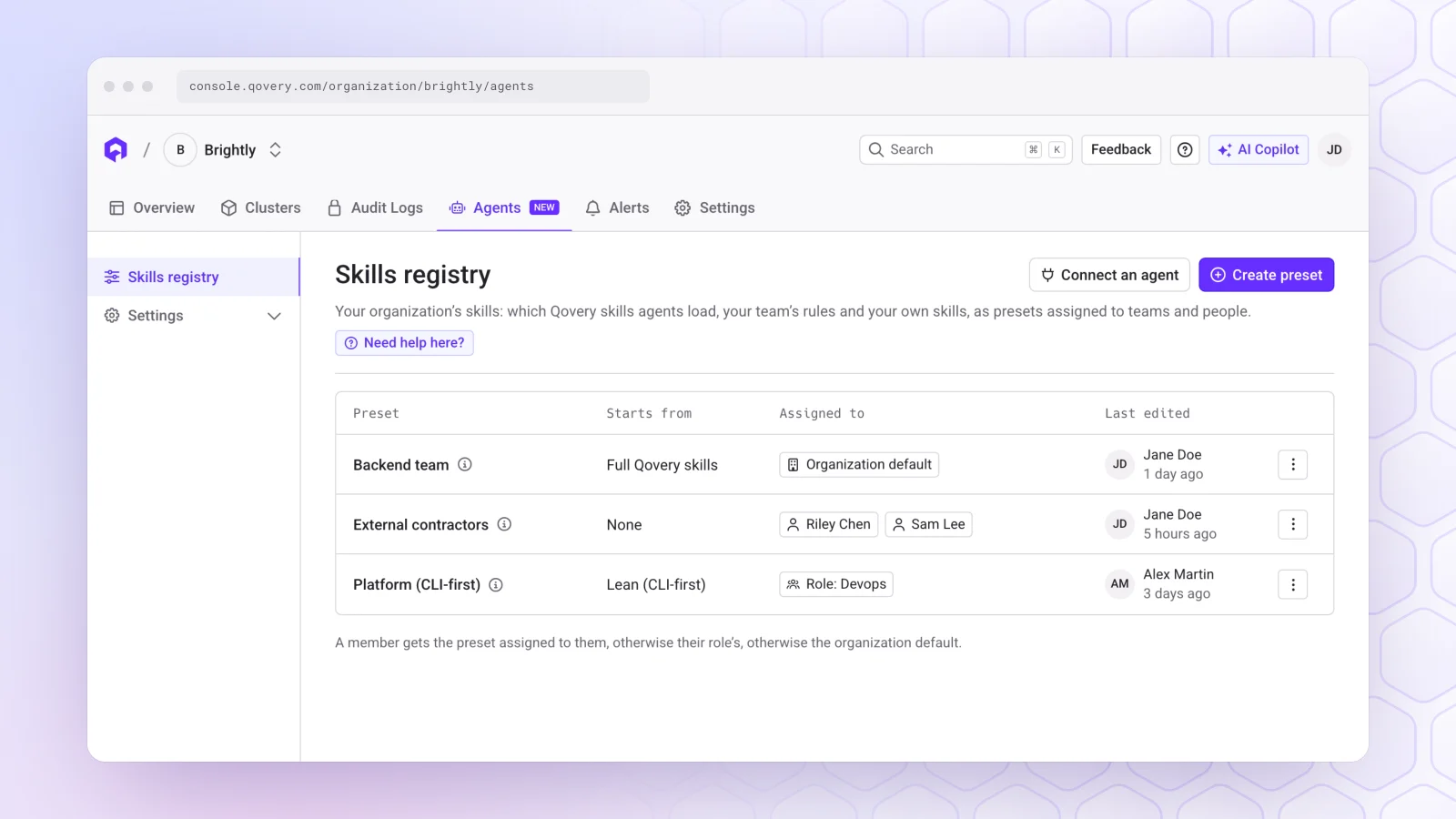
The Skills registry in the Qovery Console, with three presets assigned to the organization, two members and a role
Set up your coding agents on Qovery
Open the Agents tab of your organization, create a skill preset for your team, and give each agent a policy token that allows only its job.
The Skills registry is your organization's own version of the Qovery skills. A preset decides which Qovery skills your members' agents load, what your team adds on top, and which of your own skills are available.
For each preset you choose:
Where it starts from: the full Qovery skills, a lean CLI-first skill for teams that know Kubernetes, or no Qovery skill at all.
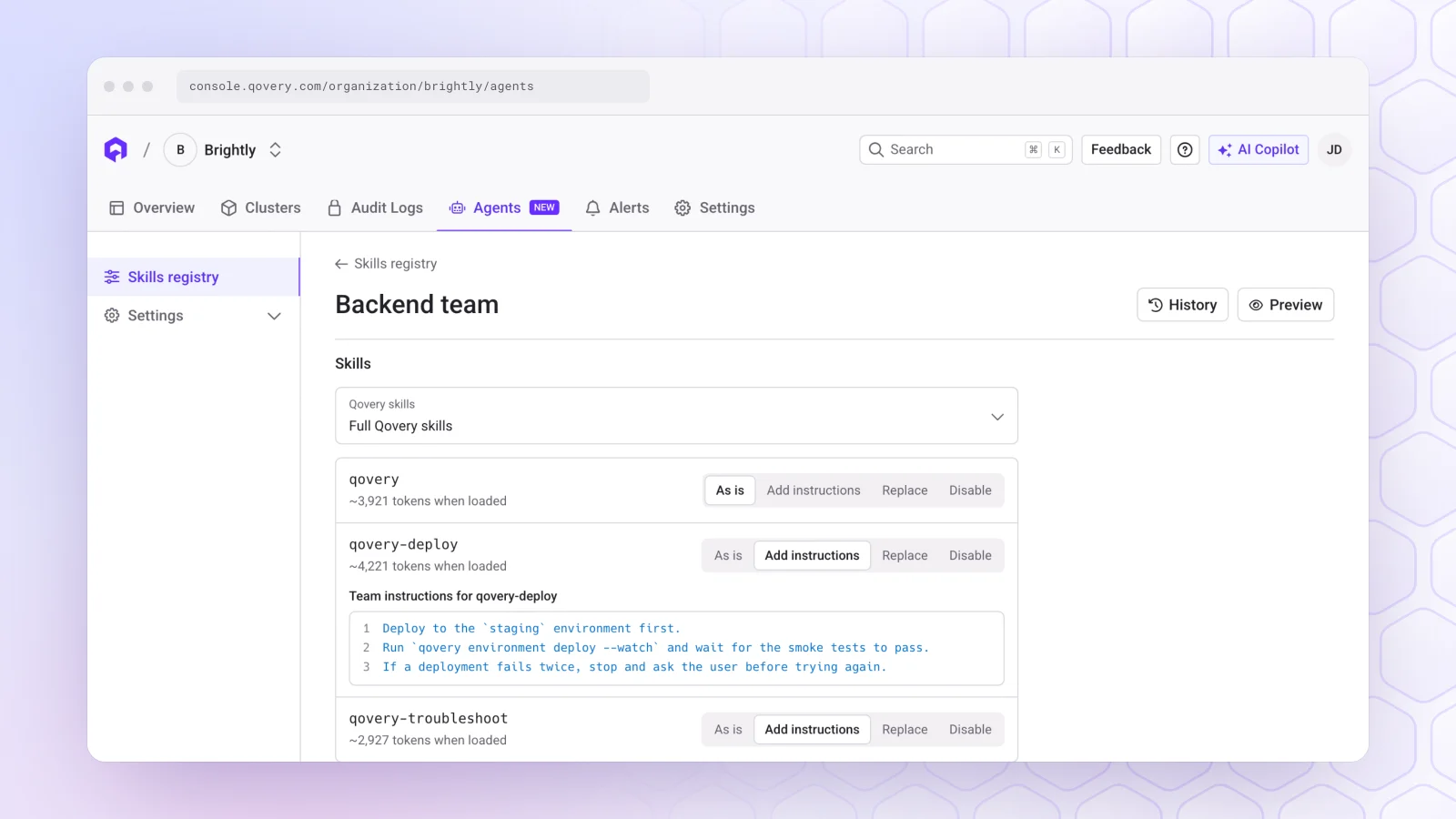
What happens to each Qovery skill: use it as is, add your team's instructions on top, replace it with your own text, or disable it.
Your team context: facts that hold across tasks, such as which cluster is production or what an agent must never do. It goes with every skill the agent loads.
Your own skills, for processes Qovery can't know, like your release checklist.
Who receives it: the organization default, a role, or a member. When several presets match, the most specific wins: the member's preset, then their role's, then the organization default.
You don't start from a blank page. The registry has templates for common profiles, such as developers, product managers, platform engineers, security reviewers, QA and on-call, and you can save your own presets as templates.
A Backend team preset in the editor: qovery-deploy keeps the Qovery skill and adds three team instructions
Load only what the task needs
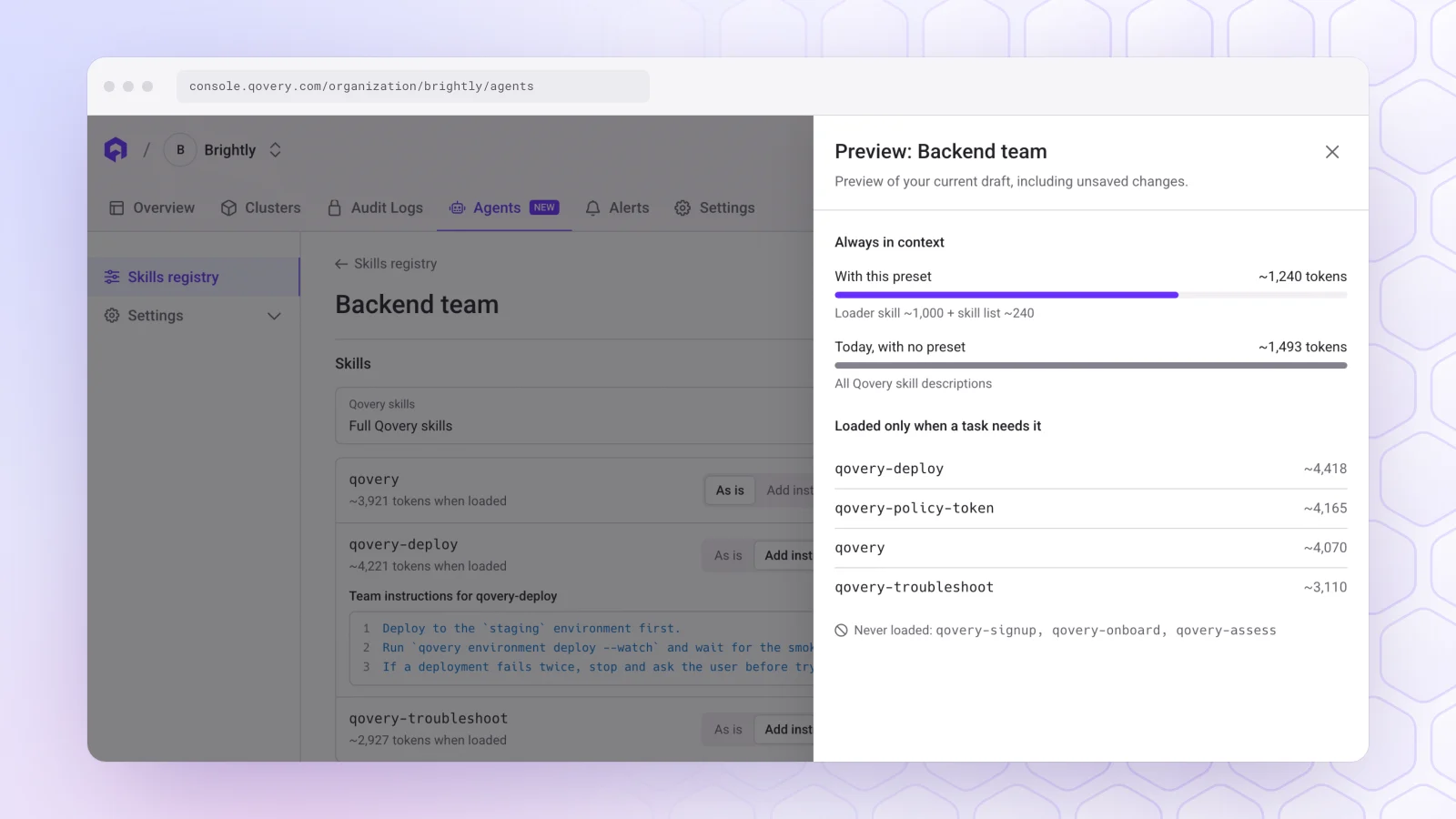
Every token an agent reads costs money and competes with the task. Presets are built so the agent reads a short list of skill names and descriptions first, then loads only the skill the task needs. The Preview panel shows what a preset costs: what stays in the agent's context all the time, and what each skill adds when a task needs it, next to the size of the Qovery skills with no preset.
The Preview panel of a preset: about 1,240 tokens always in context, and the cost of each skill when a task needs it
Every save is checked before anyone gets it
A preset runs inside your members' agents, on their machines, next to their code and credentials. So Qovery checks what you save, whoever saves it.
Every save goes through two gates. Rule checks come first and catch known patterns: text that tries to take over the agent, read local credentials, send data out, run downloaded code, skip the member's approval or hide actions from the member. Then a model on AWS Bedrock reviews the whole preset and judges its intent, which catches reworded attempts the rules miss. While this runs, the save button reads "Checking for security…". A refused save shows each finding next to the exact field and line, marked "Rule check" or "Model review". If the review cannot give a verdict, nothing is saved and the previous revision stays active.
Every edit is a revision with its history, which you can compare and restore. Creates, edits, deletes and refused saves are in the audit logs, and a refused save keeps the findings, never the text. Members who are not admins get a read-only view of the preset that applies to them, so nothing reaches their agent in secret.
What ships next: Today the registry is where you write, review and assign presets. The next release of the Qovery skills reads the preset that applies to each member and loads it on its own, so a change you save reaches every agent in your organization at their next task.
Control agents with policy tokens
A preset changes the instructions an agent reads. What the agent is allowed to do comes from the token it uses.
At our talk at Alan's office in Paris, I shared a number from Anthropic: 97% of Claude Code permission prompts get approved. After a few hundred prompts, people stop reading, so approving every change by hand slows the agent down and adds little safety. The problem to fix is permissions. Roles were made for humans, and a role that can change something can usually delete it too. You can read the full talk recap.
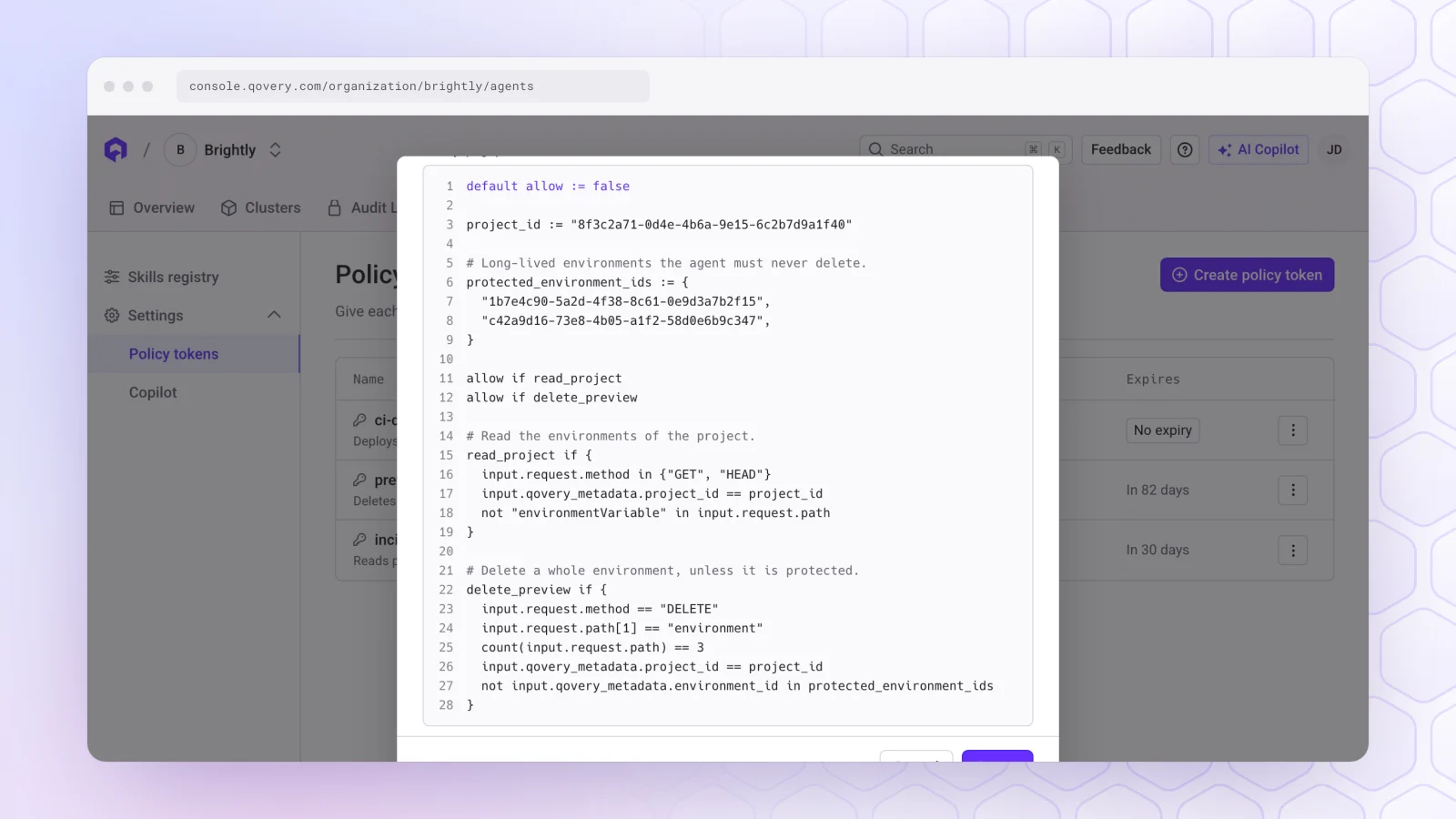
A policy token carries a policy written in Rego, the language of Open Policy Agent. Qovery checks it on every API request the token makes, and the Console, the CLI, the Terraform provider and the MCP server all go through that API. A request runs only if a rule allows it. Everything else is refused with a 401 before it reaches the endpoint. The token also has a role, and an allowed request runs with that role, so the token can never do more than both allow. Every call lands in the audit log under the token's own name.
Creating a policy token for an agent that cleans up previews: it can read the project's environments and delete a preview, never a protected environment
You manage them in Agents > Settings > Policy tokens: give the token a name, a role and its policy, and keep the token value, which is shown once. A policy cannot be edited after creation, so a new job means a new token. Owners, admins and DevOps members manage policy tokens.
You don't have to write Rego by hand. Describe the job in plain English to your coding agent with /qovery-policy-token, and the skill writes a deny-by-default policy, tests it, and creates the token once you approve it.
What teams do with it
Here are a few setups, from the safest to the most autonomous.
A backend team on a shared cluster. Their preset keeps the full Qovery skills, adds "deploy to staging first" to qovery-deploy, disables the organization assessment skill, and adds their release checklist as their own skill.
External contractors. A preset assigned to two members turns off every Qovery skill and gives them only the team's guardrail skills.
A platform team that lives in the terminal. A lean, CLI-first preset assigned to the DevOps role, so their agents carry one short CLI-first skill instead of the full Qovery skills.
A CI agent that ships previews. A policy token that can deploy preview environments of one project and delete old ones, and can never touch production.
Agents that run on their own. A token that only stops and starts listed dev environments, used by an agent that runs every weeknight at 8 PM. Our agent policy examples go from read-only investigation to security patches, each with its policy, the prompt for the agent and a suggested trigger.
Connect an agent once per machine
The Connect an agent window, at the top of the Skills registry, sets up a machine in one place: install the Qovery skills, install the CLI and sign in, or add the MCP server, with the steps for Claude Code, Codex, Cursor, Gemini CLI and VS Code. You do it once per laptop or CI runner.
The Copilot moved here too, under Agents > Settings > Copilot. The old Organization settings links redirect to the new pages.
The Qovery skills also gain qovery-support. We built it from our anonymized support history: it answers the questions users ask most about Qovery, Kubernetes and AWS, with the fixes that worked, and hands off to qovery-troubleshoot when a service needs live diagnosis.
What comes next
Two parts of the Agents tab are rolling out after this launch:
Activity will show, in one view, what members' agents and policy tokens did through Qovery, allowed and denied, by member, token and skill. It sees only actions taken through Qovery, and it never collects prompts or code.
Automations, in early access, lists your organization's Agent Tasks: agents that run next to your services, on a schedule or a webhook, with a token that allows only their job.
Where platform engineering is going
Platform teams used to build a portal and a set of golden paths. More and more, developers reach the platform through an agent, so the golden path becomes the context that agent loads and the permissions it holds. Platform teams will own that context and those permissions the way they own a cluster or a pipeline today.
We built the Agents tab for that. With Qovery, agents can do the work end to end: deploy, debug, clean up and patch. The platform team decides what they know and what they may do, and the Qovery API checks every operation.
To get started, open the Agents tab of your organization in the Qovery Console, create a preset from a template, and give your first agent a policy token. The Agents page shows the whole area, and the docs cover the Agents tab, skill presets and API policy tokens.
Romaric founded Qovery to make Kubernetes accessible to every engineering team. He writes about platform strategy, developer experience, and the future of cloud infrastructure.
Next step
Set up your coding agents on Qovery
Open the Agents tab of your organization, create a skill preset for your team, and give each agent a policy token that allows only its job.