Blog
AI
Product
3
minutes

Qovery Skill for AI Agents: Deploy Apps in One Prompt

Use Qovery from Claude Code, OpenCode, Codex, and 20+ AI Coding agents
April 20, 2026
Romaric Philogène
CEO & Co-founder
Summary
Twitter icon
linkedin icon

The world of AI coding assistants is exploding.

Claude Code, Codex, OpenCode, Cursor, VS Code Copilot, Gemini CLI - there are now 20+ AI coding tools that can help you write code faster than ever. But here’s the catch: you can write the perfect app in seconds, but deploying it? That’s still a nightmare.

Enter the Qovery Skill - a complete, comprehensive solution that bridges AI agents directly to production deployments.

The Problem: AI Can Code, But Deployment Remains Complex

We’ve all been there. You’re working with an AI coding assistant, and it’s so powerful. It generates your entire application, handles dependencies, configures your database… and then you hit the deployment wall.

Suddenly you’re:

  • Configuring Your infrastructure / Kubernetes manifests
  • Setting up CI/CD pipelines
  • Managing cloud provider credentials
  • Wrestling with Terraform state files

It’s a disconnect. Your AI can write production-ready code, but getting it to production requires a completely different skillset.

The Solution: Qovery Skill for AI Agents

The Qovery Skill gives AI agents full control over Qovery:

  • CLI operations
  • API integration
  • Terraform support
  • Multi-cloud deployment (AWS, GCP, Azure, or your own Kubernetes)

No more “here’s your code, good luck deploying it.” Now it’s “here’s your code, and it’s already in production.”

How It Works

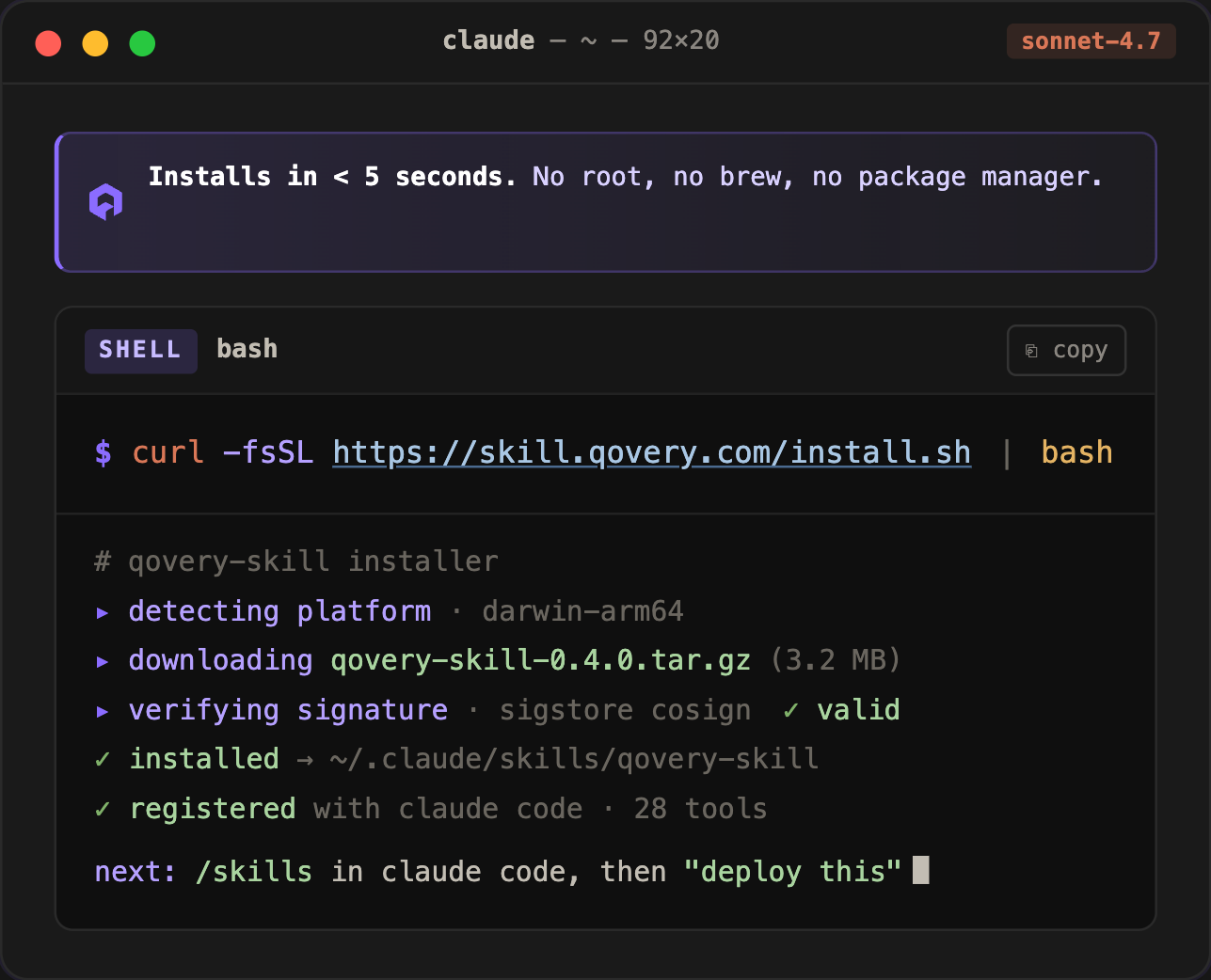
You can install qovery skill in a single command.

As soon as you install the Qovery skill - you can deploy, optimize, troublehoot.. your apps

Compatible With Everything

It works with all the major AI coding tools:

  • Claude Code
  • OpenCode
  • Cursor
  • VS Code Copilot
  • Gemini CLI
  • 20+ more tools

Your favorite AI assistant just got a superpower.

Demo: Tic Tac Toe, From Zero to Production in One Prompt

The Challenge: Deploy a simple Tic Tac Toe application - spoiler alert - it's insanely fast and painless with Qovery Skill.

// video

Before Qovery Skill:

  1. Generate the code (AI)
  2. Write Dockerfile (you or AI)
  3. Set up Kubernetes manifests (manual or AI-assisted)
  4. Configure your cloud provider (the hard part)
  5. Set up CI/CD pipeline
  6. Deploy and debug whatever broke

After Qovery Skill:

  1. Generate the code (AI)
  2. Tell your AI agent: “Deploy this to production with Qovery”
  3. Done. Doing the job ✓

The entire application goes from zero to fully deployed with a single prompt. No YAML hell. No credential hunting. Just code → production.

Enterprise Control, Developer Simplicity

Here’s what platform engineers and DevOps teams are going to love:

Speed That Actually Matters

Deployments that used to take hours now happen in minutes. Your AI writes the code; your Qovery Skill handles the infrastructure.

Enterprise-Grade Control

Because it's built for enterprise constraints - you get:

  • Full multi-cloud support (AWS, GCP, Azure)
  • Your own cloud credentials (BYOK)
  • Complete audit trails
  • Production-grade security
  • No vendor lock-in

It’s Your Infrastructure

Qovery stays in control. Your cloud provider stays in control. The AI just becomes the interface. No hidden costs, no surprise bills, no mysterious vendor lock-in.

AI Deployment as a First-Class Citizen

With the Qovery Skill, AI agent deployment becomes a first-class entry path alongside:

  • Web Console (web-based management)
  • Open API
  • CLI
  • Terraform Provider
  • MCP Server

Now it’s AI Agent + Qovery Skill. Four equally powerful ways to interact with your infrastructure.

What’s Under the Hood

The Qovery Skill provides:

  1. Context-aware commands – The AI understands your Qovery organization, projects, and environments.
  2. Smart defaults – It knows what makes sense without you explaining everything.
  3. Error handling – When things go wrong, it knows how to recover.
  4. State management – Your infrastructure state is consistent and predictable.

Because it uses CLI, API, and Terraform interchangeably, it can adapt to whatever approach works best for the situation.

Ready to Try It Yourself?

1. Install the Skill

curl -fsSL <https://skill.qovery.com/install.sh> | bash

2. Connect Your AI Tool

Follow the documentation in our GitHub repo for your specific AI coding tool.

3. Deploy Something

Start small. Try deploying a simple application. Watch what happens.

4. Go Wild

Once you see how it works, deploy your next production app. Or your next microservice. Or your entire stack.

This Changes Everything

We’ve been building Qovery for years to make Kubernetes accessible. We’ve added Docker Desktop support, cloud console interfaces, Terraform providers… but this? This is different.

The Qovery Skill for AI agents means that the person (or AI) writing your code is the same one deploying it. No handoffs. No context switching. No “it works on my machine” problems.

It’s simple. It’s powerful. It just works.

Useful links:

  • Documentation: https://www.qovery.com/docs/getting-started/quickstart/ai-agent
  • Qovery Skill: https://github.com/Qovery/qovery-skills
Share on :
Twitter icon
linkedin icon
Tired of fighting your Kubernetes platform?
Qovery provides a unified Kubernetes control plane for cluster provisioning, security, and deployments - giving you an enterprise-grade platform without the DIY overhead.
See it in action

Suggested articles

AI
Product
3
 minutes
Qovery Skill for AI Agents: Deploy Apps in One Prompt

Use Qovery from Claude Code, OpenCode, Codex, and 20+ AI Coding agents

Romaric Philogène
CEO & Co-founder
Kubernetes
 minutes
Stopping Kubernetes cloud waste: agentic automation for enterprise fleets

Agentic Kubernetes resource reclamation is the practice of using an autonomous control plane to continuously identify, suspend, and delete idle infrastructure across a multi-cloud Kubernetes fleet. It replaces manual cleanup and reactive autoscaling with intent-based policies that act on business state, eliminating the configuration drift and cloud waste typical of unmanaged fleets.

Mélanie Dallé
Senior Marketing Manager
Platform Engineering
Kubernetes
DevOps
10
 minutes
What is Kubernetes? The reality of Day-2 enterprise fleet orchestration

Kubernetes focuses on container orchestration, but the reality on the ground is far less forgiving. Provisioning a single cluster is a trivial Day-1 exercise. The true operational nightmare begins on Day 2. Teams that treat multi-cloud fleets like isolated pets inevitably face crushing YAML configuration drift, runaway AWS bills, and severe scaling bottlenecks.

Morgan Perry
Co-founder
AI
Compliance
Healthtech
 minutes
Agentic AI infrastructure: moving beyond Copilots to autonomous operations

The shift from AI copilots to autonomous agents is redefining infrastructure requirements. Discover how to build secure, stateful, and compliant Agentic AI systems using Kubernetes, sandboxing, and observability while meeting EU AI Act standards

Mélanie Dallé
Senior Marketing Manager
Kubernetes
8
 minutes
The 2026 guide to Kubernetes management: master day-2 ops with agentic control

Effective Kubernetes management in 2026 demands a shift from manual cluster building to intent-based fleet orchestration. By implementing agentic automation on standard EKS, GKE, or AKS clusters, enterprises eliminate operational weight, prevent configuration drift, and proactively control cloud spend without vendor lock-in, enabling effective scaling across massive fleets.

Mélanie Dallé
Senior Marketing Manager
Kubernetes
 minutes
Building a single pane of glass for enterprise Kubernetes fleets

A Kubernetes single pane of glass is a centralized management layer that unifies visibility, access control, cost allocation, and policy enforcement across § cluster in an enterprise fleet for all cloud providers. It replaces the fragmented practice of switching between AWS, GCP, and Azure consoles to govern infrastructure, giving platform teams a single source of truth for multi-cloud Kubernetes operations.

Mélanie Dallé
Senior Marketing Manager
Kubernetes
 minutes
How to deploy a Docker container on Kubernetes (and why manual YAML fails at scale)

Deploying a Docker container on Kubernetes requires building an image, authenticating with a registry, writing YAML deployment manifests, configuring services, and executing kubectl commands. While necessary to understand, executing this manual workflow across thousands of clusters causes severe configuration drift. Enterprise platform teams use agentic platforms to automate the entire deployment lifecycle.

Mélanie Dallé
Senior Marketing Manager
Qovery
Cloud
AWS
Kubernetes
8
 minutes
10 best practices for optimizing Kubernetes on AWS

Optimizing Kubernetes on AWS is less about raw compute and more about surviving Day-2 operations. A standard failure mode occurs when teams scale the control plane while ignoring Amazon VPC IP exhaustion. When the cluster autoscaler triggers, nodes provision but pods fail to schedule due to IP depletion. Effective scaling requires network foresight before compute allocation.

Morgan Perry
Co-founder

It’s time to change
the way you manage K8s

Turn Kubernetes into your strategic advantage with Qovery, automating the heavy lifting while you stay in control.