Keep ArgoCD. Get Qovery. ArgoCD Integration Is Here.
Moving to a new platform shouldn't mean weeks of migration work before you see any value. Qovery now lets you connect your ArgoCD server and manage your existing applications directly alongside your Terraform modules, lifecycle jobs, and Qovery-native services, from a single control plane.
For most DevOps and platform engineering teams, adopting a new platform comes with an unspoken tax: the cost of getting out of what you already have.
ArgoCD is deeply embedded in how teams work. It's not just a deployment tool, it's a process. Developers know how to push changes. Platform engineers know how to manage application definitions. It works. And the prospect of mapping dozens of ArgoCD applications to a new format, retraining developers on new flows, and maintaining two parallel systems during a transition is enough to make any team pause, or walk away entirely.
So the question becomes: do you take on a multi-week migration project before you can even start getting value from Qovery? Until now, the honest answer was yes.
One Control Plane, No Migration Required
With Qovery's ArgoCD Integration, you no longer have to choose between adopting Qovery and keeping your existing ArgoCD setup.
Connect your ArgoCD server to Qovery, and your existing applications are imported directly into the platform. They live alongside your other resources: Terraform modules, lifecycle jobs, Qovery-native services. You get unified RBAC, deployment visibility, audit logs, and access to metrics, logs, shell, and manifest diffs, all in one place, without touching a single ArgoCD application definition.
Your developers keep their existing workflows. Your platform team keeps control. And you can start delivering value from Qovery on day one, without a migration project blocking the way.
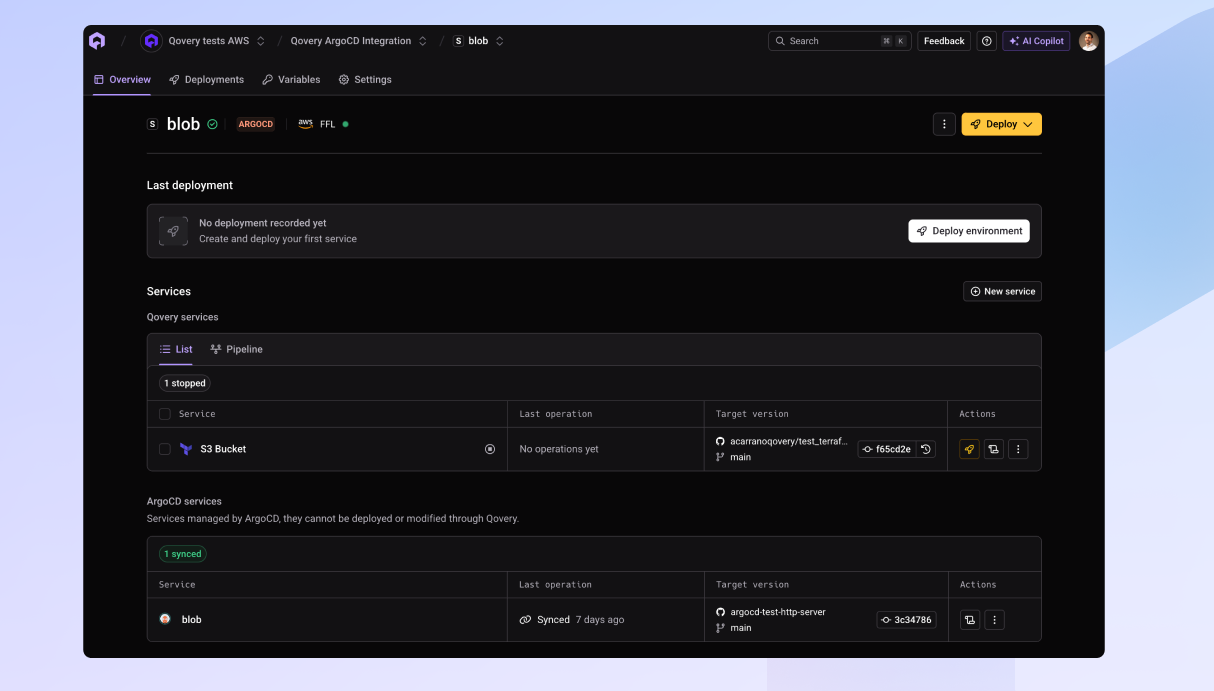
ArgoCD services and Qovery-native services side by side in a single environment
This is the first step in a deeper ArgoCD integration. We're working with customers to understand what comes next, including a migration tool to move ArgoCD applications to native Qovery Helm services for teams that want to fully converge over time. The path forward is yours to choose.
Outcomes for Your Team
Less friction: Adopt Qovery without rewriting your ArgoCD setup or changing how developers ship today.
Clearer visibility: See ArgoCD applications, Terraform modules, and all other resources in a single control plane, with unified logs, metrics, and audit trails.
Reduced risk: No forced migration, no big-bang cutover, no disruption to running applications or internal processes.
Incremental adoption at scale: Bring Qovery in alongside your existing tooling, and migrate at the pace that works for your team.
Keep ArgoCD. Get Qovery.
Connect your ArgoCD server to Qovery and manage all your services from a single control plane-no migration required.
A 15-person platform team at a fintech company manages 35 ArgoCD applications across three clusters. They've been evaluating Qovery to standardize infrastructure provisioning and improve developer autonomy, but every conversation stalls on the same point: the ArgoCD migration is estimated at three to four weeks of work, and no one wants to own that project right now.
With the ArgoCD Integration, they connect their server, import their applications, and start onboarding product teams to Qovery the same week. Their developers keep pushing changes the way they always have. The platform team gains a unified view across ArgoCD apps and Terraform modules. And the migration question moves from a blocker to a future conversation, one they can have on their own terms.
How to Use
Connect your ArgoCD server in Qovery and define the cluster to import.
Browse your imported ArgoCD applications inside the Qovery interface.
Manage them alongside your other Qovery services, with access to metrics, logs, shell, and manifest diffs.