Beneath the Stack: A Software Engineer's Journey into Infrastructure
A software engineer's hands-on journey building a private cloud on bare-metal: Incus clustering, K3s, OVN networking, the Gateway API, and everything that breaks along the way - and what it taught them about why platforms like Qovery exist.
As a software engineer, I spend most of my days building services and tackling challenges around scalability, security and performance. For most of my career,I've built distributed system on the cloud where you never really have to question yourself about the underground.
The wires allowing your beautiful app’s traffic to be reached and load balanced, the tools you’re using to promote and update your services in a safe and reproducible manner, until recently.
At the start of 2026, I joined Qovery. Our mission is simple: To eliminate the complexity of infrastructure & Kubernetes management, but as the saying says smooth seas do not make skillful sailors. To truly understand the pain we solve for our customers, I decided to explore the upside down, and to get my hands dirty.
The goal here is simple, learning by doing.
Simplicity and practicality are de facto out of scope, exit the raspberry and docker-compose files and welcome to an over-engineered setup.
The Architecture
The big picture
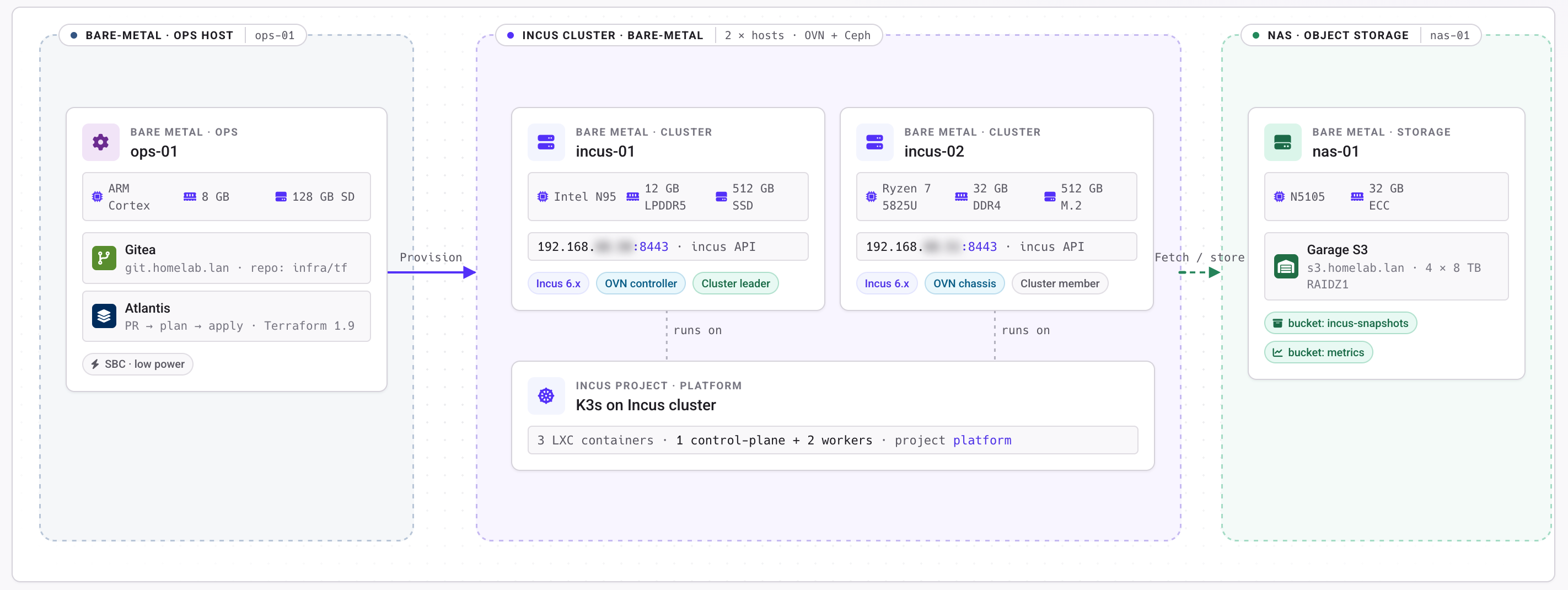
For this experiment I am not starting from the ground up, I already have a bare metal machine that I use mainly to self host my repositories and provision whatever infra I’m running at the moment.
I like to do it the gitops way, so for this project I’ll create a new repository, bake some terraform and provision my infrastructure using atlantis, eventually we’ll have a running incus cluster at the end of the journey.
Building a private cloud ersatz
To make this project closer to the real world, I have decided to build my solution on two clustered bare metal machines.
In this cluster I’ll have two projects platform and prod, the first one is mainly to monitor services, while the second one is mainly used to run workloads (apps, self-hosted services etc.). It allows me to define different custom resources and authorized NFS for each project.
As platform and prod setup are identical, we’ll simply focus on the platform one.
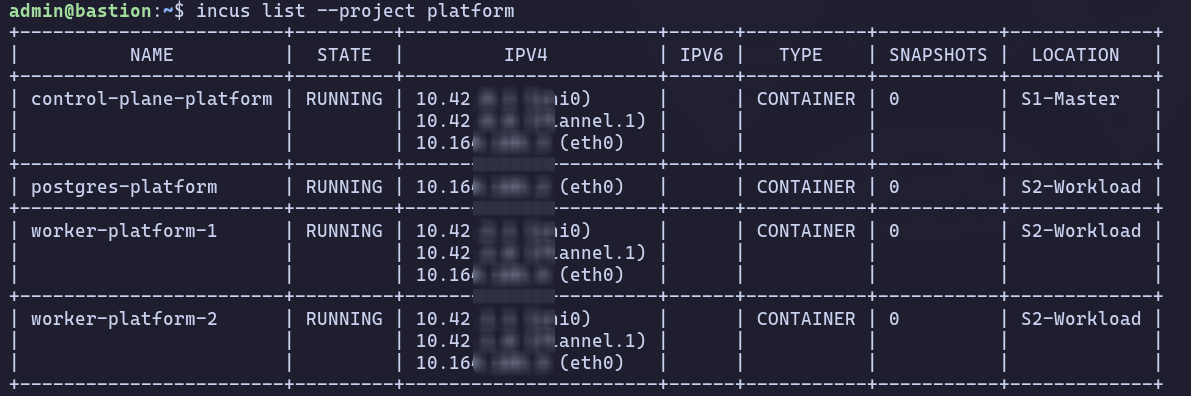
A project will run K3s and other services alongside (such as a nats broker and a postgres database).
In order to have interaction between services running in kubernetes and services running outside of it ( In the same cluster, but also sometimes in another cluster (e.g. the log scrapped from production services are sent to the platform cluster).
To summarize, this is what we need to bring up platform:
A Unified Hypervisor (Incus Clustering): Instead of treating the two bare-metal machines as separate entities, I joined them using Incus Clustering. This created a single unified API plane. When I deploy a K3s worker container, Incus handles the scheduling, and the distributed OVN network stretched seamlessly across both physical machines via a native Linux bridge.
The Orchestrator (K3s): A lightweight, highly available Kubernetes distribution running securely inside the Incus system containers, using VXLAN for pod-to-pod communication.
**The Modern Ingress (OVN + Gateway API):**I bypassed legacy NGINX ingress controllers in favor of the modern Kubernetes Gateway API powered by Envoy. To route physical traffic into the cluster, I utilized native Incus OVN Load Balancers.
Cluster creation
Here, we are laying the foundational boundaries. We configure the Incus Terraform provider to authenticate with the bare-metal API, and then create an isolated incus_project (which allows me to completely separate the Platform and Prod environments). Next, we spin up a distributed OVN network.
Think of this OVN network as a massive virtual switch that spans across both physical servers, allowing containers to talk to each other as if they were wired into the same physical motherboard.
A virtual network is useless if it cannot talk to the outside world. This block bridges the gap between the virtual and the physical. We take the physical network interfaces of both our Master and Workload bare-metal servers and attach them to an Incus physical uplink (br-uplink). This is the plumbing that allows our virtual OVN Load Balancers to grab real-world IPs on my home network so my laptop can actually reach the cluster.
This is where the heavy lifting happens. We are spinning up the actual K3s nodes as lightweight Incus system containers. Notice the use of cloud-init to automatically bootstrap the Kubernetes control plane and join the worker nodes using a dynamically generated token.
We also define the OVN Load Balancer here, explicitly telling it to catch traffic on ports 80 and 443 and spray it across our worker containers.
Because we are running K3s inside a container, we have to inject a massive list of linux.kernel_modules so that Kubernetes's internal networking (kube-proxy, iptables, and VXLAN) can actually function.
HCL
terraform {
  required_version = "~> 1.10"
  required_providers {
    incus = {
      source  = "lxc/incus"
      version = "1.0.0"
    }
    random = {
      source  = "hashicorp/random"
      version = "~> 3.6"
    }
  }
}

resource "random_password" "k3s_token" {
  length  = 32
  special = false
}
resource "incus_network_lb" "envoy_ingress" {

  network        = "ovn-${var.environment}"
  listen_address = local.environment_vips[var.environment]

  # 1. Define the destinations (Backends)
  dynamic "backend" {
    for_each = {
      for idx, worker in var.workers :
      "worker-${var.environment}-${idx + 1}" => worker
    }

    content {
      name           = backend.key
      target_address = backend.value.ip
      target_port    = ""
    }
  }

  port {
    protocol    = "tcp"
    listen_port = 443
    target_backend = [
      for idx, _ in var.workers : "worker-${var.environment}-${idx + 1}"
    ]
  }
  port {
    protocol    = "tcp"
    listen_port = 80
    target_backend = [
      for idx, _ in var.workers : "worker-${var.environment}-${idx + 1}"
    ]
  }
  depends_on = [incus_instance.k3s_workers]
}

resource "incus_instance" "k3s_control_plane" {
  image   = "images:${var.image}"
  project = var.incus_project
  name    = "control-plane-${var.environment}"
  target  = var.master_server

  config = {
    "security.nesting"     = "true"
    "security.privileged"  = "true"
    "limits.cpu"           = var.control_plane.cpu
    "limits.memory"        = var.control_plane.memory
    "linux.kernel_modules" = "ip_tables,ip6_tables,netlink_diag,nf_nat,overlay,br_netfilter,bridge,nf_conntrack,iptable_filter,iptable_nat,ip_vs,ip_vs_rr,ip_vs_wrr,ip_vs_sh,xt_conntrack,iscsi_tcp"
    "raw.lxc"              = <<-EOT
    lxc.apparmor.profile=unconfined
    lxc.cap.drop=
    lxc.cgroup.devices.allow=a
    lxc.mount.auto=proc:rw sys:rw cgroup:rw
    EOT
    "user.user-data" = templatefile("${path.module}/k3s_cp_cloudinit.yaml", {
      master_host_ip       = var.master_server_host_ip,
      control_plane_ip     = var.control_plane.ip,
      k3s_token            = random_password.k3s_token.result
    })
  }

  device {
    name = "kmsg"
    type = "unix-char"
    properties = {
      path = "/dev/kmsg"
    }
  }

  device {
    name = "api-proxy"
    type = "proxy"
    properties = {
      "listen"  = "tcp:0.0.0.0:${var.control_plane.api.external_port}"
      "connect" = "tcp:127.0.0.1:${var.control_plane.api.internal_port}"
    }
  }

  #set up a storage pool to store instance data
  device {
    name = "root"
    type = "disk"
    properties = {
      "path" = "/"
      "pool" = "local"
    }
  }

  #set up a network interface so the instance is reacheable via network
  device {
    name = "eth0"
    type = "nic"
    properties = {
      "network"      = var.network_name
      "ipv4.address" = var.control_plane.ip
    }
  }

}
resource "incus_instance" "k3s_workers" {
  depends_on = [incus_instance.k3s_control_plane]
  image      = "images:${var.image}"
  project    = var.incus_project
  target     = var.workload_server

  for_each = {
    for idx, worker in var.workers :
    "worker-${var.environment}-${idx + 1}" => {
      role   = "worker"
      cpu    = worker.cpu
      memory = worker.memory
      ip     = worker.ip
    }
  }

  name = each.key

  config = {
    "limits.cpu"    = each.value.cpu
    "limits.memory" = each.value.memory

    "linux.kernel_modules" = "ip_tables,ip6_tables,netlink_diag,nf_nat,overlay,br_netfilter,bridge,nf_conntrack,iptable_filter,iptable_nat,ip_vs,ip_vs_rr,ip_vs_wrr,ip_vs_sh,xt_conntrack,iscsi_tcp"

    "security.nesting"    = "true"
    "security.privileged" = "true"

    "raw.lxc" = <<-EOT
	    lxc.apparmor.profile=unconfined
	    lxc.cap.drop=
	    lxc.cgroup.devices.allow=a
	    lxc.mount.auto=proc:rw sys:rw cgroup:rw
	    EOT

    "user.user-data" = templatefile("${path.module}/k3s_wkr_cloudinit.yaml", {
      control_plane_ip = var.control_plane.ip,
      k3s_token        = random_password.k3s_token.result
    })
  }
  device {
    name = "kmsg"
    type = "unix-char"
    properties = {
      path = "/dev/kmsg"
    }
  }

  #set up a storage pool to store instance data
  device {
    name = "root"
    type = "disk"
    properties = {
      "path" = "/"
      "pool" = "local"
    }
  }

  #set up a network interface so the instance is reacheable via network
  device {
    name = "eth0"
    type = "nic"
    properties = {
      "network"      = var.network_name
      "ipv4.address" = each.value.ip
    }
  }
}
The result
Running atlantis apply on this yields a completely declarative, reproducible Kubernetes architecture. In a matter of minutes, we go from empty bare-metal servers to a fully clustered K3s environment. It features distributed storage pools, a dedicated OVN subnet, and an ingress Load Balancer wired directly into my home network's DNS. If the cluster ever breaks, I don't troubleshoot it; I simply destroy it and let Atlantis rebuild it from scratch.
A Query’s journey
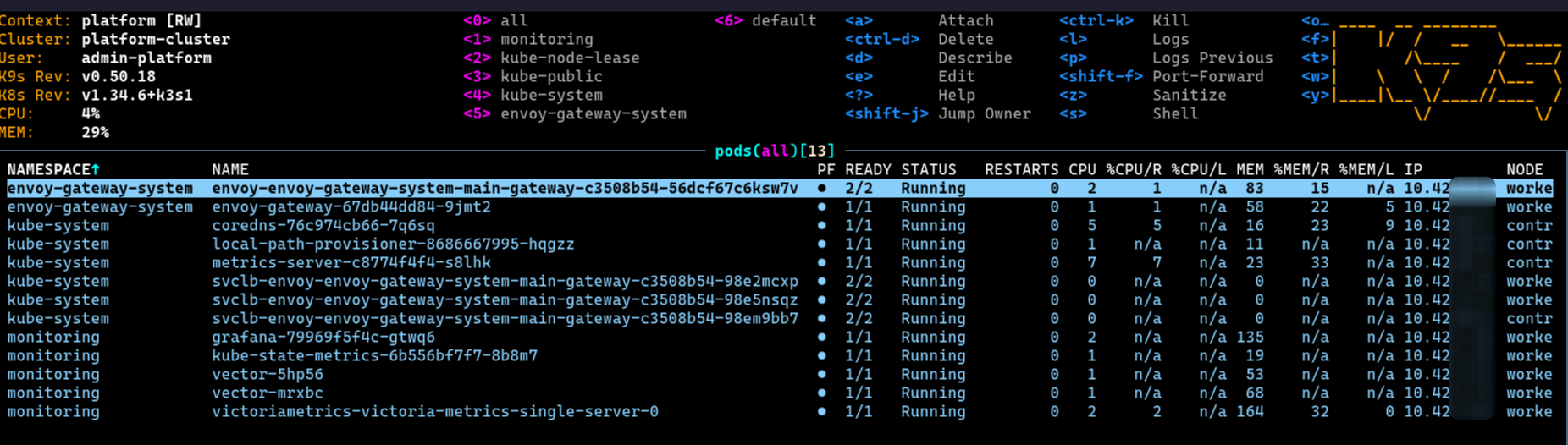
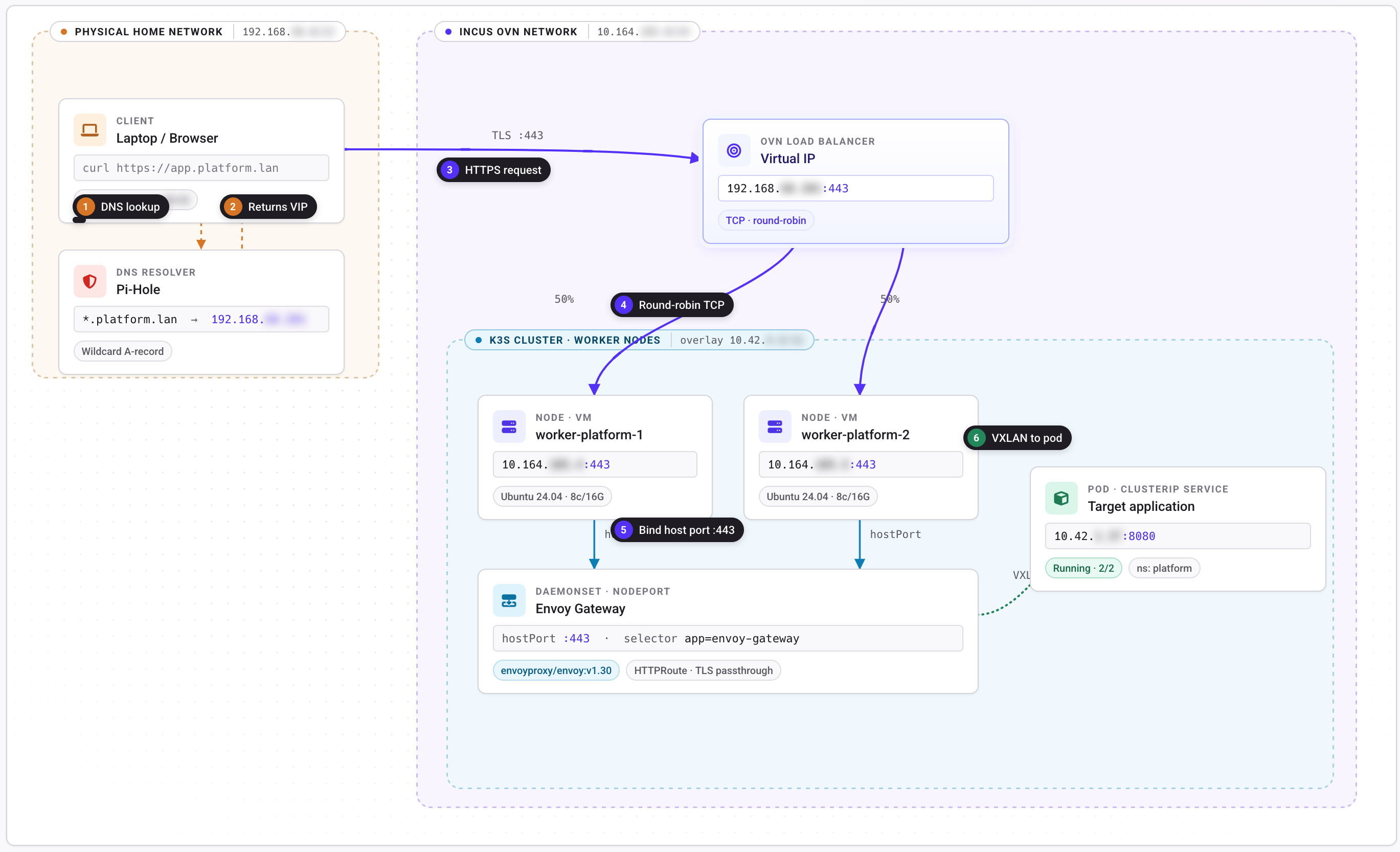
To understand the sheer complexity of this setup, let’s trace a single HTTPS request from my laptop to my internal Grafana dashboard at https://grafana.platform.home. In AWS, this is handled by an ALB. In my homelab, the packet must survive a gauntlet:
The Virtual IP (VIP): My laptop queries my local Pi-Hole, which resolves the domain to my Platform environment's VIP.
The OVN Load Balancer: The packet hits the physical router and is intercepted by the Incus OVN Load Balancer listening on that VIP.
OVN uses a round-robin algorithm to select a healthy K3s worker container.
The First Tunnel (Geneve): OVN wraps the packet in a Geneve (Generic Network Virtualization Encapsulation) tunnel header and fires it across the physical network to the cluster node.
The Node Port (Klipper): The S2 node unwraps the Geneve packet. Inside the K3s container, the built-in ServiceLB (Klipper) has bound port 443 on the container's network interface. It catches the packet and forwards it into the Envoy Gateway pod.
TLS Termination & Routing (Envoy): Envoy unencrypts the traffic using.
It reads the HTTP Host header (grafana.platform.home) and matches it against my HTTPRoute manifest.
The Second Tunnel (VXLAN): Envoy determines the target Grafana pod is on another node. It wraps the unencrypted packet in a second tunnel-a K3s VXLAN-and sends it back out.
The Destination:
The packet finally arrives at the Grafana pod, the dashboard renders, and the response traverses the entire labyrinth in reverse.
Notable issues I had to solve
1. The "Tunnelception" Problem (MTU & MSS Clamping)
Because my packets were subjected to that "double tunnel" penalty (VXLAN inside Geneve), standard 1500 MTU packets were too bloated to fit through the physical ethernet cables.
I had Silent packet drops and Connection Reset by Peer errors. Fixing this required injecting iptables rules via cloud-init to clamp the TCP MSS to 1300.
I never used tcpdump this much in my entire carreer.
2. The Ingress Provider Bugs
OpenTofu is strict. I spent quite a few time debugging why my OVN Load Balancers were crashing Envoy. It turned out I had to trick the OpenTofu Incus provider into doing a 1:1 port mapping for HTTP/HTTPS by explicitly passing an empty string "" as a target port to bypass an obscure provider bug.
3. The CI/CD Pipeline Maintenance
Even my automation required manual intervention. My Atlantis pipeline would occasionally lock up due to "ghost versions" of infrastructure states stuck in the cache, or crash because legacy HashiCorp PGP keys had expired.
4. Security
You might have noticed the glaring security.privileged = "true", security.nesting = "true", and the disabling of AppArmor (lxc.apparmor.profile=unconfined) in the Terraform code above.
Running a container orchestrator (Kubernetes) inside a container runtime (Incus) is essentially inception, and it requires punching massive holes in the hypervisor's security boundary. You have to map the root user, expose cgroups, and pass through raw kernel modules.
Managing these security contexts, fixing MTU packet drops, and wrestling with networking is an incredibly time-consuming endeavor. Building this stack is an unparalleled playground for learning how low-level Linux networking, virtualization, and ingress routing actually work. But if your goal is to build software, spending weeks tuning iptables and tunnels is an exhausting distraction.
Why this matters: Don’t build the road, ship your product instead.
By the time I finally saw the green lock icon on my Grafana dashboard, I felt proud, but I realized I had spent 95% of my time fighting the infrastructure and 5% of my time actually deploying apps.
This is the exact problem Qovery solves. Qovery sits on top of your AWS, GCP, or Scaleway account, and takes care of everything for you, while you stay in control.
If I had used Qovery instead :
Zero Infrastructure Debugging: No MTU math, no OVN cluster management, no worrying about packet encapsulation. Qovery provisions the managed Kubernetes cluster in the background with best-practice networking out of the box.
Automated Ingress & TLS: Instead of writing complex Gateway and HTTPRoute manifests, tricking Load Balancer providers, and generating OpenSSL certs, Qovery handles routing automatically. You attach a custom domain in the UI, and it provisions Let's Encrypt certificates and configures the ingress controller without a single line of YAML.
Built-in CI/CD: Instead of maintaining a custom Atlantis and OpenTofu container, Qovery connects directly to your Git repository. You push code, and Qovery builds the container and deploys it. Preview environments are spun up automatically for pull requests.
Developer Autonomy: In my homelab, if a database needs spinning up, it requires a new Terraform block and state management. With Qovery, developers can click a button or use the CLI to spin up a PostgreSQL instance, fully wired with the correct environment variables, clusters, networking, domain name, you get all this for free
Building this project was the best educational experiences of my career,. If you want to deeply understand how the internet actually works, go build a bare-metal cluster. But if you want to deliver value to your users don't build the road before you drive.
Antoine is a senior software engineer at Qovery. He writes about hands-on infrastructure engineering, Kubernetes internals, and the realities of running production systems.
Next step
Agents ship fast. Guardrails keep them safe.
Qovery ensures every agent action is scoped, audited, and policy-checked. Start deploying in under 10 minutes.