The Secure PaaS Alternative: Keep the PaaS Experience, Run It on Your Own Cloud
Railway, Northflank and seven other developer platforms disclosed breaches in October 2026. Here is why a shared PaaS turns one breach into everyone's breach, how Qovery gives you git-push deploys while your apps and data run in your own AWS, GCP, Azure or Scaleway account, and what Qovery still holds.
October 2026 was hard for developer platforms. Wiz's Black October report lists nine AI developer platforms that disclosed incidents in one month, including Railway and Northflank. Attackers were looking for stored environment variables, especially AI keys.
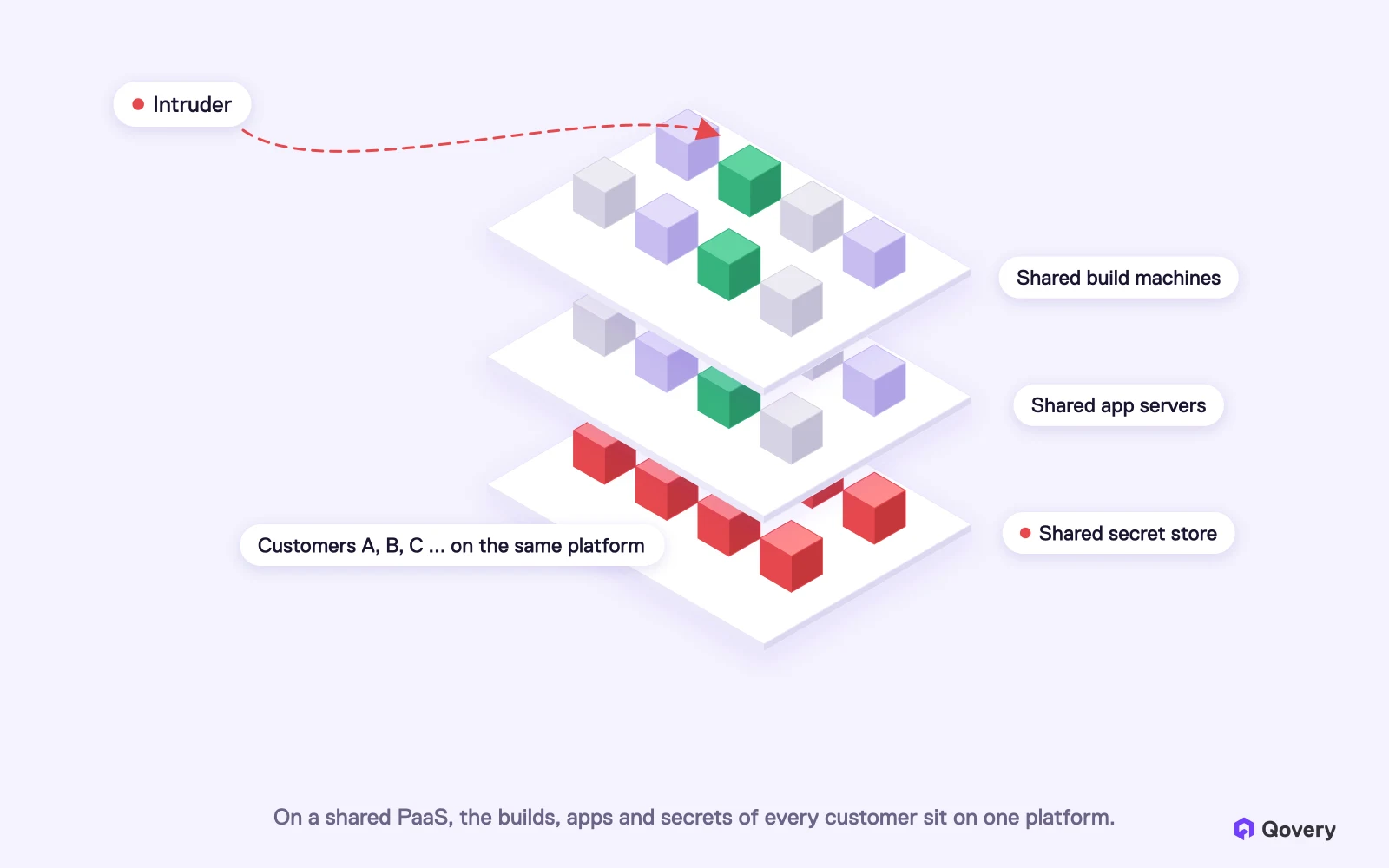
A shared PaaS shares its risk. Builds, app servers and the secret store are used by all customers at once. When an attacker gets in, every customer is affected, and the advice becomes "everyone, rotate everything."
Qovery keeps the PaaS experience and runs your apps in your own cloud. You get git push, preview environments, databases and autoscaling. Your apps and data run in your own cloud account, and Qovery manages them from the outside. Builds run on Qovery's machines unless you choose your own cluster.
We designed it this way on purpose. We come from finance, where every infrastructure had to be isolated. Qovery is SOC 2 Type II certified, pentested every year, and used by regulated companies in financial services and health tech.
For full isolation, the control plane can run in your infrastructure too. We are rolling out a dedicated Qovery control plane inside the customer's own infrastructure, for industries that cannot share anything.
No platform is immune, Qovery included. This article also says what Qovery still holds and how you can reduce it.
Before anything else: a security incident can happen to any company, including ours. The teams at Railway, Northflank and the other platforms hit this month are working hard to protect their customers, and we wish them a fast recovery.
What this month shows is a pattern in how platforms are built. This article explains that pattern in plain terms, how Qovery is built differently, and where Qovery still has work to do.
Why are PaaS platforms an attack target?
A Platform as a Service (PaaS) such as Heroku, Render, Railway or Northflank's hosted platform runs your app for you. You push code, and the platform builds it, runs it and gives it its secrets. That is a great developer experience, and it is why so many teams start there.
To do this for thousands of customers, a PaaS shares almost everything:
Build machines. Your code is built on the same pool of machines as other customers' code.
App servers. Your app runs next to apps from other companies, separated by containers or virtual machines.
Secret store. Your database passwords, API keys and AI keys sit in the same system as everyone else's, so the platform can hand them to your app when it deploys.
Management system. One dashboard and one API manage all customers at once.
On a shared PaaS, the builds, apps and secrets of every customer sit on one platform. An intruder who gets into one layer can reach all customers.
Sharing keeps costs low. It also means one break-in can reach many companies at once, so a PaaS is worth more to an attacker than any single customer.
What recent incidents show
The pattern is not new, and the details are public:
Platform
When
What the company reported
Heroku
April 2022
Stolen GitHub OAuth tokens, and config vars for Review Apps and Heroku CI downloaded from a database (Heroku)
CircleCI
January 2023
Customer environment variables, tokens and keys taken; encryption keys "extracted from a running process" (CircleCI)
Railway
October 2026
Customer environment variables accessed and some decrypted; initial access believed to be "privilege escalation in our build infrastructure" (Railway, Wiz)
Northflank
October 2026
All users told to "assume all environment variables have been decrypted"; users report AI keys used (Northflank status)
Encryption at rest did not stop these leaks, because the platform has to decrypt secrets to deploy your app. And the guidance after each incident applied to every customer, because every customer's secrets were in the same place.
Why AI keys made it worse
AI keys turn into money in minutes. In the cases Wiz followed, attackers tested stolen keys within 30 minutes, then used them at scale days later. Two stolen AWS Bedrock keys made about 800,000 and 1.7 million calls, which Wiz estimates "likely ran up over $100k in usage." The keys then appeared on websites that resell cheap AI access.
When one platform stores the AI keys of thousands of companies, it becomes a very attractive target.
How does Qovery give you a PaaS without the shared platform?
Qovery does not host your apps, and never will. Qovery gives you the same developer experience as a PaaS (git push, preview environments, databases, autoscaling, logs) and runs your apps and databases in your own cloud account.
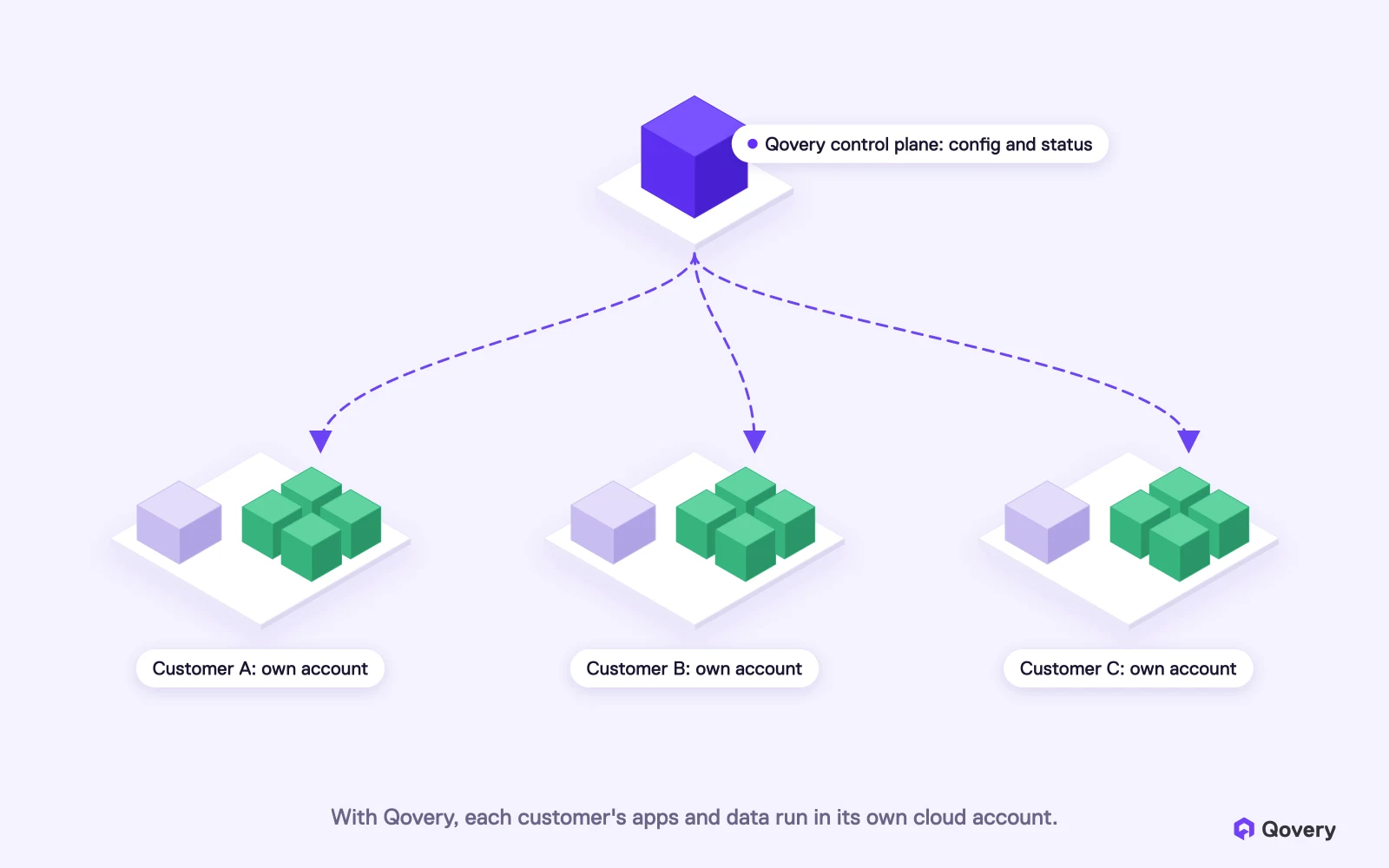
Qovery is split into two parts. Engineers call them the control plane and the data plane. In plain words:
The part that manages (the control plane) is Qovery. This is the Console you click in, the API, and the engine that plans each deployment. It stores your settings and the status of your services.
The part where things run (the data plane) is your cloud account. Qovery creates and manages a Kubernetes cluster in your AWS, GCP, Azure or Scaleway account, or connects to a cluster you already have. Your apps, databases and TLS certificates run there, and your logs are stored there.
With Qovery, each customer's apps and data run in its own cloud account. Qovery sends instructions to each account separately.
Qovery sends deployment instructions to each customer's cluster over an encrypted connection. Customer clusters never talk to each other. Customer A's apps never run next to Customer B's, because they are in different cloud accounts. Think of Qovery as the remote control, and your cloud account as the machine.
A remote control is still powerful. Qovery can deploy to your cluster, and when your team opens logs, metrics or a remote shell in the Console, that traffic goes through Qovery. So Qovery's own security matters, and the rest of this article covers how we protect it and how you can reduce what Qovery can reach. The security overview describes this split in detail.
What this changes if something goes wrong
If an attacker gets into...
On a shared PaaS
With Qovery
One customer's app
Can try to escape to the shared server next to other customers' apps
Stays inside that customer's own cloud account
The platform's secret store
Gets the secrets of every customer
Gets only the secrets customers chose to store in Qovery, and none of those kept in their own secret manager
The platform's management system
Controls the shared servers where every customer's apps run
Can send deployments to customer clusters, but holds no app data. Each customer can watch its access in its own logs and cut it off. With a dedicated control plane, there is no shared management system at all
The build machines
Builds of every customer run on the same pool
Shared by default too, on disposable build nodes; you can move builds into your own cluster
The platform is down
Your apps may be down too
Your apps keep running in your cluster; new deploys wait
Why did we build Qovery this way?
We come from finance, from capital markets, where every infrastructure had to be isolated from the others. We took more than 15 years of that experience and built Qovery on it.
When we built Qovery, we wanted the developer experience of a PaaS without giving up that isolation. That is harder than running everything on one shared platform, and it took us years. It is also why regulated companies in financial services and health tech run on Qovery.
I have always told my team that a breach can happen to anyone, and it is one of my biggest fears at Qovery. That is why security has been a large part of our budget since the first days of the company, and we will keep investing in it.
How is Qovery audited?
SOC 2 Type II. An independent auditor tests our security controls over time.
HIPAA, DORA and GDPR. Qovery supports HIPAA requirements for health tech (with a Business Associate Agreement), DORA requirements for financial services in the EU, and GDPR.
A penetration test every year. Independent experts test our code, our application and our infrastructure, with one main goal: stealing customer secrets.
Qovery deploys your apps into your own AWS, GCP, Azure or Scaleway account, with preview environments, databases and autoscaling, and without a DevOps hire.
Here is what you get, and where each feature applies.
Your apps run in your account
Each environment (production, staging, a preview for a pull request) runs in its own Kubernetes namespace, a separate space in your cluster. Your application data and your databases stay in your cloud account. You can see every resource Qovery creates in your own cloud console.
Secret values can stay in your secret manager
With the Secret Manager integration, you give Qovery a reference such as prod/payments/stripe. A small open-source tool in your cluster, the External Secrets Operator, reads the value from AWS Secrets Manager, AWS Parameter Store or GCP Secret Manager and passes it to your app. The value never goes through Qovery, so a breach of Qovery's database would not expose it. It does not make the value unreachable: anyone who can deploy to your cluster can deploy code that reads it, which is why your secret manager's own access logs are worth watching. This is available today on Qovery-managed clusters on AWS and GCP. For the most sensitive values, your app can also read them itself while it runs, with its own cloud permission.
Qovery uses short-lived access to your cloud
With the recommended setup on AWS and GCP, Qovery does not keep a permanent password to your cloud account. On AWS, you create an access role (an IAM role) in your account. Qovery borrows it for a short time when it needs to make a change, and the access expires on its own. The role only accepts requests made for your organization (details). On GCP, the same idea is called Workload Identity Federation. Every call Qovery makes to your cloud provider shows up in your cloud audit logs (CloudTrail on AWS), and you can delete the role at any time. Your apps keep running if you do.
Two limits to know. The role has wide permissions, because Qovery creates and upgrades clusters, networks and databases for you. And other setups use long-lived credentials that Qovery stores encrypted: static access keys on AWS, JSON keys on GCP, a certificate or client secret on Azure, and API keys on Scaleway. If you use one of them, rotate it on a schedule, or move to the role-based setup where your cloud offers it.
Builds: on our workers, or in your cluster
To be fair, this is one place where Qovery shares machines between customers. By default, Qovery builds your images on a pool of build machines that Qovery runs for all customers. We do this on purpose: builds don't use resources in your cluster, and we run them on large machines with build caching tuned to make them as fast as we can.
Each build gets a disposable, short-lived build node. Only the secrets you mark for the build are passed to it, and they are not stored in the image.
We know shared builders are a sensitive spot, because that is how the attacker got into Railway. When independent pentesters test Qovery, trying to break out of a shared builder and gain more access was one of the first things they attacked. We watch this part very closely, and we will keep making it stronger.
If you don't want your builds on shared machines at all, you can choose to run them in your own cluster instead. Then your code, your build secrets and your images never leave your account. The choice is yours.
For full isolation: a dedicated control plane in your infrastructure
Some industries need total isolation, with nothing shared with other customers, not even the control plane. For them, we are rolling out a dedicated Qovery control plane that runs inside your own infrastructure. Your Console, your API and your settings then live in your network too, with no shared Qovery system between you and other customers. If your security or regulatory team requires this, talk with us.
What Qovery still holds
Secrets you add in the Qovery Console, without a secret manager, are stored in Qovery's database. They are encrypted with AES-256 and a key unique to your organization, hidden in the Console, and cannot be read back through the API. They are decrypted when a deployment needs them. Our article on how Qovery stores secrets explains each step.
For production, we recommend keeping secret values in your own secret manager and giving Qovery only the references. Then a breach of Qovery would expose paths to your secrets, not the secrets themselves.
How does Qovery compare with other PaaS options?
Heroku, Render, Railway
Northflank
Qovery
Where your apps run
The vendor's infrastructure, shared with other customers by default (Heroku sells isolated Private Spaces)
The vendor's infrastructure, or your cloud account with the BYOC (bring your own cloud) option
Your cloud account or your own Kubernetes cluster
Where your data lives
The vendor's infrastructure
Depends on the option
Your cloud account
Git push, previews, databases
Yes
Yes
Yes
Who pays the cloud bill
The vendor, inside its price
Depends on the option
You, with your own discounts and credits
Northflank offers a BYOC option next to its hosted platform. For Qovery, your cloud account is the only place your apps run.
A shared PaaS is still a good choice for many teams, especially early on. If you are a regulated company, if your apps hold AI keys or customer data, or if a security questionnaire asks where your workloads run, owning the account answers those questions directly.
How do I move from a PaaS to Qovery?
You keep your code and your Dockerfiles. Most teams move one environment at a time:
Connect your cloud account by creating an access role (AWS) or Workload Identity Federation (GCP), and let Qovery create the cluster. Or connect a Kubernetes cluster you already run.
Create new secrets in your own secret manager. Don't copy the old values from the PaaS. Rotate them as you move.
Deploy staging first, compare it with the old platform, then move production with both running side by side.
Move the database last, with a replica or a dump and a short write freeze.
What is the most secure alternative to a PaaS like Heroku, Render or Railway?
A platform that keeps the PaaS developer experience but runs your apps in your own cloud account. Qovery deploys to your AWS, GCP, Azure or Scaleway account, or to your own Kubernetes cluster, so your apps and data are not on infrastructure shared with other customers.
Why are PaaS platforms targeted by attackers?
A PaaS stores the secrets of all its customers and runs their apps on shared machines. One break-in can reach many companies at once. In October 2026, Wiz counted nine developer platforms that disclosed incidents, with attackers looking for stored environment variables and AI keys.
Is Qovery a PaaS?
Qovery gives you the experience of a PaaS, but it does not host your apps. It manages and deploys apps in your own cloud account from the outside. Your apps and databases run there. Builds run on Qovery's shared build machines by default, or in your own cluster if you choose.
Can Qovery be breached?
Yes. No platform is immune, and we say so openly. A breach of Qovery could expose the secrets customers store in the Qovery Console, and Qovery's control plane can deploy to customer clusters, so we protect it as carefully as we can and have it tested every year. A breach would not give an attacker shared servers to move through, because customers' apps do not run on shared servers. Secrets kept in your own secret manager never pass through Qovery. For full isolation, you can run a dedicated control plane in your own infrastructure.
Where do Qovery builds run?
By default, on disposable build nodes in a pool of shared build machines that Qovery runs. This keeps builds fast and uses none of your cluster's resources. If you prefer, you can run builds in your own cluster, so your code and build secrets never leave your account.
Which certifications does Qovery have?
Qovery is SOC 2 Type II certified, compliant with HIPAA, DORA and GDPR, and pentested by independent experts every year. Details are on the trust center.
Do I need a DevOps team to run Qovery in my own cloud?
Most teams don't. Qovery creates and upgrades the cluster, sets up the network and HTTPS certificates, and gives developers git-push deploys and preview environments. Your team keeps shipping code, and the infrastructure stays in your account.
Romaric founded Qovery to make Kubernetes accessible to every engineering team. He writes about platform strategy, developer experience, and the future of cloud infrastructure.
Next step
Keep git push. Run it in your own cloud.
Qovery deploys your apps into your own AWS, GCP, Azure or Scaleway account, with preview environments, databases and autoscaling, and without a DevOps hire.