Shared Staging is a Bottleneck: Relying on shared staging environments creates testing queues, configuration drift, and endless management toil for DevOps teams, ultimately slowing down development velocity.
Ephemeral Architecture is the Solution: DevOps can eliminate these bottlenecks by architecting on-demand backend preview environments that use Kubernetes namespaces, dynamic networking, and lightweight containerized databases for every pull request.
Automation Enables Self-Service: Using platforms like Qovery to automate the lifecycle of these environments (including data seeding on startup and auto-teardown on merge) controls cloud costs and shifts DevOps from environment gatekeepers to platform enablers.
While frontend teams take automated preview environments for granted, backend teams often struggle with the complexity of dynamically provisioning databases, message queues, and stateful data.
As a result, many default to shared staging environments, a compromise that creates testing bottlenecks, configuration drift, and endless management toil.
This guide explains how to architect isolated, on-demand backend preview environments that overcome complex data lifecycle challenges, eliminate staging queues, and free your DevOps team from environment triage by leveraging a modern Kubernetes management platform.
Why Shared Staging Is a DevOps Nightmare
Shared staging environments made sense when infrastructure was expensive and deployments were infrequent. This is not true anymore today.
1. The Staging Queue
en developers share one staging environment. This naturally generates a testing queue.
The daily cycle usually looks like this:
Developers wait for one another to finish integration work.
The environment accumulates configuration drift as temporary fixes are applied.
Services restart repeatedly as branches deploy over each other.
The DevOps engineer becomes a full-time staging administrator.
The environment meant to catch problems before production becomes a source of problems itself.
2. From Pets to Cattle
Traditional environments are akin to pets, with their name, history, and accumulated state. When they break, someone nurses them back to health, and rebuilding one also takes significant effort.
This shift simplifies DevOps operations, as instead of maintaining one special environment and managing deployment queues, teams provision ephemeral previews on demand. DevOps engineers stop managing staging and start managing the platform that creates environments automatically.
The Architecture of Backend Previews
Backend preview environments require solving three infrastructure challenges: isolation, networking, and cost management.
Isolation (Namespaces): Preventing conflicts so Service A in PR #5 runs completely independently from Service A in PR #7.
Networking (Internal DNS & Ingress): Ensuring services discover each other dynamically without developers writing custom staging configurations.
Cost Management (Lifecycle Control): Automatically pausing or tearing down environments so cloud bills don't spiral out of control.
Isolation Through Namespaces
Kubernetes namespaces provide the isolation primitive for backend preview environments. Each pull request deploys to a dedicated namespace containing all services the application requires.
Namespace isolation prevents the conflicts that plague shared staging. Service A in PR #5 runs independently from Service A in PR #7. Port conflicts don't occur because each namespace has its own network space.
Namespace isolation prevents the conflicts that plague shared staging. Service A in PR #5 runs independently from Service A in PR #7. Port conflicts don't occur because each namespace has its own network space.
As a comprehensive kubernetes management platform, Qovery creates these namespaces automatically when pull requests open. The platform provisions all required resources within the namespace, deploys services with appropriate configurations, and tears everything down when the pull request closes.
Networking for Dynamic Environments
The networking challenge is different than isolation.
In a microservices architecture, Service A in PR #5 must communicate with Service B in PR #5, not with Service B in production or in another pull request's environment. This internal DNS resolution must happen automatically, as developers shouldn’t have to cater to special staging configurations, their application should run the same way they run in production.
Internal DNS within each preview namespace solves service discovery. Services reference each other by name, and DNS resolution returns the correct endpoints for that specific environment. External access requires dynamic ingress reconfiguration, where each preview environment receives a unique URL for testing and review.
Cost Management Through Lifecycle Control
Ephemeral environments introduce a legitimate cost concern. If every pull request creates a complete backend stack, the cloud bill could escalate beyond what a single staging environment costs.
Lifecycle management keeps costs controlled. Auto-sleep rules pause environments during inactive periods, as environments don’t need to run overnight, and automatic cleanup removes resources when pull requests close or merge.
Qovery's cost optimization features enforce these lifecycle rules automatically. The math works in favor of ephemeral environments: a staging server runs 24/7 regardless of usage, while preview environments run only when developers actively need them.
The Hard Part: Data and Stateful Services
Spinning up stateless application containers is straightforward. Container images deploy quickly, scale horizontally, and require no special handling between environments. Databases make everything harder.
1. The Database Problem
A production PostgreSQL instance might contain 50 GB of data, complex schemas with dozens of migrations applied, and referential integrity constraints spanning hundreds of tables. Provisioning a full instance with production data for a ten-minute code review is impractical. The cost is excessive, provisioning time is too long, and copying production data into ephemeral environments creates security and compliance risks.
While full database copies are too slow, empty databases are too limited, since many bugs only manifest with realistic data. Shared databases are too dangerous, as multiple preview environments writing to the same instance induce potential conflicts.
Teams need a strategy that provides realistic database environments without the overhead of full production replicas.
2. Containerized Databases
For preview environments, containerized databases replace managed cloud instances. A PostgreSQL container running within the preview namespace provides the same interface as an RDS instance but provisions in seconds rather than minutes.
These containerized databases are lightweight and disposable. They don't need the durability guarantees of production databases because they exist only for testing. When the preview environment shuts down, the database container disappears with it.
3. Lifecycle Hooks and Seed Scripts
An empty database isn't useful for testing. Lifecycle hooks solve this by executing seed scripts automatically when the preview environment boots. The database container starts, migrations run to establish the schema, and seed scripts populate it with test data. The environment becomes available only after data preparation completes.
Qovery supports lifecycle hooks that trigger these scripts as part of environment creation. DevOps teams define the seed script once, and it executes automatically for every preview environment. Developers never need to manually import data or run migration commands.
Ready to build this?
See the exact step-by-step guide to get started with our preview environment on AWS
Configuring preview environments involves defining triggers, specifying environment composition, and integrating with existing CI/CD workflows.
1. Creating the Blueprint Environment
Preview environments in Qovery clone from a Blueprint Environment, a fully configured, working environment that serves as the template for every preview. The blueprint contains all the services, databases, and configurations that each preview environment needs.
The setup starts by cloning an existing working environment and designating it as the blueprint. This environment should include all application services, databases, lifecycle jobs for data seeding, and supporting infrastructure.
The blueprint must deploy and function correctly on its own, as every preview environment inherits its configuration. Qovery recommends running blueprint environments on a separate cluster from production to keep preview workloads isolated and simplify cost tracking.
2. Enabling Preview Environments
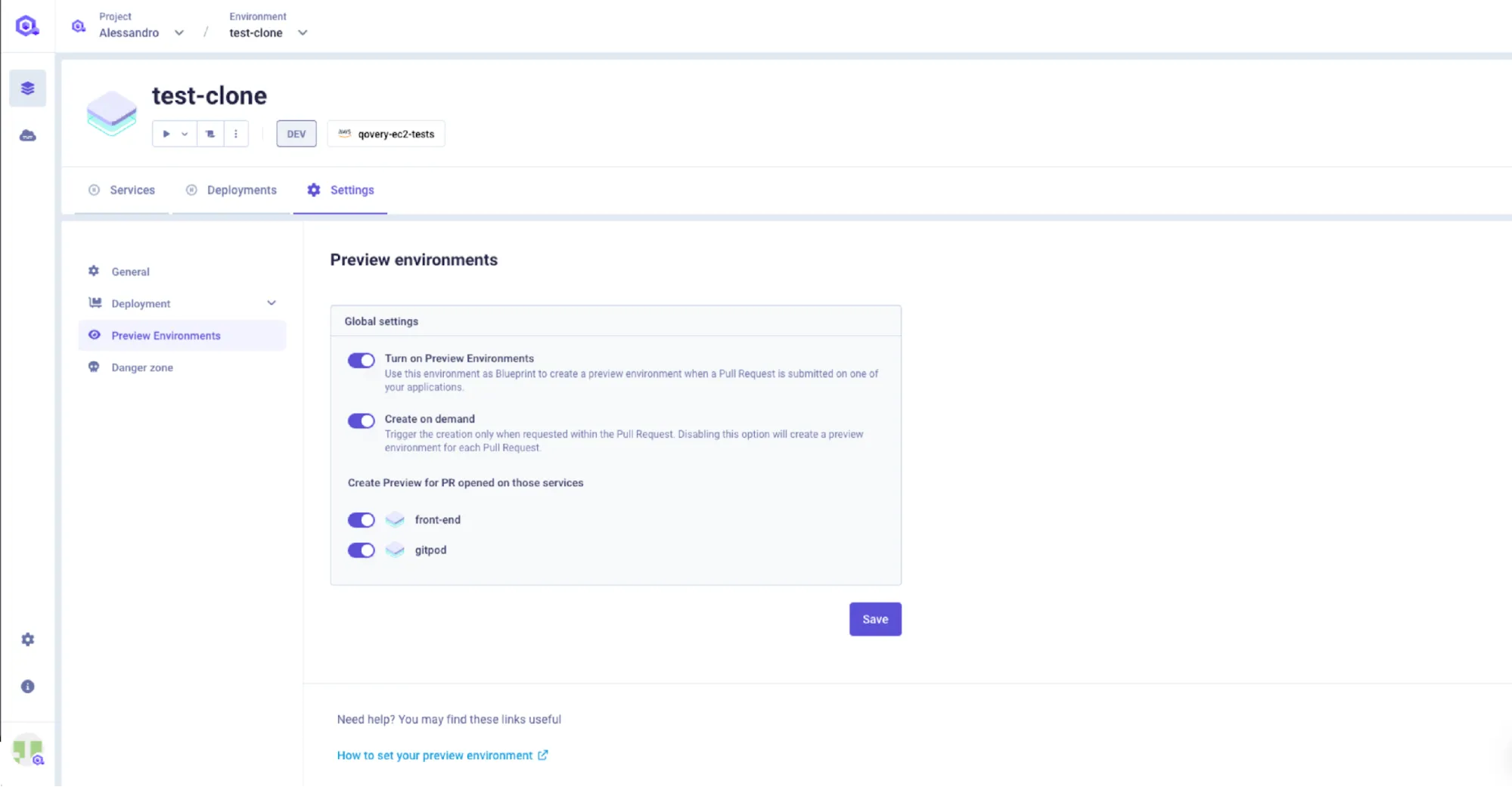
With the blueprint in place, enabling previews requires toggling the feature in Environment Settings under the Preview Environments tab.
The configuration includes selecting the base branch (typically `main` or `staging`) that triggers environment creation. Qovery can then automatically create a preview environment for every pull request targeting the base branch.
Per-service configuration provides additional control, letting DevOps engineers select which applications, databases, and jobs to include in each preview.
3. Database Seeding with Lifecycle Jobs
Data seeding in preview environments uses Qovery's Lifecycle Jobs, custom jobs triggered by environment events like creation, stop, or deletion. A lifecycle job configured with the `on_start` event runs automatically when a preview environment spins up, executing migration scripts and populating seed data before application containers begin accepting traffic.
The lifecycle job references a Git repository containing the seed script and Dockerfile. Qovery builds and runs the job within the preview namespace, giving it access to the environment's database credentials through environment variables. DevOps teams define the job once in the blueprint, and every preview environment inherits it automatically.
4. CI/CD Integration
Qovery provides two paths for integrating preview environments with CI/CD workflows.
The simplest approach uses Qovery's native auto-deploy feature. Qovery connects directly to GitHub, GitLab, or Bitbucket and listens for pull request events via webhooks. When a PR opens against the configured base branch, the platform clones the blueprint and deploys the preview environment automatically. No pipeline configuration is required.
For teams that need more control, Qovery's CLI integrates directly into GitHub Actions workflows. A GitHub Actions pipeline can build and test the artifact, then use the Qovery CLI to clone environments, update application branches, deploy specific commits, and delete environments on PR close. The CLI commands map to the full preview lifecycle:
JAVASCRIPT
```
# Clone blueprint into a preview environment
qovery environment clone \
  --environment "Blueprint" \
  --new-environment-name "preview-pr-123"

# Update the application to the feature branch
qovery application update \
  --environment "preview-pr-123" \
  --application "api" \
  --branch "feature-branch"

# Deploy
qovery application deploy \
  --environment "preview-pr-123" \
  --application "api" \
  --commit-id $GITHUB_SHA --watch

# Clean up when PR closes
qovery environment delete \
  --environment "preview-pr-123" --yes
```
Agents ship fast. Guardrails keep them safe.
Qovery ensures every agent action is scoped, audited, and policy-checked. Start deploying in under 10 minutes.
Backend preview environments change the operational dynamics of the DevOps team in measurable ways.
1. Reduced Ticket Volume
Developers stop waiting for staging access because they create preview environments themselves through pull requests, they also can access logs directly and autonomously. Each environment starting fresh, their ability test properly is enhanced.
Ticketing time that consume DevOps’ day shrink. Engineers who spent hours daily managing staging requests redirect that time toward platform improvements and infrastructure optimization.
2. Improved Production Stability
Production incidents often trace to differences between testing and production environments. Staging drift, configuration mismatches, and untested integration points allow bugs to reach production that isolated testing would have caught.
Preview environments reduce these incidents. Each change tests against a fresh environment matching production configuration. Integration issues surface during development rather than after deployment, and post-incident reviews stop citing "worked in staging" as explanation for production failures.
3. Developer Enablement
DevOps teams shift from gatekeeping to enabling. Instead of managing access to scarce staging resources, they provide a platform that creates resources on demand.
Developers gain autonomy, operations reduces interrupt load, and the DevOps team becomes a platform team providing self-service capabilities rather than a service desk processing environment requests.
Conclusion
Shared staging environments create bottlenecks that slow development and burden operations. The solution is dynamic, ephemeral preview environments that provision on demand and terminate automatically.
By leveraging a Kubernetes management platform like Qovery, you get the orchestration layer that makes this architecture practical. The platform handles the underlying Kubernetes infrastructure complexity that takes DevOps teams weeks to configure manually.
By adopting this model, DevOps shifts from a reactive service desk to a strategic platform team, empowering developers with self-serve testing and freeing up operations to focus on impactful work.
Frequently Asked Questions (FAQs)
Q: What is a backend preview environment?
A: A backend preview environment is a fully functional, isolated, and ephemeral replica of your backend infrastructure (including APIs, databases, and microservices) generated automatically for a specific Pull Request. It allows developers to test their changes safely without impacting staging or production.
Q: Why are shared staging environments bad for DevOps?
A: Shared staging environments create severe testing bottlenecks because multiple developers must queue up to test their changes. Furthermore, they suffer from "configuration drift" as temporary hotfixes are applied, turning the staging environment into a fragile liability that requires constant DevOps maintenance.
Q: How do you handle databases in an ephemeral preview environment?
A: Instead of duplicating heavy, managed cloud databases (like RDS), ephemeral preview environments use lightweight, containerized databases (like a PostgreSQL Docker container). When the preview boots, automated lifecycle hooks run migration scripts and inject "seed data" so the developer has realistic data to test against.
Q: Does creating an environment for every PR increase cloud costs?
A: It actually optimizes costs when managed correctly. While a traditional staging environment runs 24/7 (even on weekends), automated preview environments use "auto-sleep" features to pause when inactive, and are automatically deleted the second a PR is merged, drastically reducing idle compute waste.
Melanie leads content at Qovery. She covers platform engineering trends, Kubernetes operations, FinOps, and the tools that help engineering teams ship faster.
Next step
Agents ship fast. Guardrails keep them safe.
Qovery ensures every agent action is scoped, audited, and policy-checked. Start deploying in under 10 minutes.