This article will help you understand why scalability is important, what application scalability is, and the key components to consider when building scalable web applications for your startup.
Why Is Scalability Important?
In today’s world, users expect a lightning-fast load time, high availability 24/7, and minimal disruptions to the user experience, no matter how many other people are trying to access your web app. If your application isn’t designed properly, and cannot handle the increase in users and workload, then people will inevitably abandon your app for more scalable apps offering a better user experience.
Scalability is an essential component of software because:
It impacts an organization’s ability to meet ever-changing network infrastructure demands.
It can cause service disruptions that drive customers away if the business’ growth outpaces its network capabilities. It is important to ensure that you are maintaining high availability as it will help you in keeping your customers happy.
If you are facing less demand during the off-season, then you can downscale your network for reducing your IT costs.
Too often, companies typically focus more on features and less on scalability. Scalability is however essential to the life of any web application, or it will simply fail to perform. Prioritizing it from the start leads to lower maintenance costs, better user experience, and higher agility.
What is Application Scalability?
Scalability describes a system’s elasticity. Application scalability is the ability of an application to handle a growing number of users and load, without compromising on performance and causing disruptions to user experience. To put it another way, scalability reflects the ability of the software to grow or change with the user’s demands.
The scalability of an application can be measured by the number of requests it can effectively support simultaneously. It’s however a long-time process that impacts almost every single item in your stack, including both hardware and software sides of the system. So scaling these resources can include any combination of adjustments to network bandwidth, CPU and physical memory requirements, and hard disk adjustments. Meaning your application needs to be correctly configured, where the right software protocols and hardware are aligned to meet a high number of requests per minute (RPM).
Building with scalability in mind will help you improve your ability to serve customer requests under heavy load, as well as reduce downtime due to server crashes.
All in all, the goal of scalability is to ensure that your user experience remains constant regardless of the number of people who use your app.
When talking about scalability in cloud computing, you will often hear about two main ways of scaling: Horizontal or Vertical. So what is it, and what is the difference?
Horizontal Scaling Vs Vertical Scaling
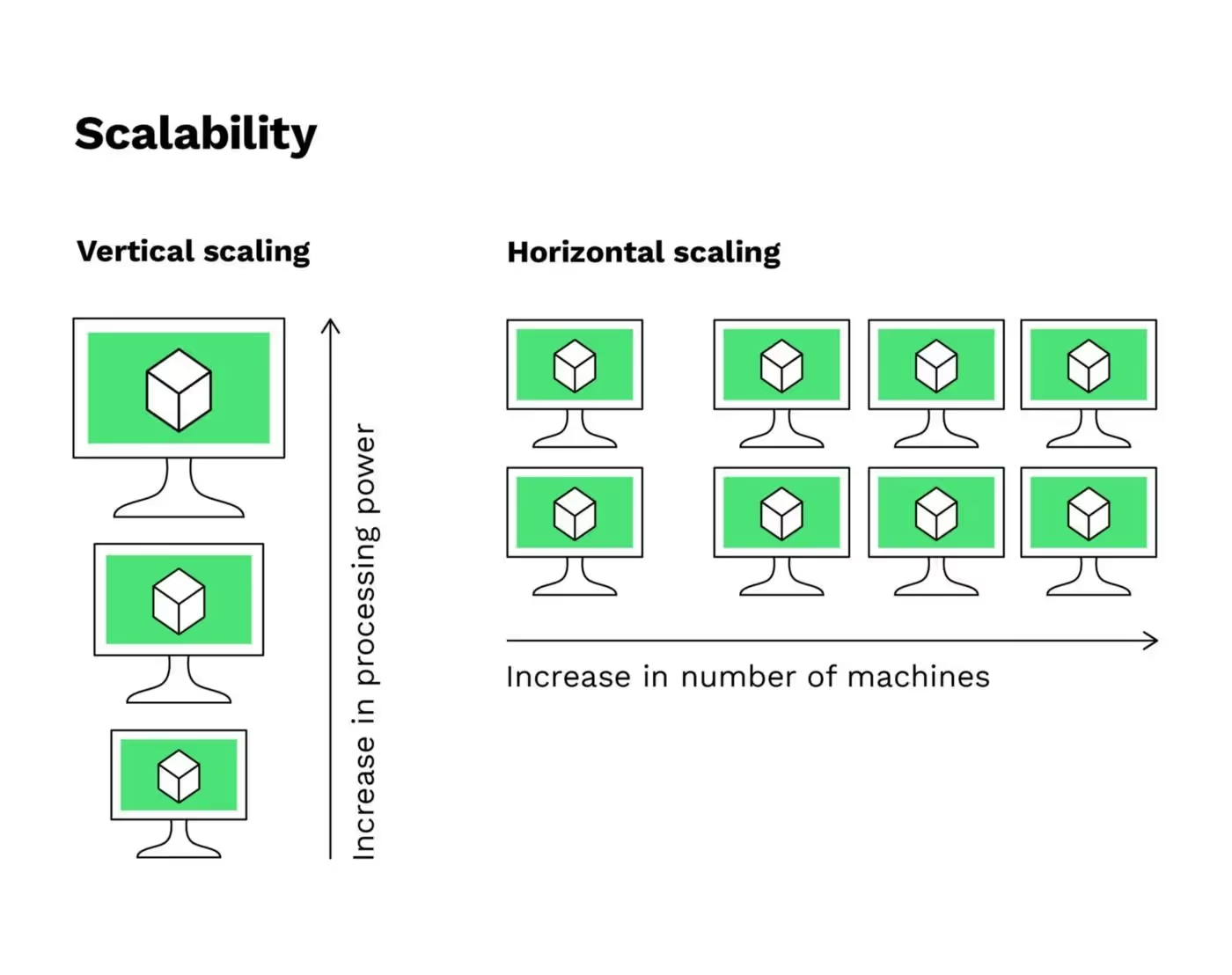
Horizontal scaling (also described as “scaling out”) and Vertical Scaling (also described as “scaling up)” are pretty similar because they both involve adding computing resources to your infrastructure. But there are distinct differences between the two in terms of implementation and performance.
Credit - BitPanda
Horizontal Scaling (Scaling out): Horizontal scaling refers to adding additional nodes or machines to your infrastructure to handle new demands. Suppose you are hosting a web application on a server and realize that it no longer has the capacity (or capabilities) to handle traffic or load. Then, adding a server may be your solution.
Vertical Scaling (Scaling up): While horizontal scaling refers to adding additional nodes/machines, vertical scaling refers to adding more power to your current machines that it meets demand. Suppose now your server requires more processing power. Then, adding processing power and memory to the physical machine running the server may be your solution.
So the main difference to keep in mind is that Horizontal scaling adds more machine resources to your existing machine infrastructure. In contrast, Vertical scaling adds power to your current machine infrastructure by increasing power from CPU or RAM to existing machines.
Whether it’s Horizontal or Vertical scaling, this decision will largely be influenced by the nature of the application and the expected increase in server load and other similar variables.
7 Things to Consider to Build Scalable Web Applications
Now that you understand what application scalability is and why it is essential let’s review the steps to build scalable web applications.
1. Assess the need for scaling and managing expectations
Don’t try to improve scalability when you don’t need to. Scaling could be costly. Make sure that your expectations of scaling justify the expenses (and not because everyone is talking about scalability). Here are a few things that can help you decide:
Collect data to verify your web application supports your growth strategy? (Have you seen an increase in the number of users? By how much, and in what time frame? What are your expectations in the next few weeks/months?)
The storage plan you are using (Is it flexible for size changes?)
Define options you will have in case you experience a drastic increase in user and data traffic.
2. Use metrics to define your scalability challenge
Suppose now your web app needs to be scaled. You need to decide what scalability issues you need to focus on. This can be done by using these four scalability metrics:
Memory utilization: This is the amount of RAM used by a particular system at a certain unit of time.
CPU usage: High CPU usage typically indicates that your app is experiencing performance issues. This is an essential metric that most app-monitoring tools can measure
Network Input/Output. It refers to the time spent sending data from one tracked process to another. Verify the instances that consume the most time.
Disk Input/Output. It refers to all the operations that happen on a physical disk.
3. Choose the tools to monitor the application scalability
Let’s go forward on this point. Now that you have decided on the metrics to focus on, you need app-monitoring tools to track related metrics. Prominent PaaS (like Heroku) and IaaS (like AWS) solutions offer good application monitoring solutions (APM), which makes the task easier. For example, Elastic Beanstalk (AWS) has its ‘own inbuilt monitoring solution and Heroku uses its own New Relic add-on for monitoring. We can also mention good AMP market solutions such as Datadog AMP (among our proud investors), New Relic AMP, AppDynamics, etc.
4. Use the suitable infrastructure options for scalability
Suppose you are a startup building a web app. Using a PaaS (like Heroku) or an IaaS (like AWS) is recommended because Cloud services take care of many aspects of web app development and maintenance. These aspects include the infrastructure and storage, servers, networking, databases, middleware, and runtime environment. PaaS and IaaS can make scaling easier since they offer auto-scaling, along with reliability and availability of SLAs.
5. Pick the right software architecture pattern for scalability
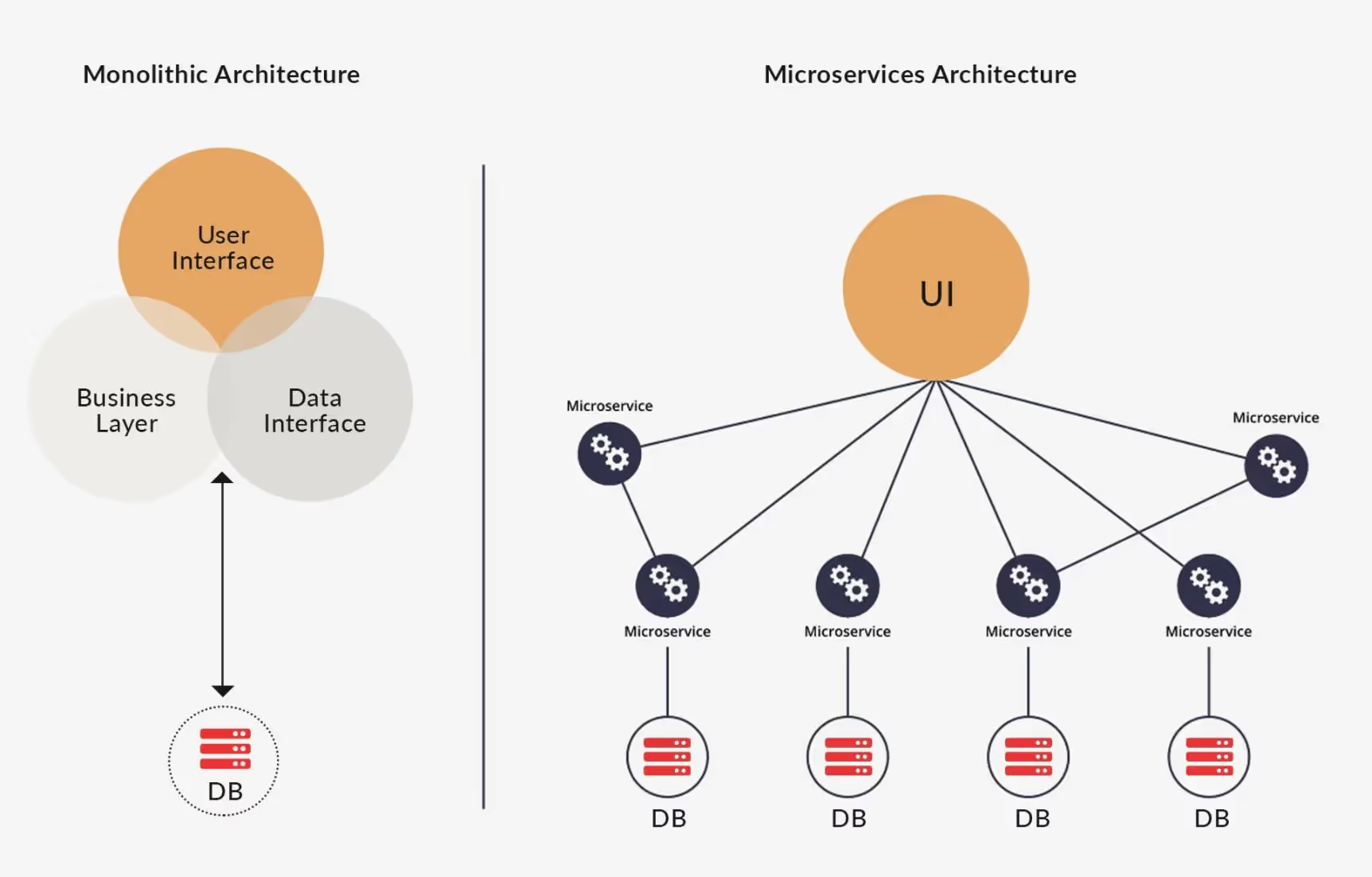
Probably one of the most important parts of application scalability. The scalable architecture enables web applications to adapt according to the user demand and offer the best performance. Therefore, architecture issues can significantly impact scalability. Here are two main architecture patterns that we will consider here for scalability: Monolithic Architecture and Microservices Architecture.
Credit - sourcefuse.com
Monolithic Architecture. A Monolithic application is built in one large system and usually one codebase. Monolithic architecture is a great choice for small apps, as it offers the advantage of having one single codebase with multiple features. But it can quickly become chaotic and out of control when the application evolves with additional features and functionalities.
Microservices Architecture. Unlike Monolithic architecture, Microservices is built as a suite of small services, each with its codebase. So all the services have their logic and database and perform the specific functions. There are no strict dependencies of the modules in the microservices framework, making it quite flexible. By now, any upgrades in specific functionalities have become an easier task without affecting the entire application. That is why many organizations started building with monolith first and then moved to a microservices framework for scaling and adding new capabilities to their applications much easier.
6. Choose the correct database to scale
When talking about scaling, the database is a significant point to focus on after you have addressed the infrastructure and architecture aspects. The type of database you choose will depend on the data types you need to store, meaning relational (such as MySQL or PostgreSQL) or unstructured (NoSQL database, like MongoDB).
Whether you opt for relational or unstructured databases, it should be easy to integrate into your app.
7. Choosing the proper framework for scalability
Frameworks could significantly affect the application scalability, so its choice affects the performance of an app with the increase of features. Depending on your choice of the development language, you have quite a few options. For example, frameworks like Django and Ruby on Rails are great options for building scalable web applications, but if you compare Ruby on Rails with Node.Js, Node.Js offers a great capacity to run complex projects asynchronous queries. You could find other frameworks such as Angular JS, React.js, Laravel, etc. But keep in mind that the success of your application scalability will depend on how well you choose the infrastructure and architecture pattern to support a large scale.
Agents ship fast. Guardrails keep them safe.
Qovery ensures every agent action is scoped, audited, and policy-checked. Start deploying in under 10 minutes.
Other factors to consider when building scalable web apps
Sustainable design. The quality of code also significantly affects scalability.
Testing. Testing is an essential part of the entire web application development lifecycle. Proper load and performance testing ensure your app a smooth growth. Besides, realistic load testing is important, so that you can correctly simulate the environment, users, and data your web application might encounter. One great solution is choosing a Test-driven Development (TDD) to leverage the iterative development approach.
Deployment Challenges. When you have a deployment of multiple services interacting with each other, you will need to implement and test reliable communication mechanisms and orchestration services simultaneously to ensure lower disruptions. This is a more DevOps practice, and it’s most useful when a project requires timely results and has multiple contributors.
Third-party services (via APIs). Probably the most common cause of bottlenecks and operational failures. How these APIs work has an impact on your web app scalability.
Security. No web app is 100% secure. Ensure to implement certain practices to improve security against potential issues (such as hashing and salting databases where passwords are stored or securing client-server communication).
Conclusion
As you can see, there are many things and challenges to consider when building scalable applications. But scalability is essential if you want your startup to succeed and develop a successful product that meets growing market demands. That’s why your applications should be developed with scalability in mind.
There are a few other challenges involved in building such apps for a startup, including spending months to configure and manage infrastructure, build a robust deployment pipeline and maintain it, or the cost of hiring a team that has extensive experience in custom web development.
How to easily scale your application with Qovery
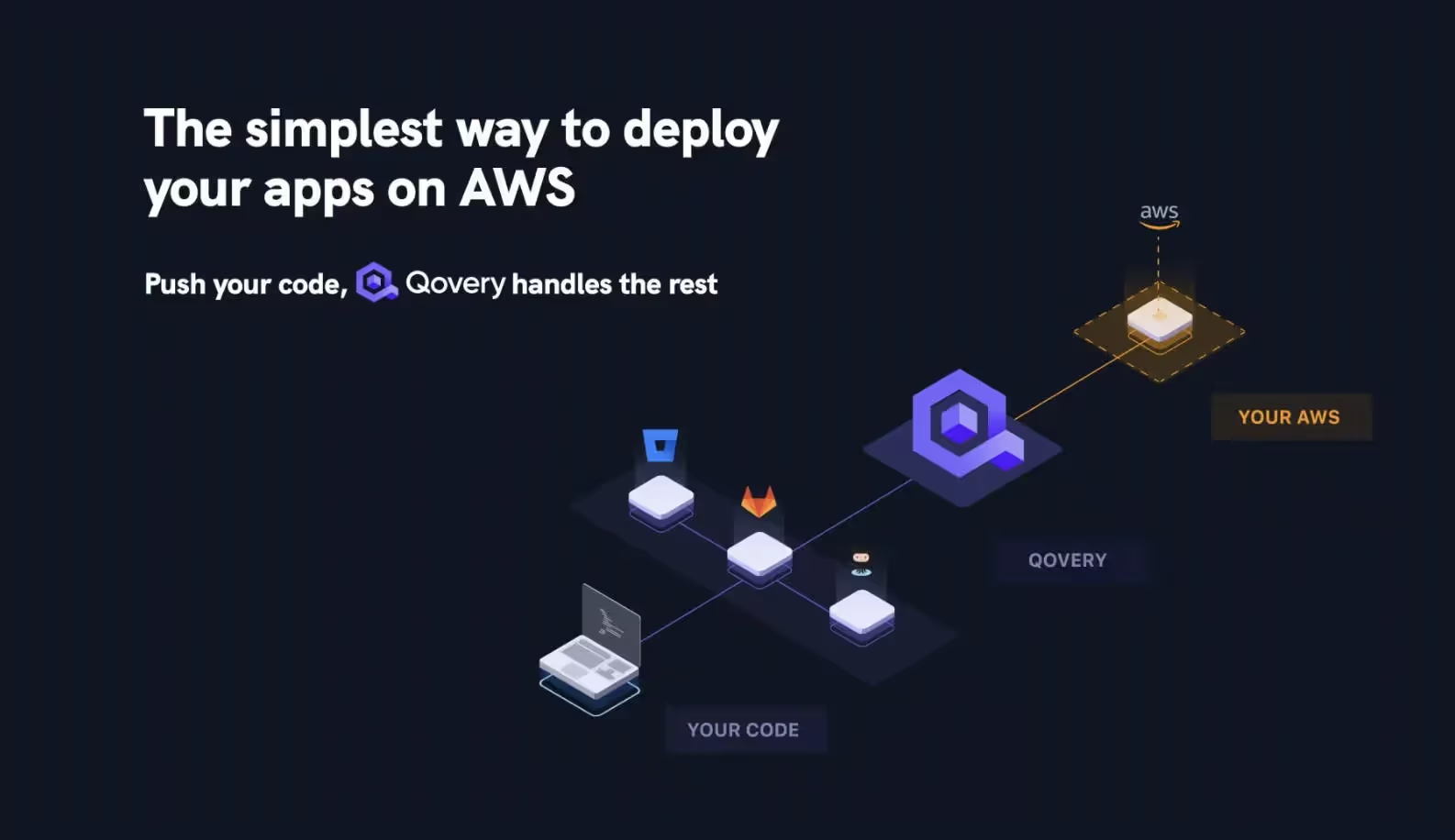
Qovery is a revolutionary way to deploy and scale your app, making it easier for developers to interact with the AWS suite. Essentially, it is a middle layer between your repository and your AWS infrastructure. All you have to do is connect Qovery to your AWS account and link it to your repository. Push your code, and Qovery will do the rest.
The beauty of Qovery is in its simplicity. A full deployment suite may require months of work from DevOps engineers to be built on top of AWS, but with Qovery, all of this is handled in just fifteen minutes.
The simplest way to deploy your apps on AWS | Qovery
What does Qovery do?
BUILD: Qovery builds your apps and integrates them into your CI. Developers are autonomous to make their applications.
DEPLOY: With Qovery, developers can deploy their applications in dev, staging, and production environments. Every push is deployed
RUN: Tech team gets a production-ready platform in 30 minutes on AWS, which lets them manage and control their infrastructure
SCALE: The Qovery Engine operates and runs on top of Kubernetes in your cloud account. It is open-source and ready to be fine-tuned as your need grow.
The ability of an application to handle a growing number of users and requests without degrading performance, and to do so by adding resources rather than by rewriting. It is a property of the architecture, not something you can add at the point where load arrives.
What is the difference between horizontal and vertical scaling?
Vertical scaling means making a machine bigger, adding CPU or memory to the existing instance. Horizontal scaling means adding more instances behind a load balancer. Vertical is simpler but hits a hardware ceiling and a single point of failure; horizontal scales further but requires the application to be stateless.
When should you start optimizing for scalability?
Later than most teams assume. Scaling costs money and complexity, so the first step is deciding whether you actually need it. Premature scalability work usually buys capacity you never use while making the codebase harder to change, which is the resource you do need.
What metrics show you have a scalability problem?
Response time under load, throughput, error rate and resource saturation, measured together. A single number is misleading: rising CPU with flat latency is fine, while flat CPU with rising latency usually points at a database, a lock or an external dependency rather than at compute.
Does a PaaS or IaaS scale better?
Neither scales better inherently; they differ in who does the work. A PaaS handles scaling for you within its limits, which is ideal early. IaaS gives you the controls to scale further and requires you to build the automation. Most teams start on the former and move when its ceiling becomes the constraint.
Morgan co-founded Qovery and leads engineering. He writes about Kubernetes architecture, DevOps best practices, and building resilient infrastructure at scale.
Next step
Agents ship fast. Guardrails keep them safe.
Qovery ensures every agent action is scoped, audited, and policy-checked. Start deploying in under 10 minutes.