GPU orchestration guide: How to auto-scale Kubernetes clusters and slash AI infrastructure costs
To stop GPU costs from destroying SaaS margins, teams must transition from static to consumption-based infrastructure by utilizing Karpenter for dynamic provisioning, maximizing hardware density with NVIDIA MIG, and leveraging Qovery to tie scaling directly to business metrics.
Dynamic Provisioning via Karpenter: Overcome standard autoscaler limits by provisioning exact GPU instances just-in-time and terminating them the millisecond a task completes, minimizing expensive idle time.
High-Density Hardware Utilization: Maximize your hardware ROI by using NVIDIA MIG to partition a single GPU into isolated instances for production, and employing software-level time-slicing for cost-effective development environments.
Business-Aligned Scaling with Qovery: Move beyond lagging CPU metrics by using Qovery to trigger scaling based on actual workload demand (like queue depth), automate ephemeral cluster lifecycles, and enforce strict project-level cost governance.
Is your GPU spend scaling faster than your revenue? For SaaS leaders, the promise of AI-driven claims processing often comes with a hidden sting: a cloud bill that stays "always-on" even when claim volume drops. Leaving a cluster of A100s idling overnight is a direct hit to your unit economics.
To maintain a competitive margin, your infrastructure must be as elastic as your demand. This guide covers how to move beyond static provisioning to a truly consumption-based GPU architecture.
The Business Objective: Protect the Unit Margin
Traditional Kubernetes clusters fail the "Margin Test" due to three specific technical bottlenecks:
The cold start penalty: Long provisioning times often force infra team to keep "warm" (idle) nodes active to avoid latency spikes, burning OpEx with zero ROI.
Underutilization: Allocating a full A100 for a simple OCR task creates massive resource waste.
Disconnected scaling: Standard autoscalers react to CPU/RAM pressure, lagging indicators that don't reflect the actual claims queue depth.
Strategy 1: Dynamic Provisioning with Karpenter
While the standard Cluster Autoscaler is functional, Karpenter is the gold standard for sophisticated GPU orchestration. It bypasses the rigid limitations of "Node Groups" by communicating directly with the cloud provider’s fleet API.
Just-in-time infrastructure: Karpenter evaluates the pending pod’s specific requirements (GPU type, memory, architecture constraints) and provisions the exact instance type at the moment of request.
Fast node downscaling: Instead of waiting for the standard 10-minute cooldown, Karpenter can terminate nodes the millisecond the last GPU task completes, ensuring you only pay for the seconds used to process a claim.
Spot instance diversification: For non-critical batch claims processing, use Karpenter to juggle various Spot GPU generations (e.g., G4dn, G5, P4), reducing costs by up to 70%.
Strategy 2: High-Density Utilization (MIG vs. Time-Slicing)
To optimize your Cost per Inference, you must maximize hardware density.
NVIDIA MIG (Multi-Instance GPU): For production workloads, partition a single A100/H100 into up to seven hardware-isolated instances. This allows you to process seven concurrent claims streams on a single physical card without noisy-neighbor interference.
GPU time-slicing: Use software-level context switching for dev/staging environments. This allows multiple pods to share one GPU, drastically reducing the cost of non-production environments.
Strategy 3: Aligning Infrastructure with Business Logic with Qovery
The missing link for many DevOps teams is connecting "Claims Volume" to "Node Count." Qovery simplifies this by providing a high-level abstraction over Kubernetes complexity:
Metric-based scaling: Don't just scale on CPU. Use Qovery to trigger scaling based on custom metrics through the Keda integration, such as the depth of your SQS/RabbitMQ claims queue.
Environment lifecycle management: Automatically spin up ephemeral GPU clusters for model validation, then auto-delete them the moment the test suite finishes.
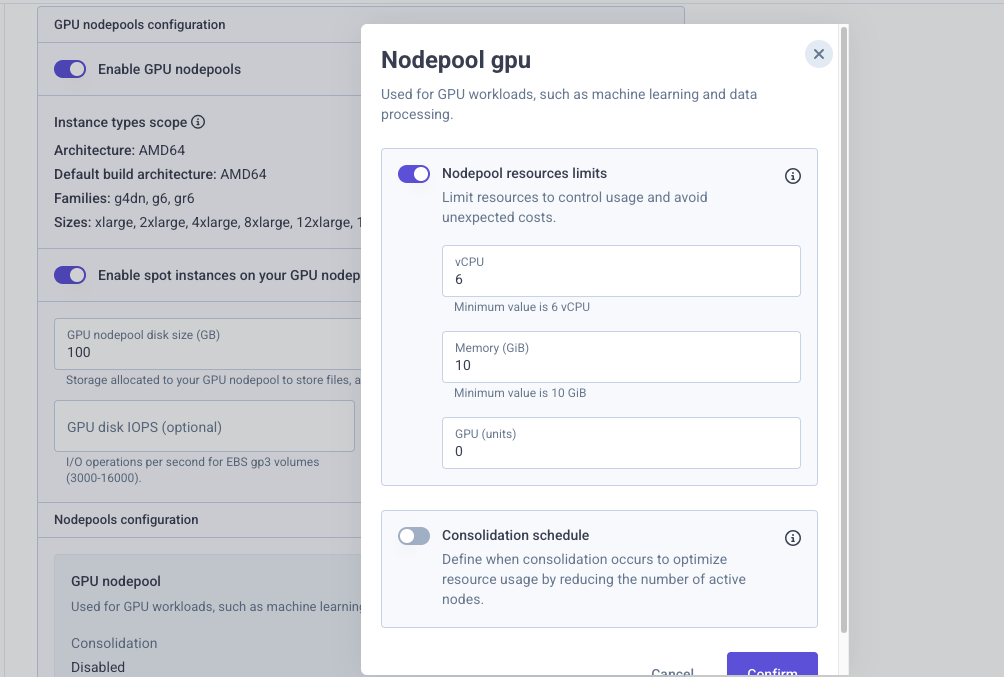
Cost governance: Define hard spend limits at the project level. Qovery ensures that a spike in claims volume or an experimental model doesn't result in an astronomical cloud bill at the end of the month.
Conclusion: From Cost Center to Competitive Advantage
In the 2026 SaaS landscape, GPU efficiency is a significant architectural edge. By implementing Karpenter for speed, MIG for density, and Qovery for business-aligned orchestration, you transform your AI infrastructure from a fixed overhead into a variable cost that scales perfectly with your revenue.
Frequently Asked Questions (FAQs)
1. Why do traditional Kubernetes clusters struggle with GPU cost efficiency?
Traditional clusters often fail the "Margin Test" due to cold start penalties that force teams to keep expensive nodes warm, underutilization of full GPUs for minor tasks, and standard autoscalers that react to lagging CPU/RAM indicators rather than actual demand.
2. How does Karpenter improve upon standard Kubernetes autoscaling?
Karpenter bypasses rigid Node Groups and communicates directly with the cloud provider’s API. It provisions the exact instance type needed at the moment of request and terminates nodes instantly when tasks finish, rather than waiting for standard cooldown periods.
3. What is the difference between NVIDIA MIG and GPU time-slicing
NVIDIA MIG (Multi-Instance GPU) physically partitions a single GPU into hardware-isolated instances ideal for production workloads, preventing noisy-neighbor interference. GPU time-slicing uses software-level context switching to share a single GPU among multiple pods, making it a highly cost-effective solution for dev and staging environments.
4. How does Qovery help align GPU infrastructure with business needs?
Qovery provides a management layer that scales your infrastructure based on custom business metrics (like the depth of an SQS claims queue) rather than just CPU load. It also automates the creation and deletion of ephemeral testing clusters and enforces hard spend limits to prevent billing surprises.
Melanie leads content at Qovery. She covers platform engineering trends, Kubernetes operations, FinOps, and the tools that help engineering teams ship faster.
Next step
Agents ship fast. Guardrails keep them safe.
Qovery ensures every agent action is scoped, audited, and policy-checked. Start deploying in under 10 minutes.