What a Preview Environment per Agent PR Really Costs, and How to Cap It
A transparent cost model for one full-stack preview environment per coding-agent pull request on an existing EKS cluster, built from AWS us-east-1 list prices read on 7 November 2026: cost per hour, per PR and per month, and how delete-on-merge, on-demand previews, schedules and Spot change the bill.
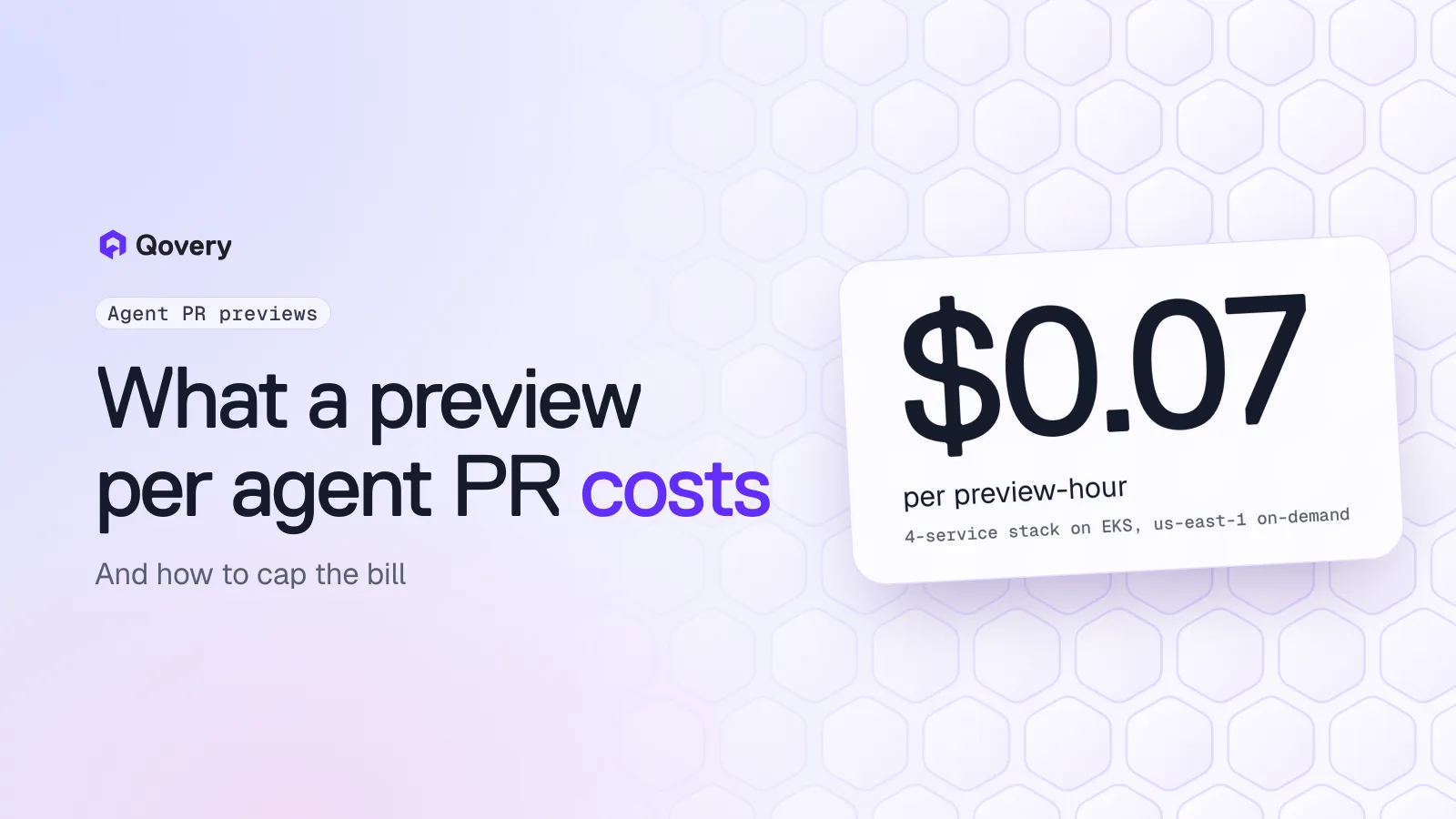
One full-stack preview costs about $0.07 an hour on an existing EKS cluster in us-east-1: an API, a server-rendered frontend, a Postgres container and a small Redis, priced from m6i.large on-demand ($0.096 an hour) plus 10 GiB of gp3 storage ($0.08 per GB-month). Prices read on 7 November 2026.
Lifetime drives the bill. The same preview costs $0.28 if it lives 4 hours, $1.67 for a day and $11.72 for a week.
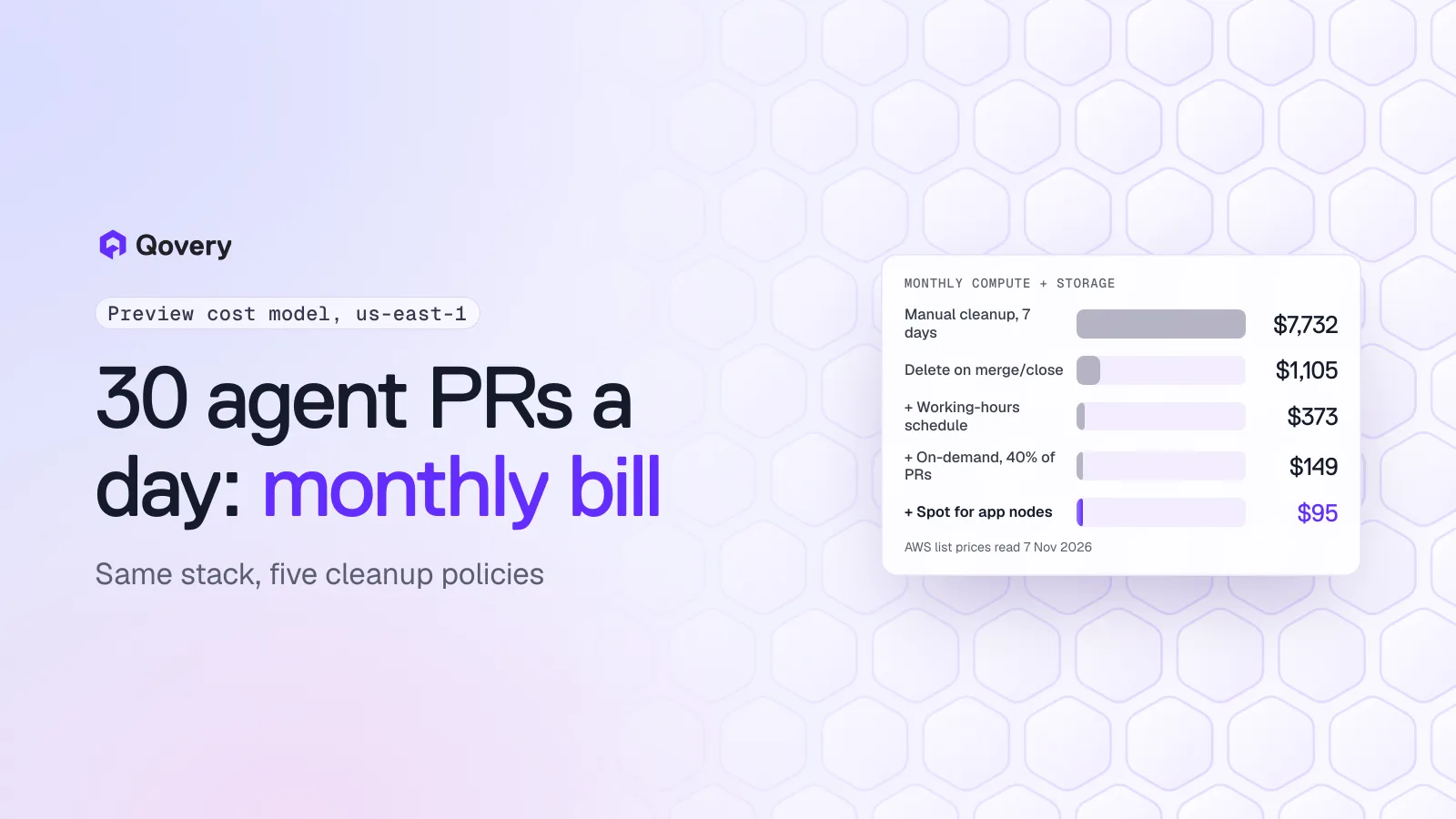
At 30 agent PRs per working day, previews that wait for a weekly manual cleanup cost about $7,700 a month. Deleting on merge or close brings that to about $1,100. Adding a working-hours schedule, creating previews only on request and running app containers on Spot brings it to about $95.
Your node group's maximum size is the real spending cap. It bounds the worst case no matter how many PRs your agents open.
On Qovery Free, the 1,000 deployment minutes are the Qovery-side limit. The AWS bill for the cluster stays yours, and it follows the policies below.
Coding agents open pull requests faster than people review them. Claude Code, Cursor and Codex can each produce several PRs in an afternoon, and a reviewer who has to check out each branch locally to see if it works becomes the bottleneck. A live environment per PR fixes the review problem. The question CTOs ask next is what it does to the cloud bill.
This post answers it with a model you can rerun with your own numbers. Every price comes from a public AWS page, and every assumption is written down so you can change it.
The stack we price
A typical agent PR in a product team touches a web app and its API, and sometimes a migration. A useful preview runs the whole stack, so the model prices four services, sized for review traffic (a handful of people clicking around and an end-to-end test suite), not production load:
Service
CPU request
Memory request
Storage
api (Node or Python)
0.5 vCPU
1 GiB
none
web (Next.js, server-rendered)
0.25 vCPU
512 MiB
none
postgres (container)
0.25 vCPU
512 MiB
10 GiB gp3 volume
redis (container)
0.1 vCPU
256 MiB
none
Total
1.1 vCPU
2.25 GiB
10 GiB
The model assumes the EKS cluster already exists and already pays for its control plane, its ingress load balancer and its system add-ons. Previews add pods to it, so the marginal cost of a preview is the node capacity those pods reserve plus the volume they create.
AWS prices used (read 7 November 2026)
All prices are us-east-1, Linux, from the public AWS pricing pages:
EC2 On-Demand: m6i.large (2 vCPU, 8 GiB) at $0.096 per hour.
EC2 Spot: m6i.large at $0.0425 per hour when we read it. Spot prices move with supply and demand, so check the current value before you reuse this figure.
EBS: gp3 storage at $0.08 per GB-month, with 3,000 IOPS and 125 MB/s included.
EKS: $0.10 per cluster per hour in standard support. Not counted per preview, since the cluster runs anyway.
Cost per preview-hour
Two choices turn node prices into a per-preview price.
Price by CPU. An m6i.large has 4 GiB of memory per vCPU. The preview stack asks for about 2 GiB per vCPU, so CPU fills a node before memory does. One vCPU of on-demand m6i.large costs $0.096 / 2 = $0.048 per hour.
Add 30% overhead. Nodes never give pods all their capacity. The kubelet and system reserve take a slice, DaemonSets for logs and networking take another, and the scheduler never packs nodes perfectly. A 1.3 multiplier on requested CPU covers this for a cluster that autoscales its preview nodes. If you measure your own allocation efficiency, replace it.
That gives:
Line
Formula
Per hour
Compute, on-demand
1.1 vCPU x $0.048 x 1.3
$0.0686
Storage
10 GiB x $0.08 / 730 h
$0.0011
Preview, on-demand
$0.0697
Compute, app pods on Spot
(0.75 x $0.02125 + 0.35 x $0.048) x 1.3
$0.0426
Preview, apps on Spot
$0.0437
In the Spot line, only api and web move to Spot nodes. Postgres and Redis stay on on-demand capacity, which follows AWS's own guidance to keep databases and other stateful workloads off Spot. A preview database losing its pod mid-review is annoying rather than fatal, but a reviewer who sees a broken preview stops trusting the system.
What is not in the model: the EKS control plane and the shared ingress load balancer (already paid), NAT gateway and data transfer (small for review traffic, large if your previews pull big datasets), container registry storage, log ingestion, and the compute used to build images. If your previews seed a database from a snapshot, add the snapshot restore and the larger volume.
Cost per PR: lifetime is the whole story
Multiply the hourly rate by how long the preview lives:
Preview lifetime
On-demand
Apps on Spot
4 hours (reviewed the same afternoon)
$0.28
$0.17
24 hours (reviewed next morning)
$1.67
$1.05
3 days
$5.02
$3.14
7 days (waits for a weekly cleanup)
$11.72
$7.33
30 days (forgotten)
$50.21
$31.43
A 4-hour preview and a forgotten one differ by a factor of 180. Agent PRs make this worse than human PRs for one reason: volume without ownership. A developer remembers the branch they opened. Nobody remembers the fourteenth PR an agent opened on Tuesday, and abandoned agent PRs are common, because a reviewer often rejects the approach and asks for a fresh attempt rather than a fix.
Cost per month at N agent PRs per day
With 22 working days a month and a 24-hour average lifetime:
Agent PRs per working day
PRs per month
Previews live at once
On-demand, 24 h
Every control applied
10
220
about 10
$368
$32
30
660
about 30
$1,105
$95
100
2,200
about 100
$3,682
$317
"Every control applied" is the last step of the next section: delete on merge, working-hours schedule, previews on request for 40% of PRs, and app pods on Spot.
The concurrency column matters for capacity planning. Thirty live previews reserve about 43 vCPU (30 x 1.1 x 1.3), which is about 22 m6i.large nodes. At a 7-day lifetime the same 30 PRs a day leave around 150 previews alive, which is over 100 nodes. Your cluster autoscaler or Karpenter needs room for that, or previews sit in Pending.
Give every agent PR its own environment, on your own cluster.
Qovery Free connects one Kubernetes cluster you already run (EKS, GKE, AKS, k3s or on-premise), with preview environments, environment cloning and deployment from Claude Code, Cursor or Codex. 3 users, AI agents don't count, 1,000 deployment minutes a month, no credit card.
Monthly bill for 30 agent PRs per working day: $7,732 with weekly manual cleanup, $1,105 when previews are deleted on merge or close, $373 with a working-hours schedule, $149 when only 40% of PRs get a preview, $95 with app pods on Spot
The chart applies the controls one after the other to 660 PRs a month. Each step keeps the previous ones.
1. Delete on merge or close: $7,732 to $1,105
The baseline assumes someone deletes previews in a weekly sweep, so the average preview lives 7 days. Tying the preview's life to the PR's life cuts the bill by 86% in this model, because most agent PRs are merged or closed within a day.
In Qovery, a preview environment is a clone of a blueprint environment, created when a PR targets the blueprint's base branch. The preview environment documentation lists the delete triggers: when the PR is merged, when it is closed without merging, and manual deletion from the Console or the CLI. An abandoned agent PR that someone closes takes its environment with it.
The remaining risk is the PR that stays open for weeks because nobody closes it. Set a rule in your team (or a scheduled GitHub Action) that closes stale agent PRs after a few days, and the preview follows.
2. Stop previews outside working hours: $1,105 to $373
Reviewers work about 11 hours a day, 5 days a week. That is 55 of the 168 hours in a week, so a preview that only runs during those hours costs a third of one that runs around the clock. Compute drops to zero while a preview is stopped. In the model the 10 GiB volume keeps billing, since the environment still exists.
Qovery handles this with deployment rules. A rule sets auto-start and auto-stop times, a timezone and the days of the week, and the [PR]* wildcard pattern matches every preview environment created from a pull request:
Pattern:  [PR]*
Start:    Monday-Friday at 08:00 (Europe/Paris)
Stop:     Monday-Friday at 19:00 (Europe/Paris)
Put the rule at the right priority. Rules are evaluated top to bottom and the first match wins, so a catch-all * rule placed above [PR]* would shadow it.
If your agents run overnight and you want their previews ready for the morning, keep the schedule anyway. The preview deploys when the PR opens, stops at 19:00, and starts again at 08:00 when reviewers arrive.
3. Create previews on request: $373 to $149
Not every agent PR needs a running environment. A dependency bump, a typo fix in docs or a refactor covered by unit tests can be reviewed from the diff. The model assumes 40% of agent PRs get a preview, which matches teams where previews are reserved for changes a human needs to click through.
Qovery supports two preview workflows. In the automatic one, every PR targeting the base branch gets a preview. In the manual one, described in the docs as the option for teams that want to control costs, nothing is created until someone comments /qovery preview on the PR. The comment can come from a reviewer, or from the agent itself when its task touches UI or API behaviour. See how create-on-demand works for the PR flow.
Two smaller levers sit in the same place. The preview settings let you choose which services a preview includes, so a frontend-only change doesn't need the worker fleet. And a preview can use a shared database instead of a cloned one when the PR doesn't touch the schema. For PRs that do, see schema migrations in ephemeral environments.
4. Run app pods on Spot: $149 to $95
Moving api and web to Spot nodes takes another third off. With Spot at $0.0425 against $0.096 on-demand when we read the prices, app compute costs 56% less, and the databases stay on on-demand capacity.
How you get Spot capacity depends on who runs the nodes:
On a Qovery-managed EKS cluster (paid plans), Spot is a cluster setting: the managed EKS docs describe a per-node-pool Spot toggle, and container databases are pinned to the on-demand stable pool automatically.
On Qovery Free, the cluster is yours (BYOK), so Spot is your node configuration. On EKS, create a managed node group with the Spot capacity type, which labels its nodes eks.amazonaws.com/capacityType: SPOT, or a Karpenter NodePool that allows spot. Then point the preview's app services at those nodes with the Qovery advanced setting deployment.affinity.node.required:
JSON
{ "eks.amazonaws.com/capacityType": "SPOT" }
Set it on api and web in the blueprint environment, and every preview cloned from it inherits it. The setting only adds node affinity. If your Spot nodes carry a taint, the pods also need a matching toleration, which Qovery doesn't add on BYOK nodes, so the simplest setup is an untainted Spot node group used for previews.
The cap that holds when everything else fails
Every control above depends on people and agents behaving as expected. One setting doesn't: the maximum size of the node group or Karpenter NodePool that previews run on.
Put previews on their own node group (or their own cluster, which the Qovery docs recommend anyway, separate from production) and give it a maximum of, say, 10 m6i.large nodes. The worst case is then 10 x $0.096 x 730 hours, about $700 a month on-demand, or about $310 at the Spot price we read. If agents open more PRs than that capacity holds, the extra previews wait in Pending instead of growing the bill. That is the right failure mode for review environments.
Qovery Free: what the 1,000 minutes cover
Qovery Free runs on one cluster you already operate (EKS, GKE, AKS, k3s or on-premise), with 3 users, and AI agents don't count as users. It includes preview environments, environment cloning and deployment from Claude Code, Cursor or Codex through MCP, the CLI and Skills. There is no time limit and no credit card.
The Free plan's limit is 1,000 deployment minutes a month, with a hard stop. One deployment minute is one minute of build and deploy time across any service. When the minutes run out, new deployments stop until the next month or an upgrade. The minutes limit Qovery usage. They don't limit your AWS bill: a preview that is already running keeps reserving nodes until it is stopped or deleted, which is why the controls above still matter on Free.
To size Free for agent previews, measure your own deployment times in the deployment history. As an illustration, if a preview deployment takes 8 minutes (two services built and deployed, databases started) and an agent PR gets 3 deployments (the first one plus two pushes after review comments), each PR uses 24 minutes, and 1,000 minutes cover about 40 previewed PRs a month. With previews on request for 40% of PRs, that is about 100 agent PRs a month, or 4 to 5 per working day. Scheduled starts also appear in the deployment history, so check how many minutes they use in your organization before relying on schedules on Free.
Past that, paid plans add more users and deployment minutes, clusters managed by Qovery, and support. The numbers are on the pricing page.
Rerun the model with your numbers
Six inputs change the result:
CPU and memory requests of your preview stack. Read them from your manifests or from the Qovery service settings, not from production sizing.
The node type you'd use for previews, and its on-demand and Spot price in your region.
The overhead factor. 1.3 is a reasonable default for an autoscaled node group. Measure requested / allocatable on your preview nodes for a better one.
Average PR lifetime, from your Git provider's API. Split agent PRs from human PRs if you can.
The share of PRs that need a preview. Start at 100% with automatic previews, then look at which previews nobody opened.
Review hours. A team spread across time zones needs a wider schedule than 08:00 to 19:00.
For a four-service stack (API, server-rendered frontend, Postgres and Redis containers) reserving 1.1 vCPU and 2.25 GiB on an existing EKS cluster in us-east-1, about $0.07 an hour on on-demand m6i.large nodes, including a 10 GiB gp3 volume. That is $1.67 for a preview that lives a day. Prices were read from the AWS pricing pages on 7 November 2026.
What makes preview environments expensive?
Lifetime. The hourly rate of a review-sized stack is small, but a preview that waits a week for cleanup costs 7 times more than one deleted after a day, and 40 times more than one reviewed and merged within an afternoon. Coding agents open many PRs that nobody owns, so automatic deletion on merge or close matters more for agent PRs than for human ones.
Does Qovery delete preview environments automatically?
Yes. Qovery deletes a preview environment when its pull request is merged or closed without merging. You can also delete one manually from the Console or with qovery environment delete.
Can I create a preview only for some pull requests?
Yes. With the on-demand workflow, Qovery creates nothing until someone comments /qovery preview on the pull request. The automatic workflow creates a preview for every PR that targets the base branch.
Can Qovery stop preview environments at night?
Yes, with deployment rules. A rule sets start and stop times, a timezone and days of the week, and the [PR]* pattern applies it to every preview environment created from a pull request.
Can preview environments run on Spot instances with Qovery Free?
Yes, if your cluster has Spot nodes. On Qovery Free the cluster is yours, so you create the Spot node group or Karpenter NodePool, then target it from the preview's services with the deployment.affinity.node.required advanced setting. The Spot toggle in Qovery's cluster settings applies to clusters managed by Qovery, which are part of paid plans.
Do Qovery Free's 1,000 deployment minutes include my cloud costs?
No. Deployment minutes measure build and deploy time on Qovery's side. Your cluster runs in your own cloud account, so AWS bills you for the nodes, volumes and traffic your previews use, whatever plan you are on.
Romaric founded Qovery to make Kubernetes accessible to every engineering team. He writes about platform strategy, developer experience, and the future of cloud infrastructure.
Next step
Give every agent PR its own environment, on your own cluster.
Qovery Free connects one Kubernetes cluster you already run (EKS, GKE, AKS, k3s or on-premise), with preview environments, environment cloning and deployment from Claude Code, Cursor or Codex. 3 users, AI agents don't count, 1,000 deployment minutes a month, no credit card.