Installing Karpenter: Lessons Learned From Our Experience
This article shares our experience migrating from the AWS Cluster Auto Scaler to Karpenter. We provide an overview of the steps we took to install Karpenter. This article is the first in a series dedicated to Karpenter. In future posts, we will cover other aspects of using Karpenter.
But before getting started, let's explain what Karpenter is...
What's Karpenter?
AWS Karpenter is an open-source, flexible, high-performance Kubernetes cluster autoscaler. It was developed by AWS to address some of the inherent limitations of the default Kubernetes autoscaler, particularly around efficient resource allocation and cost optimization. Karpenter dynamically adjusts the volume and compute resources to meet application demands, significantly reducing costs and improving application performance. Discover more about Karpenter on its official page.
At Qovery, we allow our users to spin up Kubernetes clusters on AWS, GCP, and Scaleway in 5 minutes. Karpenter is also an option that can be turned on with one click when creating an EKS cluster.
When we migrated from the AWS Cluster Auto Scaler to Karpenter, one of the first decisions was determining where to run the Karpenter controller. Karpenter can be deployed:
on AWS EKS managed node groups
directly on EC2 instances
on AWS Fargate
It is not recommended to run the Karpenter controller on a node managed by Karpenter itself. One of the main reasons is the bootstrapping issue and the risk of unavailability. If the nodes running Karpenter are removed, no other node will be started to rerun the Karpenter controller, leading to potential downtime and unavailability.
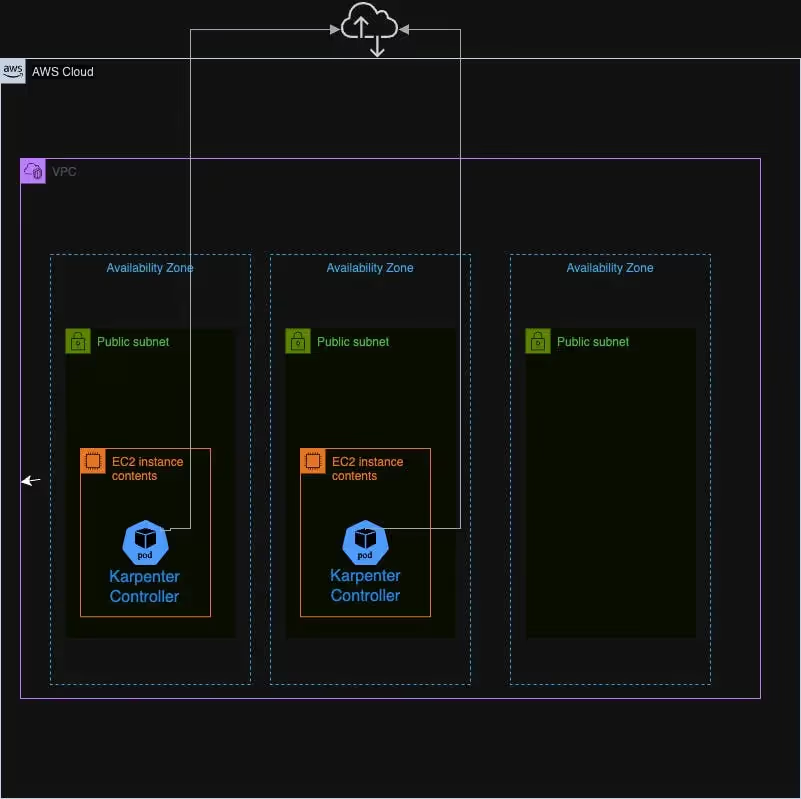
Option 1: EKS managed Node Group or directly on EC2 instances
Nodegroup Diagram
Running the Karpenter controller on a small EKS node group involves setting up a dedicated group of EC2 instances to host the controller pods. This approach offers:
Control and Customization: You have complete control over the EC2 instances.
Consistent Performance: EC2 instances provide predictable performance with dedicated CPU and memory resources.
However, this option also comes with some challenges:
Operational Overhead: Managing the node group requires additional effort for scaling, patching, and monitoring the instances.
Running the Karpenter controller directly on EC2 instances introduces further challenges compared to using a managed node group. It involves manual configuration of the EC2 instances to install and manage the Kubernetes Kubelet, update the operating system, apply security patches, and keep Kubernetes versions up to date. Additionally, you must set up your own monitoring solutions and handle the replacement of unhealthy instances.
Option 2: AWS Fargate
null
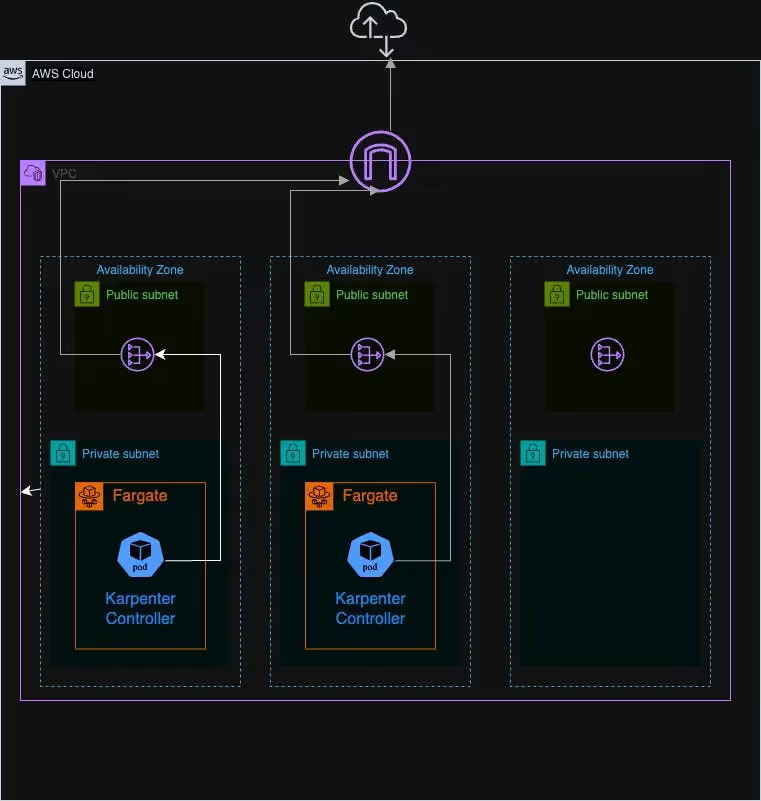
Deploying the Karpenter controller on AWS Fargate abstracts away the underlying infrastructure, offering a serverless compute engine for containers. This approach has several advantages:
Simplified Management: Fargate removes the need to manage and scale EC2 instances, reducing operational overhead.
Automatic Scaling: Fargate automatically scales based on demand, ensuring the controller always has the necessary resources.
However, there are some considerations:
NAT Gateway Requirement: A Fargate profile must be set up with private subnets and do not have a direct route to an Internet Gateway. However, internet access is necessary to download the Karpenter image or for Karpenter to download pricing data over time. Therefore, connecting the subnets used for the Fargate profile to the internet using a NAT Gateway is necessary. This introduces additional costs for clusters, but this setup is compliant with best practices as it increases security by preventing the internet from initiating connections with instances on private subnets.
Why We Chose Fargate
After evaluating the options, we decided to deploy the Karpenter controller on AWS Fargate. Here’s why:
Reduced Management Overhead: By using Fargate, we significantly reduced the operational burden of managing EC2 instances.
Security and Isolation: Running in Fargate provides enhanced security through isolation and managed infrastructure.
Terraform for AWS Resource Creation
The installation of a cluster with Karpenter will be divided into several phases. The first phase involves creating all the necessary AWS resources using Terraform. In the next section, we will describe the additional resources required for installing Karpenter.
IAM Roles:
There are three additional roles to create:
fargate-profile: This role is an IAM role used by the Fargate node to make AWS API calls. The AmazonEKSFargatePodExecutionRolePolicy managed policy must be attached to this role. Kubelet on the Fargate node uses this IAM role to communicate with the API server. This role must be included in the aws-auth ConfigMap so that Kubelet can authenticate with the API server. When a Fargate profile is created, this role is automatically added to the cluster's aws-auth ConfigMap.
resource "aws_iam_role" "fargate-profile" {
  name = "qovery-eks-fargate-profile"
  assume_role_policy = jsonencode(
    {
      Statement = [{
        Action = "sts:AssumeRole"
        Effect = "Allow"
        Principal = {
          Service = "eks-fargate-pods.amazonaws.com"
        }
      }]
      Version = "2012-10-17"
    }
  )
}

resource "aws_iam_role_policy_attachment" "karpenter-AmazonEKSFargatePodExecutionRolePolicy" {
  role       = aws_iam_role.fargate-profile.name
  policy_arn = "arn:aws:iam::aws:policy/AmazonEKSFargatePodExecutionRolePolicy"
}
karpenter-node-role: This role is assigned to the EC2 instances that Karpenter provisions. It allows these instances to interact with various AWS services required for their operation. This role must be set in the aws-auth ConfigMap. This part will be described in the following section.
Karpenter uses an SQS queue to monitor specific events from AWS services, such as instance interruptions or scheduled maintenance events. When these critical events are received, Karpenter can take appropriate actions to maintain the stability and performance of your nodes. For example, if an instance interruption event is detected, Karpenter can proactively launch new instances to replace the affected ones, ensuring continuous availability and minimizing downtime. By leveraging this event-driven approach, Karpenter enhances the resilience and reliability of your infrastructure.
The subnets associated with an AWS fargate profile must be private and have no direct route to an Internet Gateway.
In addition to the Karpenter controller profile, we need to create three other Fargate profiles to run essential pods required for Karpenter to be operational. Once Karpenter is installed and configured, these Fargate profiles can be deleted, allowing these pods to run on EC2 instances started by Karpenter.
The applications that require Fargate profiles are:
CoreDNS: Installed through AWS add-on, it is crucial for internal DNS resolution within the cluster.
EBS CSI: Also installed through AWS add-on, this driver manages EBS volumes and provides persistent storage for the cluster.
Qovery User Mapper: Developed by Qovery, this tool configures the aws-auth ConfigMap to include the role karpenter-node-role in the mapRoles section. You can find a complete description of this tool in the following article.
Karpenter must know which subnets and security groups to use when creating EKS instances. These subnets and security groups can be configured explicitly during the deployment of Karpenter using the Karpenter Helm chart. However, Karpenter can also automatically identify these resources if they are tagged with the key karpenter.sh/discovery and the value set to the name of the cluster. Therefore, if you decide to use tagging, you must update your subnet and security group resources with the following tag:
  tags =
	  {
      "karpenter.sh/discovery" =
}
Agents ship fast. Guardrails keep them safe.
Qovery ensures every agent action is scoped, audited, and policy-checked. Start deploying in under 10 minutes.
Our Helm chart to create a default NodePool and the associated NodeClass. This is required so that Karpenter knows what types of nodes we want for unscheduled workloads. Without any NodePool, Karpenter will not create any nodes.
Although the Karpenter Helm chart installs the CRDs during the initial installation, it does not update them when upgrading the version. By separating the CRDs into their own chart, we can update both the CRDs and Karpenter independently, ensuring we can upgrade the Karpenter version seamlessly.
Troubleshooting Common Issues
When the two pods of the Karpenter controller start on Fargate, they initially enter a pending state. It can take at least one minute for the two nodes with names starting with “fargate” to appear. Once these nodes appear, the two pods will move to the running state. If the nodes do not appear and the pods remain pending, review the setup of the Fargate profile, ensuring that the associated subnets are private and linked to a NAT Gateway.
If the pods are running but no nodes are created by Karpenter, you can check the events associated with the nodeClaims (CRD added when installing Karpenter). If the event reason is NodeNotFound with the message ‘Node not registered with cluster,’ then check that aws-auth in the config map is correctly configured.
If Karpenter can’t create spot instances and you have an event that says: “The provided credentials do not have permission to create the service-linked role for EC2 Spot Instances,” check that the service-linked role AWSServiceRoleForEC2Spot is present. (See the previous section to get the command to check.)
Conclusion
In this article, we’ve explored how to install Karpenter on an AWS EKS cluster. The deployment options we evaluated, particularly the decision to run the Karpenter controller on AWS Fargate, have greatly simplified our infrastructure management while enhancing security and scalability. We detailed the steps and considerations involved in installing Karpenter, from configuring IAM roles and setting up SQS queues to deploying Karpenter via Helm, including using a separate Helm chart for installing and updating the necessary CRDs.
We also covered troubleshooting common issues that may arise during the deployment process, providing solutions to ensure a successful installation. As we continue to explore and utilize Karpenter, we will share further insights in future articles.
Frequently asked questions
What is Karpenter?
An open-source Kubernetes cluster autoscaler from AWS. Instead of scaling predefined node groups, it provisions nodes directly in response to pending pods, choosing instance types that fit the workload, which generally gives faster scheduling and better bin packing than the Cluster Autoscaler.
Where should you run the Karpenter controller?
On a small EKS managed node group or EC2 instances, or on AWS Fargate. The node group option is familiar but creates a bootstrapping dependency: the thing that provisions nodes is itself running on a node. Fargate abstracts that away, which is why Qovery chose it.
Why run Karpenter on Fargate?
It removes the chicken-and-egg problem of the autoscaler depending on the capacity it is meant to provide. There is no node group to size, patch or scale for the controller itself, which matters when you are managing many clusters and want the control path to be identical and low-maintenance in each.
What IAM roles does Karpenter need?
Several distinct ones, which is where installations commonly go wrong. There is a role for the Fargate profile that runs the controller pods, a role the controller itself assumes to provision EC2 capacity, and a node role that the instances it creates use to join the cluster.
Should you migrate from Cluster Autoscaler to Karpenter?
It is usually worth it for faster node provisioning and better instance selection, particularly on mixed workloads where fixed node groups waste capacity. Budget for the migration itself: the IAM setup, the Terraform, and the disruption policies all need deliberate configuration rather than defaults.