Hardware Selection is Now the AI Bottleneck: Choosing the correct hardware (GPU vs. TPU) is crucial for controlling the cost and time-to-market of AI projects. The decision is framed by a trade-off: GPUs offer flexibility and broad framework support (especially PyTorch), while TPUs offer specialized efficiency and throughput for large-scale, matrix-heavy training (especially with TensorFlow/JAX on Google Cloud).
The Decision Hinges on Specific Workload: The choice is not universal but depends on the operational context. Choose GPU for research, diverse workloads, smaller models, and PyTorch; choose TPU for massive, long-running training jobs, maximum cost efficiency, and native integration with Google Cloud's TensorFlow/JAX ecosystem.
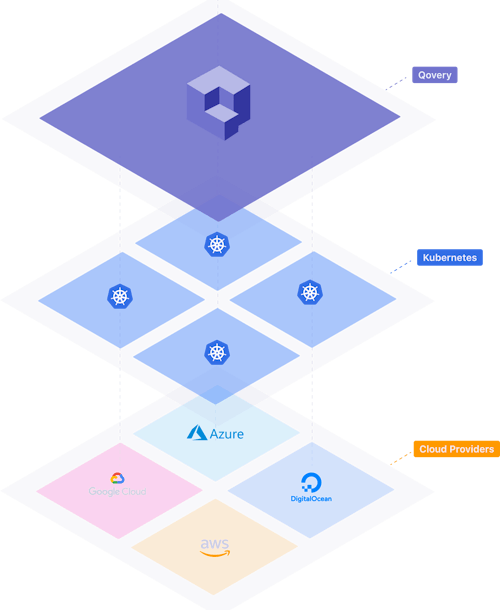
Qovery Solves MLOps Infrastructure Complexity: Deploying specialized hardware requires managing complex Kubernetes node pools, drivers, and resource scheduling. Qovery acts as an abstraction layer, allowing DevOps and ML teams to provision GPU/TPU nodes via a simple interface, thereby eliminating manual YAML, automating autoscaling, and ensuring engineers can focus on models, not cluster management.
The Cost of One Bad Decision in MLOps? Weeks of Lost Time and a Six-Figure Cloud Bill.
You've built the pipelines, but now the compute is the choke point. Training today's massive AI models (whether a new LLM or a huge recommendation engine) can grind your team to a halt. The difference between choosing the wrong hardware (GPU vs. TPU) and the optimized stack is the difference between doubling your budget and halving your timeline.
Hardware is no longer just a financial concern; it's the core operational bottleneck in scaling AI.
This guide cuts through the marketing hype and gives you the DevOps-level decision matrix for choosing specialized hardware, ensuring your infrastructure meets your model's demands.
GPU: The General-Purpose Workhorse
Graphics Processing Units originated in the gaming industry, designed to render complex graphics at high rate. This parallel architecture proved unexpectedly suitable for machine learning when researchers discovered that neural network training maps efficiently onto GPU hardware.
Architecture and Design
GPUs contain small, general-purpose cores organized into streaming multiprocessors. This massive parallelism allows GPUs to process many data elements simultaneously rather than sequentially.
The architecture prioritizes flexibility. Each core can execute arbitrary instructions, supporting diverse computational needs. CUDA, NVIDIA's parallel computing platform, provides the software foundation for GPU programming.
This ecosystem has matured over many years, accumulating libraries, tools, and community knowledge that simplify development. Most deep learning frameworks integrate CUDA deeply, making GPU acceleration accessible without low-level programming.
Strengths and Limitations
GPU flexibility makes them suitable for diverse workloads within ML pipelines. Data preprocessing, feature engineering, model training, and inference all run on the same hardware. Teams can experiment with novel architectures, custom operations, and research implementations without hardware constraints.
The established ecosystem reduces adoption friction. PyTorch, TensorFlow, and other frameworks support GPU acceleration out of the box. Debugging tools, profilers, and optimization guides are widely available. Engineers moving from CPU-based development find extensive documentation and community support.
The trade-off is efficiency on specialized tasks. GPUs allocate capacity to general-purpose capabilities that matrix-heavy workloads don't require. For pure matrix multiplication at scale, this flexibility becomes overhead rather than advantage.
TPU: The Specialized Accelerator
Tensor Processing Units are custom accelerators designed by Google specifically for deep learning workloads. First deployed internally in 2015 and made available through Google Cloud in 2018, TPUs take a fundamentally different approach to AI acceleration.
Architecture and Design
TPUs center on a systolic array architecture optimized for matrix multiplication. Rather than thousands of independent cores, TPUs arrange processing elements in a grid where data flows systematically between neighbors. Each element performs a matrix operation as data passes through, which results in minimal memory access.
TPUs include high-bandwidth memory directly integrated with the processing array. The hardware handles large batch sizes efficiently, processing many samples simultaneously to increase efficiency. Multiple TPU chips can also operate as unified systems for distributed training.
Strengths and Limitations
For matrix-centric workloads, TPUs deliver high throughput with strong power efficiency. Large transformer model training done on TensorFlow or JAX can see significant performance improvements compared to equivalent GPU configurations. The specialized architecture removes overhead that general-purpose designs carry.
TPUs integrate tightly with Google's software ecosystem. TensorFlow and JAX support TPU execution natively, with compiler optimizations that map operations onto the hardware efficiently. Google Cloud provides managed TPU access, handling driver updates, and hardware maintenance.
The main limitation is scope. Operations outside TPU strengths execute slowly or require CPU fallback. Furthermore, PyTorch support exists but lags behind TensorFlow integration, teams committed to this framework face additional friction adopting TPUs.
Direct Comparison: The Decision Matrix
Choosing between TPU and GPU requires evaluating specific workload characteristics rather than seeking a universal answer. Several dimensions matter for practical decision-making.
Training Performance
For large-scale training jobs running days or weeks, TPUs often provide better cost efficiency. The specialized architecture delivers high throughput on transformer and machine-learning specific architectures. Teams training foundation models or large recommendation systems frequently select TPUs for production training.
GPUs remain competitive for smaller models and research workflows. The flexibility to iterate quickly, try experimental architectures, and debug issues outweighs raw throughput advantages when training runs complete in hours rather than weeks.
Inference Characteristics
Both architectures handle inference effectively, with different strengths. GPUs excel when latency matters and batch sizes vary. The general-purpose cores handle single-request inference efficiently, and the mature serving ecosystem provides production-ready deployment options.
TPUs deliver strong sustained throughput for high-volume inference with consistent batch sizes. Applications processing millions of requests with predictable patterns benefit from TPU efficiency. The cost per inference can favor TPUs when utilization remains high.
Framework Compatibility
GPU support is available across most majors ML frameworks: CUDA. PyTorch, TensorFlow, JAX, specialized libraries also mostly provide GPU acceleration. Teams can choose frameworks based on research needs or organizational preferences without hardware constraints.
TPU support concentrates in TensorFlow and JAX. PyTorch runs on TPUs through translation layers, but performance and compatibility lag native support. Organizations focusing on TensorFlow and JAX will find optimized integration with TPUs.
Agents ship fast. Guardrails keep them safe.
Qovery ensures every agent action is scoped, audited, and policy-checked. Start deploying in under 10 minutes.
The decision between GPU and TPU depends on workload characteristics, framework preferences, and operational context.
Choose GPU When
PyTorch is the primary framework. The ecosystem integration and community support make GPUs the natural choice for PyTorch-based workflows. While TPU support exists, the experience remains less polished than TensorFlow on TPU or PyTorch on GPU.
Workloads require flexibility. Pipelines combining data preprocessing, training, and inference on the same hardware benefit from GPU versatility. Research projects exploring novel architectures require hardware that accommodates experimentation without constraints.
Model sizes are moderate. For models that train a matter of hours, GPU flexibility outweighs TPU throughput advantages. The ability to iterate quickly matters more than maximizing compute efficiency.
Diverse workloads share infrastructure. Teams running varied ML tasks across shared clusters find GPUs handle the diversity better. Not every workload matches TPU strengths, and GPU generality provides consistent performance across use cases.
Choose TPU When
Google Cloud is the deployment target. TPUs are available exclusively through Google Cloud, making them natural choices for organizations already operating in that environment. The integration with GCP services simplifies operational management.
Training runs massive models for extended periods. When training jobs run for weeks and cost tens of thousands of dollars, TPU efficiency compounds and becomes a crucial advantage. The cost per training hour often favors TPUs for large transformer models and similar architectures.
TensorFlow or JAX is the primary framework. These frameworks provide native TPU support with optimized compilation and execution. Teams already using Google's ML ecosystem face minimal adoption friction.
Cost and power efficiency matter at scale. For sustained high-utilization workloads, TPU efficiency translates to lower operational costs. Organizations optimizing cloud spend on matrix-heavy workloads find TPUs economically attractive.
Conclusion
The GPU vs. TPU decision reflects a broader shift in AI infrastructure. As models grow larger and training costs increase, hardware selection directly impacts project feasibility and economics. General-purpose flexibility and specialized efficiency represent genuine trade-offs and decisions for engineering organizations.
GPUs provide the flexibility and ecosystem breadth that research and diverse production workloads require. TPUs deliver focused performance for matrix-heavy operations at scale, particularly within Google's framework ecosystem.
The future likely involves both architectures deployed strategically across the ML lifecycle. Experimentation and development may favor GPU flexibility while production training of validated architectures shifts to TPU efficiency. Teams benefit from understanding both options rather than committing exclusively to one.
Hardware decisions should align with models, frameworks, and cloud environments rather than abstract performance comparisons. The right choice depends on specific workload characteristics and organizational context.
Qovery's Value in Specialized AI Workloads
Deploying ML workloads on GPU or TPU infrastructure introduces operational complexity beyond hardware selection. Kubernetes configurations require specialized node pools, driver management, resource scheduling, and affinity rules. Teams spend significant engineering time on infrastructure rather than model development.
Qovery acts as an abstraction layer that simplifies this complexity. ML engineers provision GPU and TPU nodes by selecting options in a web interface, bypassing the need to write Kubernetes YAML, manage drivers, or configure node affinity manually.
The platform handles scalable, secure deployment of specialized compute automatically. Data scientists focus on models, frameworks, and data rather than cluster management or operational overhead. This separation allows ML teams to select hardware based on workload requirements without inheriting infrastructure complexity.
Qovery integrates autoscaling and resource optimization automatically. Expensive GPU and TPU nodes scale dynamically based on demand, avoiding idle compute costs. Ephemeral environments allow teams to test ML pipelines in isolated copies before production deployment, catching configuration issues early.
Melanie leads content at Qovery. She covers platform engineering trends, Kubernetes operations, FinOps, and the tools that help engineering teams ship faster.
Next step
Agents ship fast. Guardrails keep them safe.
Qovery ensures every agent action is scoped, audited, and policy-checked. Start deploying in under 10 minutes.