How Qovery works under the hood in 2026: the control plane, the open-source Rust engine that turns an API call into Terraform and Helm, what it installs in your cloud account, and what actually happens during a deployment.
First published on . This article started as part 1 of an engineering series. We rewrote it in October 2026 from the current Qovery Engine source code (v1.377.8), because the 2022 version no longer described how Qovery works.
In September 2022 I wrote the first part of a series on how we built Qovery. Four years later, a good part of it was out of date. The engine has grown to about 200,000 lines of Rust, we added Azure, self-managed and on-premise clusters, and Qovery now runs AI agents next to your workloads.
So I reopened the engine repository and rewrote this article from the code as it is today. Same goal as in 2022: no black box. If you run Qovery, you should know what it does in your cloud account.
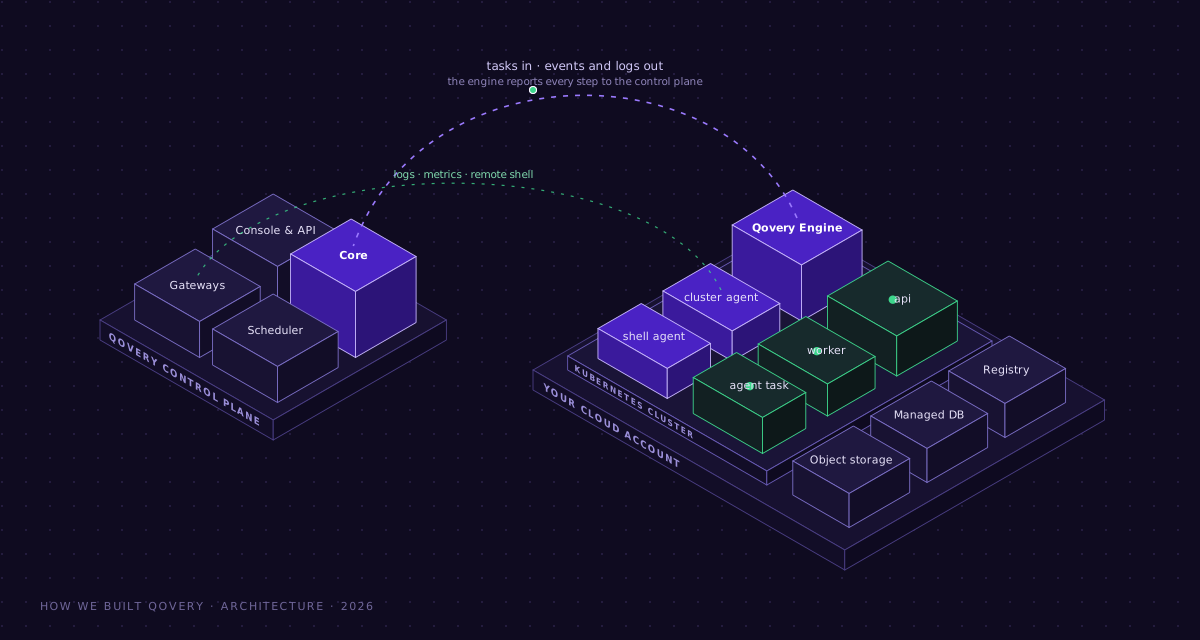
Qovery has two halves. The control plane runs on our side and holds the business logic. Everything that runs your applications lives in your cloud account, as standard Kubernetes, Terraform and Helm resources.
The Qovery Engine is the open-source Rust component that turns a request into Terraform runs, Helm releases and container builds. It can run on our side or inside your own cluster.
A deployment builds images in parallel (and skips the build when the image already exists), then ships each service as an atomic Helm release that rolls back on failure.
The same engine now runs Blueprints (managed cloud services from a catalog), cluster analysis (cost and deprecated APIs) and agent tasks.
The two halves
When you use Qovery, two systems are involved.
The control plane runs in Qovery's own infrastructure. The Console, the CLI, the Terraform provider and the MCP server all talk to it through the same API. It stores your organization, projects, environments and their configuration, and it decides what work needs to happen.
Your cloud account is where everything runs: the VPC, the managed Kubernetes cluster, the registry, the databases and your workloads. Qovery creates these resources with your credentials and they stay yours.
The control plane on our side, the engine, agents and workloads in your cluster
Everything else in this article follows from that split. The control plane decides, and the work happens in your account. Nothing that serves your users' traffic depends on the control plane being up. I come back to this at the end.
The Qovery Engine
The engine is the piece that does the work. It is open source, written in Rust (edition 2024, on tokio), and it is a library: the binary that wraps it and the control plane are not in that repository, but the code that creates and changes resources in your cloud account is.
A few numbers from the October 2026 tree:
Rust in src/
~200,000 lines in 430 files
Rust in tests/
~87,000 lines
Helm charts shipped with the engine
99
Terraform files for cluster bootstrap
AWS 50, GCP 20, Azure 13, Scaleway 8
Four kinds of work
Every piece of work the engine accepts is a request, and every request becomes a task. All tasks implement the same small interface: run, cancel (gracefully or forced), and report what happened.
Four request types, one Task interfaceDiagram source (Mermaid)
flowchart LR
    CP[Control plane] -->|InfrastructureEngineRequest| IT[Infrastructure task<br/>create · upgrade · pause · delete · restart]
    CP -->|EnvironmentEngineRequest| ET[Environment task<br/>deploy · pause · delete · restart]
    CP -->|BlueprintEngineRequest| BT[Blueprint task<br/>create · delete · diff]
    CP -->|ClusterAnalysisEngineRequest| AT[Cluster analysis task<br/>cost and deprecated APIs]
    IT --> T{{Task<br/>run · cancel · report}}
    ET --> T
    BT --> T
    AT --> T
Each request carries a deployment token, the action to perform and a pre-signed upload URL. When the task ends, the engine uploads its full engine.log to that URL, so the log of every operation is kept even if the engine that ran it is gone.
The engine does not reinvent the tools
The engine orchestrates. It renders configuration from Tera templates and drives the same tools a platform team would use by hand:
Terraform or OpenTofu for cloud resources
Helm (with a post-renderer of our own) and kubectl for everything inside Kubernetes
docker buildx with BuildKit for builds, skopeo to copy images between registries
git, plus the cloud CLIs, eksctl and govc for EKS Anywhere on vSphere
We made that choice early and I would make it again. When something breaks, your team can open the Terraform state or run helm history and read exactly what Qovery did. There is no proprietary format standing between you and your infrastructure.
Where the engine runs
The engine can run in two places, and the code names them QoverySide and ClientSide.
Qovery side: the engine runs in our infrastructure and reaches your account with the credentials you gave us.
Client side: the engine runs inside your own cluster, deployed as the qovery-engine Helm chart. It connects out to our gRPC endpoint with a cluster-scoped token, and it forces secret redaction in its logs before anything leaves your cluster. The chart also keeps warm pods per CPU architecture so a task does not wait for a node to boot.
Creating a brand-new cluster starts from our side, since there is no cluster yet to run in. Client-side mode is what regulated teams ask for: the control plane stays with us, and the execution stays in their account.
What happens when you create a cluster
Here are the cluster kinds the engine supports today:
Provider
Managed by Qovery
Self-managed (you bring the cluster)
AWS
EKS
EKS
Google Cloud
GKE
GKE
Azure
AKS
AKS
Scaleway
Kapsule
Kapsule
On-premise
EKS Anywhere on vSphere
Any conformant Kubernetes
For a managed cluster, the sequence looks like this:
Creating a managed clusterDiagram source (Mermaid)
sequenceDiagram
    actor U as You (Console, API, CLI, Terraform)
    participant CP as Control plane
    participant E as Qovery Engine
    participant C as Your cloud account
    U->>CP: Create cluster (provider, region, nodes)
    CP->>E: InfrastructureEngineRequest (Create)
    E->>E: Render Terraform and Helm values from templates
    E->>C: terraform apply (network, IAM, managed Kubernetes)
    Note over E,C: Terraform state is stored in a bucket with a lock table
    E->>C: helm upgrade --install, chart by chart
    E-->>CP: Events and logs for every step
    E->>CP: Cluster outputs (endpoints, identifiers)
    CP-->>U: Cluster ready
The Terraform part creates the cloud resources. The Helm part turns a bare Kubernetes cluster into something you can run production on. Depending on the provider and the cluster's settings, the engine installs:
Traffic and certificates: ingress-nginx, cert-manager, external-dns, and on AWS the load balancer controller. Envoy Gateway is being rolled out next to nginx for the Gateway API, with a dual-stack phase before it becomes the default.
Scaling: Karpenter on EKS (optional, version 1.10), the cluster autoscaler, KEDA, the vertical pod autoscaler, metrics-server.
Secrets: External Secrets Operator, wired to AWS Secrets Manager, Parameter Store or GCP.
A deployment is an EnvironmentEngineRequest. One request can carry eight kinds of services:
Applications, built from a Git repository
Containers, from an image you already have
Databases, PostgreSQL, MySQL, MongoDB or Redis, either as a container or as a managed cloud service
Jobs, as cron jobs or lifecycle jobs that run on start, stop or delete
Helm charts, from a chart repository or a Git repository
Terraform services, run with Terraform or OpenTofu
Routers, for domains and TLS
Agentic workflows, which I cover below
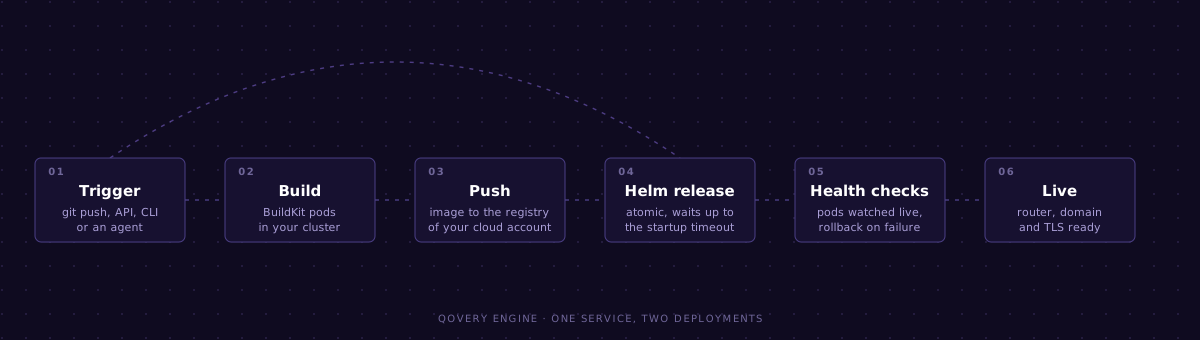
Here is a single service going through the pipeline, twice. The first time every step runs. The second time, the same commit is already built, so the engine goes straight to the release.
One service deployed twice: the second run skips build and push
And here is what the engine does with the whole request:
Inside an EnvironmentEngineRequestDiagram source (Mermaid)
flowchart TD
    A[Request received] --> B[Sync external secrets]
    B --> C{Image already<br/>in the registry?}
    C -- yes --> E
    C -- no --> D[Build in parallel<br/>buildx with BuildKit pods in the cluster]
    D --> E[Create the namespace]
    E --> F[Deploy services in parallel<br/>one atomic Helm release each]
    F --> G{Healthy before the<br/>startup timeout?}
    G -- yes --> H[Deploy the service's router]
    H --> I[Report success]
    G -- no --> J[Helm rolls back to the<br/>previous release]
    J --> K[Report failure, mark services<br/>not yet deployed as cancelled]
Here are the details behind each step.
Builds run in your cluster
The engine spawns BuildKit builder pods in your own cluster through buildx's Kubernetes driver, with the layer cache stored in your registry. Builds are multi-arch. The engine also checks whether a builder was OOM-killed, so a build that ran out of memory is reported as exactly that.
The fastest build is the one you skip
Before building, the engine checks if the image for that commit already exists in the registry. If it does, the build is skipped, unless you force it. Redeploying, rolling back or cloning an environment to a preview does not pay for a build twice.
Everything runs in parallel, within limits
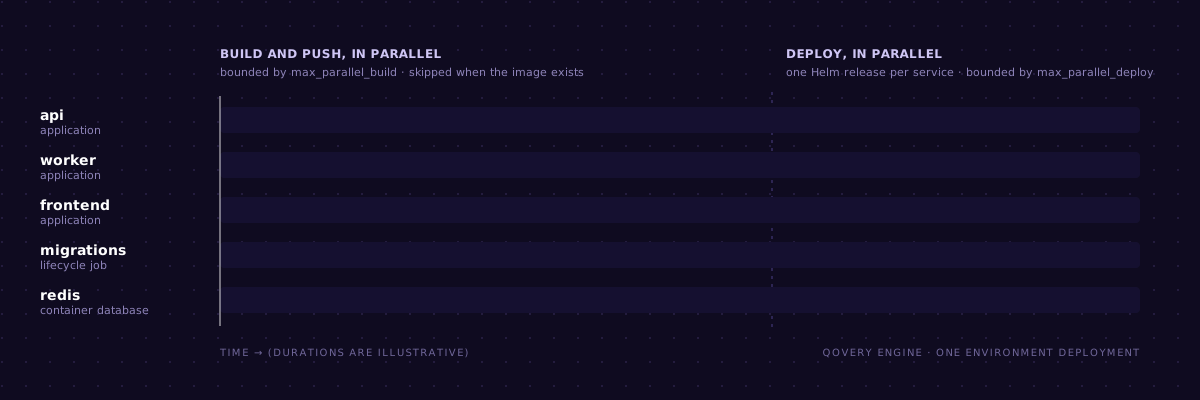
Builds go through a thread pool bounded by max_parallel_build, and deployments through another one bounded by max_parallel_deploy. Without a limit, ten BuildKit pods starting at once on a three-node cluster would compete with the workloads already running there.
Builds in parallel, then deploys in parallel
Deployment stages, which order groups of services (your database before your API, for example), are handled by the control plane before the work reaches the engine.
Every service is an atomic Helm release
Each service is rendered from one of our charts (q-container, q-job, q-terraform-service, q-agentic-workflow) and installed with Helm's atomic and wait flags, using the service's startup timeout. While it waits, a reporter thread watches pods and Kubernetes events, so you see "image pull failed" or "readiness probe failed" in the logs as it happens. If the release does not become healthy in time, Helm rolls it back and the previous version keeps serving traffic.
You can cancel
A deployment can be cancelled, gracefully or by force. The engine checks for cancellation between steps, stops what it can, and marks everything it did not deploy as cancelled.
Blueprints: managed services from a catalog
In 2022, if you wanted a managed PostgreSQL, the engine had Terraform code for it, per cloud provider. That does not scale to every service teams ask for: Kafka, S3 buckets, CloudFront, MongoDB Atlas, Snowflake.
Blueprints solve this. A Blueprint is a manifest (qbm.yml) in our service catalog that points to Terraform, OpenTofu or Helm code. The engine clones the catalog, reads the manifest and renders a small wrapper that uses our own Terraform provider. It also supports a diff action that runs a plan without applying it, so you can review a change before it happens.
Adding a managed service is now a pull request to a catalog, not a change to the engine.
Agents run on the same rails
This is the biggest change since 2022. The engine has a service type called AgenticWorkflow. It runs an AI agent as a Kubernetes job, in your cluster, built on our qovery-ai-runner image, with Claude or Amazon Bedrock as the model provider. Each run gets:
a prompt and a set of MCP servers it is allowed to use
a host allowlist that limits where it can connect
outputs and webhooks to report what it did
Running agents through the engine gives them the same guarantees as any other workload: they run in your account, behind your network rules, with logs and history. In the product we call these agent tasks.
Cluster analysis
The fourth kind of task is read-only. The engine runs KRR against Prometheus and Thanos data to recommend CPU and memory requests per container, and Pluto to find Kubernetes APIs that will be removed in the next version. Upgrading Kubernetes with a deprecated API still deployed is the classic way to break production on a Tuesday, so we check before you upgrade.
How the engine talks back
Every task streams events (debug, info, warning, error) through a channel, tagged with the stage they belong to: infrastructure, environment, blueprint or cluster analysis. Secret values are masked before an event is emitted. In parallel, the engine records how long each step took, which is how we know where deployments spend their time.
On the infrastructure side, the engine also sends back the list of Terraform resources it manages and, when a cluster operation fails, a failure context to help diagnose it. That is the transparency pillar from the 2022 article, finally in the code.
Credentials and secrets
Cloud credentials reach the engine with each request. On AWS the engine works with temporary credentials that include a session token, and uses EKS Pod Identity for components inside the cluster.
Environment variables come with an is_secret flag. Secret ones are written as Kubernetes Secrets and masked in every log line.
External secrets stay in AWS Secrets Manager, Parameter Store or GCP. The External Secrets Operator syncs them into the cluster, so Qovery never stores the secret values.
The pillars, four years later
In 2022 I listed four architectural pillars. Here is how each one held up.
Zero trust. Short-lived credentials per request, secret masking in logs, and an in-cluster engine that opens its own connection out to us. This is stronger than it was in 2022.
Autonomous. Your workloads are Helm releases on a cluster in your account. If the Qovery control plane goes down, you lose the ability to deploy through Qovery, and nothing else. This one held up exactly as designed.
Resilient. Atomic releases with rollback, and cancellation that leaves nothing half-deployed. In 2022 I wrote about availability zones. Today I would put failing cleanly first.
Transparency. Every operation produces a full log, an event stream and step metrics, and the infrastructure Qovery manages is listed back to you. Back then it was a promise for V3; now it ships.
What is new since the 2022 version
Where the engine runs: in 2022 a local engine bootstrapped the cluster, then a remote engine took over inside it. Today the location is a setting, our side or yours.
Clouds: GKE, AKS, self-managed clusters on every provider, and EKS Anywhere for on-premise.
Builds: BuildKit pods in your cluster, skipped when the image already exists.
Managed services: Blueprints from a catalog, with a plan before apply.
Service types: Helm charts, Terraform services, lifecycle jobs and agent workflows.
Scaling and traffic: Karpenter on EKS, KEDA, VPA, and Envoy Gateway rolling out next to NGINX.
Wrapping up
Qovery is still a remote system split in two: a control plane that decides, and an engine that executes in your cloud account with the tools you already know. What changed is the scope. The engine now builds, deploys, provisions managed services from a catalog, analyzes clusters and runs agents, and it can do all of it from inside your own cluster.
The engine is on GitHub. Read it, open an issue, or try Qovery on your own cloud account and watch the engine logs while it creates your first cluster.
Romaric founded Qovery to make Kubernetes accessible to every engineering team. He writes about platform strategy, developer experience, and the future of cloud infrastructure.
Next step
Agents ship fast. Guardrails keep them safe.
Qovery ensures every agent action is scoped, audited, and policy-checked. Start deploying in under 10 minutes.