ECS vs EKS in 2026: The ECS Limits AWS Won't Raise, and When They Matter
If ECS works for your team, no single limit forces you off it. Growing teams still hit a few hard ECS and Fargate quotas that AWS won't raise, starting with 100 target groups per load balancer for preview environments. Here are the limits, the numbers, and how to add EKS for previews without moving production.
If ECS works for your team, stay on it. No single limit forces a team off ECS, and AWS keeps shipping on it: Express Mode, Managed Instances, GPU sharing. Teams move when they grow and start hitting quotas that AWS won't raise.
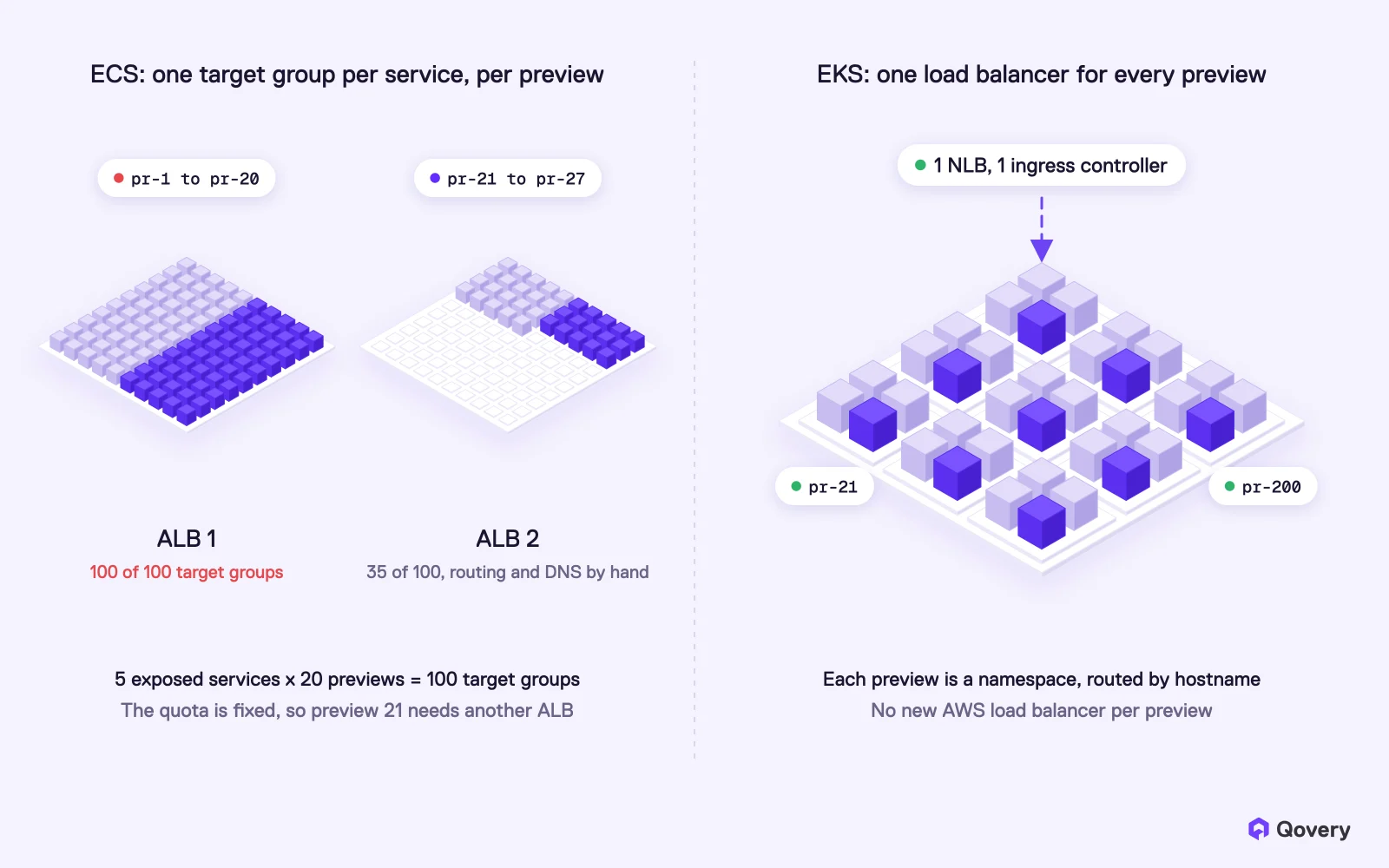
Preview environments hit the wall first. An Application Load Balancer accepts at most 100 target groups, and AWS lists that quota as not adjustable. Each exposed service in each preview needs its own target group, so with 4 or 5 services per environment you get about 20 previews per load balancer.
Fargate has its own ceilings. Launches are capped at 20 tasks per second per Region by default (adjustable on request), there are no daemons, so every agent runs as a sidecar in every task, and there are no GPUs.
Helm charts don't run on ECS. Temporal, Datadog, KEDA, cert-manager and GPU operators ship as Helm charts. On ECS, someone rewrites each one as task definitions and keeps that port up to date.
You don't have to move production first. Keep production on ECS and run preview environments on EKS in the same AWS account. Once previews run on EKS, most of the migration work is already done.
This article started as an internal Slack thread. A team running on ECS had just seen a Qovery demo and liked it, then told us they had no plan to leave ECS because "everything works fine". Someone asked me what single argument would force an ECS team to move.
I've run many ECS to EKS migrations as a cloud architect at Qovery, and my answer was that there isn't one. If ECS works for a team, no single limit forces them off it. Teams move when they grow. Past a certain size, Fargate gets expensive and they start hitting quotas that AWS won't raise.
Here is that answer in full, with each number checked against the AWS documentation in November 2026.
ECS is not standing still
ECS is a good product, and AWS keeps investing in it. In the last year it shipped Express Mode, which gives you a load-balanced HTTPS service from one command, and ECS Managed Instances, which bring AWS-managed EC2 capacity with GPU health checks, fractional GPUs and NVIDIA MPS sharing. Express Mode makes the same "simple" promise most platforms make.
A team of ten running a handful of services on ECS has little reason to move. The limits below show up later, as you add environments, services, tools and people.
ECS and Fargate limits that AWS won't raise
AWS splits its quotas into adjustable ones, which you can raise with a support request, and fixed ones. These are the fixed ones that growing teams run into, from the ECS quotas page and the Application Load Balancer quotas page:
Quota
Default
Adjustable
Where it hurts
Target groups per Application Load Balancer
100
No
Preview environments, many small services
Load balancers per target group
1
No
You can't share a target group across ALBs
Target groups per ECS service
5
No
Services exposed on many ports or paths
Containers per task definition
10
No
App plus sidecars for logs, APM, security, proxy
Tasks per service (desired count)
5,000
No
Very large services (1,000 with service discovery)
Tasks launched per service per minute on Fargate
500
No
Fast scale-out of one service
Services per Service Connect namespace
300
No
Large service meshes
Fargate On-Demand sustained launch rate
20 per second
Yes, on request
Big deploys and scale-out across the account
Most teams never reach 5,000 tasks per service. The first row is the one that hurts smaller teams.
Preview environments: 100 target groups per load balancer
A preview environment is a full copy of your stack for one pull request: the frontend, the API, the workers and a database, reachable on its own URL. On ECS, each exposed service in each preview is its own ECS service, and an ECS service sends traffic through an ALB target group.
An Application Load Balancer accepts 100 target groups, and AWS won't raise that. A target group belongs to exactly one load balancer. With 4 or 5 exposed services per environment, one ALB holds about 20 previews, fewer once production and staging take their share.
On ECS, every exposed service in every preview needs its own ALB target group, so one ALB fills up at about 20 previews. On EKS, one ingress controller behind one NLB routes every preview by hostname
After that, you split previews across load balancers and manage the routing yourself: which preview lives on which ALB, which DNS record points where, which listener rules to clean up when a pull request closes. Rules per ALB are capped too (100 by default, adjustable). AWS's own Express Mode works the same way: it puts up to 25 services behind one ALB and creates a new ALB when that fills up.
The ALB is only part of the work. ECS has no equivalent of a Kubernetes namespace, so a preview is a set of loose resources you create and delete together: task definitions, services, target groups, listener rules, security groups, Cloud Map entries, a database. Each team writes that glue in Terraform or CI scripts and maintains it.
On EKS, each preview is a namespace. One ingress controller behind one Network Load Balancer routes every preview by hostname, so preview number 21 or 200 needs no new AWS load balancer. Deleting the namespace deletes the preview.
For a small team on ECS, this is usually the first wall. It is also where a hybrid setup makes the most sense (see below).
Helm charts and agents: no daemons on Fargate
Most infrastructure software now ships as a Helm chart: Temporal, Datadog, KEDA, cert-manager, the NVIDIA GPU operator, most databases' operators. None of these charts run on ECS. A team that wants one of them on ECS rewrites it as task definitions and keeps that port in sync with every upstream release. This is the first pain larger ECS teams bring up with us.
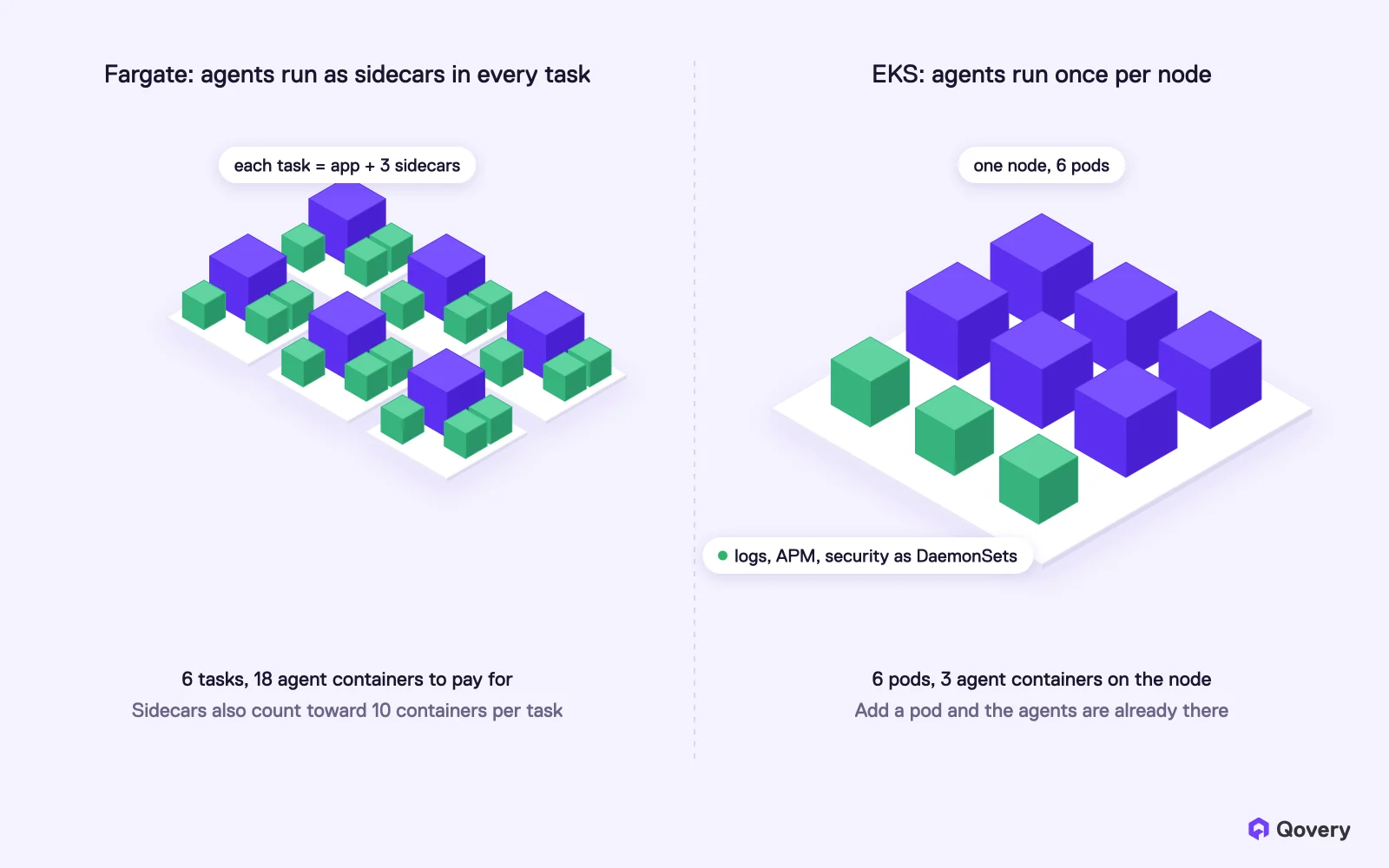
Fargate also has no DAEMON scheduling strategy. On EC2 or Kubernetes, a log shipper, an APM agent or a security scanner runs once per node. On Fargate there is no node you can reach, so each agent runs as a sidecar container inside every task. You pay for that CPU and memory in every task, and the sidecars count toward the 10-containers-per-task-definition limit.
On Fargate, every task carries its own log, APM and security sidecars. On EKS, each agent runs once per node as a DaemonSet and serves every pod on it
The ECS EC2 launch type and ECS Managed Instances do support daemons. Moving off Fargate fixes this part without leaving ECS, at the cost of managing capacity again.
Keep production on ECS. Run preview environments on EKS.
Qovery runs EKS in your own AWS account and creates a full-stack environment for every pull request, with one load balancer for all of them. Start with previews, move production later if you want.
All Fargate launches in a Region share one account-wide budget: a burst of 100 tasks, then 20 tasks per second sustained by default. The same budget covers EKS pods running on Fargate. AWS will raise it on request. A single service also can't launch more than 500 Fargate tasks per minute, and that one is fixed.
The bigger cost is the cold start. Each Fargate task starts in its own fresh microVM, so there is no node-level image cache to reuse, and every task pulls its image again. In the migrations we run, that is often 30 to 60 seconds for a typical image, longer for large ones. AWS's answer is Seekable OCI lazy loading, which helps but has to be set up per image. On EKS, pods land on nodes that are already running and usually have the image cached.
Fargate has no GPU support. Any AI inference or training next to an ECS app means running ECS on EC2 or Managed Instances anyway. That is also why sandboxes and agent runtimes, which need fast starts, GPUs and many short-lived isolated workloads, are mostly built on Kubernetes today.
What Fargate costs at steady load
At on-demand list prices in us-east-1, Fargate charges $0.04048 per vCPU-hour and $0.004445 per GB-hour. A 2 vCPU, 8 GB task running all month costs about $85. An m6i.large EC2 instance with the same 2 vCPU and 8 GB costs $0.096 per hour, about $70 a month. That is roughly 20% more for Fargate when the EC2 instance is fully used.
Sidecars in every task. The log, APM and security agents above add CPU and memory to each task.
Spot. Fargate Spot gives up to 70% off. EC2 Spot goes up to 90% off, and on EKS, Karpenter packs pods onto Spot instances and removes empty nodes.
Fargate is still a good deal for bursty or scale-to-zero workloads, and for teams that never want to think about nodes. For services that run all day at steady load, EC2 capacity costs less, whether you reach it through ECS on EC2 or through EKS.
Running ECS and EKS side by side
The team from the Slack thread didn't want to migrate. They wanted preview environments for each pull request, and wanted production to stay on ECS. That is a sound plan, and a common one.
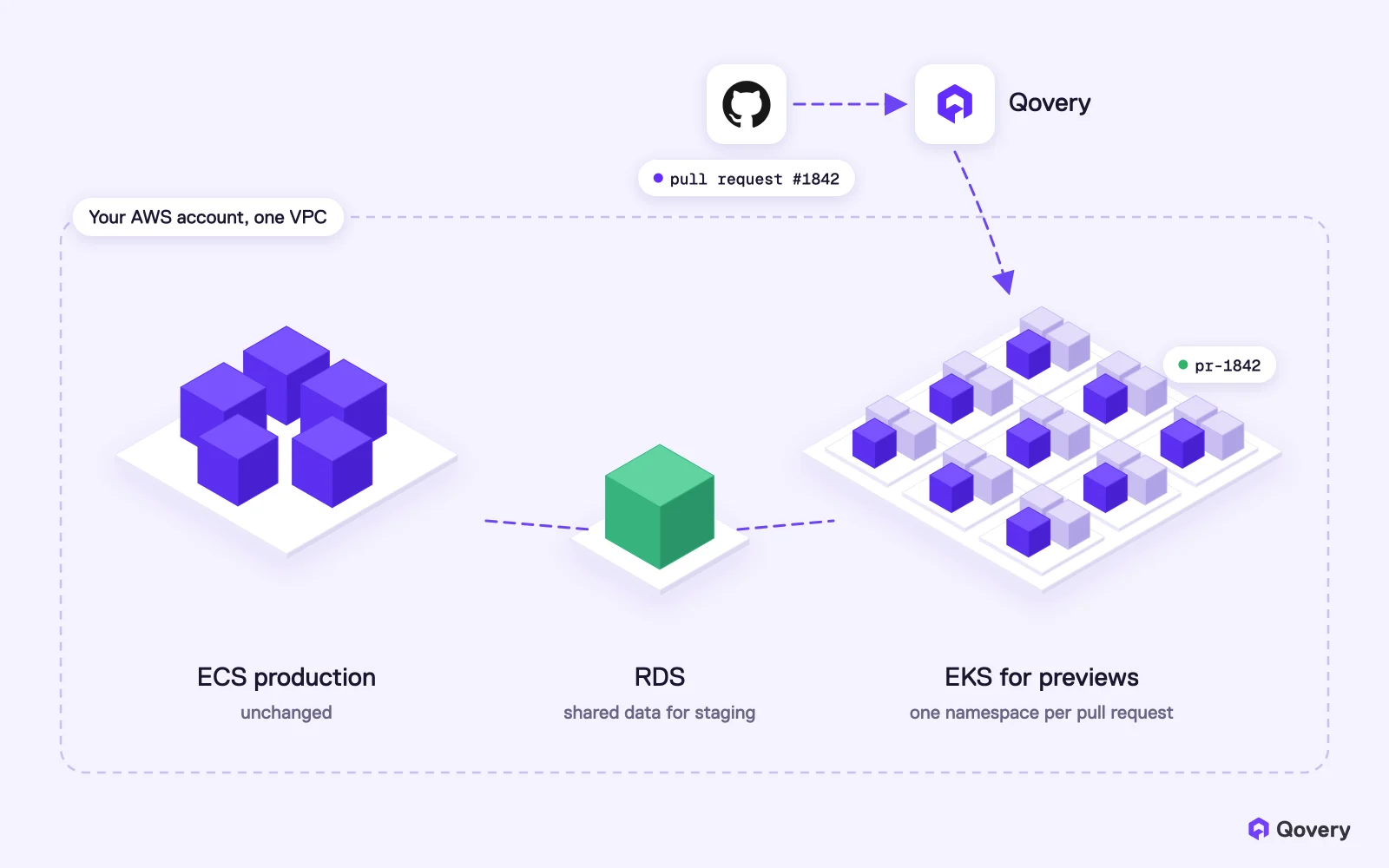
You can keep production on ECS and add an EKS cluster in the same AWS account for preview environments only. Previews reach the shared services they need (a staging RDS instance, an S3 bucket, an internal API on ECS) over the same VPC or a VPC peering. Production doesn't change.
Production stays on ECS. Qovery runs an EKS cluster in the same AWS account for one preview environment per pull request, connected to the shared RDS instance over the VPC
Running two platforms for good makes little sense, and the hybrid setup doesn't have to last. Building previews on EKS means writing down every service, variable, port, database and dependency of your stack as an environment definition. Once that blueprint exists and previews run on it every day, moving production is mostly a clone of that environment to a production cluster and a DNS cutover, with ECS kept as the fallback until you're confident.
How Qovery fits
Qovery is an Agentic DevOps platform that runs Kubernetes in your own cloud account. On AWS, it creates and manages an EKS cluster in your account, with Karpenter for node scaling, and you never write Kubernetes YAML.
For a team on ECS, the usual path is:
Connect your AWS account and let Qovery create an EKS cluster for non-production workloads.
Describe your stack once: the services from your task definitions, their variables and ports, and the databases they need. Qovery can create databases per preview or point previews at shared ones.
Turn on preview environments for your repositories. Every pull request gets a full copy of the stack in its own namespace, on its own URL, behind one load balancer. The preview is deleted when the pull request closes.
Add the Helm charts you couldn't run on ECS as services in the same environment.
Move production later, or never. When you're ready, clone the environment to a production cluster and switch DNS. If ECS stays the right home for production, previews keep running as they are.
Count the target groups on your busiest ALB. Above 60, plan now.
Count how many preview environments you'd run on a busy day, multiplied by the exposed services per preview.
List the Helm charts you'd install tomorrow if you could, and the ones you've already ported to task definitions.
Count the sidecars per task definition and the CPU and memory they reserve across all tasks.
Check your Fargate bill for services running 24/7 at steady load, and compare with EC2 on-demand and Spot.
Check whether any team plans GPU inference, agent sandboxes or customer-hosted deployments in the next 12 months.
Ask who maintains the ECS glue (Terraform, CI scripts, preview scripts) and what happens if that person leaves.
If most answers are "not yet", ECS is the right choice for now. If two or three are already painful, start with preview environments on EKS.
Frequently asked questions
Is there a limit on target groups per Application Load Balancer?
Yes. An Application Load Balancer supports up to 100 target groups, and AWS lists this quota as not adjustable. A target group can be attached to only one load balancer. Teams that need more split their services across several ALBs.
How many preview environments can I run on ECS?
There is no ECS limit on environments as such, but each exposed service in each preview needs its own ALB target group, and one ALB holds 100. With 4 or 5 exposed services per environment, one ALB holds about 20 previews. Beyond that, you add load balancers and manage the routing and DNS between them yourself.
Can I run Helm charts on ECS?
No. Helm charts deploy Kubernetes resources, and ECS is not Kubernetes. To run software that ships as a Helm chart on ECS, you rewrite it as ECS task definitions and services and maintain that port yourself.
Does AWS Fargate support DaemonSets or daemons?
No. Fargate doesn't support the ECS DAEMON scheduling strategy, so agents for logs, monitoring or security run as sidecar containers in every task. The ECS EC2 launch type, ECS Managed Instances and EKS on EC2 nodes all support daemons.
Does Fargate support GPUs?
No. GPU workloads on AWS containers run on ECS with EC2 or Managed Instances, or on EKS with GPU nodes.
Is Fargate more expensive than EC2?
For workloads running all the time at steady load, usually yes. At us-east-1 list prices, a 2 vCPU, 8 GB Fargate task costs about $85 a month against about $70 for an m6i.large, and fixed task sizes and sidecars widen the gap. Fargate wins for bursty or scale-to-zero workloads.
Should I migrate from ECS to EKS?
If ECS works and none of the limits above affect you, no. Teams usually move when they need many preview environments, want to run Helm-packaged software, need GPUs or daemons, or want to deploy outside a single AWS account. You can start by running preview environments on EKS and keep production on ECS.
Can I keep production on ECS and run preview environments on EKS?
Yes. Run an EKS cluster in the same AWS account for previews, and reach shared resources like RDS over the same VPC or a VPC peering. With Qovery, the EKS cluster runs in your account, each pull request gets its own environment, and the same environment definition can later deploy production.
Guillaume is a Staff Solutions Architect at Qovery. He helps customers troubleshoot production infrastructure and writes about Kubernetes operations, AI agents, and reliable cloud platforms.
Next step
Keep production on ECS. Run preview environments on EKS.
Qovery runs EKS in your own AWS account and creates a full-stack environment for every pull request, with one load balancer for all of them. Start with previews, move production later if you want.