

Overview
This guide shows you how to connect an API gateway in front of 3 different applications using NGINX, a lightweight web server capable of handling thousands of requests per second.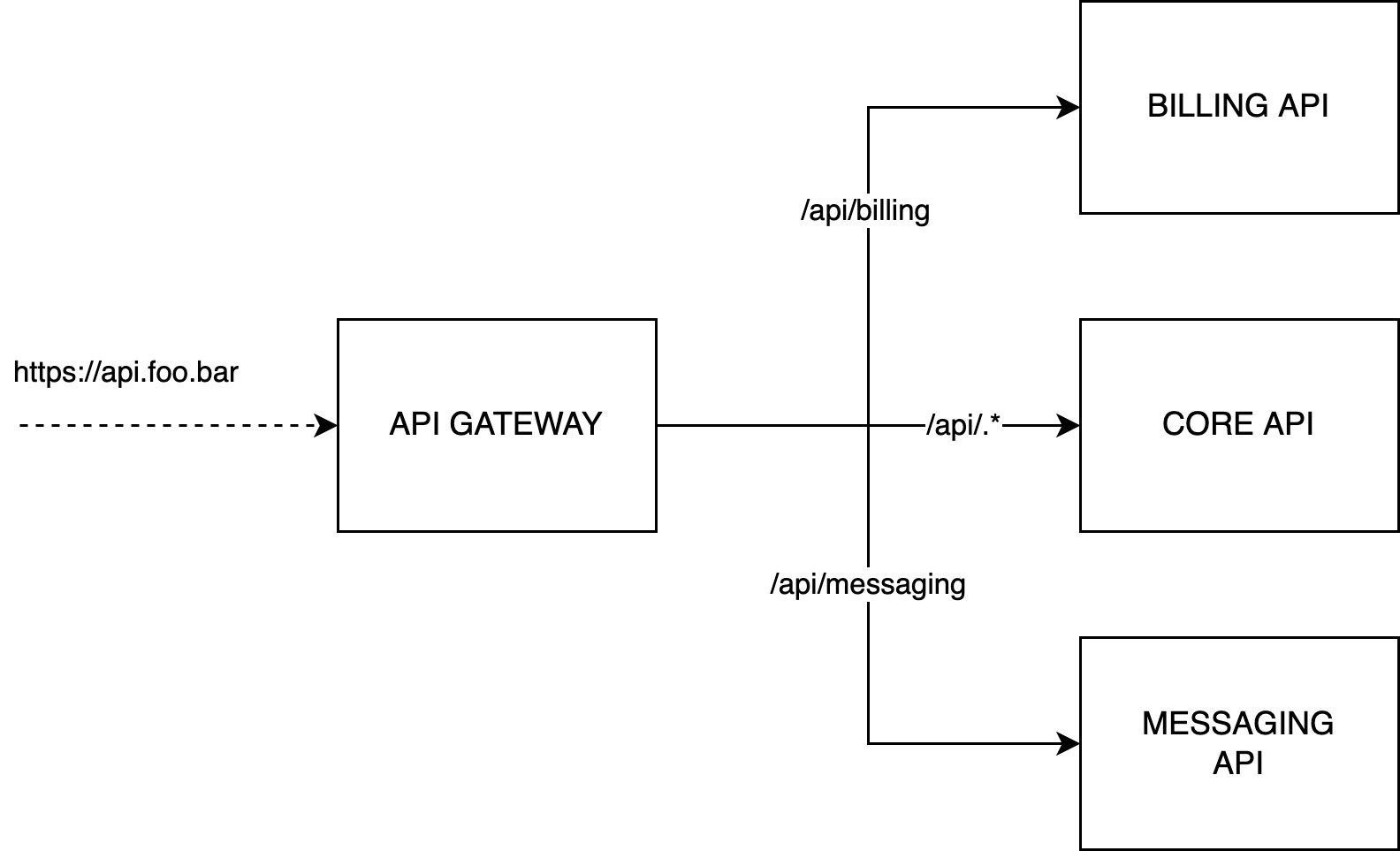
Prerequisites
- At least one application created in Qovery
- Ideally three applications (billing API, core API, messaging API), though one application is sufficient to follow this tutorial
Step 1: Clone API Gateway Template
Fork the NGINX gateway repository:Step 2: Edit Configuration Files
routes.conf.template
The routing configuration directs incoming traffic to the appropriate backend services:Important Notes:
- Rules apply sequentially - the first match wins
- Internal network uses HTTP protocol
- External connections use HTTPS
- Complex path patterns are supported
Step 3: Create API Gateway App in Qovery
Create a new application in Qovery with the following settings:- Build mode: Dockerfile
- Port: 80
Step 4: Configure Environment Variables
Create three environment variable aliases with ENVIRONMENT scope:Finding the Correct Environment Variables
To find the right environment variable for each service:- Access the target application in the Qovery Console
- Extract the application ID from the URL:
- Take the first segment of the ID:
082e36c4 - Prepend ‘Z’:
Z082e36c4 - Search for environment variables containing this prefix
The environment variable with this prefix and suffix
_HOST_INTERNAL is the one you need to use.Step 5: Set Up Custom Domain
Add a custom domain to expose the gateway with your chosen domain name. Navigate to your API gateway application settings and configure your custom domain.Step 6: Deploy
- Commit your changes to the
routes.conf.templatefile - Push to your repository
- Deploy the application from the Qovery Console
Next Steps

NGINX Gateway Repository
View the template repository with example configurations
Application Configuration
Learn more about configuring applications on Qovery
Environment Variables
Detailed guide on managing environment variables
Custom Domains
Configure custom domains for your applications