Benefits of Using the AWS Elastic Load Balancing
The major use for an ELB is to ensure the elastic and high availability of your resources. There are four types of forwarding rules that you can assign to a load balancer: HTTP, HTTPS, TCP, and UDP.
The four AWS load balancer types explained: Application, Network, Gateway and Classic, when to use each, and how to configure an ALB.

The major use for an ELB is to ensure the elastic and high availability of your resources. There are four types of forwarding rules that you can assign to a load balancer: HTTP, HTTPS, TCP, and UDP.
Some of the benefits of ELB include the following:
As of today, AWS supports four types of load balancers: Classic Load Balancers, Network Load Balancers (NLBs), Application Load Balancers (ALBs), and Gateway Load Balancers (GWLBs). This article will focus on the first three, as their sole purpose is to distribute incoming traffic across multiple targets.
The Classic Load Balancer is a previous-generation load balancer and, currently, is only recommended for scenarios where you still have instances running on an EC2-Classic network; if you do not, then AWS recommends that you use an NLB or an ALB, as the features provided by the Classic Load Balancer can be replaced by either.
This is the simplest form of load balancer that was originally used for classic EC2 instances. It operates both at the connection level and the request level. The main disadvantage of this type of load balancer is that it does not support some features, such as host-based routing or route-based routing. Once configured, the load balancer distributes the load among the servers regardless of what is on the server, which, in certain situations, can reduce efficiency and performance.
The Application Load Balancer (ALB) is a load balancer at the seventh layer of the OSI model, and it can route the network packet to different backend services based on the content of the network packet. Unlike running an elastic load balancer for each service, an ALB can balance network traffic for multiple backend services. For example, a URL containing "/api" and a URL containing "/signup" will be routed to different backend services.
This type of load balancer is a new generation of load balancer from AWS that provides native support for HTTP/2 and WebSocket protocols. By multiplexing requests over a single connection, HTTP/2 reduces network traffic. WebSocket allows developers to configure persistent TCP connections between client and server while minimizing power consumption.
Compared with the Classic Load Balancer, the ALB supports more features, such as the following:
If the application needs to achieve extreme performance and static IP, AWS recommends that you use a Network Load Balancer (NLB).
The NLB is optimized to handle bursty, unstable traffic patterns and rapidly fluctuating workloads. Providing high throughput, NLB can scale to handle millions of requests per second. So if your workload requirements are to handle bursty workflows at the transport layer or require extreme network performance, then you may consider using an NLB.
In addition, NLB automatically provides a static IP that can be used as the frontend IP of the balancer itself. It is also possible to assign a resilient IP address to each subnet enabled for the load balancer. This allows the NLB to be incorporated into your existing firewall security policy and avoid the problems associated with DNS caching.
Next, learn how to create an ALB through the AWS Management Console, a web-based interface.
Decide which two Availability Zones you'll utilize for your EC2 instances before you start. In each of these Availability Zones, configure your virtual private cloud (VPC) with at least one public subnet. The load balancer is configured using these public subnets. You can instead launch your EC2 instances in one of these Availability Zones' other subnets.
In each Availability Zone, start at least one EC2 instance. Make each EC2 instance have a web server installed, such as Apache. Ensure that these instances' security groups enable HTTP access on port 80.
Then complete the following steps.
To create an ALB, complete the following steps:
4.  Choose "Create load balancer".

5.  Choose "Create for ALB".
To configure your cloud load balancer, complete the following steps:
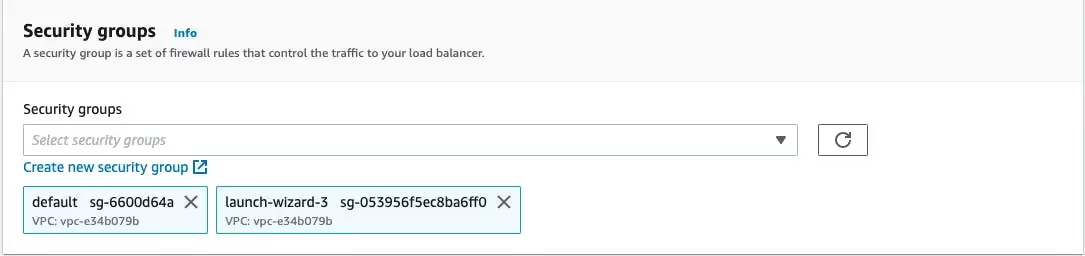
To have ELB configure a security group for your load balancer on your behalf, complete the following steps:
Create a target group to use in request routing. The default rule for your listener routes requests to targets registered in that group. The load balancer checks the health of the targets in this target group with the health check settings defined for the target group.
To configure your target group, complete the following steps in the Configure Routing section:
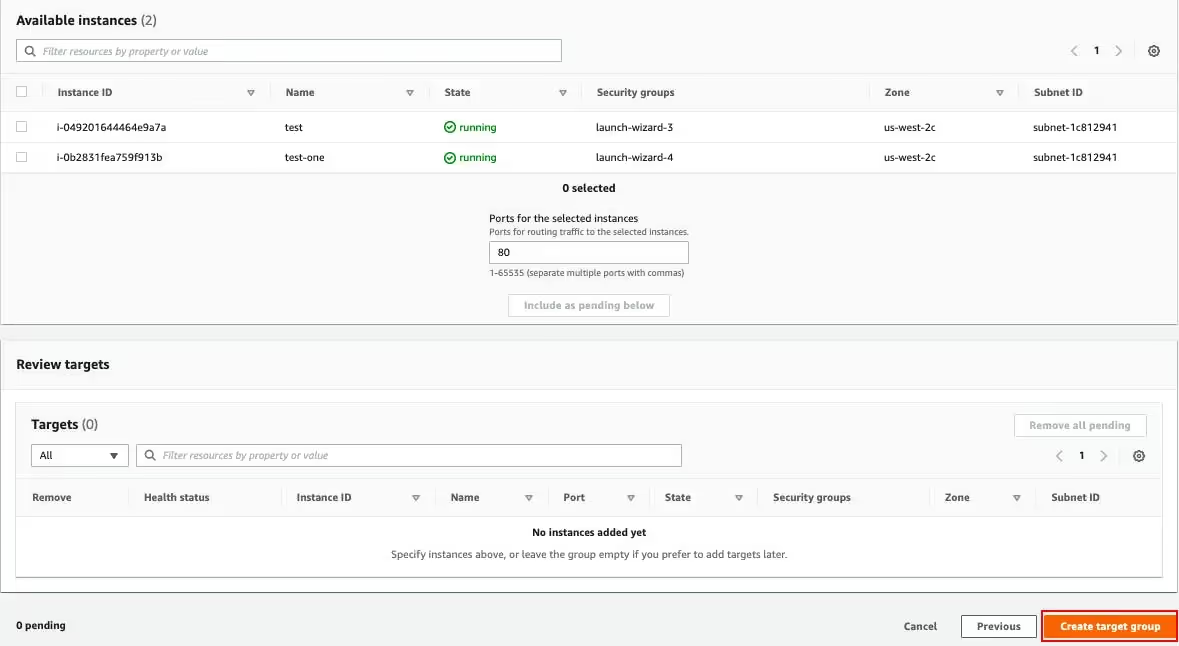
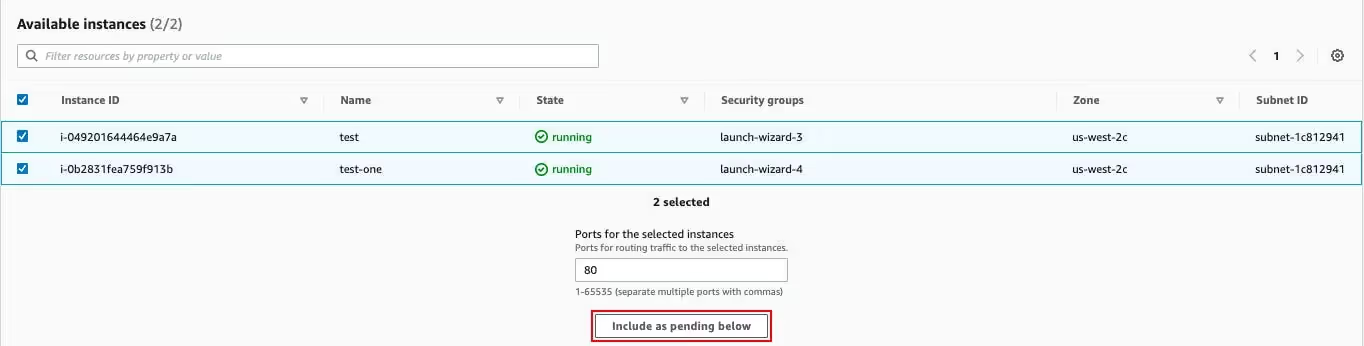
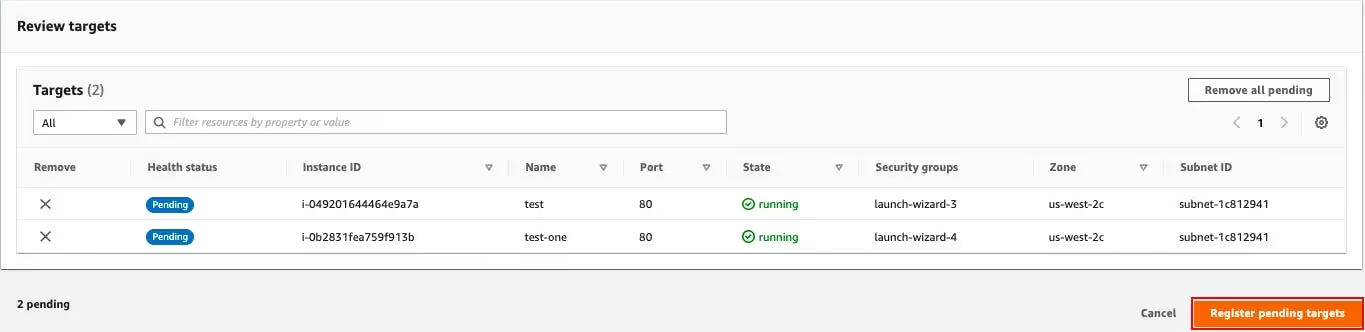
To register your instances with the target group, complete the following steps on the Register Targets page:
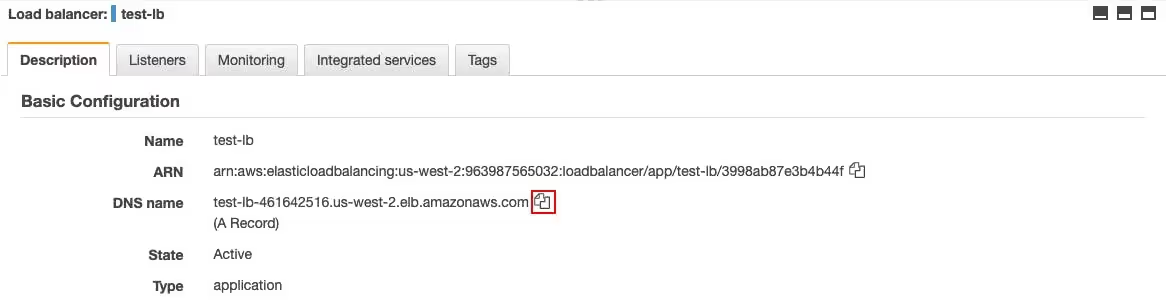
Review the summary of your settings before creating your load balancer. After creating the load balancer, verify that it's sending traffic to your EC2 instances.
To create and test your load balancer, complete the following steps:

In this article, you learned basic information about the load balancers used in AWS (excluding GWLBs). You also learned to create an ALB with a single EC2 instance.
Some key points to remember are as follows:
The unique needs of your application use case-such as whether you need end-to-end SSL/TLS encryption or whether you want path-based or host-based routing-will determine the type of load balancer that is best for you.
Four. The Classic Load Balancer is the original, operating at both connection and request level and now largely legacy. The Application Load Balancer works at layer 7 and routes on request content. The Network Load Balancer works at layer 4 for extreme performance and static IPs. The Gateway Load Balancer fronts third-party virtual appliances.
An ALB understands HTTP, so it can route by host, path, header or query string, terminate TLS and integrate with authentication. An NLB operates at the TCP and UDP level, forwards without inspecting content, and delivers much higher throughput with lower latency plus a static IP per Availability Zone.
Use an ALB for HTTP and HTTPS applications that need content-based routing, which covers most web workloads. Use an NLB when you need extreme performance, static IPs, or you are load balancing non-HTTP protocols. Use a Gateway Load Balancer only when inserting virtual network appliances. Avoid the Classic Load Balancer for anything new.
A target group is the set of registered destinations a listener rule forwards to, typically EC2 instances, IP addresses or Lambda functions. It also owns the health check configuration, so the load balancer stops sending traffic to a target that stops responding on the configured port and path.
At least two, which is why the console asks you to select them during creation. Spreading targets across zones is what makes the load balancer a high-availability component rather than a single point of failure that happens to sit in front of several instances.
Romaric founded Qovery to make Kubernetes accessible to every engineering team. He writes about platform strategy, developer experience, and the future of cloud infrastructure.
Qovery ensures every agent action is scoped, audited, and policy-checked. Start deploying in under 10 minutes.