Blog
Product
Terraform
2
minutes

Export Your Qovery Configuration into Terraform Manifest in One Click

At Qovery, we've always prided ourselves on the usability and convenience of our web interface. It's where most of our users begin their journey, configuring and deploying applications with ease and speed. Many users start configuring their applications on our intuitive web interface, validate the successful deployment, and then transition to writing their configurations with the powerful infrastructure-as-code tool, Terraform, utilizing the Qovery Terraform Provider.
Romaric Philogène
CEO & Co-founder
Summary
Twitter icon
linkedin icon

This transition, while empowering, can often be time-consuming and complex. Manually converting the configurations from Qovery's platform into Terraform scripts can be tedious and error-prone. To streamline this process and make your life easier, we're thrilled to introduce our latest feature – the one-click export of your app configuration to a Terraform manifest.

Feature Overview

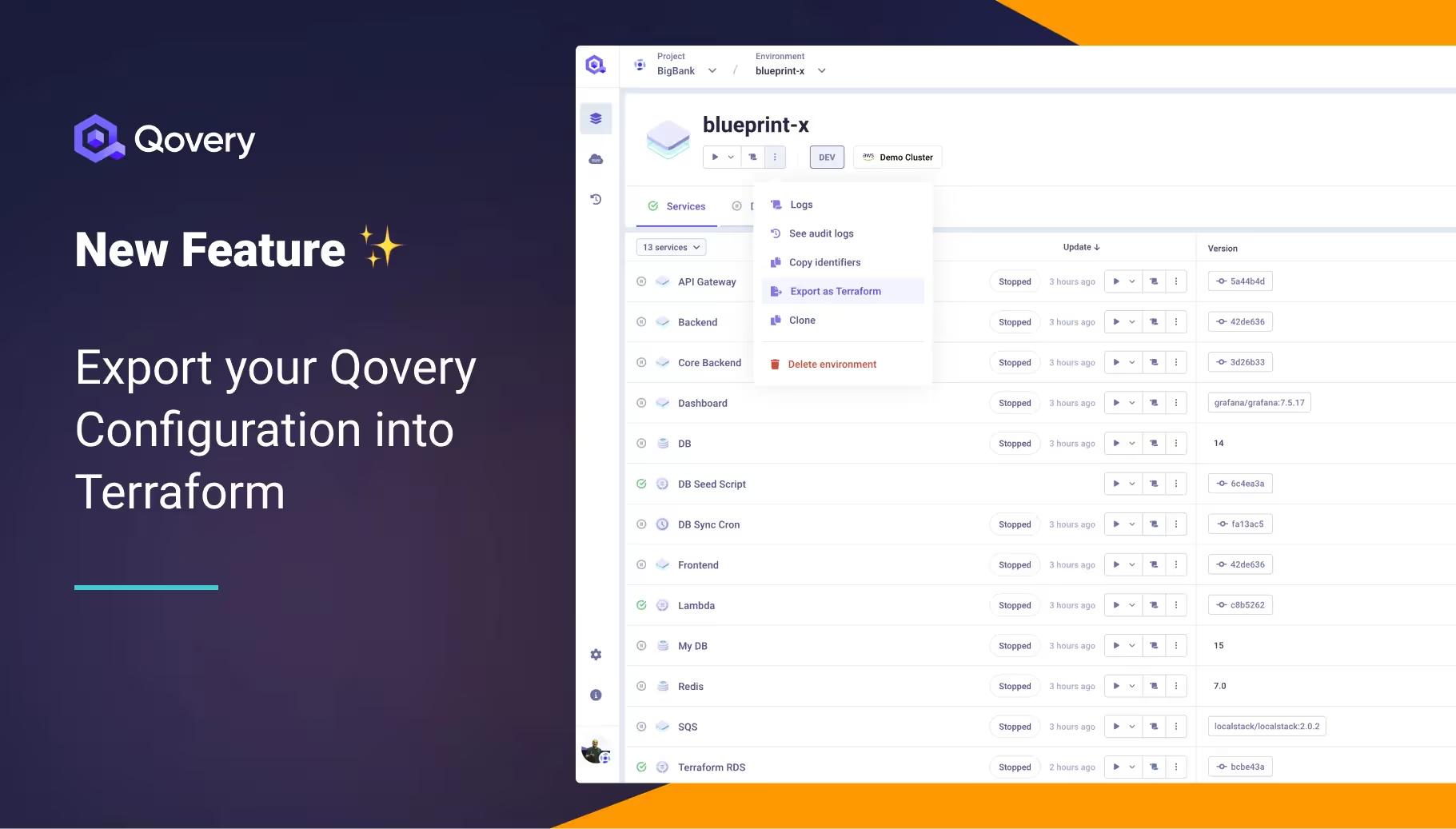
With just one click, our users can now generate a complete Terraform configuration file from their existing application setup on Qovery. This feature simplifies the transition to Terraform, significantly reducing the time and effort required to adopt an infrastructure-as-code approach for managing your app's deployment.

Take a look yourself ⬆️

How it Works

Leveraging this new feature is as straightforward as it gets. In your Qovery environment:

  1. Click on the ellipsis button of your environment.
  2. Click on the newly added "Export as Terraform" button.
  3. A popup will appear, and you can select whether you want to export the secrets (only for admin).
  4. Qovery will instantly generate a Terraform manifest based on your existing configurations, providing a downloadable file.

You can then use this exported manifest as you would with any other Terraform file.

Why It's a Game Changer

  1. Simplicity: This feature eliminates the need for manual script writing. Qovery does the hard work for you, converting your configurations into a Terraform manifest, enabling you to manage your infrastructure effortlessly.
  2. Version Control: The new feature makes it easier than ever to keep track of changes and manage versions of your setup. This improves collaboration and transparency among your team.
  3. Consistency and Reusability: The exported Terraform code can be used across different environments, ensuring a consistent infrastructure setup. This not only saves time but also minimizes errors that could arise from varying configurations.
  4. Collaboration: With infrastructure as code, Engineering and DevOps teams can now access, review, and improve it, promoting collaboration within your team.

Conclusion

Qovery's one-click export to Terraform feature is an essential step in redefining how DevOps engineers and Developers manage their infrastructure. We're excited to see how this feature simplifies your workflows and allows you to focus more on coding and less on managing infrastructure. Experience a new level of convenience in your infrastructure management by trying out this innovative feature today!

Resources

Share on :
Twitter icon
linkedin icon
Ready to rethink the way you do DevOps?
Qovery is a DevOps automation platform that enables organizations to deliver faster and focus on creating great products.
Book a demo

Suggested articles

DevOps
 minutes
TPUs vs. GPUs: The DevOps Guide to AI Hardware Selection

Stop guessing on AI hardware. This DevOps guide details when to use TPUs vs. GPUs for optimal performance, cost, and framework compatibility in MLOps.

Mélanie Dallé
Senior Marketing Manager
Cloud
Business
10
 minutes
The DevOps Guide to Docker Monitoring: Tools, Best Practices, and Unified Observability

Stop tool sprawl. Compare top Docker monitoring tools (Prometheus, Datadog, Qovery) and learn how unified observability simplifies K8s debugging and speeds up feature delivery.

Romaric Philogène
CEO & Co-founder
Cloud
Heroku
Internal Developer Platform
Platform Engineering
9
 minutes
The Top 8 Tools to Build a Zero-Toil PaaS on Your Cloud

Stop managing K8s complexity. Discover the top 8 platform tools (Qovery, Rancher, Dokku) that let you build a customizable, zero-maintenance PaaS on your cloud.

Morgan Perry
Co-founder
Kubernetes
 minutes
How to Deploy a Docker Container on Kubernetes: Step-by-Step Guide

Simplify Kubernetes Deployment. Learn the difficult 6-step manual process for deploying Docker containers to Kubernetes, the friction of YAML and kubectl, and how platform tools like Qovery automate the entire workflow.

Mélanie Dallé
Senior Marketing Manager
Observability
DevOps
 minutes
Observability in DevOps: What is it, Observe vs. Monitoring, Benefits

Observability in DevOps: Diagnose system failures faster. Learn how true observability differs from traditional monitoring. End context-switching, reduce MTTR, and resolve unforeseen issues quickly.

Mélanie Dallé
Senior Marketing Manager
DevOps
Cloud
8
 minutes
6 Best Practices to Automate DevSecOps in Days, Not Months

Integrate security seamlessly into your CI/CD pipeline. Learn the 6 best DevSecOps practices—from Policy as Code to continuous monitoring—and see how Qovery automates compliance and protection without slowing development.

Morgan Perry
Co-founder
Heroku
15
 minutes
Top 10 Heroku Alternatives: When Simplicity Hits the Scaling Wall

Escape rising Heroku costs & outages. Compare top alternatives that deliver PaaS simplicity on your own cloud and scale without limits.

Mélanie Dallé
Senior Marketing Manager
Product
Infrastructure Management
Deployment
 minutes
Stop tool sprawl - Welcome to Terraform/OpenTofu support

Provisioning cloud resources shouldn’t require a second stack of tools. With Qovery’s new Terraform and OpenTofu support, you can now define and deploy your infrastructure right alongside your applications. Declaratively, securely, and in one place. No external runners. No glue code. No tool sprawl.

Alessandro Carrano
Head of Product

It’s time to rethink
the way you do DevOps

Say goodbye to DevOps overhead. Qovery makes infrastructure effortless, giving you full control without the trouble.