
Hey Team,
Quick reminder: our live webinar, "Heroku to AWS in one command, with an agent doing the work," runs this Thursday, September 24 from 5:00 to 6:00 PM. Guillaume Da Silva and Romaric Philogène migrate a real Heroku app onto AWS live, agent doing the work end to end. Join the live webinar.
This release opens Agent Tasks to everyone in beta, adds a migration path from existing managed databases into blueprints, and gives clusters the same deployment history and logs services already had.
🤖 Agent Tasks: run AI agents on your own infrastructure
Running an AI agent safely used to mean sending your data to someone else's infrastructure, or spending weeks building your own event receivers, schedulers, and Helm charts to keep it on your side of the perimeter.
Agent Tasks treat an AI agent as a first-class workload on Qovery, with the same infrastructure control, network boundaries, and data residency as any other service, and you don't have to start from a blank prompt to get one running. Ready-made templates already cover the common use cases:
- Build & deployment optimizer: reviews recent builds and deployments, flags slow or wasteful steps.
- Incident analyser: investigates an alert, including a Honeybadger variant, and pulls the context behind it.
- Jira coding agent: turns a ticket into a PR without leaving the tracker.
- Linear coding agent: same workflow, wired to Linear issues.
Live in open beta today, available to everyone. Read the full story: Stop Building Your Own Agent Infrastructure. Meet Agent Tasks, or jump into the getting started guide.
🧱 Database Blueprints: migrate an existing managed database, plus Redis and Valkey
Legacy Qovery managed databases were hard to extend with new capabilities like read replicas, which is why the underlying system got rebuilt on blueprints. That left teams still running the old managed PostgreSQL or MySQL with no path onto the new one, short of re-provisioning from scratch.
There's now a migration path that adopts your live RDS instance into a blueprint via Terraform import: no re-provisioning, no data movement, no change to endpoint or password, so your apps keep their existing connection variables. A preview runs against the live instance first, and a safety gate blocks any plan that would replace or destroy it. Covers AWS PostgreSQL 14 through 17 today, and isn't self-service yet, reach out through the Console's help button or your Slack channel to get one scheduled. The catalog also grew with a new Redis and Valkey blueprint, and a password change on any blueprint database now reaches the underlying instance instead of just the stored value.
See the Blueprints migration guide for what's supported and how it runs.
📊 Cluster Deployments: the same history and logs services already had
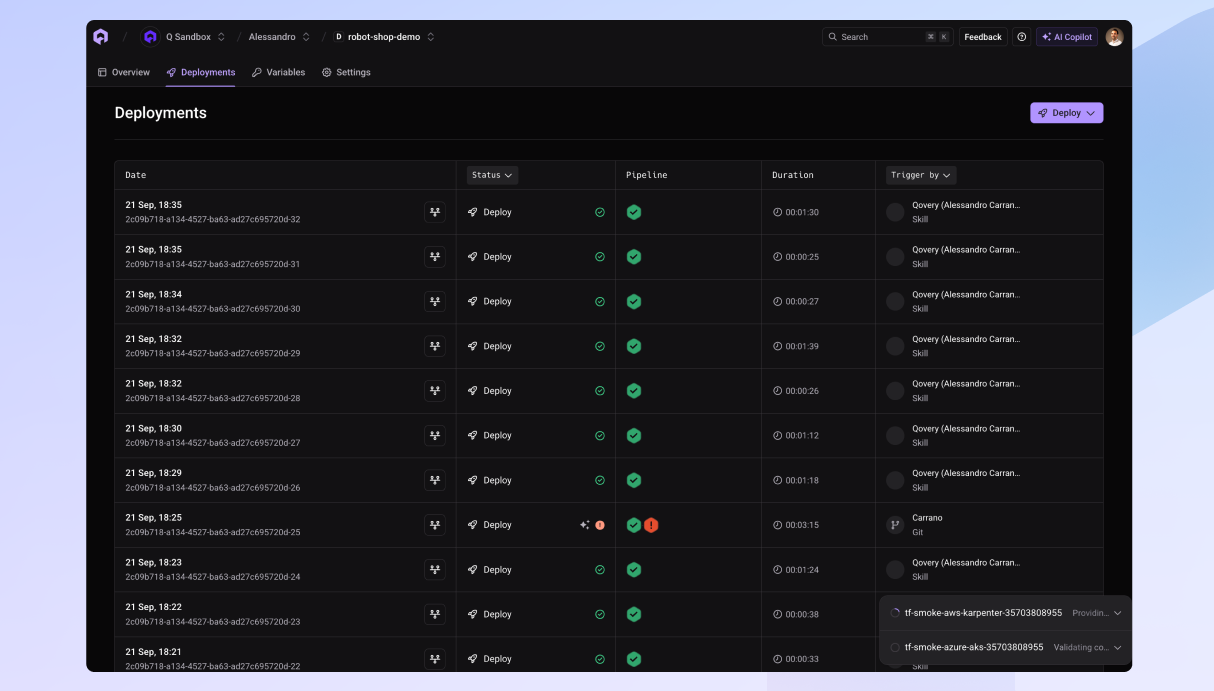
Clusters were the one place without real deployment history. The old "Deployment Logs" tab showed only the current run, so tracing last week's deployment meant digging through raw logs.
Clusters now get a Deployments tab, same as services: past deployments with trigger, initiator, status, and live duration, a dedicated per-deployment logs page, and dry runs in the list. The cluster overview's "Last deployment" card links straight to those logs. Live for everyone now, the legacy tab is gone.
🐳 Build Variables: pass ARGs and secrets into your Docker build
Environment variables only applied at runtime before this, so a value your build needed, a public API URL, a private registry token, had no defined path in.
Qovery now passes a variable into the build exactly the way your Dockerfile asks for it: declare it as ARG NAME and it's baked into the image, or as RUN --mount=type=secret,id=NAME and it's mounted for that one step only, never written to a layer. The Dockerfile decides which path a variable takes, not whether it's marked secret in Qovery.
- Use
ARGfor non-sensitive values baked into the image. - Use a secret mount for credentials the image must not carry, like a registry token or SSH key.
Works across applications, cronjobs, lifecycle jobs, and Terraform services using a Dockerfile fragment. See the build-time variables guide.
🛠️ Minor updates
- Qovery now supports the Melbourne and Jakarta AWS regions.
- The CLI accepts
latestas a git commit id on--commit-id, deploying the tip of the branch instead of requiring an explicit SHA. - The Terraform provider keeps a partially created service in state instead of losing it when creation fails partway through.
- The
qovery-optimizeskill and the CLI'sqovery cluster analysis cost-recommendationnow use historical metrics for right-sizing recommendations when Qovery Observe is enabled on the account. - Fixed an access-control gap where organization-wide resources could be reached beyond a user's actual permissions.
As always, let us know what you think and what you would like to see next.
Talk soon, The Qovery Team 🚀