Blog
Qovery
Product
3
minutes

Inside Story: Audit & Events Tracking Feature With Our Customer Feedback

At Qovery, we are dedicated to providing the best experience possible to our users when it comes to managing their cloud infrastructure. We believe that building features with our customers is essential to our success. That's why we worked closely with our customers to develop our new feature, Audit & Events Tracking.
September 26, 2025
Albane Tonnellier
Product Marketing Manager
Summary
Twitter icon
linkedin icon

The Need for an Audit & Events Tracking Feature

The idea of this feature

Initially coming from customers feedbacks, the Audit & Events Tracking feature is designed to provide users with complete visibility of all changes made to their deployments and settings. At present, there's no simple way to know exactly what happened within an organization. There's no information on what parameter has been changed and when, who created an environment, or who triggered a deployment. Having a clear timeline of the events that happened in the organization (from a setting and deployment point of view) will empower internal and external users and simplify debugging in case of an issue.

The objective

Our goal is to provide an access to a timeline of events that happened in your Qovery organization and finally answer the question "who did what and when." We already have the Deployment History section, but it's not enough to have a complete view. We wanted to provide an audit log view where users could see what happened in their organization, when, and who did it, but before starting with the development of the feature, we sought the input of our customers to ensure that their needs and preferences were taken into account.

The Process

Before proceeding with the solution, we asked several questions on our Forum to gather insights from customers, including:

  • Which information would you like to see within this audit timeline screen? would you like to have both the deployments AND the settings changes or you prefer to have them split into two different sections?
  • How would you like to analyze the data within it: would you like to filter the data? export it in a particular format? any particular use case we should cover?
  • What would be the ideal data retention? We can’t store those events forever and we would like to know if you have any constraints on your side.

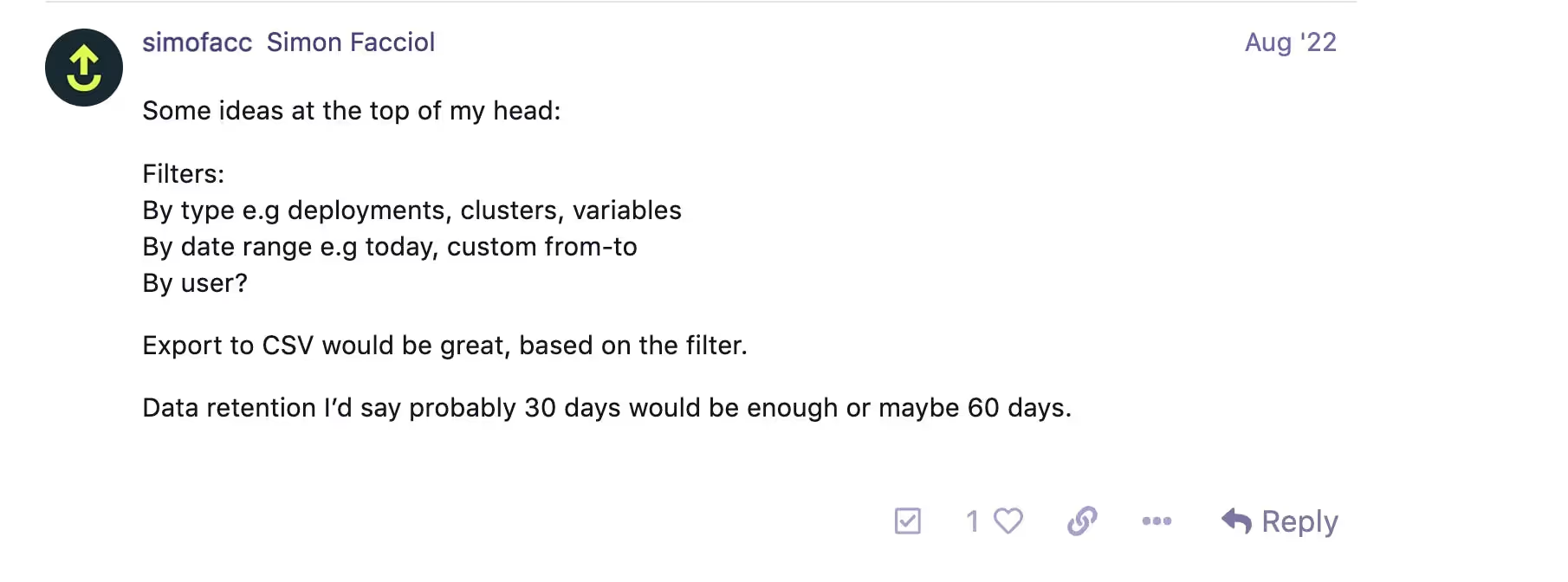
Customers provided valuable insights on what they would like to see in the audit timeline screen, such as filtering by type (e.g., deployments, clusters, variables), filtering by date range (e.g., today, custom from-to), filtering by user, or the possibility to export to CSV based on the filter.

Customer Feedback on the Forum

The Final Solution

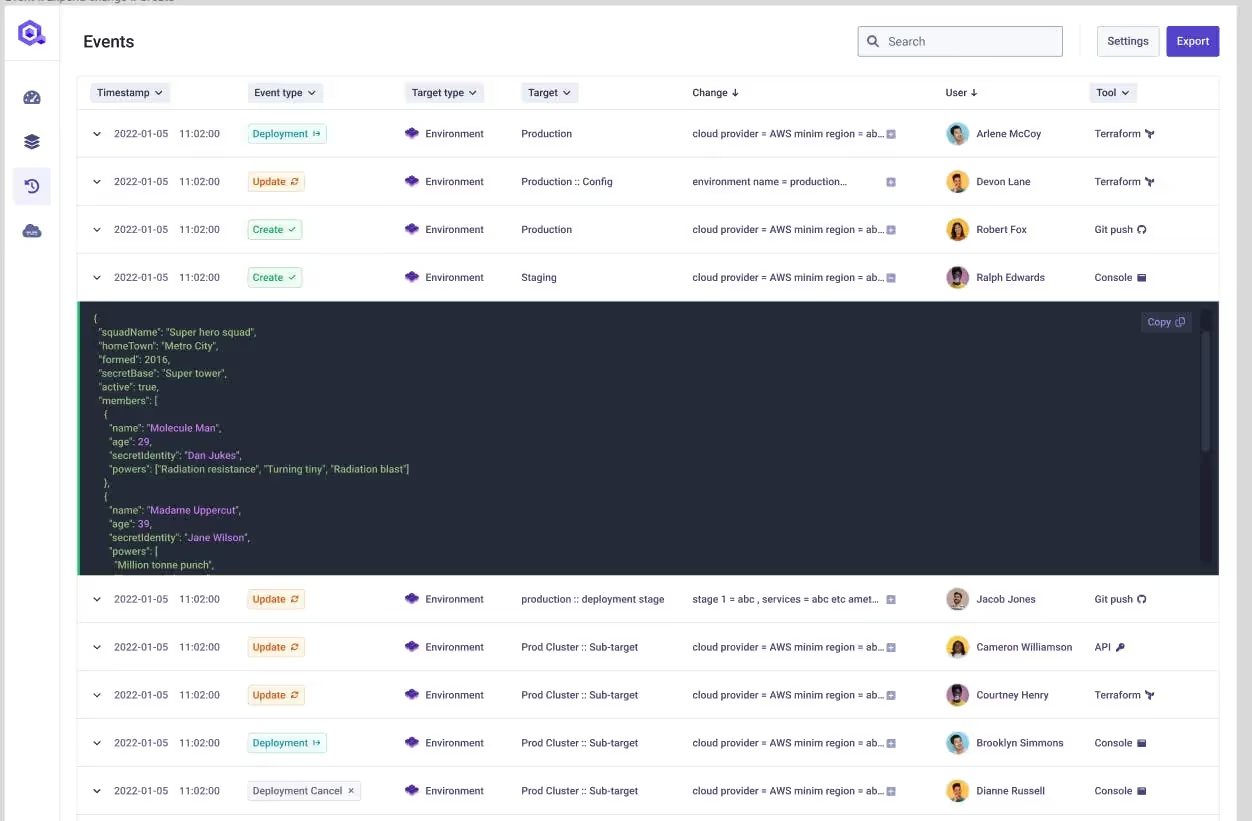
After gathering valuable insights from our customers, we were finally able to move forward with this topic. The idea is to provide a complete timeline of anything that happened in your organization, including setting updates and deployments. In the Figma below you can find what the feature will look like:

Figma of the Solution

As you can see, any change will be tracked together with the user or API token that did the change and the "tool" used (Qovery Terraform provider, Qovery Console, Git push on the repo, etc.).

In the first iteration, if an update is sent on a resource, we will not provide the "delta" directly, but instead, users will find the entire status of the resource after its modification. If users need to compute a delta, they will have to filter the audit log and compare the resource status between two events. We will add this automatic "delta" feature in a second iteration.

Conclusion

If you are exited as well about this feature, you can follow its progress on our Public Roadmap! At Qovery, we believe in building features with our customers, and we're excited to continue working with them to continue building the future of the cloud.

Share on :
Twitter icon
linkedin icon
Tired of fighting your Kubernetes platform?
Qovery provides a unified Kubernetes control plane for cluster provisioning, security, and deployments - giving you an enterprise-grade platform without the DIY overhead.
See it in action

Suggested articles

AI
Compliance
 minutes
Agentic AI infrastructure: moving beyond Copilots to autonomous operations

The shift from AI copilots to autonomous agents is redefining infrastructure requirements. Discover how to build secure, stateful, and compliant Agentic AI systems using Kubernetes, sandboxing, and observability while meeting EU AI Act standards

Mélanie Dallé
Senior Marketing Manager
Kubernetes
8
 minutes
The 2026 guide to Kubernetes management: master day-2 ops with agentic control

Effective Kubernetes management in 2026 demands a shift from manual cluster building to intent-based fleet orchestration. By implementing agentic automation on standard EKS, GKE, or AKS clusters, enterprises eliminate operational weight, prevent configuration drift, and proactively control cloud spend without vendor lock-in, enabling effective scaling across massive fleets.

Mélanie Dallé
Senior Marketing Manager
Kubernetes
 minutes
Building a single pane of glass for enterprise Kubernetes fleets

A Kubernetes single pane of glass is a centralized management layer that unifies visibility, access control, cost allocation, and policy enforcement across § cluster in an enterprise fleet for all cloud providers. It replaces the fragmented practice of switching between AWS, GCP, and Azure consoles to govern infrastructure, giving platform teams a single source of truth for multi-cloud Kubernetes operations.

Mélanie Dallé
Senior Marketing Manager
Kubernetes
 minutes
How to deploy a Docker container on Kubernetes (and why manual YAML fails at scale)

Deploying a Docker container on Kubernetes requires building an image, authenticating with a registry, writing YAML deployment manifests, configuring services, and executing kubectl commands. While necessary to understand, executing this manual workflow across thousands of clusters causes severe configuration drift. Enterprise platform teams use agentic platforms to automate the entire deployment lifecycle.

Mélanie Dallé
Senior Marketing Manager
Kubernetes
Terraform
 minutes
Managing Kubernetes deployment YAML across multi-cloud enterprise fleets

At enterprise scale, managing provider-specific Kubernetes YAML across multiple clouds creates crippling configuration drift and operational toil. By adopting an agentic Kubernetes management platform, infrastructure teams abstract cloud-specific configurations (like ingress controllers and storage classes) into a single, declarative intent that automatically reconciles across 1,000+ clusters.

Mélanie Dallé
Senior Marketing Manager
Kubernetes
Cloud
AI
FinOps
 minutes
GPU orchestration guide: How to auto-scale Kubernetes clusters and slash AI infrastructure costs

To stop GPU costs from destroying SaaS margins, teams must transition from static to consumption-based infrastructure by utilizing Karpenter for dynamic provisioning, maximizing hardware density with NVIDIA MIG, and leveraging Qovery to tie scaling directly to business metrics.

Mélanie Dallé
Senior Marketing Manager
Product
AI
Deployment
 minutes
Stop Guessing, Start Shipping. AI-Powered Deployment Troubleshooting

AI is helping developers write more code, faster than ever. But writing code is only half the story. What happens after? Building, deploying, debugging, scaling. That's where teams still lose hours.We're building Qovery for this era. Not just to deploy your code, but to make everything that comes after writing it just as fast.

Alessandro Carrano
Head of Product
AI
Developer Experience
Kubernetes
 minutes
MCP Server is the future of your team's incident’s response

Learn how to use the Model Context Protocol (MCP) to transform static runbooks into intelligent, real-time investigation tools for Kubernetes and cert-manager.

Romain Gérard
Staff Software Engineer

It’s time to change
the way you manage K8s

Turn Kubernetes into your strategic advantage with Qovery, automating the heavy lifting while you stay in control.