Need for Automation: How to Scale Infrastructure Effectively
As businesses scale, managing infrastructure becomes increasingly complex and distributed, leading to challenges in consistency, performance, and security. Manual configurations and outdated practices can no longer meet the demands of today’s highly competitive businesses. To tackle these issues, adopting a phased approach; Day 0, Day 1, and Day 2; provides a practical roadmap for scaling infrastructure automation effectively. Each phase addresses specific challenges and lays out actionable strategies to simplify operations, improve performance, and enhance security. Let's explore these phases in detail along with practical insights for teams to build, scale, and optimize infrastructure without requiring deep DevOps expertise.
Let’s start with Day 0 which will be confined to laying the foundation for infrastructure automation.
Day 0: Laying the Groundwork
Day 0 is all about preparation. Before diving into automation, you need to establish a solid foundation for your infrastructure that prioritizes simplicity, consistency, and security. This phase ensures your systems are set up for smooth scaling as your needs grow.
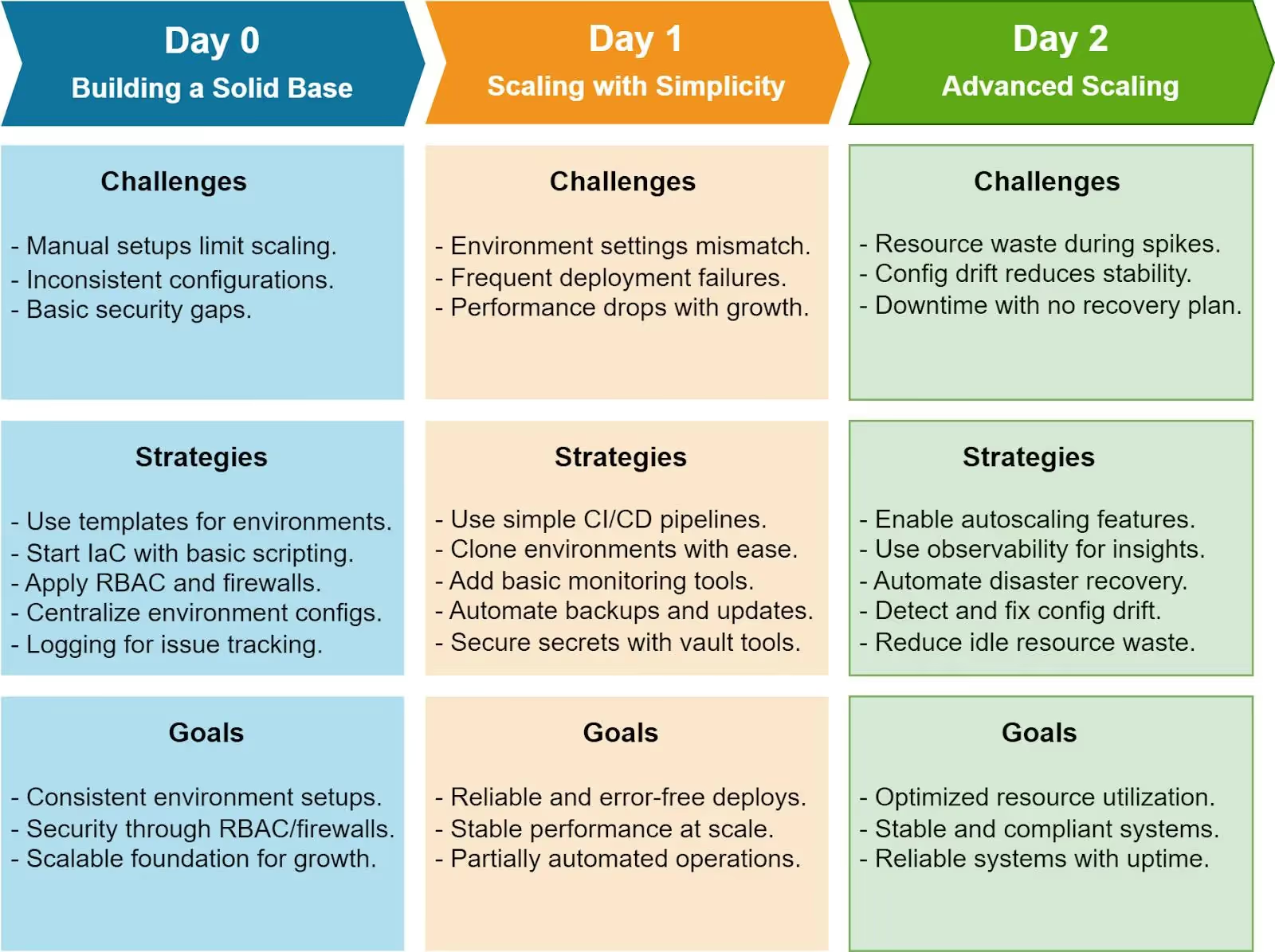
Scaling Limitations: Manual configurations can’t keep up with the demands of scaling infrastructure. When you rely on one-off setups, duplicating environments becomes error-prone and time-consuming.
Performance Inconsistencies: Diverse configurations across environments often lead to unpredictable performance. Debugging these inconsistencies can drain time and resources.
Basic Security Vulnerabilities: Initial environments are often built with minimal security measures, leaving systems exposed to potential threats.
Strategies
1. Use Standardized Templates: Start with standardized environment templates to ensure consistency and reliability. For instance:
- AWS Elastic Beanstalk: Automate the deployment and scaling of web applications with preconfigured templates for servers, databases, and network settings. However, Beanstalk can present limitations in flexibility and customization as your infrastructure scales. For the best alternatives, check out our guide 10 Best AWS Elastic Beanstalk Alternatives in 2024.
- Azure Resource Manager Templates: Quickly set up environments with reusable, predefined configurations for compute, storage, and networking.
These templates not only save time but also enforce uniformity, reducing the likelihood of errors when replicating environments.
2. Adopt Incremental Infrastructure as Code (IaC): Begin using simple IaC tools to define your infrastructure in a way that’s version-controlled and repeatable. Start small:
- Write basic Terraform scripts to deploy essential resources like virtual machines or storage buckets.
- Use AWS CloudFormation to automate the creation of a virtual private cloud (VPC).
Even basic adoption of IaC ensures you can recreate environments consistently, helping avoid the “works on my machine” problem.
3. Implement Security Basics: At this stage, focus on low-effort but high-impact security measures:
- Role-Based Access Control (RBAC): Limit who can access critical resources and assign permissions based on roles. Tools like AWS IAM and Azure Active Directory make this manageable.
- Firewalls and Security Groups: Define simple inbound and outbound traffic rules to restrict unauthorized access. For example, only allow traffic from known IP ranges to your application servers.
These foundational security steps protect your environments without requiring advanced expertise.
Goals
By the end of Day 0, your infrastructure should be standardized, repeatable, and equipped with basic security measures. This ensures you’re ready to scale confidently and build on a solid, secure foundation in subsequent phases.
Day 1 is about scaling your infrastructure to handle multiple environments and deployments effectively. By introducing simple automation and monitoring solutions, you can reduce manual effort, minimize deployment risks, and maintain system performance without requiring advanced DevOps skills.
Challenges
**Managing Environment-Specific Configurations
**Each environment (e.g., development, staging, production) requires unique configurations. Manually managing these can lead to errors and inconsistencies.
**Reducing Deployment Risks Due to Misconfigurations
**Without proper safeguards, deployments may overwrite critical settings, introduce breaking changes, or leave environments incomplete.
**Maintaining System Performance Across Scaling Operations
**Growing systems can encounter bottlenecks if resource usage isn't monitored or optimized.
Strategies
1. Simplify Automation with Beginner-Friendly CI/CD Tools
Leverage user-friendly Continuous Integration and Continuous Deployment (CI/CD) tools to simplify and standardize deployments. Examples include:
GitHub Actions: Automate build, test, and deployment steps using intuitive workflows. For example, create a workflow to automatically deploy changes to staging after code is merged.
Bitbucket Pipelines: Use its straightforward YAML configuration to automate deployments with minimal setup.
These tools are accessible to teams with limited technical expertise, providing prebuilt templates and easy integration with code repositories.
2. Lightweight Monitoring for Resource Tracking
Use simple monitoring solutions to identify bottlenecks and ensure resource availability:
AWS CloudWatch Basic Alarms: Set up alerts for CPU or memory spikes without needing deep technical knowledge.
Pingdom: Track website uptime and basic performance metrics with a clear, user-friendly dashboard.
These tools provide actionable insights with minimal configuration effort, helping teams address issues before they escalate.
3. Automate Repetitive Tasks with Cloud-Native Features
Instead of advanced configuration tools like Ansible or Puppet, rely on built-in cloud services and basic scripting:
Backups: Use AWS Backup or Azure Backup to schedule and automate snapshots of critical resources with just a few clicks.
Environment duplication: For testing, leverage powerful cloning capabilities like Qovery. It offers more advanced functionalities and a significantly better developer experience compared to traditional tools like AWS Elastic Beanstalk or Azure Resource Manager templates.
Configuration Management: Manage environment variables and secrets securely using specialized tools like Doppler, Infisical, or Vault. These solutions provide enhanced security and user-friendly interfaces, surpassing basic options like AWS Parameter Store or Azure Key Vault for more robust and scalable secret management.
These approaches offer automation benefits without requiring advanced technical skills.
Goals
By the end of Day 1, your infrastructure should support reliable, consistent deployments with minimal manual intervention. Simple CI/CD pipelines, lightweight monitoring, and cloud-native automation ensure performance, scalability, and ease of use for teams without deep DevOps expertise. This foundation prepares you for advanced scaling and optimization in Day 2.
Agents ship fast. Guardrails keep them safe.
Qovery ensures every agent action is scoped, audited, and policy-checked. Start deploying in under 10 minutes.
Day 2 is about scaling infrastructure to handle increasing complexities while ensuring high performance, robust security, and minimal downtime. This phase focuses on proactive optimization and automation, enabling infrastructure to self-manage as demands grow. The goal is to create systems that are resilient, compliant, and capable of recovering seamlessly from unexpected issues.
Challenges
**Managing Resource Utilization Without Manual Intervention
**Scaling infrastructure manually is inefficient and error-prone, especially during high-traffic periods. Ensuring optimal resource allocation without manual oversight is critical.
**Avoiding System Drift While Maintaining Compliance
**As configurations evolve, discrepancies (drift) can emerge between the desired and actual states of infrastructure. Left unchecked, this can lead to compliance violations and performance issues.
**Ensuring Seamless Recovery from Unexpected Issues
**Downtime caused by failures, whether due to system crashes or misconfigurations, can disrupt operations and impact user experience. Reliable recovery processes are essential to mitigate these risks.
Strategies
1. Leverage Advanced Autoscaling Features
Use native cloud tools to automate resource scaling based on real-time demand:
AWS Auto Scaling: Automatically adjusts compute resources (e.g., EC2 instances) to match traffic patterns, ensuring consistent performance during peak and off-peak times.
Google Cloud Autoscaler: Dynamically allocates resources to manage workloads efficiently, reducing costs during low-demand periods.
Qovery with Karpenter Integration: Automate scaling effortlessly with Qovery’s advanced features, which not only optimize resource allocation but also help reduce costs. Qovery ensures that scaling decisions are intelligent, efficient, and cost-effective, making it a standout option for modern infrastructure needs.
Autoscaling ensures that your infrastructure remains cost-effective while handling traffic surges without degradation.
2. Integrate Proactive Observability Tools
Observability tools provide deeper insights into system performance and health, helping teams identify and resolve issues before they impact operations:
Datadog: Monitor application performance, infrastructure health, and log data in one dashboard. Use alerting features to notify teams about anomalies.
AWS CloudWatch Logs Insights: Analyze logs to detect unusual patterns or potential problems in your infrastructure.
By integrating observability tools, you can proactively address resource bottlenecks, identify inefficiencies, and maintain compliance.
3. Automate Disaster Recovery Processes
Implement automated processes for backup and recovery to minimize downtime and protect critical data:
AWS Backup: Set up scheduled backups for databases, files, and volumes with automated restore options.
Azure Site Recovery: Automate failover to secondary regions for critical workloads in case of regional outages.
Snapshot and Restore Workflows: Use prebuilt workflows to recover specific components like databases or virtual machines quickly.
Automated disaster recovery ensures seamless business continuity during unexpected failures.
Goals
By the end of Day 2, your infrastructure should be optimized for high performance and security, capable of scaling dynamically, and resilient to failures. With advanced autoscaling, observability tools, and automated recovery processes in place, you’ll reduce manual involvement while maintaining a robust and reliable system. This final phase ensures your infrastructure is future-proof and ready to handle complex operational demands effortlessly.
Day 0, Day 1, and Day 2 approach | Qovery
How Qovery Helps with Day 0, Day 1, and Day 2
Qovery simplifies infrastructure management at every stage-planning, deployment, and scaling-by providing a unified platform with powerful automation and developer-friendly features. Here’s how:
Day 0: Building a Strong Foundation
Qovery lets you define your infrastructure as code, ensuring consistent and repeatable environment setups across all stages. Its automation eliminates manual errors and integrates built-in security measures, so you start with a solid, secure base. For instance, Qovery simplifies multi-environment provisioning in minutes using preconfigured templates, helping teams achieve operational readiness faster.
Day 1: Streamlined Deployments
With Qovery’s native CI/CD pipelines, deployment becomes seamless and error-free. It automates application rollouts and environment configurations while supporting environment cloning, allowing teams to test safely and iterate quickly. Features like secrets management and rollback options ensure reliability even during high-pressure deployments.
Day 2: Auto-Scaling and Optimization
Qovery’s advanced autoscaling, powered by its native integration with Karpenter, dynamically adjusts resources to match demand, optimizing performance while reducing costs. Real-time monitoring tools integrated into the platform provide actionable insights to preempt issues. Additionally, Qovery automates backups and disaster recovery, ensuring business continuity with minimal manual intervention.
By addressing the challenges of each phase with concrete tools and automation, Qovery empowers teams-regardless of DevOps expertise-to manage infrastructure at scale effortlessly while maintaining high performance, security, and cost-efficiency.
Conclusion
Managing infrastructure at scale requires a structured approach to overcome challenges in consistency, performance, and security. In Day 0, setting a strong foundation ensures repeatability and security. Day 1 introduces automation and monitoring to streamline deployments and maintain stability during scaling. Finally, Day 2 focuses on advanced scaling, proactive monitoring, and resilience to ensure optimal performance and compliance. By adopting this phased approach, organizations can effectively scale their infrastructure while reducing manual effort. Platforms like Qovery make this process even more seamless, providing integrated solutions that support teams through every phase of their automation journey.
Morgan co-founded Qovery and leads engineering. He writes about Kubernetes architecture, DevOps best practices, and building resilient infrastructure at scale.
Next step
Agents ship fast. Guardrails keep them safe.
Qovery ensures every agent action is scoped, audited, and policy-checked. Start deploying in under 10 minutes.