The Essential Guide to Azure Infrastructure, Monitoring, and Management Tools
Master Azure infrastructure management across four pillars - governance, cost control, security, and operations - and learn how to host open source LLMs like DeepSeek, Mixtral, and Gemma at scale on your own cloud, with a 2026 comparison of GPU providers and hosting platforms.
A successful Azure strategy relies on four pillars: Effective infrastructure management is built on a foundation of governance and compliance, proactive cost management, robust security, and continuous operational excellence. You can't scale without mastering all four.
Native Azure tools are powerful, but complex: Azure provides powerful tools like ARM templates, Azure Policy, and Azure Monitor for each management pillar. However, using them effectively across a growing organization can require significant expertise and coordination, often leading to manual processes and inconsistencies.
Platforms like Qovery simplify and automate: Platforms like Qovery act as a unified management layer, automating the configuration of Azure tools and enforcing best practices. They provide a streamlined interface that simplifies complex infrastructure workflows, boosting developer productivity while ensuring control and visibility for operations teams.
Running open source LLMs is now part of the job: Hosting DeepSeek, Mixtral, or Gemma at scale means choosing between managed inference APIs (Together AI, Fireworks AI, Baseten), raw GPU clouds (Lambda, RunPod, CoreWeave), or your own cloud account. Running the models in your own VPC through a platform like Qovery keeps data, networking, and cost under your control.
Managing Azure infrastructure well comes down to four pillars: governance and compliance, cost control, security and identity, and operational observability. Get those right and you can scale globally without the reactive firefighting. A fifth concern now sits on top of them: running AI and open source LLM workloads like DeepSeek, Mixtral, and Gemma on your own cloud without blowing the budget.
This guide covers the native and third-party tools for each pillar and the strategies to combine them. New for 2026, it also covers how to host open source models at scale. If you came here to figure out where to run DeepSeek, Mixtral, or Gemma, jump to the section on running open source LLMs on your own cloud below. Otherwise, start with the four pillars.
Pillar 1: Governance & Compliance
Strategy
Consistent resource deployment and policy enforcement create the backbone of a well-managed Azure environment. Engineering organizations need standardized approaches to infrastructure provisioning that prevent configuration drift and ensure compliance with organizational policies. Without these controls, teams create resources independently, leading to security vulnerabilities and compliance violations that can potentially surface during audits.
Tools
Azure Resource Manager (ARM) Templates enable Infrastructure as Code practices by defining resources declaratively. These JSON-based templates specify the desired state of Azure resources, allowing teams to version control infrastructure configurations alongside application code. ARM templates ensure consistency across environments, though their complexity often requires significant expertise to implement effectively.
Azure Policy enforces organizational standards by evaluating resources against defined rules. Policies can prevent non-compliant resource creation or audit existing resources for violations. Common policies include requiring specific tags, restricting resource locations, or mandating encryption settings. Policy assignment happens at various scopes, from individual resource groups to entire management groups, providing flexibility in governance enforcement.
Resource tagging provides the metadata necessary for tracking ownership, cost allocation, and compliance categorization. A well-defined tagging strategy typically includes tags for environment (production, staging, or development), cost center, owner, and project. Tags enable automated governance workflows, such as deleting untagged resources after a grace period or generating cost reports by department.
Pillar 2: Cost Management & Optimization
Strategy
Cloud sprawl remains one of the primary challenges for growing cloud deployments. Resources proliferate across departments and projects, often without proper tracking or optimization.
Proactive cost control requires visibility into spending patterns, automated optimization recommendations, and enforcement mechanisms that prevent budget overruns before they occur.
Tools
Azure Cost Management and Billing Tools provide comprehensive spend analysis across Azure services. The platform offers customizable dashboards showing costs by resource, department, or project based on tagging strategies. Budget alerts notify stakeholders when spending approaches thresholds, while cost analysis tools identify trends and anomalies. Integration with Azure Advisor provides optimization recommendations directly within cost reports.
Azure Advisor analyzes resource utilization patterns to identify cost-saving opportunities. Recommendations include rightsizing underutilized virtual machines, identifying unattached storage accounts, or suggesting reserved instance purchases for consistent workloads. The advisor dashboard prioritizes recommendations by potential impact, helping teams focus on high-value optimizations.
Automation through Azure Automation or Logic Apps enables scheduled cost optimization actions. Common automations include shutting down development environments after business hours, scaling down test clusters on weekends, or deleting unattached disks after a retention period. These automated actions prevent waste from accumulating while maintaining necessary resources during active periods.
Pillar 3: Security & Identity Management
Strategy
Zero Trust architectures have become the standard for cloud security, requiring verification at every access point regardless of network route or entry point. This approach demands unified security posture management across all Azure resources, with consistent identity controls and network protections.
Security teams need centralized visibility into vulnerabilities while maintaining granular access controls that don't impede developer productivity.
Tools
Microsoft Defender for Cloud serves as the central security platform for Azure environments. It provides security posture management through continuous assessment of resources against security benchmarks. The platform identifies misconfigurations, suggests remediation steps, and tracks compliance with regulatory standards. Advanced threat protection capabilities detect and respond to active attacks across compute, storage, and database services.
Azure Active Directory (Azure AD/Microsoft Entra ID) manages user identities and access permissions across Azure resources. Role-based access control (RBAC) ensures users have minimum necessary permissions, while privileged identity management provides just-in-time access for administrative tasks. Conditional access policies enforce additional verification based on risk signals, such as location or device compliance status.
Azure Firewall provides network-level security through centralized traffic inspection and filtering. As a managed service, it scales automatically with traffic demands while maintaining high availability. Application and network rules control both outbound and inbound traffic, with threat intelligence feeds blocking known malicious IP addresses. Integration with Azure Monitor enables detailed traffic analysis and security event investigation.
Pillar 4: Operational Excellence & Observability
Strategy
Operational excellence requires comprehensive visibility into system behavior as well as effective automations that reduce manual intervention. Engineering teams need real-time insights into application performance, infrastructure health, and user experience.
Quick issue resolution depends on collecting and correlating data across multiple sources, while automation handles routine maintenance tasks.
Tools
Azure Monitoring and Observability form the foundation of observability through its integrated collection of monitoring services. The platform aggregates metrics, logs, and traces from Azure resources and applications. Application Insights provides application performance monitoring with automatic instrumentation for common frameworks. Log Analytics offers a powerful query language for analyzing log data across services, while alerts trigger automated responses to defined conditions.
Azure Automation reduces operational burden through runbook automation of routine tasks. Common automation scenarios include patching virtual machines, rotating credentials, or responding to monitoring alerts with predefined remediation steps. The service supports common scripting language options, enabling complex workflows that can be executed across multiple Azure services.
Azure DevOps enables continuous integration and deployment pipelines that automate application delivery. Pipeline definitions as code ensure consistent deployment processes across environments. Integration with Azure Resource Manager enables infrastructure deployment alongside application code, supporting true Infrastructure as Code practices.
Third-party APM tools like Datadog, New Relic, or Dynatrace provide enhanced observability capabilities beyond native Azure tools. These platforms offer advanced analytics, machine learning-based anomaly detection, and unified dashboards spanning multiple cloud providers. Organizations often combine native Azure monitoring with third-party tools for comprehensive visibility.
Running Open Source LLMs on Your Own Cloud: DeepSeek, Mixtral, and Gemma
The short answer: the best place to run open source LLMs at scale is your own cloud account (Azure, AWS, GCP, or Scaleway) on GPU instances you control, orchestrated by a platform that handles Kubernetes, autoscaling, and cost for you. Managed inference APIs get you started fastest, raw GPU clouds are cheapest per hour, and running the models in your own account keeps data, networking, and spend under your control. The rest of this section works through each option for DeepSeek, general open-model hosting, and Mixtral or Gemma.
This is no longer a niche concern. Gartner projects worldwide AI-optimized infrastructure-as-a-service spending to grow 96% to $42 billion in 2026, with spending on inference ($23.3 billion) overtaking training ($19 billion) for the first time. That sits inside a broader forecast of $2.5 trillion in total AI spending for 2026. When more than half of that infrastructure budget goes to serving models rather than training them, where and how you host inference becomes a first-order infrastructure decision.
Top platforms for hosting DeepSeek models at scale
The top platforms for hosting DeepSeek at scale fall into three groups: managed inference APIs (Together AI, Fireworks AI, Baseten), raw GPU clouds (Lambda, RunPod, CoreWeave), and your own cloud account managed through a platform like Qovery. Which one fits depends on how much you care about data locality and cost predictability versus time-to-first-token.
DeepSeek-V3 and R1 are Mixture-of-Experts models with 671 billion total parameters and 37 billion activated per token, released under the permissive MIT license. That license matters: you can pull the weights, modify them, and run them commercially with no strings attached. The catch is size. Serving the full model at production quality means multi-GPU nodes in the H100 or H200 class, not a single card.
Managed inference APIs are the fastest way to get DeepSeek answering requests. You pay per token, you write no serving code, and you scale by changing a number. The trade-offs are that your prompts and data leave your boundary, and cost climbs linearly with usage. Good for prototypes and spiky traffic.
Raw GPU clouds rent you H100 and H200 nodes by the hour or second. This is the cheapest compute per FLOP, but you own everything above the metal: drivers, the serving engine, autoscaling, health checks, and teardown. Good for teams with platform engineers to spare.
Your own cloud account runs DeepSeek on GPU node pools inside your Azure, AWS, GCP, or Scaleway VPC, next to your data and services. You keep full control of networking and spend while a control plane handles the Kubernetes plumbing. This is where Qovery fits: it deploys and manages the inference workload on infrastructure you already own.
Top tools for hosting open source LLMs on your own cloud
If you want to host open source LLMs on infrastructure you control, the core stack is three layers: a serving engine, a GPU-enabled Kubernetes cluster, and a deployment control plane. Get those three right and any open-weight model, DeepSeek, Mixtral, Gemma, or Llama, becomes a container you can ship like any other service.
Serving engine: vLLM and SGLang give you high-throughput, production-grade inference with continuous batching and paged attention. Ollama is the quickest path for single-node setups and internal tools. Text Generation Inference (TGI) is a solid middle ground.
GPU Kubernetes: managed Kubernetes with GPU node pools, Azure Kubernetes Service (AKS), EKS, or GKE, plus an autoscaler (Karpenter or Cluster Autoscaler) and KEDA for scale-to-zero so idle GPUs stop billing you.
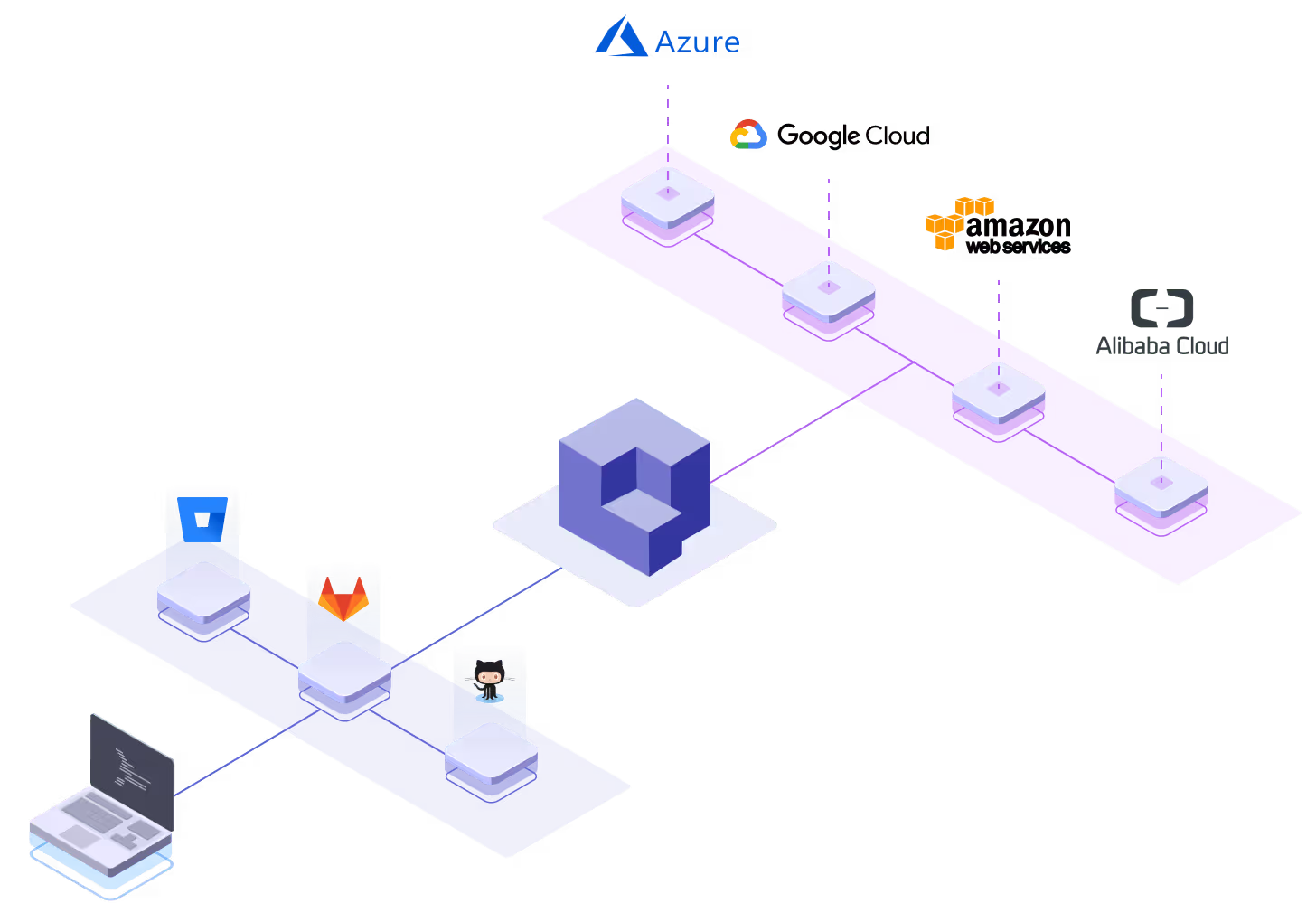
Control plane: Qovery deploys and manages all of the above on your own cloud account across AWS, GCP, Azure, Scaleway, and bring-your-own Kubernetes. You get git-based deploys, environment management, and cost visibility without hand-writing every Helm chart and Terraform module.
The pull toward self-hosting is real at scale. In Andreessen Horowitz's 2025 survey of enterprise AI buyers, 37% of companies now run five or more models in production, up from 29% a year earlier, and open source adoption runs higher at larger enterprises that want models inside their own boundary for data security and compliance. Running many models across teams is far cheaper to operate on infrastructure you already pay for than on a per-token API for each one.
Which cloud GPU providers are best for deploying Mixtral or Gemma
For Mixtral and Gemma, the best GPU provider depends on model size and how much operational work you want to own. Both families are small enough that you have real choices, which is not always true for the 671B-parameter giants.
Gemma 3 ships in 1B, 4B, 12B, and 27B sizes, and Google designed even the 27B model to run on a single GPU. The smaller sizes run happily on an L4 or A10. Mixtral 8x7B is a sparse MoE with 46.7 billion total parameters but only about 13 billion active per token, so it fits on a single H100 or a pair of A100s. Mixtral 8x22B has 141 billion total and 39 billion active, which needs a multi-GPU node. Both Mixtral models are Apache 2.0 licensed.
Small footprint (Gemma 3 up to 12B, Mixtral 8x7B): RunPod (per-second billing) and Lambda are cost-effective for experiments and bursty inference. For production, single-GPU instances in your own cloud (Azure NC-series, AWS G6/P5, GCP A3) keep the model next to your data.
Already on Azure, AWS, or GCP: deploy the model on GPU node pools in the same account so it sits beside your existing services and data, with no egress and no second vendor. Qovery manages that deployment for you.
Here is how the common options compare for actually serving open source models:
Option
What it is
Runs models in your own cloud/VPC?
Billing model
Best for
Qovery
Deployment platform (IDP) that runs on your own cloud
Yes - deploys containers and GPU workloads on your AWS, GCP, Azure, Scaleway, or BYO-Kubernetes account
Your cloud's own GPU pricing (you own the account)
Serving open-model inference in your own VPC with git-based deploys and cost control
Together AI
Managed inference and fine-tuning API
No (their cloud); dedicated endpoints available
Per-token, or hourly for dedicated H100 endpoints
Fast start, serverless open-model inference
Fireworks AI
Managed inference API with multi-LoRA serving
No (their cloud)
Per-token, tiered by model size
Serving many fine-tunes cost-effectively
Baseten
Managed model hosting with production tooling
No (their cloud); enterprise VPC options
Hourly GPU rate plus platform premium
SLAs, observability, dedicated support
Lambda / RunPod / CoreWeave
Raw GPU cloud
No (their cloud)
Hourly or per-second (H100 roughly $3 to $6 per GPU-hour)
Cheapest raw compute when you can run the ops
Vercel
Frontend/edge platform with an AI Gateway
No native GPU serving; routes requests to external model providers
Usage-based gateway
App layer plus routing to model APIs
Scalingo
European PaaS for apps and managed databases
No GPU or LLM serving
Per-app resources
Compliant EU hosting of web apps
Upsun (Platform.sh)
Multi-cloud PaaS for apps and data services
Runs apps on AWS, GCP, Azure, OVH, and IBM; no GPU or LLM serving
Per-project resources
Framework-heavy application hosting
The honest read: Together AI, Fireworks AI, and Baseten are the quickest way to get an open model behind an endpoint. Lambda, RunPod, and CoreWeave give you the cheapest raw GPUs if you have the platform team to run them. Vercel, Scalingo, and Upsun are excellent application platforms, but they host your app tier, not GPU model inference. If your priority is running DeepSeek, Mixtral, or Gemma inside your own cloud account with your data, Qovery is built for exactly that.
null
Agents ship fast. Guardrails keep them safe.
Qovery ensures every agent action is scoped, audited, and policy-checked. Start deploying in under 10 minutes.
Qovery is an opinionated Kubernetes management tool. It provides a central interface for teams to deploy infrastructure automatically while enforcing strong governance, tracking costs, and maintaining security standards.
The platform serves as a unified management layer that orchestrates these various Azure tools and strategies into a cohesive platform. Rather than requiring teams to master each tool individually, Qovery abstracts complexity while ensuring best practices are applied consistently across all deployments.
1. Brings Tooling Automations
Qovery eliminates the need for manual configuration of monitoring, security, and governance tools. When teams deploy applications through Qovery, the platform automatically configures Azure Resources for deployment and management.
It applies security policies and ideal standard practices out of the box and ensures strong cost controls through proper resource management. The platform abstracts and automates all infrastructure management, ensures every deployment follows organizational standards without requiring deep Azure expertise from developers.
2. Helps Enforcing Strategies
The platform inherently promotes consistent and compliant environments by centralizing deployment workflows. Governance policies are embedded in the deployment process rather than applied retroactively.
Cost optimization happens automatically through intelligent resource provisioning and automated cleanup of unused resources. Security best practices are enforced by default, with proper network isolation, identity management, and encryption configured for every deployment.
3. Empowers Developers
Developers deploy applications with familiar git-based workflows without navigating ARM templates, Azure Policy syntax, or the Azure console's complexity.
Qovery translates high-level application requirements into properly configured Azure resources, handling networking, security groups, and monitoring setup automatically. This abstraction creates a developer-friendly interface that accelerates deployment velocity while maintaining the control and visibility that operations teams require.
4. Provides Visibility
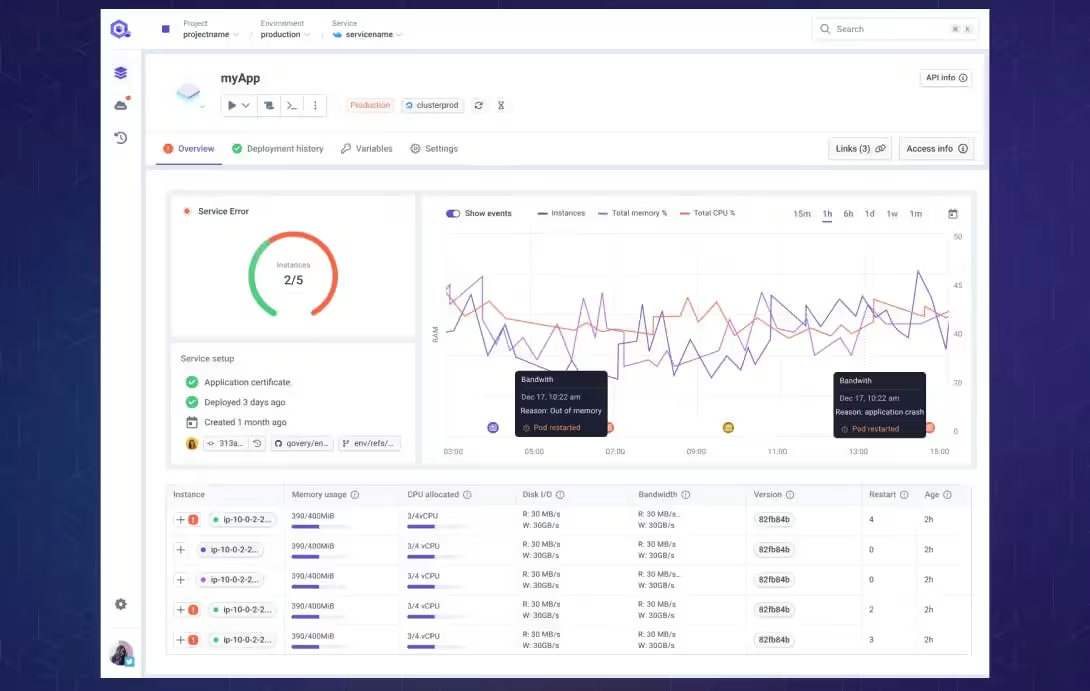
Qovery offers a single dashboard that consolidates application and infrastructure views into one console accessible by all engineers. It complements native Azure tools with developer-focused insights.
Teams see deployment status, resource utilization, and costs in context of their applications rather than raw infrastructure metrics. This unified view bridges the gap between application teams and infrastructure teams, fostering better collaboration and faster issue resolution.
null
The Future of Azure Management: Sustainable Growth, Uncompromised Control
Effective Azure infrastructure management requires more than assembling a collection of tools. Engineering organizations need to plan a cohesive strategy that aligns governance, cost control, security, and operations into a unified approach. While Azure provides powerful native tools for each management pillar, implementing them effectively across growing organizations presents significant challenges.
Platforms like Qovery provide a central framework to execute infrastructure management strategies efficiently and at scale. By automating tool configuration, enforcing best practices, and simplifying complex workflows, Qovery can help enable engineering organizations to maintain control while empowering developer productivity. The result is Azure infrastructure that scales sustainably without overwhelming teams with operational complexity.
Qovery also brings value to engineering organizations beyond these complexities. The platform focuses on the developer experience and serves as a one-stop shop for development teams to deploy their application to the cloud. Companies then benefit from better productivity and increased competitiveness by delivering faster, with better standards, on tried and true cloud solutions.
Frequently Asked Questions
Can I run DeepSeek R1 on Azure?
Yes. DeepSeek R1 is MIT-licensed and open weight, so you can pull it from Hugging Face and serve it on Azure GPU instances (NC or ND-series with H100 or A100) using vLLM or SGLang. Because it is a 671B-parameter Mixture-of-Experts model with 37B active per token, plan for multi-GPU nodes at production scale. Qovery can deploy that inference workload onto GPU node pools in your own Azure account.
Is it cheaper to self-host open source LLMs or use an API?
It depends on volume. Managed APIs like Fireworks AI and Together AI win at low or spiky traffic because you pay per token and skip the ops. Self-hosting on your own GPU instances wins at steady, high volume: a rented H100 runs roughly $3 to $6 per GPU-hour, and a busy endpoint amortizes that far below per-token API pricing. Gartner expects inference to consume 55% of AI-optimized IaaS spend in 2026, which is why owning that cost line matters as you scale.
What GPU do I need for Mixtral or Gemma?
Gemma 3 27B runs on a single modern GPU such as one H100, and the smaller Gemma sizes (1B, 4B, 12B) run on an L4 or A10. Mixtral 8x7B (46.7B total, ~13B active) fits on a single H100 or two A100s, while Mixtral 8x22B (141B total, 39B active) needs a multi-GPU node.
Does Qovery only work with AWS?
No. Qovery is multi-cloud. It deploys and manages workloads on AWS, GCP, Azure, Scaleway, and your own bring-your-own Kubernetes cluster, so you can run open source models next to your data on whichever cloud you already use.
Vercel, Scalingo, Upsun, or Qovery for hosting open source LLMs?
For serving open source LLMs on GPUs in your own cloud, Qovery is the fit: it deploys containerized inference onto GPU node pools in your account. Vercel is an application and edge platform with an AI Gateway that routes to external model providers rather than serving models on its own GPUs. Scalingo and Upsun are application PaaS platforms for web apps and managed databases, not GPU model serving.
Ready to transform your Azure infrastructure management?
Get started with Qoveryto simplify and automate your cloud operations while maintaining the control and visibility your organization requires.
Melanie leads content at Qovery. She covers platform engineering trends, Kubernetes operations, FinOps, and the tools that help engineering teams ship faster.
Next step
Agents ship fast. Guardrails keep them safe.
Qovery ensures every agent action is scoped, audited, and policy-checked. Start deploying in under 10 minutes.