Security Must "Shift Left": Security must be integrated into every stage of the development lifecycle, starting at the code commit stage, rather than being a final checkpoint. This proactive approach allows teams to find and fix vulnerabilities when they are cheaper and faster to remediate.
Automation is Essential for Scale and Speed: Implementing DevSecOps requires automating security tasks like SAST (Static Application Security Testing), DAST (Dynamic Application Security Testing), vulnerability scanning, and policy enforcement. Automation ensures security standards are applied consistently across all projects and prevents security checks from slowing down the CI/CD pipeline.
Policy and Compliance Must be Code-Defined: Security standards and regulatory compliance (like GDPR or HIPAA) must be encoded as machine-readable rules -Policy as Code. This allows automation tools to enforce policies in real time during the pipeline, generating automatic audit trails and preventing non-compliant code from reaching production.
In today's fast-paced cloud environment, integrating security into your DevOps pipeline isn't just an option - it's an absolute necessity. But the traditional view of security as a late-stage gate often leaves teams sacrificing speed for safety.
This article reveals the practical path to DevSecOps, showing you how to embed security practices directly into your CI/CD pipeline. By making security automated and invisible from the moment you commit code to the moment it's deployed, you dramatically reduce risks and unlock faster, more compliant delivery.
Let's start with securing CI/CD pipelines along with the infrastructure.
1. Securing CI/CD Pipelines and Infrastructure
Security in CI/CD pipelines: What it means?
Integrating security into CI/CD pipelines involves addressing vulnerabilities at every stage of the development process:
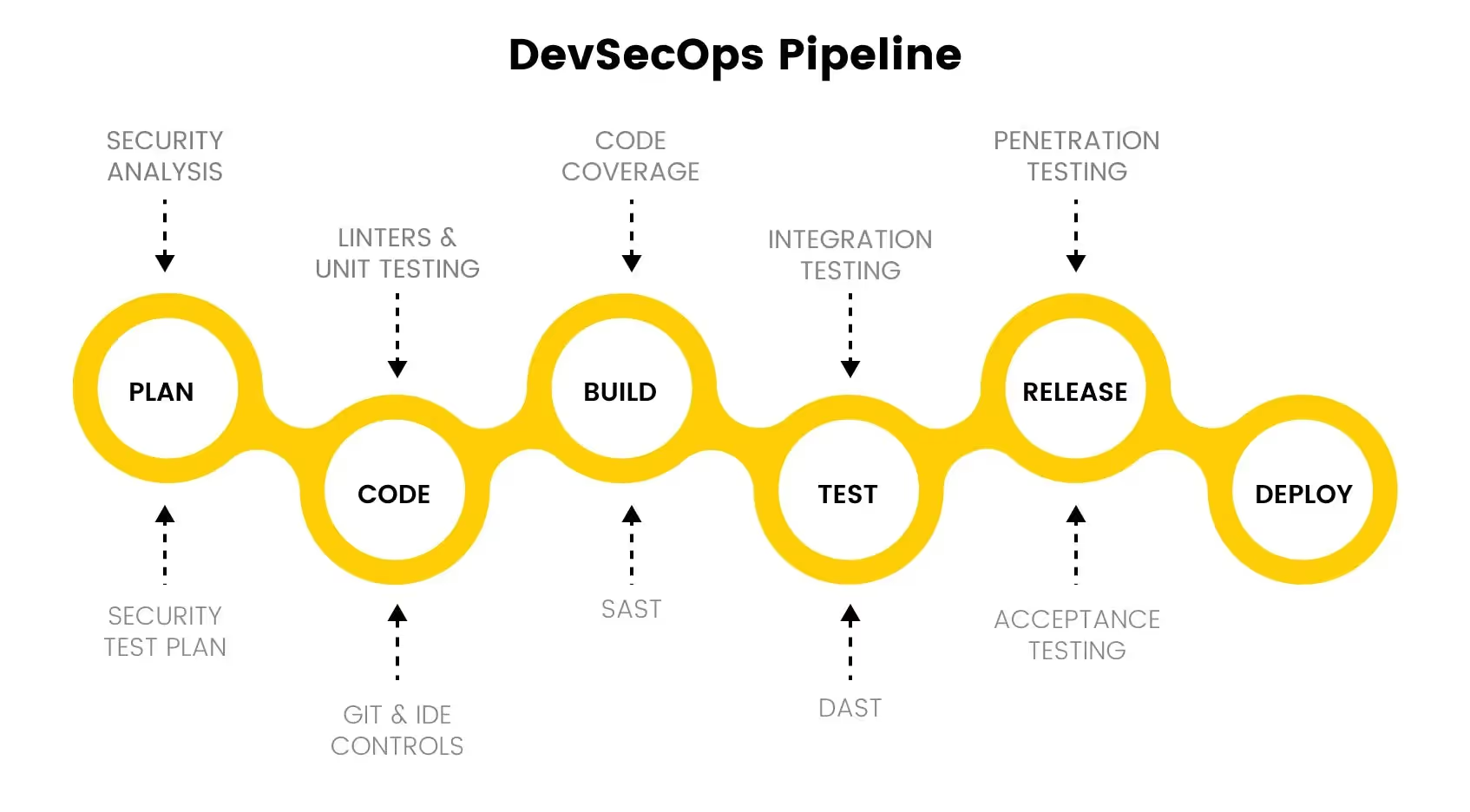
Code Commit Stage: Implement pre-commit hooks to enforce secure coding practices and catch basic errors before committing code to the repository. Build Stage: Use Static Application Security Testing (SAST) tools to scan source code and identify vulnerabilities before compilation.
Testing Stage: Apply Dynamic Application Security Testing (DAST) tools to identify vulnerabilities in running applications, such as insecure APIs or open ports.
Deployment Stage: Scan container images for vulnerabilities and validate the security of Infrastructure as Code (IaC) configurations before deployment.
SAST tools analyze source code to identify vulnerabilities before the build stage, enabling developers to fix issues early.
Best Practices:
Integrate SAST into your CI/CD pipeline for automatic code analysis.
Set baseline standards for code security using tools like SonarQube.
Recommended Tools:
SonarQube: Easy to integrate and suitable for startups.
GitHub Advanced Security: Offers built-in scanning for GitHub repositories.
Dynamic Application Security Testing (DAST)
DAST tools identify vulnerabilities in live applications by mimicking real-world attacks.
Best Practices:
Conduct basic scans on staging environments before deployment.
Schedule periodic scans for running production environments.
Recommended Tools:
OWASP ZAP: Ideal for small teams; it integrates with CI/CD pipelines.
Burp Suite (Community Edition): Provides essential scanning capabilities for startups.
Securing CI/CD Infrastructure
Pipeline Integrity:
Use Role-Based Access Control (RBAC) to limit access to CI/CD resources.
Example: Configure RBAC in GitLab or Jenkins to ensure only authorized users can modify pipelines.
Artifact Security:
Store build artifacts in secure registries with checksum validation.
Example Tool: GitHub Packages or Docker Hub with content trust enabled.
IaC Validation:
Scan IaC configurations to detect misconfigurations, such as open security groups or unencrypted volumes.
Recommended Tool: Terraform validate or Bridgecrew for comprehensive IaC scanning.
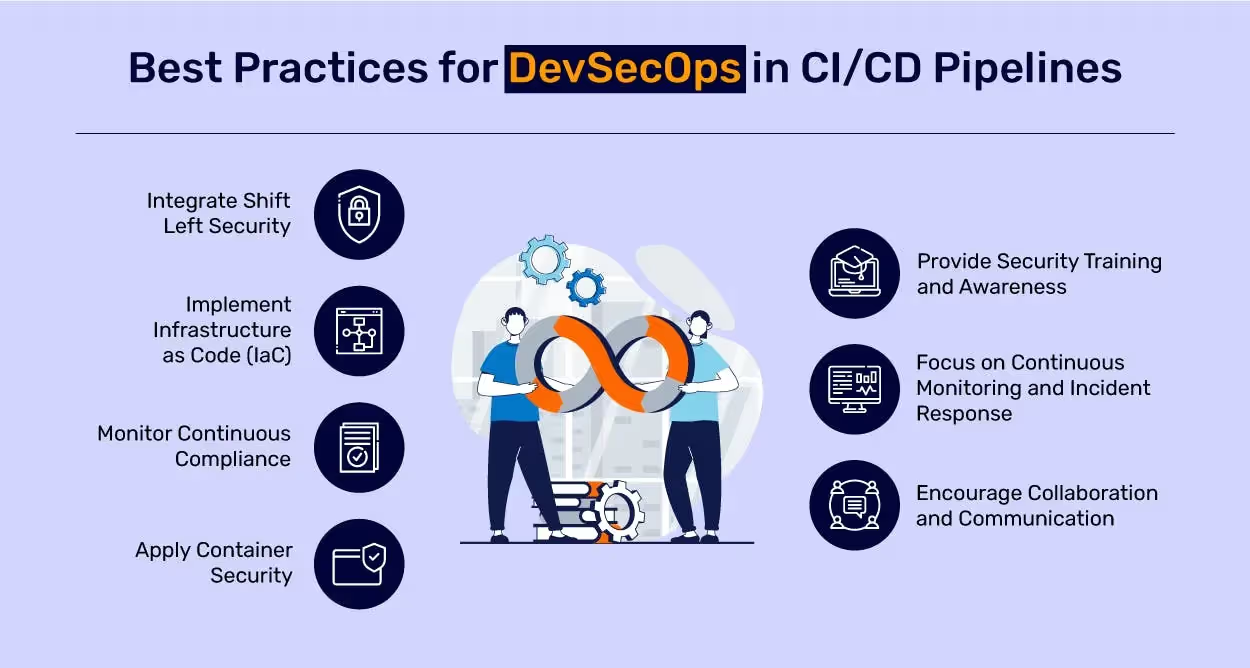
Best Practises for DevSecOps in CI/CD pipelines | Source: https://www.mindbowser.com/implement-devsecops-to-secure-ci-cd/
2. Vulnerability Scanning
Container Image Scanning
Scanning container images detects vulnerabilities in the base image, dependencies, and application layers.
Best Practices:
Use lightweight, secure base images like Alpine Linux.
Perform vulnerability scans on every build.
Use tools like Docker scan or Trivy to scan container images for vulnerability.
Recommended Tools:
Docker’s built-in security scanning tools e.g. Docker scan.
Trivy: Simple and effective for startups.
Infrastructure as Code (IaC) Scanning
IaC scanning identifies potential security risks in infrastructure automation scripts.
Best Practices:
Integrate IaC scanning into CI/CD pipelines to catch issues before deployment.
Combine automated scanning with manual reviews for critical configurations.
Recommended Tools:
Checkov: Detects common IaC vulnerabilities.
Terraform validate: Built-in tool for Terraform users.
3. Enforcing Policies and Compliance
Policy as Code
Automating policy enforcement ensures consistent application of security standards like enforcing encryption or restricting public access to resources.
Best Practices:
Define security policies as code using tools like Open Policy Agent (OPA) or AWS Config to automate checks for misconfigurations, such as ensuring encryption is enabled on storage buckets.
Integrate policy validation into CI/CD pipelines to catch non-compliance early.
Standardize policies across teams to prevent misalignment and ensure consistency.
Compliance as Code
Embedding compliance checks into workflows ensures adherence to regulations like GDPR, HIPAA, and PCI-DSS.
Best Practices:
Use tools like Chef InSpec or AWS Config to scan cloud infrastructure for regulatory compliance and detect configuration drift.
Keep compliance profiles updated to reflect the latest industry standards.
Continuously monitor and address violations, integrating compliance tools directly into your CI/CD workflows for seamless checks.
Agents ship fast. Guardrails keep them safe.
Qovery ensures every agent action is scoped, audited, and policy-checked. Start deploying in under 10 minutes.
SIEM solutions help detect, monitor, and respond to security incidents by aggregating logs and analyzing them in real time.
Best Practices:
Centralize logging from all applications and infrastructure using tools like Splunk or ELK Stack for easier management and analysis.
Configure real-time alerts for critical events, such as repeated failed login attempts or unauthorized access.
Set appropriate retention policies to balance compliance requirements with storage efficiency.
Intrusion Detection Systems (IDS)
IDS tools monitor network and system activities to identify suspicious behavior and potential intrusions.
Best Practices:
Deploy Network-Based IDS (NIDS) like Suricata to monitor critical traffic for threats such as DDoS or port scans.
Use Host-Based IDS (HIDS) like OSSEC to monitor file integrity, detect malware, and identify abnormal activity on individual servers.
Integrate IDS alerts with SIEM systems for enhanced threat correlation and detection
5. Security Awareness and Training
Security Champions
Appoint team members to act as security advocates and bridges between development and security teams.
Best Practices:
Equip champions with tools like SonarQube for static analysis and Burp Suite for application testing to enable them to identify and address vulnerabilities.
Schedule regular syncs with central security teams to ensure alignment on priorities and threat models.
Encourage participation in incident response drills and threat modeling exercises to build practical expertise.
Secure Coding Practices
Training and empowering developers with secure coding standards can significantly reduce vulnerabilities in applications.
Key Practices:
Follow the OWASP Top 10 guidelines to mitigate common vulnerabilities like SQL Injection, Cross-Site Scripting (XSS), and Insecure Deserialization.
Use dependency scanners like Dependabot or Snyk to identify and address vulnerabilities in third-party libraries.
Implement pre-commit hooks using tools like pre-commit to enforce secure coding practices before committing changes.
Conduct periodic security training and gamified exercises, such as Capture The Flag (CTF), to reinforce secure coding practices.
6. Security Risk Management and Compliance
Risk Management Frameworks
Risk management frameworks provide structured approaches to identify, assess, and mitigate security risks effectively.
Best Practices:
Use frameworks like NIST CSF for a structured, five-step approach: Identify, Protect, Detect, Respond, and Recover.
Prioritize risks based on impact and likelihood using frameworks like FAIR for quantifiable assessments.
Integrate risk evaluation into CI/CD workflows to ensure security is part of every deployment.
Cloud Detection and Response (CDR)
CDR ensures the protection of cloud infrastructure by identifying and responding to potential threats in real time.
Best Practices
Real-Time Threat Detection: Monitor cloud environments for unusual activities such as unauthorized API calls, abnormal geolocation access, or port scanning. Use tools like AWS GuardDuty to analyze logs, including VPC flow logs, DNS logs, and CloudTrail events, for anomalies.
Enforce Secure Configurations: Prevent misconfigurations by applying policy-based controls with tools like AWS Config or CloudGuard.
Behavioral Analysis with AI/ML: Detect potential insider threats or account takeovers by analyzing patterns in user and system behaviors. AI/ML-driven insights can identify deviations from typical activity and trigger proactive alerts.
Centralized Threat Management: Integrate detection tools with platforms like AWS Security Hub to consolidate findings and streamline response efforts across the organization.
Integrating Threat Detection:
Regularly audit and fine-tune detection rules to align with evolving threat landscapes.
Automate responses for high-priority findings, such as quarantining compromised instances or revoking access for suspicious users.
How Qovery Helps in Implementing DevSecOps Best Practises
Qovery is an all-in-one Kubernetes management platform that simplifies the implementation of DevSecOps practices by automating key aspects of infrastructure management and security. This makes it a powerful tool for secure application deployment.
Automated Infrastructure Provisioning
Qovery enables secure and compliant infrastructure provisioning by automating the deployment of resources in a manner consistent with industry best practices.
Consistency: Ensures infrastructure adheres to standardized configurations, reducing human errors.
Compliance: Enforces organizational security policies during resource setup.
Custom Policies and Governance
With Qovery, teams can enforce custom policies aligned with organizational or regulatory standards (e.g., GDPR, HIPAA).
Policy Enforcement: Seamlessly integrate policy checks into deployment pipelines.
Governance: Maintain audit trails for all infrastructure changes, enhancing accountability.
Advanced Security Controls
Qovery ensures robust application and infrastructure security through built-in access management and authentication mechanisms.
RBAC (Role-Based Access Control): Assign precise access levels to users and teams.
Multi-Factor Authentication (MFA): Add an extra layer of security for user authentication.
Fine-Grained Access Controls: Restrict sensitive operations to authorized personnel.
Audit Logs for Monitoring and Oversight
Detailed audit logs allow teams to track all actions within the platform for compliance and monitoring.
Centralized Logging: Simplifies root cause analysis and incident investigations.
Regulatory Compliance: Meets industry requirements for traceability and accountability.
Seamless Integration with Monitoring and Observability Tools
Qovery integrates effortlessly with popular observability solutions like DataDog and other monitoring tools. This helps with continuous visibility into your infrastructure and applications.
Proactive Monitoring: Leverage DataDog for real-time insights into performance and security metrics.
Custom Integration: Qovery supports your own infrastructure so you can integrate it with any existing observability stack.
Conclusion
Securing your CI/CD pipelines and infrastructure isn’t just about adding a layer of security - it’s about integrating it seamlessly into every step of your development process. With automation, teams can enforce security practices from the code commit stage to production deployment, ensuring that vulnerabilities are caught early and managed proactively.
This integration of security into the DevOps lifecycle - what we call DevSecOps - doesn’t just protect your application; it enhances your speed and agility, ensuring that security becomes an invisible part of the workflow.
With Qovery, implementing these DevSecOps best practices becomes easy and fast. Rather than spending months setting up secure pipelines and infrastructure, you can do it in just a few days.
Frequently asked questions
What does shift left mean in DevSecOps?
Moving security checks earlier in the lifecycle instead of running them as a final gate before release. In practice that means pre-commit hooks enforcing secure coding, static analysis on every pull request, and dependency scanning at build time, so defects are found when they are cheap to fix rather than after they ship.
What is the difference between SAST and DAST?
SAST analyses source code before the build and catches vulnerable patterns in code you wrote. DAST tests a running application by simulating real attacks and catches issues that only appear at runtime, including configuration and deployment problems. They find different classes of defect, so mature pipelines run both.
What DevSecOps tools should a small team start with?
SonarQube or GitHub Advanced Security for static analysis, since both integrate into existing pipelines without new infrastructure. OWASP ZAP for dynamic scanning against staging, because it is free and CI-friendly. Add secret scanning and dependency scanning before anything more advanced, since leaked credentials and known-vulnerable packages cause more incidents than novel code flaws.
How do you secure a CI/CD pipeline itself?
Treat the pipeline as production infrastructure. Enforce role-based access so only authorized users modify pipeline definitions, store artifacts in registries with checksum validation and content trust enabled, scope credentials to the narrowest possible permission, and keep an audit trail of who changed what. A pipeline with write access to production is a production system.
Where should security scanning run in the pipeline?
At several points, with different failure behaviour at each. Pre-commit and pull request checks should block on high-severity findings because the fix is cheap there. Staging scans should gate promotion. Production scans should be scheduled and alert rather than block, since failing a running deployment on a new signature causes more harm than it prevents.
Morgan co-founded Qovery and leads engineering. He writes about Kubernetes architecture, DevOps best practices, and building resilient infrastructure at scale.
Next step
Agents ship fast. Guardrails keep them safe.
Qovery ensures every agent action is scoped, audited, and policy-checked. Start deploying in under 10 minutes.