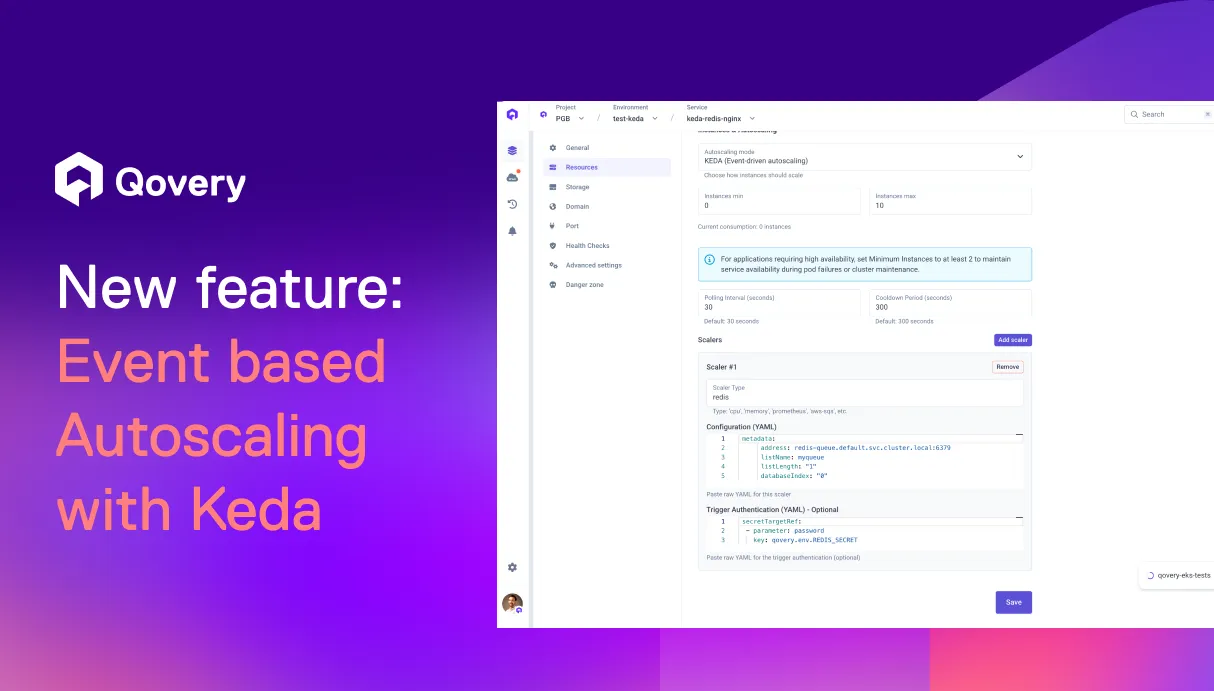
Scale What Matters, Not Just CPU - Welcome Keda autoscaling
Not every workload should scale on CPU. Qovery brings event-driven autoscaling into the application lifecycle, letting applications scale on real signals like queue depth or request latency.
Many production workloads cannot scale safely using CPU or memory. Take a billing system that processes batch requests via asynchronous jobs: you actually want each worker to run hot at 100% CPU, while scaling should follow the backlog in the queue. With CPU-based autoscaling, scaling often reacts too late, queues grow, and teams end up manually tweaking autoscaling settings during spikes to protect customer SLAs.
Autoscaling as a First-Class Platform Capability
Qovery reduces the operational effort required to run production workloads that need advanced Kubernetes primitives.
With KEDA integrated directly into application autoscaling, Qovery installs and manages KEDA for you and exposes it where you already configure scaling. You can choose standard HPA (CPU/memory) or switch to custom metrics without turning autoscaling into a separate infrastructure project.
What Changes for DevOps Teams
Reduced risk of incidents on spikes or traffic change
Fewer scripts or custom autoscalers to maintain
Less waiting on DevOps to adjust manually the autoscaling
A Real-World Scenario
A customer running a billing system processes invoices through daily asynchronous jobs where latency directly impacts customer SLAs. With CPU-based autoscaling, scaling did not react fast enough to request spikes, forcing the team to manually adjust configurations to avoid delays. By enabling custom autoscaling on their SQS queue, they now scale jobs based on pending requests and consistently meet their SLOs.
Agents ship fast. Guardrails keep them safe.
Qovery ensures every agent action is scoped, audited, and policy-checked. Start deploying in under 10 minutes.