Feedback: Improving Developer Experience with Data Science
Qovery is a continuous deployment platform. Users deploy apps of all kinds, written in any language and framework they choose. The freedom users have come with a cost for the Qovery core team - the broad scope Qovery has to cover, makes it harder to make the deployment process stable and straightforward for everybody. It's easy to create a service focused on just one language or framework - supporting all of them requires considering many more factors.
We face the challenge of making deployments as reliable and simple as possible while letting users choose any language and framework they want. We need to automate and simplify the process of finding the most commonly occurring issues to prioritize and fix the most urgent problems first.
It's not possible to foresee and prepare for all the cases - the scope is just too broad. To make sure all the deployments of any kind of apps deploy and run smoothly and figure out the most common issues, we use a data-driven approach and use a few simple ML tools to simplify determining the problems our users face while deploying their apps.
Embracing a scientific approach to collecting data, making measurements, and taking data-driven actions is the only way to find out and fix the most common problems in building and deploying our users' applications.
Error Reporting
When you deploy on Qovery, our deployment Engine runs the builds and deployments of your applications. Any error encountered in the deployment pipeline is reported back to Qovery.
An example of errors we report include:
JSON
{
  "scope": "ENVIRONMENT",
  "state": "DEPLOYMENT_ERROR",
  "message": "\\n-------------------------------------------------------------------------------\\n\\n  MESSAGE FOR QOVERY TEAM:\\n * Execution ID:  0548486d-0605-4b64-8049-24954ceec8e0-13-1625428767\\n * Scope: Build  platform 'beta-build' with id 'ze9e19029'\\n * Rollback message:  \\n\\n-------------------------------------------------------------------------------\\n\\n  \\u274c \\u274c \\u274c MESSAGE FOR THE USER \\u274c \\u274c \\u274c\\n\\n  \\u2709\\ufe0f Error message: Qovery can't build your container image  beta-build (ze9e19029) with one of the following builders:  heroku/buildpacks:20. Please do provide a valid Dockerfile to build your  application or contact the support.\\n \\ud83d\\udcac Need help: Look at  the hint message first. If you need more assistance, you can reach the  support team on Discord (https://discord.qovery.com) or on the Qovery  console (https://console.qovery.com) with the integrated chat.\\n  \\u2139\\ufe0f Hint: None builders supports Your application can't be  built without providing a Dockerfile\\n "
}
or
JSON
{
  "scope": "ENVIRONMENT",
  "state": "DEPLOYMENT_ERROR",
  "message": "\\n-------------------------------------------------------------------------------\\n\\n  MESSAGE FOR QOVERY TEAM:\\n * Execution ID:  d5ab51f0-94d3-4671-8dc6-77fc228f2e35-6-1627037439\\n * Scope: Build  platform 'beta-build' with id 'ze9e19029'\\n * Rollback message:  \\n\\n-------------------------------------------------------------------------------\\n\\n  \\u274c \\u274c \\u274c MESSAGE FOR THE USER \\u274c \\u274c \\u274c\\n\\n  \\u2709\\ufe0f Error message: error while building container image  beta-build (ze9e19029). Error: SimpleError { kind:  Command(ExitStatus(ExitStatus(256))), message: Some(\\"error while  executing an internal command\\") }\\n \\ud83d\\udcac Need help: Look at the  hint message first. If you need more assistance, you can reach the  support team on Discord (https://discord.qovery.com) or on the Qovery  console (https://console.qovery.com) with the integrated chat.\\n  \\u2139\\ufe0f Hint: It looks like there is something wrong in your  Dockerfile. Try run locally using `qovery run` or build with `docker  build --no-cache`\\n "
}
We collect hundreds of these kinds of errors. Based on this data, we try to figure out what are the most common errors that our users encounter.
The Pipeline
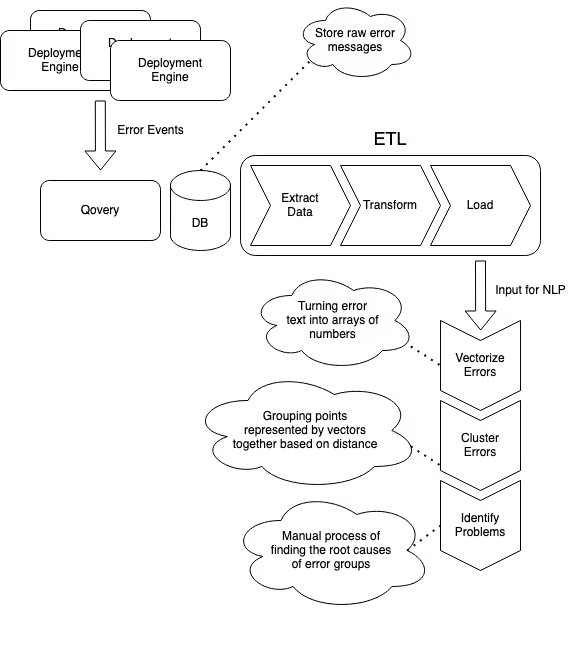
The first steps of the process resemble ETL pipeline. First, we extract data from our data store. Then, we transform it so that it can be used in our analytical use case. In the end, we come up with a new set of data that is Loaded to a separate location and then used as input in analytics.
The picture below is a visual representation of all the steps of the process. We'll go through each part more closely in the next sections of the article.
Execution pipeline
Extract
The first step in our pipeline is exporting the data from our data store. Given the amount of data we have and the fact that the database is used in production by other platform functionalities, we take a daily dump/backup of the data and use it as input in the following pipeline steps.
Transform
The data we store, however, is not structured well for what we want to do. It was not designed for processing error messages in the first place - its primary purpose is different. Thus, we need to preprocess the data before it's useful for our goal.
As an example - to improve the performance of the Qovery platform, we batch deployment events we receive, which results in multiple events being stored in a single unit. So, to prepare the input data, the first step we take is flattening those messages into a single flat list of deployment events.
After our input (the flat list of plain error logs), we start the data cleaning step. To provide thoughtful and correct answers, we need to structure our data to be more accessible to process and segment in the algorithms we use further in the pipeline.
Those steps are pretty standard in NLP and include things like:
lowercasing messages
removing punctuation
removing whitespace
removing empty messages
The code for this is straightforward - it's just executing data mapping functions on our input data:
The goal is to make the logs structured efficiently for the ML algorithms.
Load
At the end of the Transform step, we end up with a relatively small set of data that, for now, we store in a JSON file and use as an input for our simple NLP scripts.
Python
Python is excellent in how simple the language is and the number of battle-tested libraries existing in the NLP/ML space. Even though we don't use Python much at Qovery, it was easy to pick it in this case.
We didn't have to implement much ourselves. Each algorithm is already implemented and battle-tested by many popular Python libraries, starting from data cleaning, going through later steps as vectorizing data, clustering data, and so on.
All we had to do was prepare the input data, configure the libraries, and play with parameters to achieve the best results - the Python ML ecosystem is vast. It provides everything you need, so you don't need to implement much yourself.
After the data is transformed, what we want to do, is to vectorize our text data (error messages). Why would we want to vectorize the data, and what does it mean?
In NLP, vectorization is used to map words or sentences into vectors of real numbers, which can be used to find things like word predictions, similarities, etc.
We can also use vectorized data for clustering. This is what we want to achieve - group error logs, so we can see any commonly occurring patterns in deployment problems that we can address to improve the success rate of deployments at Qovery.
The method we used for vectorizing data is Doc2Vec from Gensim - using the library is as simple as executing one function with your input data and adjusting parameters:
In this step, we take our vectors (numerical representations of our documents - in this case - error logs) and group them based on their similarity.
Density-based Spatial Clustering Of Applications With Noise (DBSCAN)
The method we used to group errors is DBSCAN. The principle behind this method is pretty simple - it groups points that are close to each other based on distance (usually Euclidean distance) and a minimal number of points required to create a cluster. It also marks the points as outliers if they are located in a low-density region.
The implementation, similarly to vectorizing data, is just about invoking the library with your data and adjusting parameters:
The result of DBSCAN provided us with dozens of different error groups. Errors in each group are related to each other. In this (manual) step, I went through all the groups, starting from the biggest ones, and dug into the root cause of the issues in the group.
The results were entirely accurate - usually, most of the errors in one group were caused by one or two root causes. It wasn't always easy to find the cause - this part required a bit of digging and understanding.
For errors with unclear cause, we came up with a hypothesis and plan to validate our guesses by implementing potential fixes and measuring the results of new deployments later on again.
Insights
The results and insights we got from analyzing the output of our simple ML pipeline:
~23% of errors were caused during the build process using Buildpacks to build users apps
- ~17% - we couldn't determine what Buildpacks builder to use for the build
~16.5% - Kubernetes liveness problems failures - primarily due to users applications ports misconfiguration or crashing apps during the startup phase
~6% - another build pack problem - application errors due to more than one process run and the default Buildpacks configuration not being able to start the app
- ~5% - build errors while building Docker images provided by users
and a couple of sub-2% errors, like failures of deployment due to cloud provider limits, problems with cloning Git repositories, and minor bugs in our API or Qovery Engine
Coming up with those insights and numbers would not be possible without automating the process of analyzing deployments. There is no way to do it "manually" with the number of deployments we have and the different types of applications our users deploy.
Embracing the data-driven approach allowed us to make use of the information we already have in our databases to figure out what are the most common errors, prioritize the order of providing solutions to the problems, but also enabled us to identify many less frequently occurring problems, which when added up and fixed, should greatly increase the stability of deployments on the platform.
Summary
It's pretty impressive what we could achieve in such a short time with Python and simple NLP. A person who has little knowledge in data science can use existing libraries to process large amounts of data and develop valuable insights that can be used to improve the service.
The following steps for us are to address problems we identified and repeat analyzing the error reporting data to see where we improved and the new most frequently occurring issues. Now, it's time to make use of the insights we learned and make the builds bulletproof! :)