At Qovery, we're consistently pushing boundaries to enhance developer experiences. One of our standout achievements has been accelerating deployment times, a feat we're incredibly proud of. Today, we'd like to pull back the curtain and share how we've sped up deployments by a staggering 30% through our innovative Container Image Mirroring.
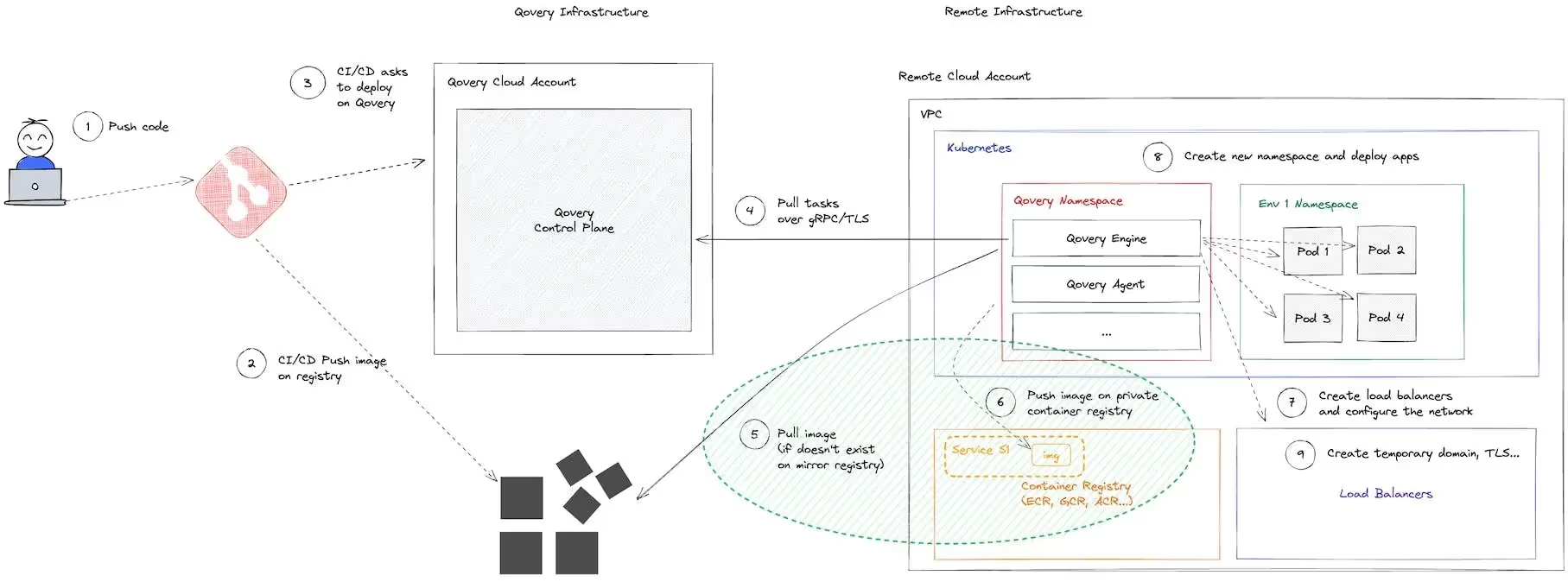
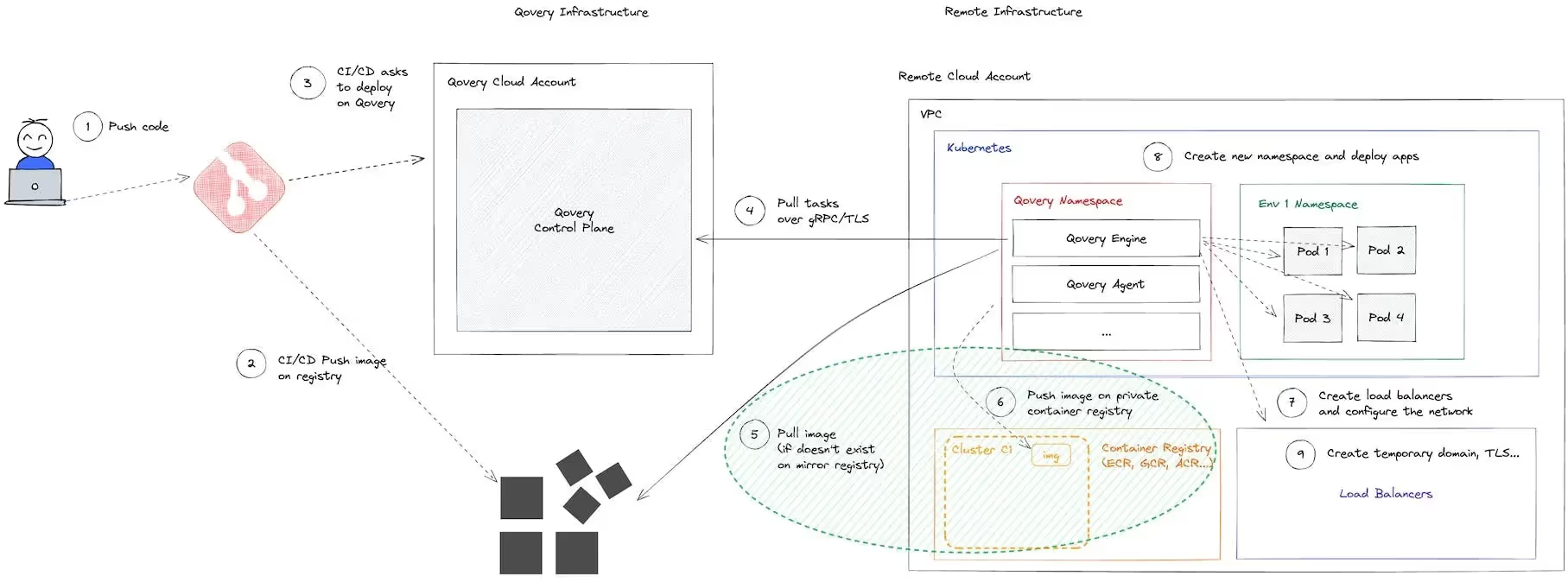
When a cluster is deployed on a cloud account, Qovery creates a dedicated image registry, which essentially acts as a mirroring system. This system ensures that every time an application is set to be deployed on your cluster, the application image is duplicated onto the mirroring registry.
Why is this essential? Image mirroring is a paramount best practice. Envision a scenario where an application runs on a production environment, and Kubernetes needs to pull the image again to launch a new instance. It would be disastrous if this process failed due to the unavailability of the source container registry. By ensuring there's always a copy on the container registry adjacent to the Kubernetes cluster, we eliminate this risk.
Before initiating the build for an application, say application A1, Qovery first checks within the mirroring registry for a previously built version. If the image, complete with the same version (determined by commit ID and environment variables), is found, the build process is skipped, and deployment on the Kubernetes cluster begins.
For Applications Deployed from a Container Registry
The behavior in this case hinges on the selected mirroring mode within the cluster's advanced settings.
Two modes are available:
Service Mode: In this default mode, images in the mirroring registry are grouped by "Qovery service", ensuring each service's mirroring process is entirely separate. If an image, marked by its unique name and tag, exists, the mirroring is overlooked, and deployment begins. However, if the same image is employed across varying environments or services, it will be mirrored repeatedly, which may decrease deployment velocity.
Step 6: push the mirrored image into an isolated container repository
Cluster Mode: Notably unavailable on Scaleway, this mode means all applications on the same cluster are mirrored within the same repository. If an image, bearing the same name and tag, is found, mirroring is skipped, and deployment commences. The highlight? If an identical image is used across environments or services, the setup refrains from duplicating the mirror process, hence hastening deployment.
Step 6: push the mirrored image into a shared container repository
Agents ship fast. Guardrails keep them safe.
Qovery ensures every agent action is scoped, audited, and policy-checked. Start deploying in under 10 minutes.
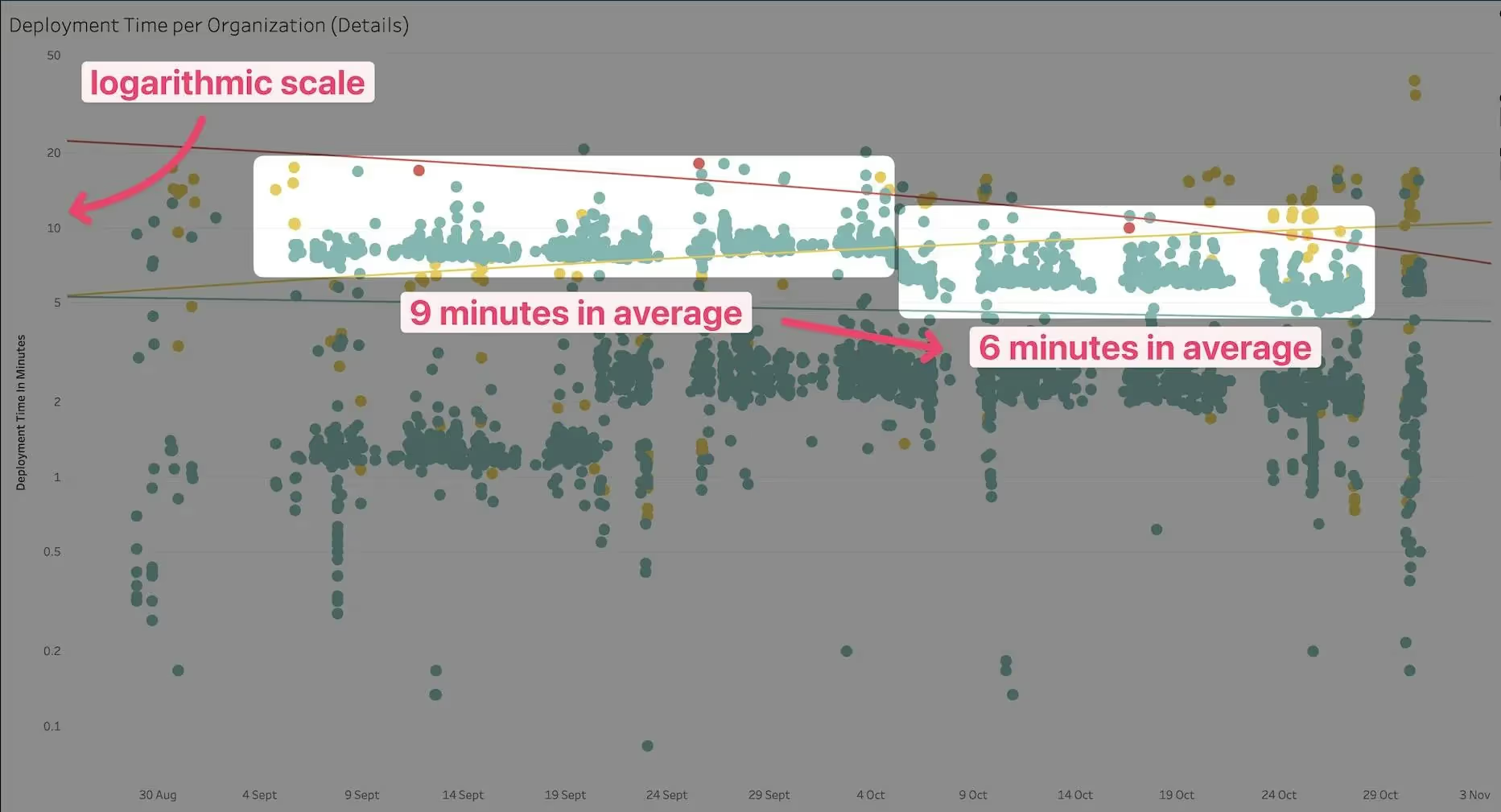
With the streamlined processes outlined above and our commitment to ensuring the utmost efficiency, we've achieved a 30% enhancement in deployment times. Every decision, from using unique image tags to selecting the right mirroring mode, plays a crucial role in this improvement.
It's worth noting that when working with containerized applications, having unique image tags is non-negotiable for accurate version management. Failing to employ unique tags can lead to complications due to caching mechanisms, not just by our mirroring system but also by Kubernetes. Ensuring this has been instrumental in achieving our accelerated deployment speeds.
Read the complete documentation of this feature here.
Romaric founded Qovery to make Kubernetes accessible to every engineering team. He writes about platform strategy, developer experience, and the future of cloud infrastructure.
Next step
Agents ship fast. Guardrails keep them safe.
Qovery ensures every agent action is scoped, audited, and policy-checked. Start deploying in under 10 minutes.