First and foremost, we need to better understand GitHub Actions and its capabilities.
GitHub Variables and Nx Reusable Workflows
At Qovery, we build our frontend using Nx and rely on the official nrwl/ci GitHub Actions. Our frontend requires third-party tokens during compile time, but we would like to avoid hardcoding them or using the .env file to define our tokens. The latter exposes our source code directly on GitHub, and even though it's not sensitive data, we don't want it to be easily scraped. As probably many others, we've faced issues when we dug into environment variables using this reusable workflow: https://github.com/nrwl/ci?tab=readme-ov-file#limited-secrets-support https://github.com/nrwl/ci/issues/92 https://github.com/nrwl/ci/issues/44 So, I wanted to share the lessons I learned from this experience.

The Qovery Team
FEB 13, 2024 · 2 MIN
Qovery · Agentic Infrastructure Platform
Build with Claude Code, Deploy with Qovery
Learn more
The main differences that are going to be important here for our use case are:
- Secrets are for sensitive data and cannot be shared with reusable workflows
- Variables are non-sensitive data and are shared to reusable workflows through the keyword vars
As mentioned earlier, our data consists of frontend third-party tokens that are not sensitive because they can be found in our public JS source code. Additionally, nx-cloud-main and nx-cloud-agents are reusable workflows.
Therefore, our solution should revolve around Variables.
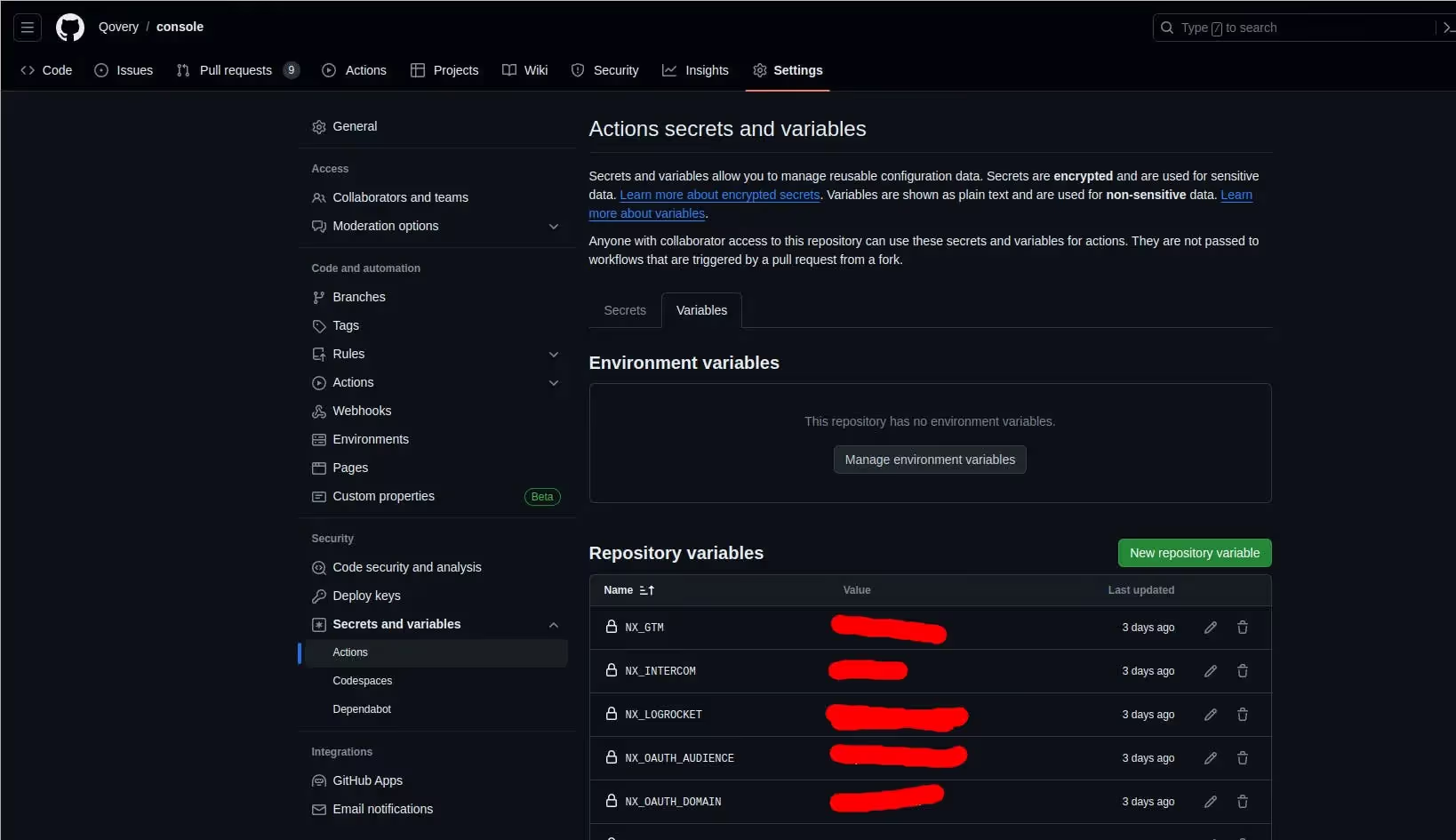
Note that you can create repository variables in GitHub like this.
Nrwl/ci reusable workflow configuration
Although GitHub Variables may appear perfect in our case, the reusable workflows from nrwl/ci do not directly utilize the vars keyword internally. Therefore, variables are not used by those workflows as they are.
Upon closer examination of the workflow configuration, we find a parameter called "environment-variables". Unfortunately, this parameter requires environment variables in dotenv format:
NX_MY_TOKEN=1234
NX_MY_OTHER_TOKEN=4567
whereas our vars are an object
JSON
{
    NX_MY_TOKEN: 1234
    NX_MY_OTHER_TOKEN: 4567
}
GitHub script to the rescue
To achieve the desired format, we require some intermediate scripting. Luckily, the actions/github-script is the ideal tool for this task. It enables us to convert GitHub variables into the expected Nx format.
YAML
  env-vars:
    runs-on: ubuntu-latest
    outputs:
      variables: ${{ steps.var.outputs.variables }}
    steps:
      - name: Setting global variables
        uses: actions/github-script@v7
        id: var
        with:
          script: |
            const varsFromJSON = ${{ toJSON(vars) }}
            const variables = []
            for (const v in varsFromJSON) {
              variables.push(v + '=' + varsFromJSON[v])
            }
            core.setOutput('variables', variables.join('\\\\n'))
  nx-main:
    needs: [env-vars]
    name: Nx Cloud - Main Job
    uses: nrwl/ci/.github/workflows/nx-cloud-main.yml@v1
    with:
      environment-variables: |
        ${{ needs.env-vars.outputs.variables }}
      # ...

  agents:
    needs: [env-vars]
    name: Nx Cloud - Agents
    uses: nrwl/ci/.github/workflows/nx-cloud-main.yml@v1
    with:
      number-of-agents: 3
      environment-variables: |
${{ needs.env-vars.outputs.variables }}
Agents ship fast. Guardrails keep them safe.
Qovery ensures every agent action is scoped, audited, and policy-checked. Start deploying in under 10 minutes.
Conclusion
We have learned more about the capabilities of GitHub Actions and are taking our CI to the next level!
We can leverage our environment variables without exposing them directly by using a bit of scripting and the options provided by Nx workflows.
And the best part is we can achieve this without hardcoding them or using a .env file.
About the author
Qovery TeamThe engineering, product, and developer experience team behind the Qovery platform.
Next step
Agents ship fast. Guardrails keep them safe.
Qovery ensures every agent action is scoped, audited, and policy-checked. Start deploying in under 10 minutes.
Continue reading
More articles
747 · Engineering12 min
Replacing ingress-nginx with Envoy Gateway on Hundreds of Clusters: What the Plan Missed
Benjamin ChastanierOct 10, 2026
740 · AI Agents4 min
How we investigate Sentry errors with an AI agent
Rémi BonnetOct 8, 2026
557 · Console10 min
A New Console for Qovery
Rémi Bonnet & Théo Grandin & Romain BillardJun 12, 2026