


My Feedback about Nixpacks - an alternative to Buildpacks



Nixpacks
Coming from the README.md
Nixpacks takes a source directory and produces an OCI-compliant image that can be deployed anywhere. The project was started [..] as an alternative to Buildpacks and attempts to address a lot of the shortcomings and issues that occurred when deploying thousands of user apps [..]. The biggest change is that system and language dependencies are pulled from the Nix ecosystem.
Nixpacks is available on Linux, MacOS, and Windows. You must also have Docker installed and running since Nixpacks relies on it. Once it's installed, you can execute the "nixpacks" cli command:
My feedback
Here are the pros and the cons coming from what I've tried and seen:
Pros
- MIT License
- Written in Rust (it's a language I particularly like)
- Using NIX and Docker to create a reproducible build.
- Building a final container image (OCI-compatible - so great to run on Kubernetes).
- Compatible with Procfile (perfect for users coming from Heroku and using Buildpacks).
- Possibility to specify the build and start command.
- A bunch of programming languages supported out of the box 👍
- We can easily add the support of a programming language and run our tests to validate it.
Cons
- Still young - seems to be only used by the creator at the moment
- By reading the Rust code, I think the team behind Nixpacks is not experienced yet with the language, so some stuff is not idiomatic (E.g using Result<Option<String>> instead of a custom enum type). It’s not a problem, but it’s probable that this version is still experimental and will lead to other major/breaking internal changes.
- Running twice a build command does not use the local Docker cache even if the code has not changed - I guess it’s due to NIX.
- It does not support (yet) the selection of multiple Procfile commands
- I tried to build a Strapi app (NodeJS), and I didn’t succeed since it seems that we can’t specify the node version to use (Nixpacks scans the package.json and pick a version that is not the correct one). I think it can be improved easily.
- I am pretty sure it works with all the simplest applications, but once apps use tons of dependencies that might link to C or Python or other languages inside, we might have failed to build (like for Buildpacks). The good part is that it is potentially easily reproducible (with NIX and the pin command).
Similar to Buildpacks with no black magic
It’s similar to Buildpacks but better since it generates a Dockerfile file and builds it with a NIX binary. Here is a schema of the process done by Nixpacks.
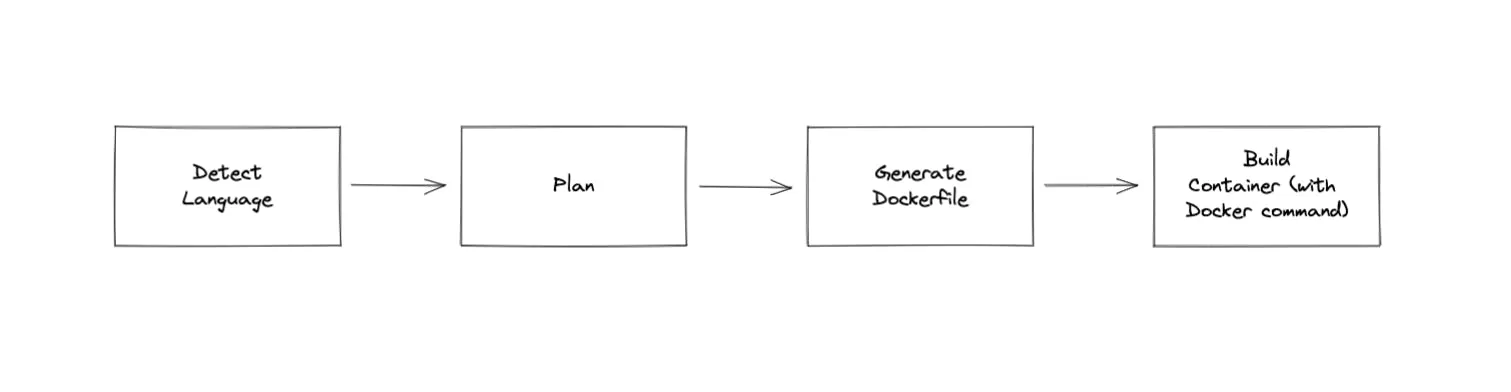
A plan looks like this:
Understandable Errors
The usage of NIX makes errors understandable when something goes wrong, which is a convenient advantage compared to Buildpacks. For instance, when running "nixpacks build ." for one of my Strapi applications, I got the following error:
In my experience, this error message is much more understandable than Buildpacks but still hard to interpret for a neophyte in building apps with Docker and NIX.
Nixpacks supports complex build (PHP Laravel)
Applications written in PHP are hard to containerize. I spent (wasted) hours with Qovery users deploying their Laravel apps because they need a web server (NGINX/Apache) and to run 3 to 4 processes inside a container. Just to give you the perspective of the complexity, here is a Dockerfile I’ve written for a hello world PHP Laravel app 😕
And with Nixpacks, you just need to run "nixpacks build .":
This example convinced me to go further in trying Nixpacks.
Building a real-world React app didn't work
I've noticed that Docker is not well known by most frontend developers; Nixpacks would be super useful here to make frontend app deployment on Kubernetes easier. Unfortunately, I didn't manage to build our Qovery v3 console React app with Nixpacks. It's a real app with different kinds of dependencies, and this is where it fails. Python seems to be required for a library. I think it is fixable with not too much effort, but it does not work out of the box.
Building a simple React app worked
In this case, with a brand new simple "hello world" react app it works
To Conclude
Nixpacks is a promising alternative to Buildpacks, and I am pretty sure it will be well received by the open-source community. We even consider using it in Qovery as soon as we are confident in its future. The team behind made a very good job in providing an elegant solution to a complex problem - building a final OCI image without necessarily spending time to write a Dockerfile while keeping it auditable via a "nixpacks plan" command.


.svg)
.svg)
.svg)

Suggested articles

The cluster coming up is the easy part. What catches teams off guard is what happens six months later: certificates expire without a single alert, node pools run at 40% over-provisioned because nobody revisited the initial resource requests, and a manual kubectl patch applied during a 2am incident is now permanent state. Agentic control planes enforce declared state continuously. Monitoring tools just report the problem.

The instinct when setting up Kubernetes observability is to instrument everything and send it all to your APM vendor. That works fine at ten nodes. At a hundred, the bill becomes a board-level conversation. The less obvious problem is the fix most teams reach for: aggressive sampling. That is how intermittent failures affecting 1% of requests disappear from your monitoring entirely.

Scaling your deployments to zero is only half the battle. If your cluster autoscaler does not aggressively bin-pack and terminate the underlying worker nodes, you are still paying for idle metal. True environment sleeping requires tight integration between your ingress layer and your node provisioner to actually realize FinOps savings.
The structure, table, tool list, and code blocks are all worth keeping. The main work is fixing AI-isms in the prose, updating the case study to real metrics, correcting the FAQ format, and replacing the CTAs with the proper HTML blocks. The tool descriptions need the "Core strengths / Potential weaknesses" headers made less template-y, and the intro needs a sharper human voice.
For years, Red Hat OpenShift has been the safe choice for heavily regulated, on-premise environments. It operates as a secure fortress. But in the public cloud, that fortress acts as an expensive prison. Paying proprietary per-core licensing fees on top of your standard AWS or GCP compute bill is a redundant "middleware tax." Escaping OpenShift requires decoupling your infrastructure from your developer experience by running standard, vanilla Kubernetes paired with an agentic control plane.


Agentic Kubernetes resource reclamation is the practice of using an autonomous control plane to continuously identify, suspend, and delete idle infrastructure across a multi-cloud Kubernetes fleet. It replaces manual cleanup and reactive autoscaling with intent-based policies that act on business state, eliminating the configuration drift and cloud waste typical of unmanaged fleets.

Kubernetes focuses on container orchestration, but the reality on the ground is far less forgiving. Provisioning a single cluster is a trivial Day-1 exercise. The true operational nightmare begins on Day 2. Teams that treat multi-cloud fleets like isolated pets inevitably face crushing YAML configuration drift, runaway AWS bills, and severe scaling bottlenecks.


.webp)