Qovery x Gitpod - Develop, Deploy and Run applications on AWS with Gitpod and Qovery
As a developer, how can you increase your velocity to ship, and how can you test what you are about to ship in a production-like environment to avoid bad surprises in production?
That’s where Gitpod and Qovery come to the rescue:
Gitpod will focus on the developer experience, making sure that individual developers and teams of developers are productive enough and can ship fast.
While Qovery's DevOps automation tool helps developers to be autonomous enough to ship in production and correctly manage their applications in production.
In this blog we will learn how can we develop and run applications using Qovery and Gitpod:
What is Gitpod
What is Qovery
How Gitpod and Qovery Make Sense Together
Make a Hotfix with Qovery and Gitpod
Try a New Feature Before Pushing it to Production
Example Scenario - Sample application on Qovery x Gitpod
What is Gitpod?
Gitpod is an open-source remote development platform for remote development. It provides an automated setup with cloud-based, remote developer environments connected with a developer’s editing experience of choice, making developer experiences better. Gitpod’s Cloud Development Environments (CDEs) help developers to be always ready-to-code from any device, from anywhere.
Rather than having a single static environment (like your local machine), Gitpod encourages you to codify your dev environment as code. With your project codified, you’ll be able to spin up a new workspace, start coding and throw away the workspace when you’re done. You can have multiple workspaces with different contexts open at once - one for your feature, one for a bug, or one for your code review directly in Gitpod.
What is Qovery?
Qovery is a DevOps automation tool delivering Environments as a Service in your Cloud, where you can build, deploy and test in production-like environments. Qovery turns app deployment and environment provisioning on AWS a breeze. Developers can instantly spin up production-like environments and start shipping in seconds.
Qovery introduced the concept of on-demand environments where dev teams can test code changes in isolation by generating Preview environments on every Pull Request.
A preview environment is as good as other deployment environments, e.g., Production, Staging, etc., because it is equipped with everything needed for proper testing in isolation. That includes infrastructure, updated products, integrations, databases, configuration, etc. A preview environment is better than traditional deployment environments because it is super easy to provision and de-provision a preview environment.
Perfectly integrated with the developer’s workflows, the Qovery UI simplifies deployment, debugging, and monitoring from a unified interface. Qovery is pluggable and ready for whatever you may hold. You can grow your stack without re-tooling and disrupting your DevOps team.
How Gitpod x Qovery Makes Sense Together!
As stated before, Gitpod, integrated into the Qovery console, will work on the developer experience, helping to have a complete cloud development environment for the developers anywhere in no time. On the other side, Qovery will help developers teams be autonomous enough to ship in production and test features on dynamic production-like environments, but let’s see how it works behind the scenes and explore some real-life examples.
The Magic Behind it
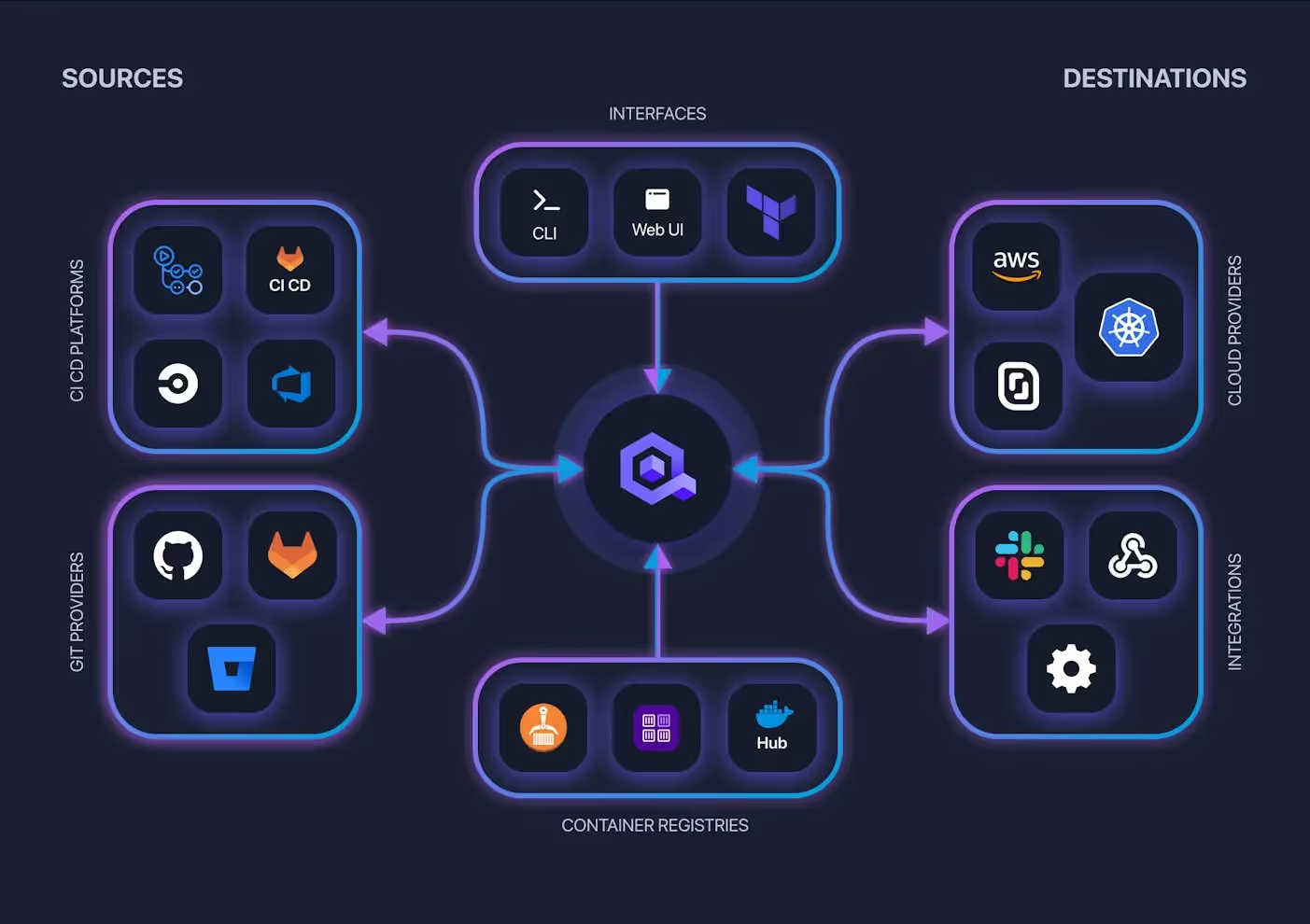
Qovery is a product that integrates into your working environment, meaning that you can connect it directly to the git account of your choice; it will take the applications from those VCS providers. You can also note that it’s integrated in the same way with Gitpod as it’s working on Git, so when you make a change with Gitpod, Qovery detect the change and react to it. You can also integrate your CI/CD, Container Registry if you want to deploy an already build the container image. Several interfaces exist, such as a web interface, CLI, API, and even a Terraform Provider. All the actions you will perform on those interfaces are applied to your Cloud Infrastructure as you connect your Cloud Provider account when registering in just 30mn.
How Qovery integrates
Make a Hotfix with Qovery and Gitpod
Let’s say you are a developer working in a production environment and need to change quickly because something went wrong! Here are the steps to follow:
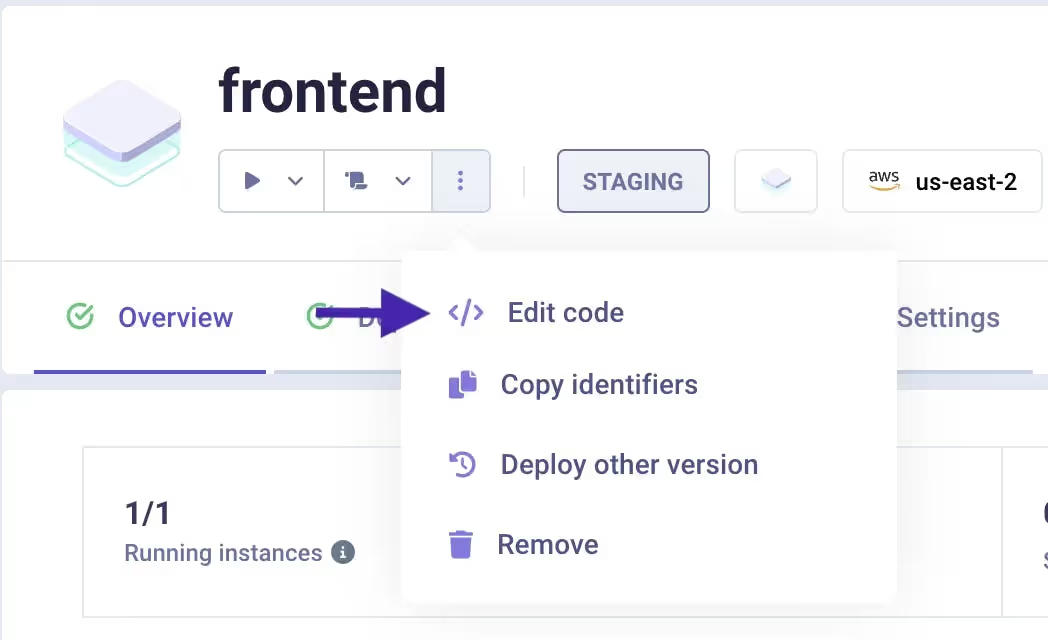
The Gitpod integration on the Qovery console will allow you to make changes by clicking on the “edit code” button in the interface.
By clicking on this “edit code” button on one of your applications, you will be redirected to Gitpod, which will already be connected to your Git account. Thus, without leaving your browser or any installation needed, you can quickly change on Gitpod with all the correct dependencies loaded and the same complete environment.
To describe your workspace, you can configure it through a .gitpod.yml file, located at the root of your project, written in YAML syntax. You can read more about it in Gitpod Documentation.
After committing and pushing from Gitpod on your necessary changes, Qovery will automatically re-deploy the new version without any downtime. You can even head to the deployment logs on the Qovery interface to see what happens in real-time such as the rebuild.
Agents ship fast. Guardrails keep them safe.
Qovery ensures every agent action is scoped, audited, and policy-checked. Start deploying in under 10 minutes.
Now let’s say that you or someone from your team wants to try out a new feature or a change before pushing it into production! Here are the steps to follow:
You can use the Preview Environment feature from Qovery that you can turn on from your Environment Settings.
For every single pull request that you create for your application, a new environment will be spun up with all the dependencies so you will be able to test that feature. When you close the pull request or merge back, the environment will disappear, so you won’t pay for resources that you are no longer consuming.
Once the Preview Environment feature is activated, you can follow the same steps as for the first use case, where you click on the “edit button” that will redirect you to Gitpod, but this time, we are just going to create a new branch.
Once your new branch is created on the Gitpod browser interface, make the change wanted on your code, and then you can commit your branch.
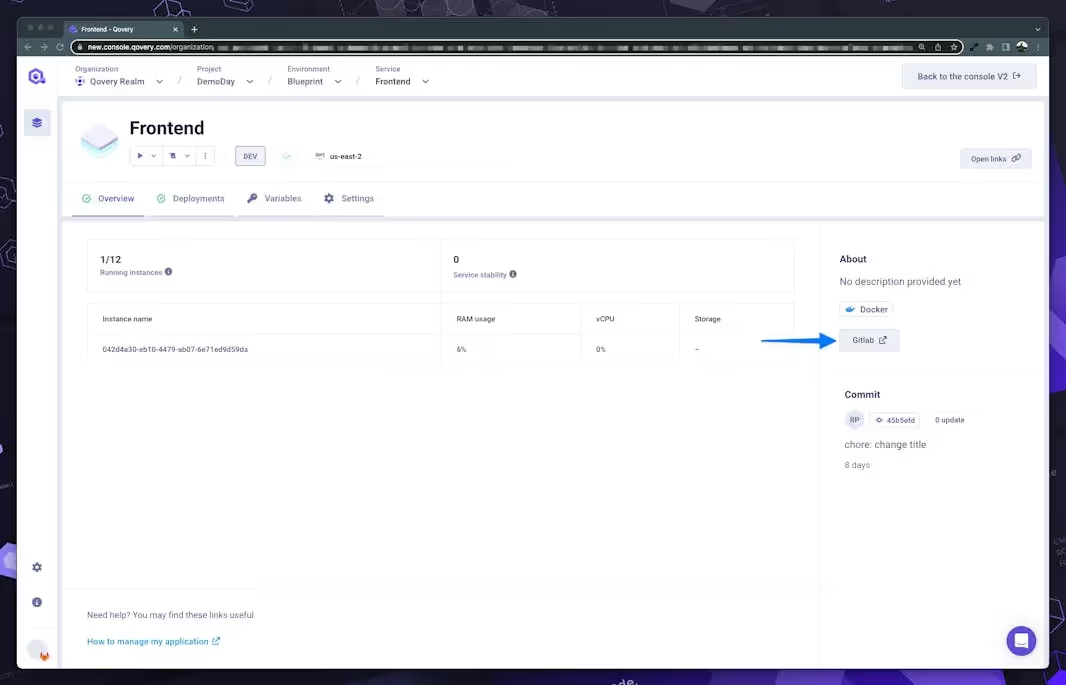
Qovery interface - click on "Gitlab" button to open Gitlab repository
Going back to the Qovery interface, you can find the Git provider button that will redirect your repository, where you can create a merge request (also called a pull request, depending on your Git provider).
After creating your merge request, you will see that a new environment has been created on Qovery, which is a full-stack environment with Frontend, Backend, API Gateway. So you can test it and change it in a production-like environment without impacting your production or any other environments.
Example Scenario - Sample application on Qovery x Gitpod
In this Demo, Nancy (Gitpod) and Romaric (Qovery), will show you how you can easily Develop, Deploy and Run applications on AWS with Gitpod and Qovery!
Whether you need to do a hotfix because you messed up something or want to try a new feature before pushing it to production, Gitpod and Qovery are here for you. The power of Gitpod and Qovery combined makes managing the environment and development easy and straightforward. Don’t wait for one more second and improve your velocity and autonomy today!
We would love to hear your feedback in the Community.