Cloud Cost Optimization Strategies: How to Reduce Cloud Infrastructure Costs
Learn how mid-size companies can dramatically cut cloud infrastructure costs using practical strategies like compute rightsizing, serverless, storage tiering, and automated scaling. This guide also explores how Qovery simplifies and automates cost optimization for growing teams - no full DevOps team required.
Mid-size organizations can significantly reduce cloud infrastructure costs by focusing on optimizing compute and storage resources. This includes right-sizing instances, leveraging serverless and spot instances, and implementing storage tiering and lifecycle policies for data.
Automation and robust monitoring are crucial for ongoing cost control. Implementing Infrastructure as Code (IaC) to prevent resource sprawl, scheduling automated shutdowns for non-critical environments, and using comprehensive monitoring to identify and address cost anomalies are essential practices.
Platforms like Qovery automate many cost-saving strategies, enabling mid-size organizations to optimize cloud spending without needing a dedicated DevOps team. Qovery offers features such as intelligent auto-scaling, dynamic environment management, and detailed cost visibility, helping companies reduce expenses and avoid vendor lock-in.
The fastest way to cut a cloud bill is to stop paying for capacity nobody uses: right-size compute to real usage, put idle non-production environments on a schedule, keep service-to-service traffic inside one availability zone, and tag everything so you can see where the money actually goes. Those four moves recover more spend in most mid-size estates than any pricing negotiation ever will.
The waste is real and it is measured. Flexera's 2026 State of the Cloud Report found that organizations now estimate 29% of their cloud spend is wasted - the first increase in five years, driven by a rush of AI workloads. A year earlier, Flexera's 2025 report already showed cloud budgets running about 17% over on average, with 84% of respondents naming managing cloud spend as their single biggest cloud challenge. The FinOps Foundation's 2025 State of FinOps survey of 861 practitioners, who together account for roughly $69 billion in public cloud spend, ranks workload optimization and waste reduction as the top priority ahead of everything else.
So this is not a niche problem, and it is not a one-time cleanup. Cost optimization is an ongoing operational discipline that has to sit inside the development process, not bolted on at the end of the quarter when finance asks questions.
This guide walks through the practical strategies that reduce infrastructure costs without a dedicated FinOps team, then answers the specific questions I keep hearing from teams weighing Kubernetes on a hyperscaler against a managed platform - including why the bill comes in higher than expected and what to monitor before you migrate a single workload.
8 Strategies for Reducing Cloud Infrastructure Cost
1. Optimizing Compute Resources
One of the constant ways of keeping costs under control within a cloud infrastructure environment is to tailor the computational resources to the actual workload that is run. As most infrastructure deployed for an application begins as oversized, the main challenge is to tune and optimize the size allocated.
Understand Usage Patterns:
The first step is to understand the actual usage of applications, to do so, monitoring CPU, Memory, and Network Utilization is imperative. Once the level and usage patterns are understood, instances and containers can be reduced to fit the actual usage. This action leaves a smaller overhead for the application to run successfully while reducing costs.
This tailoring habit is also important when using containers. Within an orchestration system like Kubernetes, it is important to define the resource requests and limits for running containers so that the underlying system can provision and allocate resources appropriately.
Implement Auto-scaling:
Applications often follow regular usage patterns (e.g. off-peak during the night and weekend). Engineering Organizations can benefit from those usage patterns by automatically adjusting their cluster sizes to the demand. By implementing auto-scaling, infrastructure sizing becomes variable and dependent on actual usage. Instances can be dynamically allocated to deliver more resources in moments of high usage, and remove machines when traffic is low.
Utilize Cost-Saving Instance Types:
Cloud Infrastructure providers have introduced the concept of Spot instances as a new opportunity for savings. These instances are offered at huge discounts and are dynamically allocated, their downside is that they can be recalled at any time. This represents an opportunity to benefit from low-cost computing for less-critical workloads that exist within a fault-tolerant environment.
Some workloads can benefit from being built on top of serverless computing options. In an event-driven model, for example, being able to run functions and subscribing to a pay-per-use model can trigger significant savings compared to keeping instances running permanently.
2. Storage Cost Reduction
When using Object Storage solutions offered by cloud providers, you have a choice of deciding which storage tier an object should be stored with. Tiers are based on access frequency and performance needs.
Choosing the Right Storage Tier
For data that needs to be accessed very frequently and fast, the more expensive hot-storage tier is the standard. For rarely accessed data, cold storage tiers are good solutions that can reduce storage costs significantly.
Implementing Lifecycle Policies
Cloud solutions offer lifecycle policies as a great way to automatically manage storage allocation and costs. They let you move data from one tier to another after a certain time or trigger deletions when data is old enough.
Continuous Storage Optimization
Keeping an eye on and optimizing storage frequently are ways to identify cleanup opportunities. This can range from de-duplicating data or compression before being stored at the end. All these habits can impact cloud costs in the long run.
3. Network Cost Management
Within distributed architecture, high costs can be incurred when using inter-region and cross-zone data transfers. To reduce this impact, it is important to reduce this communication by colocating related services or implementing an intelligent caching mechanism.
Strategic Architectural Planning
Careful architectural planning can benefit the organization in the long run. Keeping related resources geographically close minimizes transfer costs and improves performance. Moreover, building private networks for inter-service communication can be a great lever to reducing internet traffic and its costs.
Leveraging Content Delivery Networks (CDNs)
Content Delivery Networks (CDNs) reduce bandwidth costs by caching content close to the end-user requesting it. This reduces the load on the servers initially delivering the data while minimizing the data transfer expenses. They offer complex caching policies and deep integrations with most cloud providers, making them essential for a cost-effective cloud architecture.
4. Database Optimization
Each database offers different advantages to the right workload. Deciding on the correct database is important to make sure that your usage matches what it’s best designed to do. On top of the database itself, it is important to choose the right service. For example, managed database services offer operational simplicity at a higher cost, reducing the need for database expertise in-house and freeing teams to focus on their application.
Enhancing Query Performance
When using a database, it is critical to keep an eye on query performance. Using proper indexing strategies and making sure that the data is modeled correctly for it to be accessed is important. Removing these inefficiencies reduces the database load, improves query performance, and ultimately reduces the costs associated with running the database.
Implementing a Caching Layer
A smart caching layer sitting closer to the user can also alleviate pressure on the database. This lets the application layer quickly access relevant data without relying on heavy query operations. Implementing this layer is an important step to a healthy and optimized database environment.
5. Automation and Infrastructure as Code (IaC)
Enforcing Automation and Infrastructure as code when managing infrastructure reduces risks of forgotten and unmanaged resources. Automated provisioning ensures consistent deployment while automated de-provisioning prevents resource sprawl.
Scheduled Automation for Cost Savings
Scheduled automation can also be used to shut down non-critical environments (e.g. development environments) during off-hours, which provides immediate cost savings.
Replicating Cost-Optimized Configurations
Infrastructure as code enables easy replication of cost-optimized configuration across environments and facilitates rapid infrastructure changes, further improving cost savings for an engineering organization.
6. Monitoring and Observability for Cost Control
Comprehensive Observability and Monitoring provide visibility into resource utilization patterns and cost trends. They also ensure that cost anomalies are detected, using alerting and other detection systems; this enables engineering organizations to quickly respond and fix potential cost overruns.
Informing Optimization Decisions
Data collected through wide monitoring yields better information to make optimization decisions. This data can reveal usage patterns, performance bottlenecks, and opportunities to tailor fit infrastructure to an organization’s needs.
7. Vendor Lock-in Considerations
While cloud-native services offer convenience, it is important for engineering organizations to build strategies that prevent potential vendor-lock-in. Maintaining flexibility in providers, and letting workloads potentially inter-operate reduces risks for surprises and limitations for future flexibility.
Ensuring Portability with Cloud-Agnostic Layers
Maintaining portability using cloud-agnostic abstraction layers is a viable strategy to keep an organization flexible for portability in case of service disruption or pricing changes.
8. Build a Culture of Cost Optimization
Cost optimization succeeds when it becomes a core value of an engineering organization.
Fostering Cost Awareness
This involves deep training about cloud economics, providing cost visibility to teams, and incorporating cost into technical decision-making processes.
Encouraging Accountability and Incentives
Making teams accountable for their cloud spending, as well as building incentives for successful cost reductions are ways to build an inclusive culture where cloud costs matter to all engineers, thus benefiting the organization as a whole.
Agents ship fast. Guardrails keep them safe.
Qovery ensures every agent action is scoped, audited, and policy-checked. Start deploying in under 10 minutes.
Kubernetes on a Hyperscaler vs a PaaS: The Cost Questions Teams Actually Ask
Most cost conversations I have with growing engineering teams are not really about spot instances or storage tiers. They are about a bigger decision: keep running on a managed platform like Render, Vercel, Scalingo, or Upsun, or move onto raw Kubernetes on a hyperscaler (AWS, GCP, Azure, or Scaleway) to get more control. The three questions below come up on almost every call, so here are direct answers.
Is running Kubernetes on a hyperscaler cheaper than a managed PaaS?
Not automatically, and rarely below a certain scale. Raw hyperscaler compute has a lower sticker price per vCPU and per GB than a PaaS that marks it up, so at high, steady utilization Kubernetes wins on unit cost. Below that, the savings are eaten by two things a PaaS bakes into its price: the engineering time to run the cluster, and a set of infrastructure line items that never show up in a PaaS invoice (control plane fees, cross-zone data transfer, NAT gateways, load balancers, observability). A managed platform trades a higher compute margin for near-zero operational overhead. That trade is usually worth it until your bill is large enough that the compute margin exceeds the fully loaded cost of the people and hidden charges you take on by going raw.
Here is a fair, side-by-side view of the common options in 2026:
Option
What it is
Cost model
Ops burden on your team
Best fit
Render
Git-based PaaS with managed Postgres, workers, zero-downtime deploys
Per-service pricing, compute marked up over raw cloud
Very low
Small teams that want to ship without touching infra
Vercel
Frontend-focused PaaS for Next.js/React with preview per PR
Usage-based, generous free tier, steep at scale for heavy traffic
Very low
Frontend and Jamstack apps, edge rendering
Scalingo
European (French) sovereign PaaS, Heroku-like, ISO 27001 + HDS
Per-container pricing
Very low
EU teams with data-residency or compliance needs
Upsun
Multi-cloud PaaS (formerly Platform.sh) with per-branch preview environments
Usage-based, runs on AWS/GCP/Azure/OVHcloud/IBM
Low
Teams wanting PaaS convenience with cloud choice
Raw Kubernetes on a hyperscaler
EKS/GKE/AKS you operate yourself
Pay cloud list price plus every hidden line item; you own the ops
High (needs platform/DevOps skills)
Large, steady workloads with in-house expertise
Qovery
Internal developer platform on your cloud account (AWS, GCP, Azure, Scaleway, or BYO-Kubernetes)
You pay your cloud provider directly; Qovery automates the platform layer
Low
Teams that want raw-cloud economics and control without running the cluster
The honest summary: a PaaS is cheaper in total cost of ownership when your team is small and your traffic is spiky. Raw Kubernetes wins on pure infrastructure cost at scale but only if you can afford the people to run it well. The middle path is running on your own cloud account with the platform layer automated for you, which is the gap Qovery fills.
Why is our Kubernetes bill on a hyperscaler higher than we expected?
Because the biggest line items are the ones nobody sizes. When teams move to EKS, GKE, or AKS and get sticker shock, the compute they carefully right-sized is almost never the problem. The surprises hide here:
Control plane fees. Amazon charges $0.10 per hour per EKS cluster, about $73 a month before a single pod runs. Spin up separate clusters per environment and that multiplies fast. (GKE and AKS have comparable per-cluster management fees.)
The cross-AZ "tax." AWS charges $0.01 per GB in each direction for traffic that crosses an availability zone. By default, Kubernetes spreads pods across zones and routes service traffic to any healthy pod, so in a 3-AZ cluster roughly two thirds of pod-to-pod calls cross a zone boundary and get billed both ways. For a chatty microservice architecture, this alone can become a four- or five-figure monthly line item. Topology-aware routing (trafficDistribution: PreferSameZone) keeps traffic local and cuts it.
NAT gateways and egress. A NAT gateway bills around $0.045 per GB processed on top of an hourly fee, and every byte leaving the cluster for the public internet carries an egress charge. Both are invisible on an architecture diagram.
Over-provisioned requests and idle environments. Requests and limits set "to be safe" reserve capacity the scheduler can never reclaim, and preview or staging environments left running overnight burn money for a team that works eight hours a day.
The fix is not one clever setting. It is visibility into which of these buckets is draining the budget, then right-sizing requests, colocating chatty services, consolidating clusters, and shutting down idle environments automatically.
We're a 25-person team moving off Render to AWS. What cost monitoring should we set up?
Set up allocation and alerting before you migrate a single workload, not after the first surprising invoice. For a team that size moving from a PaaS to AWS, this is the stack I recommend, in order:
Tagging and account structure first. Decide a tagging convention (team, environment, application) and enforce it through infrastructure as code from day one. On a PaaS every cost was already attributed to a service; on AWS untagged resources are invisible, so tagging is the foundation everything else reports on.
AWS Cost Explorer plus AWS Budgets. Native, free, and enough to catch most waste in a mid-size estate. Set budget alerts per environment so an overrun pages someone the same week it happens, not at month end.
A Kubernetes-aware allocation tool.Kubecost or its open-source core OpenCost breaks a shared cluster's cost down to namespace, deployment, and pod - the granularity native billing cannot see once many services share nodes.
A cross-cloud cost platform when you outgrow the basics. Tools like Vantage or CloudZero add forecasting, anomaly detection, and cleaner allocation across accounts. Add one when allocating and forecasting spend becomes a recurring job rather than an occasional report.
Two habits matter more than any tool: review the cost dashboard on a fixed cadence so anomalies get caught in days, and make the team that owns a service also own its bill. Qovery gives you this visibility out of the box on your own cloud account - per-application, per-environment cost breakdowns, budget alerts, and automatic teardown of idle environments - so a small team gets FinOps discipline without hiring for it.
How to Drastically Reduce Your Cloud Infra Costs with Qovery
Qovery addresses the challenges faced by mid-size organizations in their strive for balanced growth and cost control. It provides a comprehensive platform that automates cost optimization while eliminating the complexity of cloud infrastructure management. By abstracting the intricacies of provisioning, configuration, and scaling, Qovery empowers developers to focus on building applications, while the platform automatically implements cost-efficient practices.
1. Intelligent Auto-Scaling and Instance Selection
Qovery leverages advanced node auto-scaling, including Karpenter, to automatically provision the most cost-effective instance types based on actual workload requirements. This intelligent system dynamically selects optimal instance sizes, families, and even utilizes cost-efficient Spot Instances in real time. This ensures your applications run on the most suitable and economical infrastructure available, significantly reducing compute costs.
2. Dynamic Environment Management for Savings
The platform offers dynamic environment management, a powerful feature for cost savings. Development and preview environments are automatically provisioned and precisely sized only when needed, then de-provisioned when no longer in use. This capability eliminates resource sprawl and the significant cost drain from forgotten or idle development resources, tailoring the existence of ephemeral environments to the exact needs of developers for pull requests and feature branches.
3. Smart Auto-Scaling and Real-time Cost Visibility
Qovery also offers sophisticated auto-scaling policies to respond to traffic and usage patterns. The platform will both scale resources to their needs when traffic ramps up and de-provision superfluous resources when they are not needed for services to perform correctly. This automated approach brings infrastructure naturally closer to its actual needs, bringing costs down to what is necessary.
The platform provides an easy way to set up comprehensive cost visibility through detailed reporting and analytics through solutions like Kubecost. It breaks down spending per application, project, and environment so that teams can track spending in real-time. It also offers possibilities for setting budget alerts and warning for unusual spending patterns.
4. Developer Empowerment and Multi-Cloud Portability
Qovery is a developer-focused solution that eliminates the traditional barrier between development teams and infrastructure optimization. Developers can deploy applications and manage environments themselves. They rely on the platform handling complexity and applying cost-efficient configurations along the way.
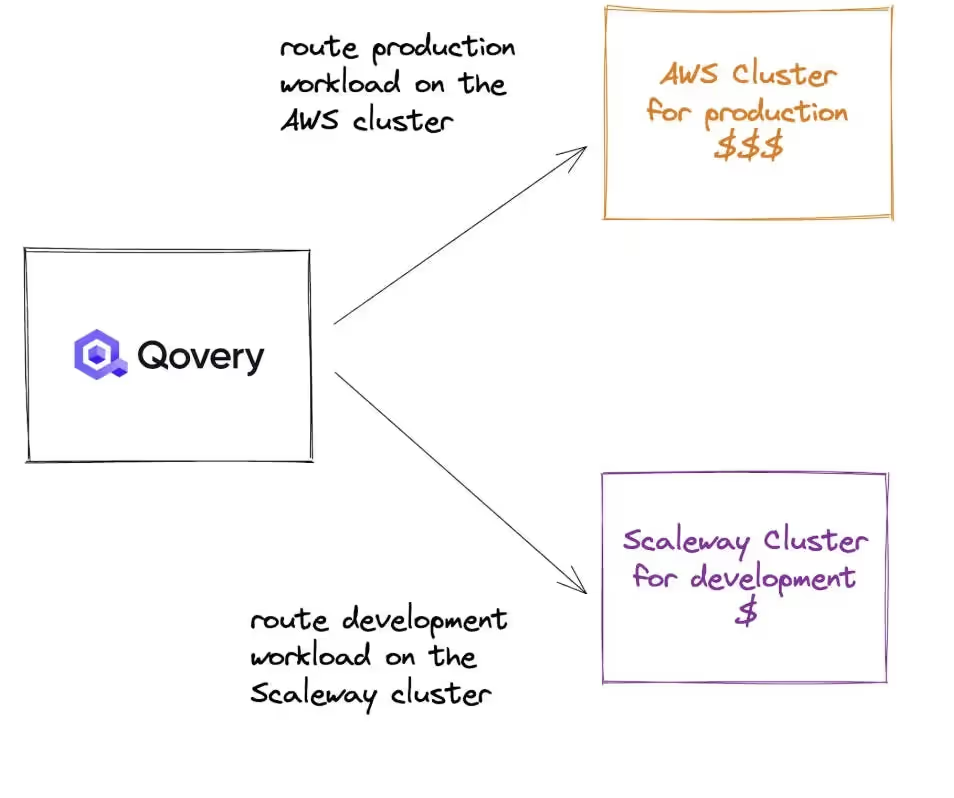
The platform is interoperable with multiple cloud providers including AWS, Azure, and Google Cloud Platform, preventing vendor lock-in while enabling organizations to leverage the most cost-effective services from different providers. Qovery’s abstraction layer allows teams to experiment and maintain their deployment processes regardless of the underlying infrastructure, providing flexibility and cost optimization while the business continues to grow.
Cloud Cost Optimization I Qovery
Conclusion
The strategies outlined in this guide provide a comprehensive framework for achieving long-term cost reductions that can limit your infrastructure cost burden.
For mid-size organizations, it is key to embrace systematic cost optimization within their engineering culture, involving all engineers at their level to make the right decisions for each development.
Engineering organizations mastering cloud cost optimization have a competitive advantage in their ability to invest more resources in product development and market expansion.
Ready to transform your cloud spending? Start on the Qovery Free plan: one cluster of your own, 3 users plus unlimited AI agents and 1,000 deployment minutes a month, with no time limit and no credit card, so you can try it on your own cloud account before you commit.
Frequently asked questions
How do you reduce cloud infrastructure costs?
Right-size compute to real usage rather than to peak guesses, move infrequently accessed data to cheaper storage tiers, keep traffic within a region to avoid cross-zone and inter-region charges, match each workload to an appropriate database, and enforce provisioning through infrastructure as code so nothing is left running by accident.
What is the biggest source of unnecessary cloud spend?
Over-provisioned and idle compute. Instances sized for a peak that rarely arrives, and non-production environments running around the clock for a team that works eight hours a day, together account for more waste in most organizations than any pricing decision.
How do data transfer costs add up in the cloud?
Quietly, because they are per-gigabyte and invisible in architecture diagrams. Cross-availability-zone traffic between services, inter-region replication and egress out to the internet each carry a charge. A chatty microservice architecture spread across zones can spend more on network than on the compute doing the work.
Does infrastructure as code reduce cloud costs?
Indirectly but reliably. It removes the forgotten resource, because everything provisioned is declared and reviewable, and it makes tearing environments down as easy as creating them. Most of the saving comes from that reversibility rather than from any pricing optimization.
Do you need a dedicated FinOps tool to control cloud costs?
Not to start. Provider-native cost tooling plus consistent resource tagging will surface most of the waste in a mid-sized estate. Dedicated tooling earns its place once spend is large enough that allocating it across teams, and forecasting it, becomes a job rather than a report.
Is Kubernetes on a hyperscaler cheaper than a PaaS like Render or Heroku?
Only at scale, and only if you can afford to run it. Raw hyperscaler compute costs less per unit than a PaaS that marks it up, so a large, steady workload is cheaper on Kubernetes. Below that point the savings disappear into engineering time and infrastructure line items a PaaS hides (control plane fees, cross-zone transfer, NAT gateways). Running on your own cloud account with the platform layer automated, as Qovery does, gets you raw-cloud pricing without the cluster operations bill.
Why did our cloud bill jump after moving to Kubernetes on a hyperscaler?
Usually because of costs you did not size. The EKS control plane runs about $73 a month per cluster, cross-availability-zone traffic is billed $0.01 per GB each way and defaults to crossing zones for roughly two thirds of pod-to-pod calls, and NAT gateways add per-GB egress charges. Over-provisioned requests and always-on preview environments finish the job. Get visibility into which bucket is draining spend, then right-size, colocate chatty services, and shut idle environments down automatically.
What cost monitoring tools should a small team set up when moving to AWS?
Start with a strict tagging convention enforced through infrastructure as code, then AWS Cost Explorer and AWS Budgets for native alerting. Add Kubecost or OpenCost to break a shared cluster down to namespace and pod, and a cross-cloud platform like Vantage or CloudZero once forecasting becomes a recurring job. Set the alerts before you migrate, not after the first surprising invoice.
What are the main alternatives to Render for a growing team?
The common ones are Vercel (frontend and Next.js apps), Scalingo (European sovereign hosting with ISO 27001 and HDS), Upsun (multi-cloud PaaS, formerly Platform.sh), raw Kubernetes on a hyperscaler, and Qovery (which runs on your own AWS, GCP, Azure, or Scaleway account so you keep cloud-native pricing and avoid lock-in). Pick by how much operational control you want against how much you want the platform to handle for you.
Melanie leads content at Qovery. She covers platform engineering trends, Kubernetes operations, FinOps, and the tools that help engineering teams ship faster.
Next step
Agents ship fast. Guardrails keep them safe.
Qovery ensures every agent action is scoped, audited, and policy-checked. Start deploying in under 10 minutes.