Kubernetes Deployment Strategies: Pros, Cons & Use Cases
Master Kubernetes deployment strategies: Rolling Update, Recreate, Blue/Green, and Canary. Learn the pros, cons, and use cases to choose the right strategy based on your uptime, risk tolerance, and resources. Simplify complex rollouts with automation.
The main Kubernetes deployment strategies-Rolling Update, Recreate, Blue/Green, and Canary-each provide a different balance of downtime, rollback speed, resource usage, and complexity. For instance, Blue/Green offers instant rollback and zero downtime but requires double the infrastructure, while Recreate is simple and resource-efficient but causes complete application downtime.
The choice of deployment strategy must be governed by four key organizational factors: Uptime Requirements (e.g., mission-critical apps need Blue/Green/Canary), Risk Tolerance (Canary limits impact to a small subset of users), Resource Constraints (Rolling Update is cost-effective), and Team Expertise (Canary and Blue/Green are high complexity).
Advanced strategies like Blue/Green and Canary require complex configuration and traffic management. Tools like Qovery can automate the Kubernetes configuration, integrate monitoring for automated rollbacks, and simplify traffic routing, enabling companies to adopt sophisticated, low-risk deployment strategies without a heavy operational burden.
Beyond the default Rolling Update, your choice of Kubernetes deployment strategy directly dictates your application's uptime, risk management, and resource efficiency.
For DevOps engineers and technical leaders, selecting the right approach-from simple Recreate to complex Canary-is a critical decision that balances zero-downtime, rollback speed, and infrastructure costs.
Understanding the trade-offs between Rolling Update, Recreate, Blue/Green, and Canary is essential for implementing a successful release process that aligns with your business goals.
Core Deployment Strategies
1. Rolling Update
The default Kubernetes strategy. It gradually replaces old application pods with new ones, one, or a few at a time, until the update completes. Kubernetes terminates a subset of old pods, starts new pods with the updated version, waits for them to become ready, then repeats the process until all pods run the new version.
No need for duplicate infrastructure, reducing costs.
Easy rollback by reversing the update process.
Native Kubernetes support requiring minimal configuration.
Cons
Rolling updates can be slow for large deployments.
Transient inconsistencies can occur when old and new versions run concurrently. Mixed-version compatibility must be maintained during rollout.
Gradual rollback takes time if issues appear.
Use Case
Use rolling updates for standard updates for most applications where a brief period of mixed versions is acceptable. This strategy works well for stateless applications with backward-compatible changes.
2. Recreate
Recreate is an all-or-nothing approach that shuts down all old application pods before starting any new ones. Kubernetes terminates the entire existing deployment, waits for all pods to stop, then creates new pods with the updated version.
Pros
Simple to implement with minimal configuration.
Avoids mixed-version issues entirely.
Resource efficient, as only one version runs at a time.
Fast rollback by redeploying the previous version.
Cons
Causes complete application downtime during deployment.
Downtime duration depends on pod startup time.
Not suitable for production applications requiring high-availability.
Use Case
Development environments, batch jobs, or non-critical applications where downtime is acceptable. Appropriate for applications that cannot handle multiple versions running simultaneously.
3. Blue/Green Deployment
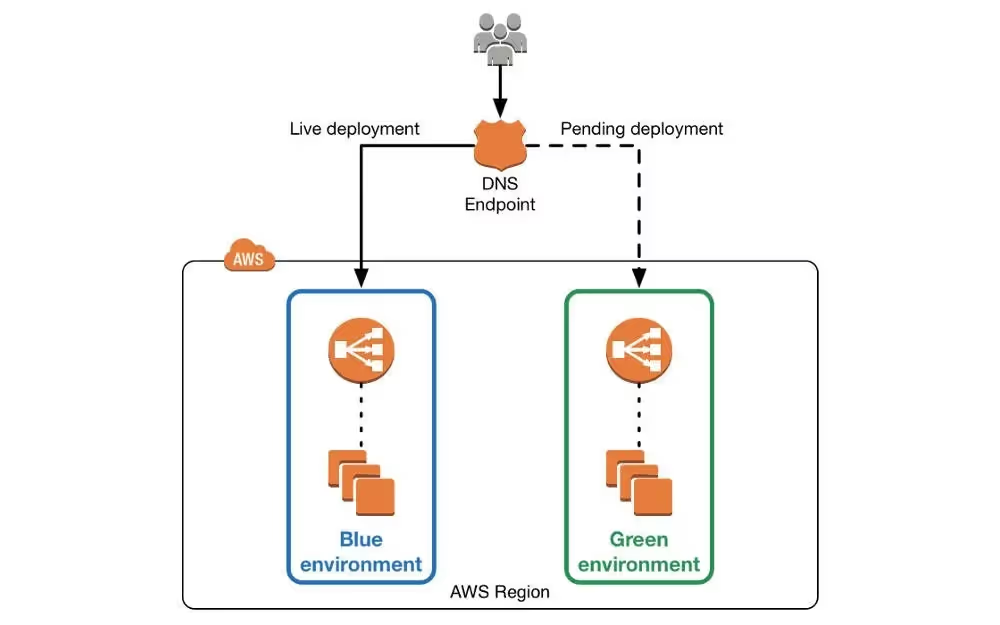
This strategy involves running two identical environments: Blue is the current live version, while Green is the new version. Both versions are live and running concurrently. Once Green is ready and validated, traffic switches instantly from Blue to Green. The Blue environment remains available for immediate rollback if needed while traffic is ramping up in the new environment.
Pros
Zero-downtime with instant traffic cutover.
Instant rollback by switching traffic back to Blue.
Thorough pre-release testing is available in a production-like environment.
Clear separation between old and new versions.
Cons
Requires doubling of the infrastructure and resources.
Complex to manage with two complete environments.
Higher costs during the deployment window.
Database schema changes and infrastructure/software updates require careful coordination during release.
Use Case
Mission-critical applications where zero downtime is non-negotiable and the cost of duplicate infrastructure is justified. Financial services, e-commerce platforms, and other high-availability requirements.
4. Canary Deployment
In Canary Deployment, a new version is released to a small subset of users and real traffic (the "canary") before full rollout. This version is closely monitored through metrics to validate and ensure correct behavior and health before gradually increasing traffic. Traffic rollout is closely controlled to make sure that the new version keeps working correctly. If issues appear, traffic routes back to the stable version. Deployment finishes when all traffic switches over to the Canary version.
Pros
Limits the impact of faulty deployments to a small user subset.
Allows real-world testing and feedback before full rollout.
Easy rollback by routing traffic away from Canary.
Enables data-driven deployment decisions.
Cons
Complex traffic routing requires additional network configuration to be setup correctly.
Deep observability and monitoring tools are required to validate canary health and correct behavior.
Deployment takes a longer time due to gradual rollout
More sophisticated infrastructure management
Customers are directly impacted by production testing during rollout, potentially exposed to faulty deployments.
Use Case
Use the Canary deployment strategy when you need real production testing by deploying new features to a small user group. Canary is valuable for high-risk changes that require production testing. Valuable for applications where minimizing widespread customer impact is critical.
Side-by-Side Comparison Table
Strategy
Downtime
Rollback Speed
Resource Usage
Complexity
Rolling Update
Zero (minimal)
Gradual
Efficient (no duplication)
Moderate
Recreate
Yes (complete)
Instant
Very Efficient
Low
Blue/Green
Zero
Instant
High (doubles resources)
High
Canary
Zero (minimal)
Easy
Moderate
High
Agents ship fast. Guardrails keep them safe.
Qovery ensures every agent action is scoped, audited, and policy-checked. Start deploying in under 10 minutes.
Application criticality determines acceptable downtime levels. Mission-critical applications require zero-downtime strategies like Rolling Update, Blue/Green, or Canary. Non-critical applications or batch processing can tolerate the downtime from Recreate deployments.
Consider user expectations and business impact. Customer-facing applications typically require continuous availability and optimal uptime, while internal tools may accept brief maintenance windows. Evaluate Service Level Agreements (SLAs) and contractual obligations for uptime guarantees to your customers.
2. Risk Tolerance
Teams must assess risk appetite for new releases. Conservative approaches favor Canary deployments that limit exposure to small user subsets. Higher risk tolerance allows Rolling Updates or Blue/Green deployments with a broader initial exposure.
Consider the consequences of deployment failures. Applications handling financial transactions or sensitive data require lower-risk strategies. Less critical applications can accept higher risk in exchange for deployment simplicity.
3. Resource Constraints
Infrastructure costs affect strategy selection. Blue/Green deployments require double resources during the deployment window, increasing costs. Organizations with limited budgets may prefer Rolling Updates or Recreate strategies that avoid resource duplication.
Evaluate whether temporary resource allocation justifies the benefits of certain deployment strategies. Cloud environments with elastic scaling can accommodate Blue/Green deployments more easily than fixed infrastructure. Consider the duration of resource duplication against the value of instant rollback capabilities.
4. Team Expertise
Team capabilities influence strategy complexity tolerance. Advanced strategies like Canary deployments require expertise in traffic management, monitoring, and automated rollback procedures. Teams without this expertise may prefer simpler approaches.
Consider training and tooling investments required for advanced strategies. Organizations with dedicated DevOps teams can manage complex deployments, while smaller teams may need simpler approaches or platform automation.
Simplifying Kubernetes Deployments with Qovery
Implementing advanced deployment strategies in Kubernetes requires configuration management, traffic routing setup, monitoring integration, and rollback automation. This complexity creates an operational burden that many mid-size companies struggle to manage effectively.
Qovery is an automated Kubernetes deployment tool that simplifies the implementation of these deployment strategies. The platform automates much of the manual configuration and management required for advanced rollouts, allowing mid-size companies to leverage strategies like Blue/Green or Canary without significant operational burden.
1. Automated Deployment Configuration
The platform handles the Kubernetes configuration required for different deployment strategies. Teams select their desired strategy while preparing their application and environment configuration. Qovery manages and configures the necessary resources, traffic routing, and health checks automatically to ensure the application deploys smoothly. This eliminates the need to manually write and maintain deployment manifests, as the platform manages this end-to-end.
2. Built-in Monitoring and Rollback
Qovery provides integrated monitoring that tracks deployment health automatically. The platform can detect issues and trigger automated rollbacks based on predefined criteria. Teams gain the benefits of sophisticated deployment strategies without building custom observability systems. Deploying through Qovery brings confidence to the application development team, as they can be sure that their rollout is controlled by the platform.
3. Simplified Traffic Management
For strategies requiring traffic splitting, like Canary deployments, Qovery handles the routing configuration. Teams specify the percentage of traffic for each version, and the platform manages the underlying infrastructure. This abstraction makes advanced strategies accessible to teams without deep Kubernetes expertise. Qovery also offers ephemeral environments to test in production-like environments ahead of rollouts.
Conclusion: Master Your Deployments with Qovery
Choosing the right deployment strategy is a key part of running stable, scalable, and reliable cloud-native applications. Each strategy offers different trade-offs between simplicity and capability, risk and safety, cost and performance.
Understanding these trade-offs enables teams to select deployment approaches that align with application requirements and organizational capabilities. The choice depends on uptime needs, risk tolerance, resource constraints, and team expertise.
Qovery empowers teams to adopt advanced deployment strategies by handling the underlying complexity. Mid-size companies can implement Blue/Green or Canary deployments without the operational burden typically associated with these approaches. Teams focus on shipping features and business value rather than managing deployment infrastructure.
⚡️ K8s Production Mastery: Get the FREE 2026 Guide
Stop wasting 30-70% of cloud spend and prevent costly downtime. This essential guide provides actionable best practices for advanced Kubernetes configuration, covering:
✅ **Cost Control:** Specific configurations to slash cloud waste.
🔒 **Security:** Mastering RBAC, Network Policies, and External Secret Management.
⏱️ **Reliability:** Implementing PDBs and robust liveness/readiness probes.
Melanie leads content at Qovery. She covers platform engineering trends, Kubernetes operations, FinOps, and the tools that help engineering teams ship faster.
Next step
Agents ship fast. Guardrails keep them safe.
Qovery ensures every agent action is scoped, audited, and policy-checked. Start deploying in under 10 minutes.