> ## Documentation Index
> Fetch the complete documentation index at: https://www.qovery.com/docs/llms.txt
> Use this file to discover all available pages before exploring further.
# FAQ
> Frequently Asked Questions
A **project** is the site that you're working on. Each project can contain multiple **applications** and be deployed in multiple **environments**. An environment is a standalone copy of your site, including apps, databases, storage, data, and all other services. By default, `main` branch is the production environment, while all other branches can be set up as identical copies of the prod environment for testing purposes.
Qovery provides `managed` and `container` modes for your databases. Basically, `managed` mode relies on the managed database provided by the cloud provider. E.g. if you choose `Postgres` with the `managed` mode while your environment is running on AWS, then Qovery provides an [AWS RDS](https://aws.amazon.com/rds) instance. Please check out our [database section](/docs/configuration/database) for further details.
Behind the scene, Qovery uses [Kubernetes](https://kubernetes.io/). Qovery extends Kubernetes to make it accessible to any developer teams.
**Important**: Qovery does not modify Kubernetes. It only deploys his services in a `qovery` Kubernetes namespace.
Yes, absolutely! Check out our monorepo guide.
Yes, absolutely! Check out our microservices guide.
GitHub, GitLab, BitBucket.
Not at the moment, but you can upvote for this feature in [our roadmap](https://roadmap.qovery.com/roadmap).
Yes, absolutely!
There isn't just one public cluster IP adress dedicated to external communication. However, worker nodes inside your cluster each have a public IP automatically attached to them. You can view those default public IPs in the details of your worker nodes (EC2 instances for AWS users) which belong to the node group in your cluster.
For improved security and control, the `Static IP` feature allows you to ensure that outbound traffic from your cluster uses specific IP addresses. For more information on the `Static IP` feature and how to enable it at cluster creation, see [Static IP on EKS](/docs/configuration/integrations/kubernetes/eks/managed#static-ip) or [Static IP on GKE](/docs/configuration/integrations/kubernetes/gke/managed#static-ip). GKE clusters can enable stable Cloud NAT IPs through the NAT Gateway feature's `staticIpsEnabled` option.
You have to create N CNAME, one per custom domain.
The Qovery team manages your Kubernetes cluster's upgrade, and you don't have to think about it. Upgrades from one minor Kubernetes version to another require a good amount of tests to make sure everything goes smoothly with zero interruptions for your app. This is why Qovery always provides 1 or 2 minor versions below the last one offered by the cloud provider. Our goal is to guarantee you the maximum uptime.
More details on this dedicated section: [how does Qovery handle Kubernetes version upgrades](/docs/configuration/clusters#how-does-qovery-handle-kubernetes-version-upgrades).
NO and you SHOULDN'T!
More details on this dedicated section: [how does Qovery handle Kubernetes version upgrades](/docs/configuration/clusters#how-does-qovery-handle-kubernetes-version-upgrades).
Absolutely, you can follow this guide to connect to your cluster with kubectl.
Absolutely, you can connect directly to your application with a shell by clicking on the Qovery cloud shell button:
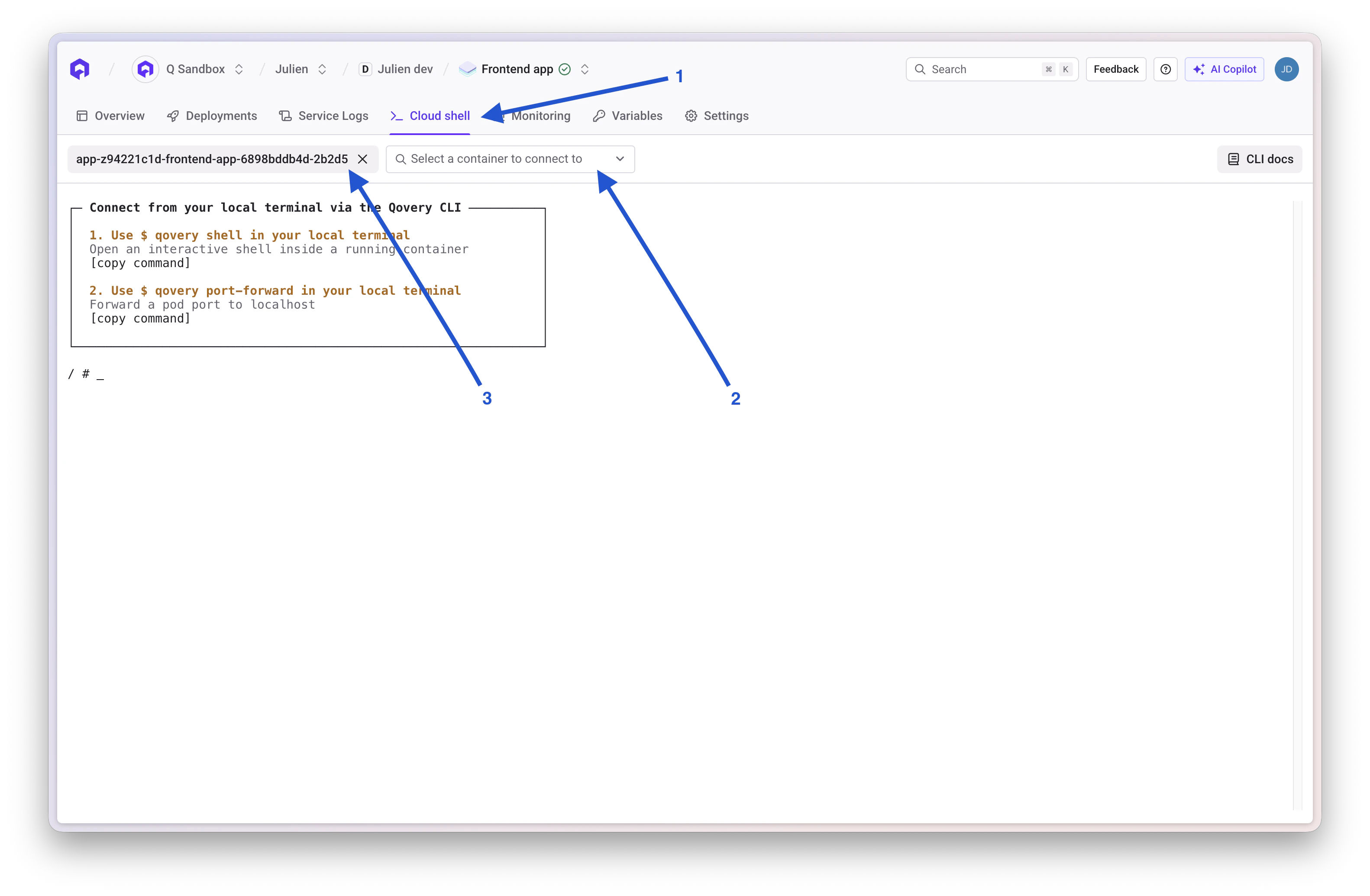 Then you just have to select the pod and the container.
You can also check out our [CLI](/docs/guides/qovery-101/provision#qovery-cli) and the `qovery shell` command.
Take a look at [our application documentation](/docs/configuration/application#auto-scaling).
### The power of Kubernetes
Under the hood, Qovery uses **containers** and **Kubernetes** to run applications. With us, your applications scale accordingly to your traffic and needs. We rely on major cloud providers to provide reliable infrastructure to make your applications highly available.
### Reliable infrastructure
What's more, we took on our shoulders the complexity of providing and managing other infrastructure requirements you need (like databases or message brokers), so you can focus merely on developing business features.
### Simple and Powerful
With Qovery, the cloud is simple again. Get all the benefits of using cloud and Kubernetes without dealing with its complexity. You don't need to hire infrastructure experts - configuring continuous integration, deployment, databases, message brokers, storage, DNS, SSL/TLS, VPCs, and many others - we do it all for you. On Qovery, you can spin up a set of microservices, databases, and other cloud services in minutes with a single Git push!
### Built for all developers
Qovery is designed by developers for developers. Our goal is to make your life easier and allow you to move faster. Developer experience is at our heart. Building cloud-native applications was never that fast and simple!
### Fully customizable for advanced business use cases
Create teams, split responsibilities, manage privileges, enforce company-wide rules, deploy to multiple clouds, plug in your own CI solutions. Qovery Business allows you to bring your organization to the next level with ease.
[Here](/docs/basic-concepts) is a detailed explanation on how Qovery works under the hood.
Contact us by email at hello (at) qovery.com or via Pylon directly in the Qovery console (existing customers).
## Still Have Questions?
If you can't find an answer to your question:
Reach out to our support team
Browse our comprehensive documentation
See what features are coming next
Then you just have to select the pod and the container.
You can also check out our [CLI](/docs/guides/qovery-101/provision#qovery-cli) and the `qovery shell` command.
Take a look at [our application documentation](/docs/configuration/application#auto-scaling).
### The power of Kubernetes
Under the hood, Qovery uses **containers** and **Kubernetes** to run applications. With us, your applications scale accordingly to your traffic and needs. We rely on major cloud providers to provide reliable infrastructure to make your applications highly available.
### Reliable infrastructure
What's more, we took on our shoulders the complexity of providing and managing other infrastructure requirements you need (like databases or message brokers), so you can focus merely on developing business features.
### Simple and Powerful
With Qovery, the cloud is simple again. Get all the benefits of using cloud and Kubernetes without dealing with its complexity. You don't need to hire infrastructure experts - configuring continuous integration, deployment, databases, message brokers, storage, DNS, SSL/TLS, VPCs, and many others - we do it all for you. On Qovery, you can spin up a set of microservices, databases, and other cloud services in minutes with a single Git push!
### Built for all developers
Qovery is designed by developers for developers. Our goal is to make your life easier and allow you to move faster. Developer experience is at our heart. Building cloud-native applications was never that fast and simple!
### Fully customizable for advanced business use cases
Create teams, split responsibilities, manage privileges, enforce company-wide rules, deploy to multiple clouds, plug in your own CI solutions. Qovery Business allows you to bring your organization to the next level with ease.
[Here](/docs/basic-concepts) is a detailed explanation on how Qovery works under the hood.
Contact us by email at hello (at) qovery.com or via Pylon directly in the Qovery console (existing customers).
## Still Have Questions?
If you can't find an answer to your question:
Reach out to our support team
Browse our comprehensive documentation
See what features are coming next