> ## Documentation Index
> Fetch the complete documentation index at: https://www.qovery.com/docs/llms.txt
> Use this file to discover all available pages before exploring further.
# Certificate Management for Multi-Tenant Applications
> Implement robust SSL/TLS certificate management for multi-tenant SaaS applications
Learn how to implement robust SSL/TLS certificate management for multi-tenant SaaS applications using dedicated ingresses per tenant on Qovery.
## The Challenge
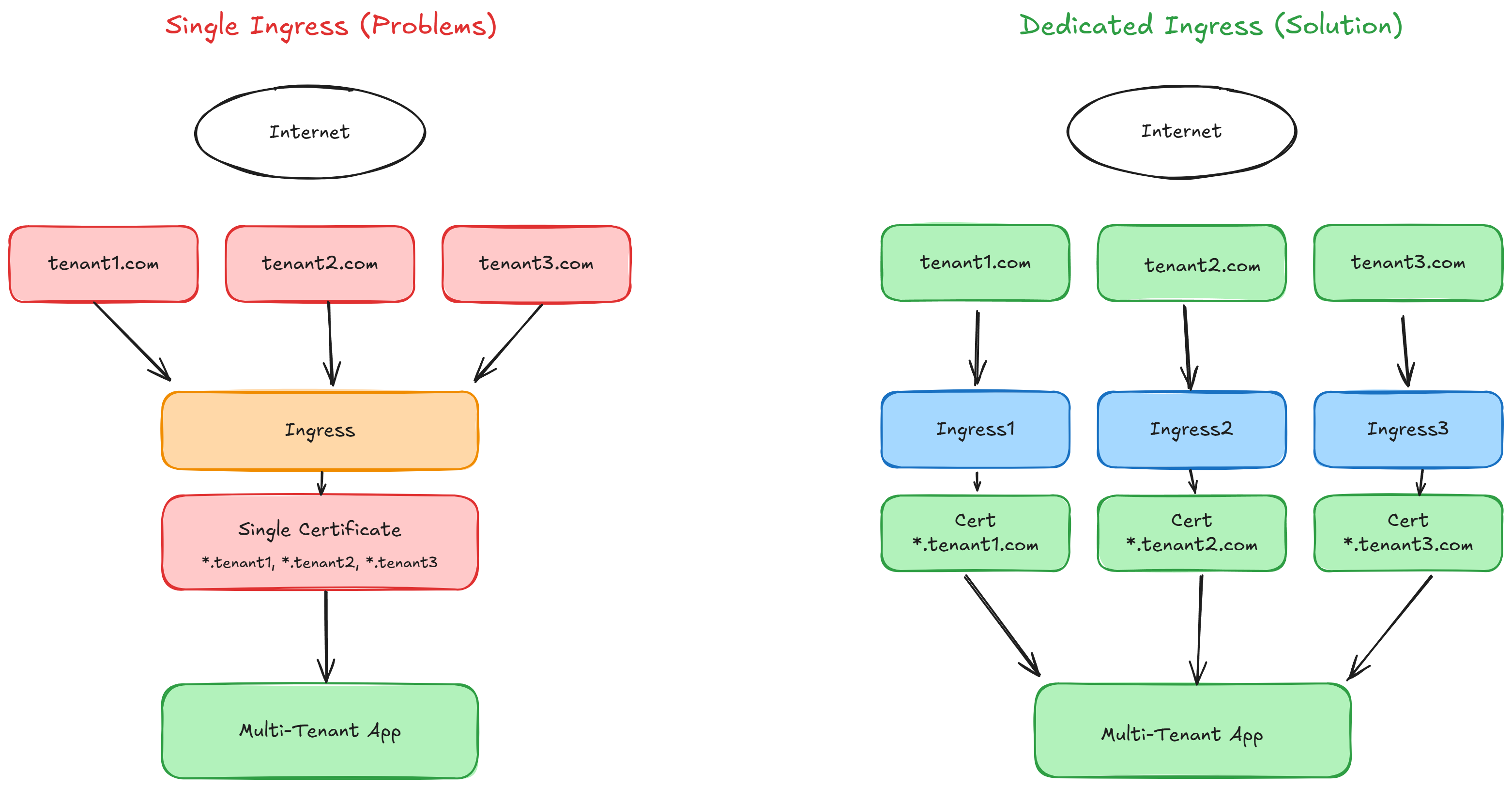
Single ingress controller approach creates problems:
* Certificate generation failures affecting all domains if one validation fails
* Entire deployment risks from misconfigured domains
* Privacy issues: customers see other tenants' domains in SSL certificates
* Let's Encrypt rate limit concerns with many domains
***
## The Solution: Dedicated Ingresses Per Tenant
 ### Benefits
* **Isolation**: Tenant certificate/ingress separation
* **Reliability**: One tenant's issues won't cascade to others
* **Privacy**: Certificates contain only specific tenant domains
* **Scalability**: Improved rate limit and renewal management
***
## Prerequisites
* Qovery account with configured cluster
* DNS management access
* Basic understanding of Kubernetes ingress
***
## Implementation Guide
### Step 1: Organize Your Platform (Optional)
Create separate environments for better organization:
1. **Core Environment** – Main application components (frontend, API, database)
2. **Tenants Environment** – Tenant-specific ingress configurations
### Benefits
* **Isolation**: Tenant certificate/ingress separation
* **Reliability**: One tenant's issues won't cascade to others
* **Privacy**: Certificates contain only specific tenant domains
* **Scalability**: Improved rate limit and renewal management
***
## Prerequisites
* Qovery account with configured cluster
* DNS management access
* Basic understanding of Kubernetes ingress
***
## Implementation Guide
### Step 1: Organize Your Platform (Optional)
Create separate environments for better organization:
1. **Core Environment** – Main application components (frontend, API, database)
2. **Tenants Environment** – Tenant-specific ingress configurations
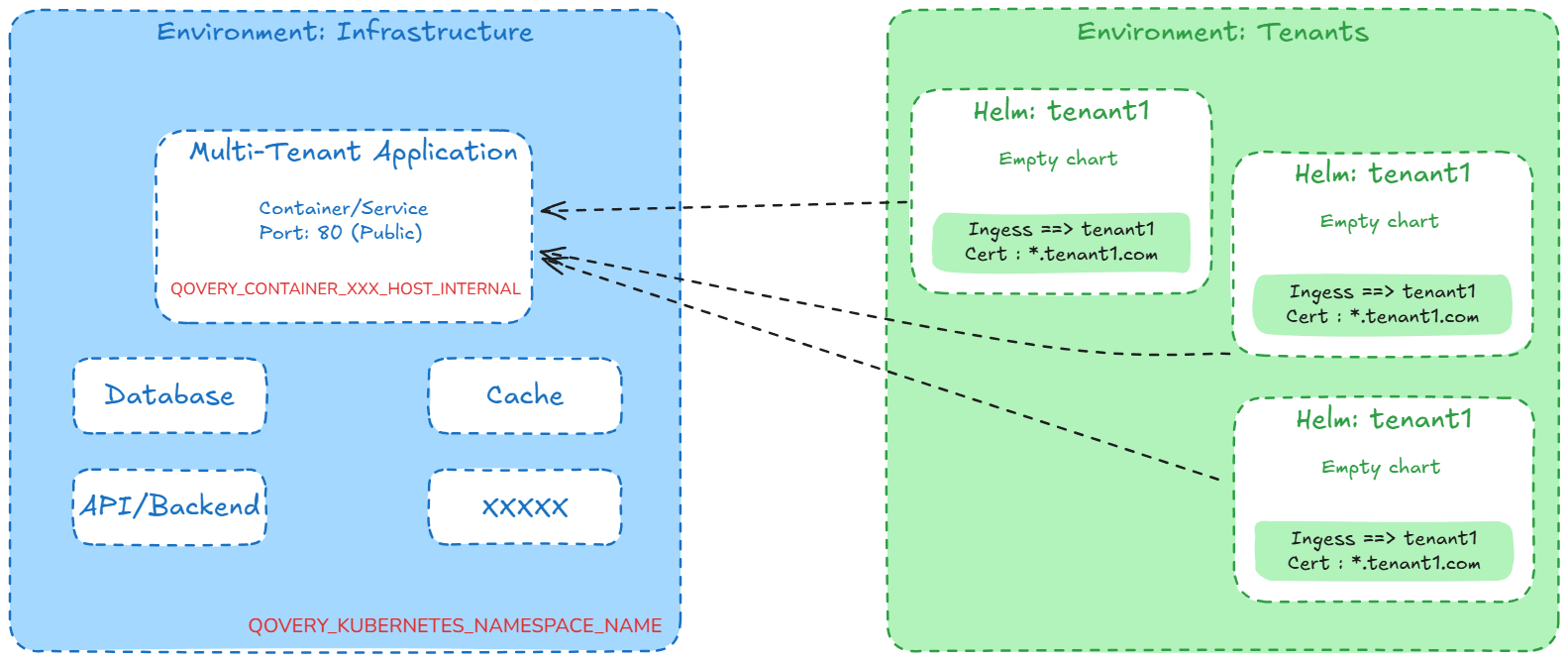 Separating core and tenant environments makes it easier to manage and scale your multi-tenant architecture.
***
### Step 2: Deploy Your Main Application
Deploy your application via UI, CLI, Terraform, or REST API to the Core environment.
1. Go to **Settings** → **Ports**
2. Add your application port
Separating core and tenant environments makes it easier to manage and scale your multi-tenant architecture.
***
### Step 2: Deploy Your Main Application
Deploy your application via UI, CLI, Terraform, or REST API to the Core environment.
1. Go to **Settings** → **Ports**
2. Add your application port
 1. Go to **Settings** → **Domains**
2. Add your main application domain
Your application will have these built-in environment variables:
* `QOVERY_CONTAINER_XXXXXXX_HOST_INTERNAL`: Internal hostname
* `QOVERY_KUBERNETES_NAMESPACE_NAME`: Kubernetes namespace
1. Go to **Settings** → **Domains**
2. Add your main application domain
Your application will have these built-in environment variables:
* `QOVERY_CONTAINER_XXXXXXX_HOST_INTERNAL`: Internal hostname
* `QOVERY_KUBERNETES_NAMESPACE_NAME`: Kubernetes namespace
 Save these values for the next steps.
***
### Step 3: Create Tenant-Specific Ingresses
Save these values for the next steps.
***
### Step 3: Create Tenant-Specific Ingresses
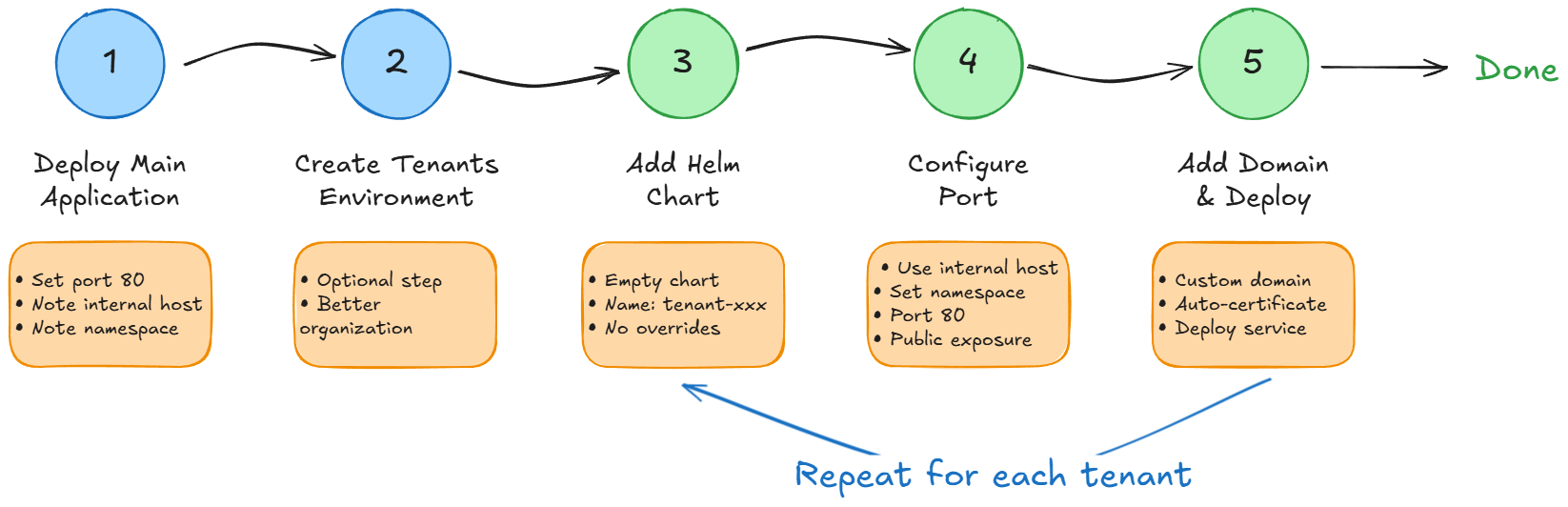 Navigate to your Tenants environment in Qovery Console.
1. Create a new Helm service
2. Use an empty chart template (or create a minimal chart)
3. Name it after your tenant (e.g., `tenant-acme-corp`)
4. Be sure to select the option `Allow cluster-wide resources`
1. Go to **Settings** → **Ports**
2. Configure:
* **Service name**: Internal hostname from core application
* **Service port**: Core application's port number
* **Namespace**: Kubernetes namespace from core application
Navigate to your Tenants environment in Qovery Console.
1. Create a new Helm service
2. Use an empty chart template (or create a minimal chart)
3. Name it after your tenant (e.g., `tenant-acme-corp`)
4. Be sure to select the option `Allow cluster-wide resources`
1. Go to **Settings** → **Ports**
2. Configure:
* **Service name**: Internal hostname from core application
* **Service port**: Core application's port number
* **Namespace**: Kubernetes namespace from core application
 1. Go to **Settings** → **Domains**
2. Add the tenant's custom domain (e.g., `acme-corp.example.com`)
1. Go to **Settings** → **Domains**
2. Add the tenant's custom domain (e.g., `acme-corp.example.com`)
 Click **Deploy**. Qovery will:
* Create a dedicated ingress for this tenant
* Generate an SSL certificate for the tenant's domain
* Route traffic from the tenant domain to your core application
***
### Step 4: Scale to Multiple Tenants
**Options for adding more tenants:**
1. **Clone Existing Configuration**:
* Clone the tenant Helm service
* Update the custom domain
* Deploy
2. **Create from Scratch**:
* Repeat Step 3 for each new tenant
* Each tenant gets isolated ingress and certificate
Consider automating tenant provisioning using the Qovery API or Terraform for large-scale deployments.
***
## Troubleshooting
**Problem:** SSL certificate not generating for tenant domain
**Solutions:**
* Check DNS propagation: `dig _acme-challenge.tenant-domain.com CNAME`
* Verify CNAME record points to Qovery cluster
* Check ingress configuration in deployment logs
* Monitor cert-manager logs for certificate generation details
* Ensure domain is not behind CDN (or configure properly)
**Problem:** Traffic not reaching the application
**Solutions:**
* Verify internal service name matches application hostname
* Confirm namespace configuration for multi-environment setups
* Check that core application is running and healthy
* Review ingress logs for routing errors
* Test internal connectivity between namespaces
**Problem:** Hit Let's Encrypt rate limits
**Solutions:**
* Use Let's Encrypt staging environment for testing
* Implement certificate caching
* Stagger tenant onboarding to spread certificate requests
* Consider using wildcard certificates for subdomains
**Problem:** Slow response times for tenant requests
**Solutions:**
* Check ingress controller resource allocation
* Monitor core application performance
* Review network policies
* Consider scaling ingress controller replicas
* Implement caching at CDN or application level
***
## Advanced Configurations
### Wildcard Certificates
For subdomains under a single domain:
```yaml theme={null}
# In tenant Helm values
domains:
- "*.tenants.example.com"
```
### Custom Certificate Providers
Use custom certificate issuers:
```yaml theme={null}
annotations:
cert-manager.io/cluster-issuer: "custom-issuer"
```
### Automatic Tenant Provisioning
Use Qovery API to automate tenant creation:
```bash theme={null}
# Example using Qovery API
curl -X POST https://api.qovery.com/environment/xxx/helm \
-H "Authorization: Token YOUR_TOKEN" \
-d '{
"name": "tenant-' + TENANT_ID + '",
"chart": "empty-chart",
"values_override": {...}
}'
```
***
## Security Considerations
* Each tenant has dedicated ingress
* SSL certificates are tenant-specific
* No cross-tenant certificate exposure
* Network policies can further isolate traffic
* Automatic renewal before expiration
* Failed renewals don't affect other tenants
* Certificate rotation without downtime
* Private keys never shared between tenants
* Use RBAC to control who can add tenants
* Audit logs track tenant creation
* Separate environments limit blast radius
* API tokens for automated provisioning
***
## Monitoring and Maintenance
### Key Metrics to Monitor
* Certificate expiration dates
* Certificate generation success rate
* Ingress response times
* Error rates per tenant
* SSL/TLS handshake failures
### Automated Alerts
Set up alerts for:
* Certificate generation failures
* Certificates expiring within 30 days
* Ingress health check failures
* High error rates for specific tenants
***
## Conclusion
Dedicated ingresses create a robust, scalable, and secure multi-tenant architecture with:
* Better tenant isolation
* Easier troubleshooting
* Improved customer privacy
* Reduced rate limit concerns
* Independent certificate lifecycle management
***
## Related Documentation
Configure custom domains
Deploy with Helm charts
Manage environments
Automate with the API
Click **Deploy**. Qovery will:
* Create a dedicated ingress for this tenant
* Generate an SSL certificate for the tenant's domain
* Route traffic from the tenant domain to your core application
***
### Step 4: Scale to Multiple Tenants
**Options for adding more tenants:**
1. **Clone Existing Configuration**:
* Clone the tenant Helm service
* Update the custom domain
* Deploy
2. **Create from Scratch**:
* Repeat Step 3 for each new tenant
* Each tenant gets isolated ingress and certificate
Consider automating tenant provisioning using the Qovery API or Terraform for large-scale deployments.
***
## Troubleshooting
**Problem:** SSL certificate not generating for tenant domain
**Solutions:**
* Check DNS propagation: `dig _acme-challenge.tenant-domain.com CNAME`
* Verify CNAME record points to Qovery cluster
* Check ingress configuration in deployment logs
* Monitor cert-manager logs for certificate generation details
* Ensure domain is not behind CDN (or configure properly)
**Problem:** Traffic not reaching the application
**Solutions:**
* Verify internal service name matches application hostname
* Confirm namespace configuration for multi-environment setups
* Check that core application is running and healthy
* Review ingress logs for routing errors
* Test internal connectivity between namespaces
**Problem:** Hit Let's Encrypt rate limits
**Solutions:**
* Use Let's Encrypt staging environment for testing
* Implement certificate caching
* Stagger tenant onboarding to spread certificate requests
* Consider using wildcard certificates for subdomains
**Problem:** Slow response times for tenant requests
**Solutions:**
* Check ingress controller resource allocation
* Monitor core application performance
* Review network policies
* Consider scaling ingress controller replicas
* Implement caching at CDN or application level
***
## Advanced Configurations
### Wildcard Certificates
For subdomains under a single domain:
```yaml theme={null}
# In tenant Helm values
domains:
- "*.tenants.example.com"
```
### Custom Certificate Providers
Use custom certificate issuers:
```yaml theme={null}
annotations:
cert-manager.io/cluster-issuer: "custom-issuer"
```
### Automatic Tenant Provisioning
Use Qovery API to automate tenant creation:
```bash theme={null}
# Example using Qovery API
curl -X POST https://api.qovery.com/environment/xxx/helm \
-H "Authorization: Token YOUR_TOKEN" \
-d '{
"name": "tenant-' + TENANT_ID + '",
"chart": "empty-chart",
"values_override": {...}
}'
```
***
## Security Considerations
* Each tenant has dedicated ingress
* SSL certificates are tenant-specific
* No cross-tenant certificate exposure
* Network policies can further isolate traffic
* Automatic renewal before expiration
* Failed renewals don't affect other tenants
* Certificate rotation without downtime
* Private keys never shared between tenants
* Use RBAC to control who can add tenants
* Audit logs track tenant creation
* Separate environments limit blast radius
* API tokens for automated provisioning
***
## Monitoring and Maintenance
### Key Metrics to Monitor
* Certificate expiration dates
* Certificate generation success rate
* Ingress response times
* Error rates per tenant
* SSL/TLS handshake failures
### Automated Alerts
Set up alerts for:
* Certificate generation failures
* Certificates expiring within 30 days
* Ingress health check failures
* High error rates for specific tenants
***
## Conclusion
Dedicated ingresses create a robust, scalable, and secure multi-tenant architecture with:
* Better tenant isolation
* Easier troubleshooting
* Improved customer privacy
* Reduced rate limit concerns
* Independent certificate lifecycle management
***
## Related Documentation
Configure custom domains
Deploy with Helm charts
Manage environments
Automate with the API