> ## Documentation Index
> Fetch the complete documentation index at: https://www.qovery.com/docs/llms.txt
> Use this file to discover all available pages before exploring further.
# Service Advanced Settings
> Fine-tune your Qovery services with advanced configuration options
## Overview
Service Advanced Settings allow you to fine-tune infrastructure and deployment parameters for your Qovery services. These settings provide granular control over build processes, networking, security, and resource allocation without requiring direct Kubernetes configuration.
Advanced settings are available for **Applications**, **Containers**, **Cronjobs**, **Jobs**, and **Helm charts**.
## Accessing Advanced Settings
Open your service (Application, Container, Cronjob, Job, or Helm) in Qovery Console
Click on the **Settings** tab
Scroll to the **Advanced Settings** section
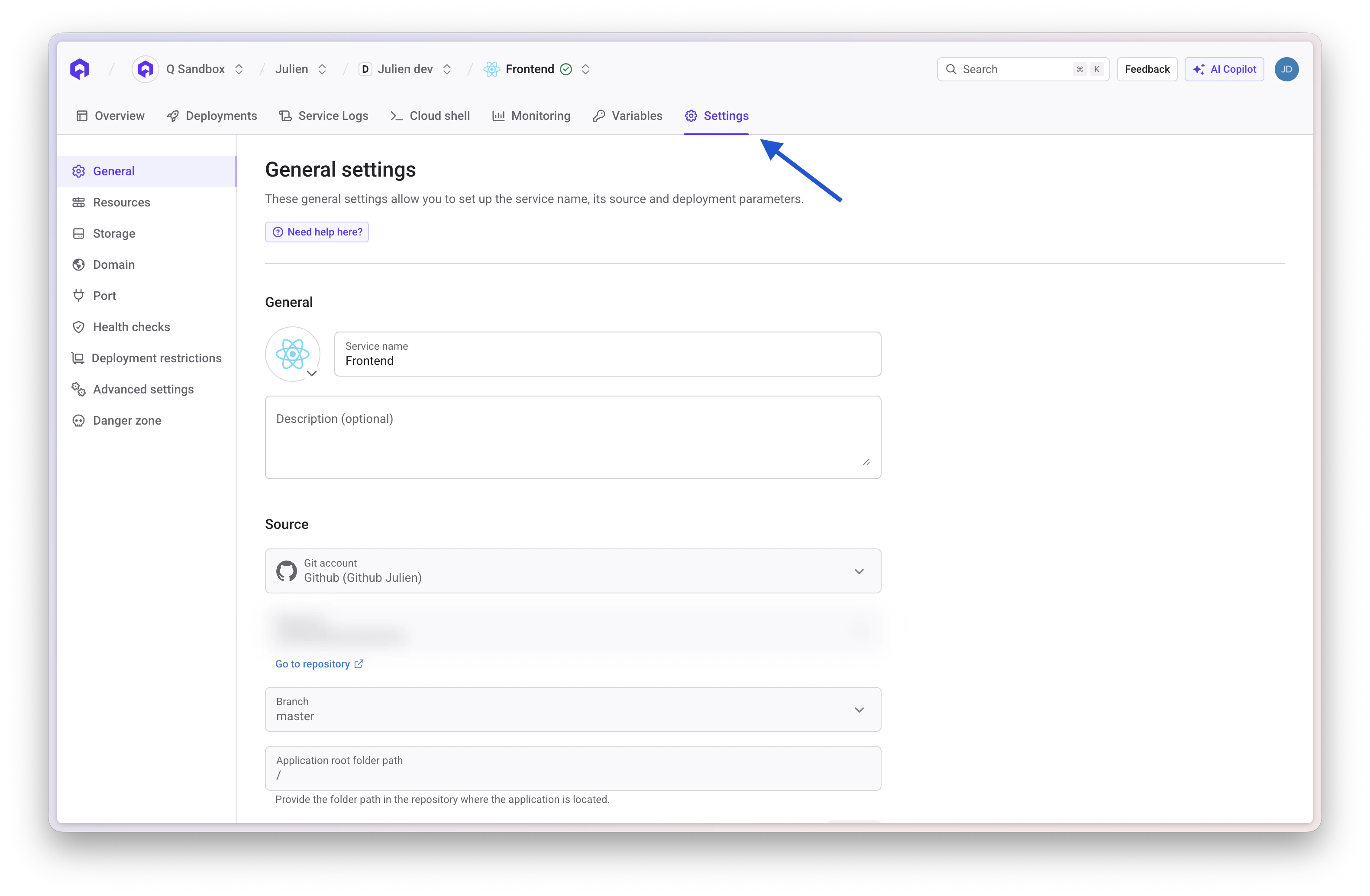 Click on a setting to modify its value. You can toggle to show only overridden settings.
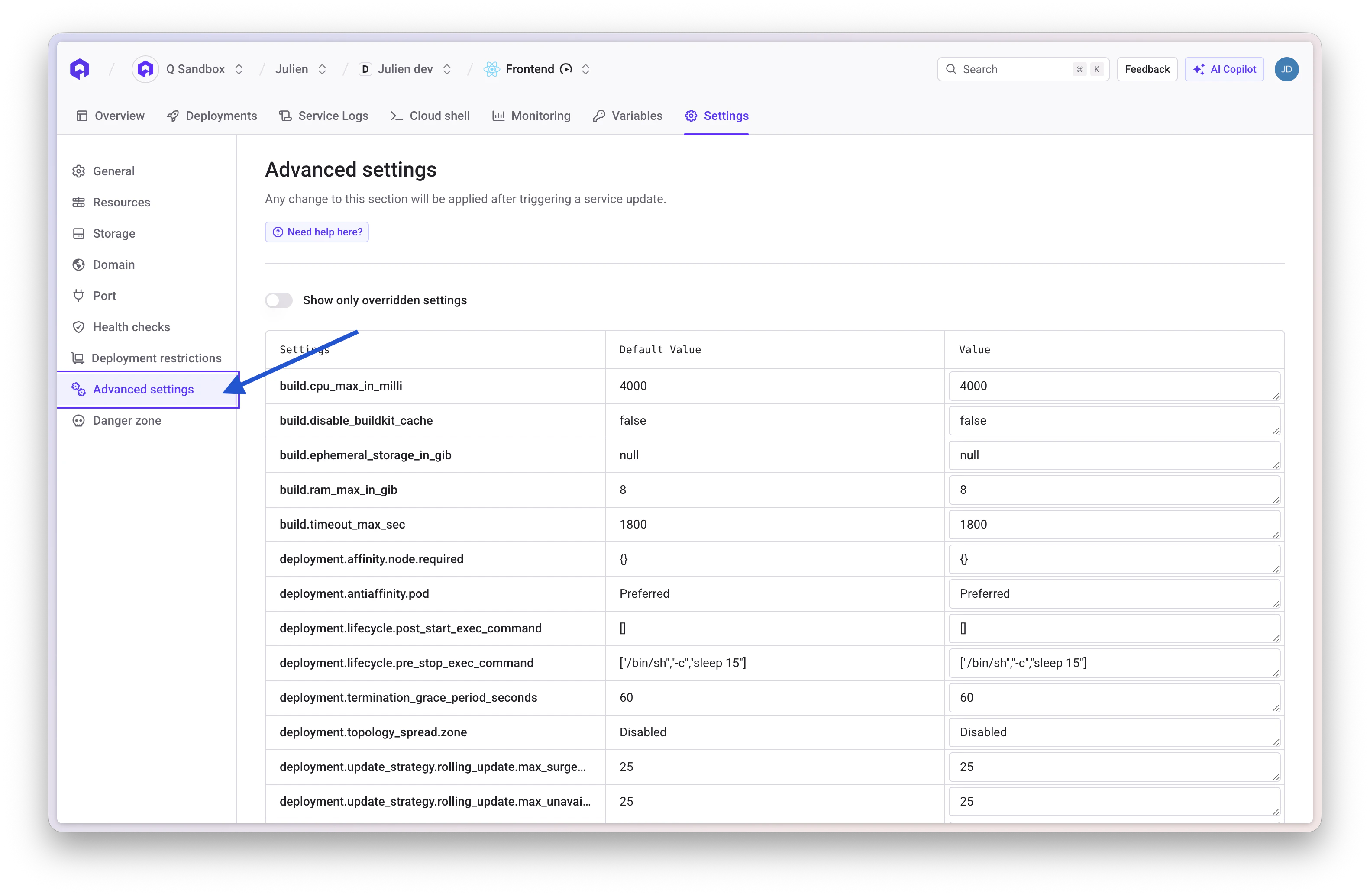 Use the **Show only overridden** toggle to view only settings that differ from defaults.
***
## Build Settings
### build.timeout\_max\_sec
Application Cronjob Job
**Type:** `integer`
**Description:** Allows you to specify an interval, in seconds, after which the application build times out.
**Default Value:** `1800`
### build.cpu\_max\_in\_milli
Application Cronjob Job
**Type:** `integer`
**Description:** Allows you to specify the maximum CPU allocation for the build process in millicores (1000m = 1 vCPU).
**Default Value:** `4000`
### build.ram\_max\_in\_gib
Application Cronjob Job
**Type:** `integer`
**Description:** Allows you to specify the maximum RAM allocation for the build process in gibibytes.
**Default Value:** `8`
### build.ephemeral\_storage\_in\_gib
Application Cronjob Job
**Type:** `integer`
**Description:** Allows you to specify the ephemeral storage allocation for the build process in gibibytes.
**Default Value:** `null`
### build.disable\_buildkit\_cache
Application Cronjob Job
**Type:** `boolean`
**Description:** Allows you to disable BuildKit registry cache (`--cache-from` and `--cache-to` flags) during Docker builds.
**Default Value:** `false`
**Use Case:** Enable this setting when your build tool (such as Turbo, Bazel, or Nx) has its own caching mechanism. In these cases, BuildKit's registry cache import/export operations add overhead without benefit, as the application-level cache is more effective. Disabling BuildKit cache can significantly reduce build times for projects using these tools.
### build.skip\_git\_submodules
Application Cronjob Job
**Type:** `boolean`
**Description:** Allows you to skip the Git submodules retrieval when Qovery clones your repository. By default, when a `.gitmodules` file is present, Qovery clones every submodule defined in it before building your service.
**Default Value:** `false`
**Use Case:** Enable this setting when your repository contains submodules that are not required to build your service — for example, a private submodule used only for infrastructure workflows. Without it, the deployment fails if Qovery has no credentials for the private submodule, forcing you to configure SSH keys for code that is never used in the build.
***
## Deployment Settings
### deployment.termination\_grace\_period\_seconds
Application Container Cronjob Job
**Type:** `integer`
**Description:** Allows you to specify the time in seconds that Kubernetes waits for a pod to gracefully shut down before forcefully terminating it. This timer starts as soon as the pod receives a `SIGTERM` signal (or the `pre_stop` hook begins, if configured). If the pod is still running after this period, Kubernetes sends a `SIGKILL`.
**Use Case:** Increase this value for services that need extra time to drain connections, finish background jobs, or flush data to disk. Keep it low for stateless workers that can restart quickly.
This value must be **greater than** the time your `deployment.lifecycle.pre_stop_exec_command` takes to complete. Otherwise Kubernetes will kill the pod before the pre-stop hook finishes.
**Default Value:** `60`
### deployment.affinity.node.required
Application Container Cronjob Job
**Type:** `Map`
**Description:** Allows you to define Kubernetes node affinity requirements to control pod placement on specific nodes based on labels. Each key/value pair maps to a Kubernetes `nodeAffinity.requiredDuringSchedulingIgnoredDuringExecution` rule — pods **will not be scheduled** unless a node matches **all** the specified labels.
**Use Case:** Use this to pin services to specific node pools, instance families, architectures, or capacity types.
**Default Value:** `{}`
Force pods onto the `stable` Karpenter NodePool using on-demand instances only:
```json theme={null}
{
"karpenter.sh/capacity-type": "on-demand",
"karpenter.sh/nodepool": "stable"
}
```
Schedule on ARM64 Graviton instances for better price/performance:
```json theme={null}
{
"kubernetes.io/arch": "arm64"
}
```
Run on ARM64 nodes with the GCP Autopilot `Performance` compute class:
```json theme={null}
{
"kubernetes.io/arch": "arm64",
"cloud.google.com/compute-class": "Performance"
}
```
If no node matches the required labels, your pods will stay in `Pending` state. Make sure the target node pool or nodes exist before applying this setting.
### deployment.antiaffinity.pod
Application Container
**Type:** `string`
**Description:** Allows you to define pod anti-affinity to control how pods are distributed across nodes. Options are `Preferred` or `Required`.
**Use Case:** Use `Required` to guarantee that no two replicas of the same service land on the same node — critical for high-availability setups where a single node failure must not take down the entire service. Use `Preferred` (default) when you want Kubernetes to spread pods across nodes on a best-effort basis without blocking scheduling if not enough nodes are available.
With `Required`, you need **at least as many nodes as replicas**. If your cluster doesn't have enough nodes, excess pods will stay `Pending`.
**Default Value:** `Preferred`
### deployment.topology\_spread.zone
Application Container
**Type:** `string`
**Description:** Controls how pods are spread across availability zones using Kubernetes [`topologySpreadConstraints`](https://kubernetes.io/docs/concepts/scheduling-eviction/topology-spread-constraints/). This setting generates a constraint with `maxSkew: 1` and `topologyKey: topology.kubernetes.io/zone`.
**Options:**
| Value | Behavior |
| ---------------- | --------------------------------------------------------------------------------------------------------------------------------------------------------------------------------------------------------------- |
| `Disabled` | No topology spread constraint is applied. Pods are scheduled without any zone-awareness. |
| `ScheduleAnyway` | Kubernetes **tries** to spread pods evenly across zones, but will still schedule them even if the distribution is not perfect. This is a soft constraint — pods are never left `Pending` due to zone imbalance. |
| `DoNotSchedule` | Kubernetes **enforces** even distribution across zones. If the scheduler cannot place a pod without exceeding a `maxSkew` of 1, the pod stays `Pending` until a suitable node becomes available. |
**Recommendation:** Use `ScheduleAnyway` for most production workloads — it provides zone spreading on a best-effort basis without risking pods stuck in `Pending`. Reserve `DoNotSchedule` for critical services where strict zone distribution is mandatory and you are confident that your cluster has enough capacity in each zone. Keep `Disabled` for dev/staging environments or workloads where zone spreading adds no value (e.g., single-replica services, batch jobs).
With `DoNotSchedule`, if your cluster has an uneven number of nodes across zones or if a zone is temporarily unavailable, excess pods will remain in `Pending` state. Make sure you have sufficient capacity in each availability zone before enabling this mode.
This setting is a prerequisite for properly leveraging multi-AZ clusters for high availability. It complements `deployment.antiaffinity.pod` which spreads pods across **nodes** — this setting spreads pods across **zones**.
**Default Value:** `Disabled`
#### Common patterns
These settings work together to cover different high-availability strategies. Here are recommended combinations depending on your use case:
Maximum resilience: pods pinned to stable on-demand nodes, strictly spread across zones, and never co-located on the same node.
| Setting | Value |
| ----------------------------------- | --------------------------------------------- |
| `deployment.affinity.node.required` | `{"karpenter.sh/capacity-type": "on-demand"}` |
| `deployment.topology_spread.zone` | `DoNotSchedule` |
| `deployment.antiaffinity.pod` | `Required` |
Requires at least as many on-demand nodes as replicas, distributed across all availability zones. Otherwise pods will stay `Pending`.
Best-effort zone and node spreading without any scheduling risk. Works well with spot instances and autoscaling.
| Setting | Value |
| ----------------------------------- | ---------------- |
| `deployment.affinity.node.required` | `{}` |
| `deployment.topology_spread.zone` | `ScheduleAnyway` |
| `deployment.antiaffinity.pod` | `Preferred` |
Pin pods to a specific zone — useful for workloads that must be co-located with a zone-bound resource (e.g., EBS volume, RDS instance).
| Setting | Value |
| ----------------------------------- | ----------------------------------------------- |
| `deployment.affinity.node.required` | `{"topology.kubernetes.io/zone": "eu-west-1a"}` |
| `deployment.topology_spread.zone` | `Disabled` |
| `deployment.antiaffinity.pod` | `Preferred` |
### deployment.update\_strategy.type
Application Container
**Type:** `string`
**Description:** Allows you to specify the deployment update strategy type. Options are `RollingUpdate` or `Recreate`.
**Use Case:**
* **`RollingUpdate`** (default) — gradually replaces pods for zero-downtime deployments. Best for stateless services.
* **`Recreate`** — terminates all existing pods before creating new ones. Use this when:
* Your service uses a **ReadWriteOnce (RWO) volume** that cannot be mounted by two pods simultaneously.
* You need to run a **database migration** at startup and cannot have two versions of the schema running at the same time.
* Your application does not support running two versions concurrently.
**Default Value:** `RollingUpdate`
### deployment.update\_strategy.rolling\_update.max\_unavailable\_percent
Application Container
**Type:** `integer`
**Description:** Allows you to specify the maximum percentage of pods that can be unavailable during a rolling update.
**Use Case:** Lower values ensure more availability during updates but slower rollout speed. Higher values speed up deployments but reduce availability.
**Default Value:** `25`
### deployment.update\_strategy.rolling\_update.max\_surge\_percent
Application Container
**Type:** `integer`
**Description:** Allows you to specify the maximum percentage of pods that can be created above the desired number during a rolling update.
**Use Case:** Higher values speed up deployments by creating more new pods at once, but require more cluster resources.
**Default Value:** `25`
### deployment.lifecycle.post\_start\_exec\_command
Application Container
**Type:** `string`
**Description:** Allows you to specify a command to execute immediately after a container starts. The command runs **in parallel** with the container's main process and the readiness probe — it does **not** block traffic on its own.
**Use Case:** Use this for initialization side-effects like warming a local cache, registering the instance with a service mesh, or writing a marker file that a readiness probe checks.
**Default Value:** `""`
**Examples:**
```json theme={null}
// Warm the application cache at startup
["/bin/sh", "-c", "curl -s http://localhost:8080/warmup || true"]
```
```json theme={null}
// Write a marker file for a readiness probe
["/bin/sh", "-c", "touch /tmp/ready"]
```
### deployment.lifecycle.pre\_stop\_exec\_command
Application Container
**Type:** `string`
**Description:** Allows you to specify a command to execute before a container is terminated. Kubernetes calls this hook when a pod is about to be stopped (scale-down, deployment, node drain). The main process receives `SIGTERM` **at the same time** as the hook starts.
**Use Case:** Use this to give your service time to drain in-flight requests, close database connections, or deregister from a load balancer before the pod disappears.
The default `sleep 15` gives Kubernetes networking time to remove the pod from service endpoints before the process exits. If your service handles its own graceful shutdown, you may still want a short sleep to avoid receiving traffic after `SIGTERM`.
**Default Value:** `["/bin/sh", "-c", "sleep 15"]`
**Examples:**
```json theme={null}
// Notify the app to drain, then wait for connections to close
["/bin/sh", "-c", "curl -s http://localhost:8080/drain && sleep 20"]
```
```json theme={null}
// Simple sleep to let LB deregister the pod
["/bin/sh", "-c", "sleep 30"]
```
***
## Network Settings
### network.ingress.enable\_cors
Application Container Helm
**Type:** `boolean`
**Description:** Allows you to enable Cross-Origin Resource Sharing (CORS) for your service.
**Default Value:** `false`
### network.ingress.cors\_allow\_origin
Application Container Helm
**Type:** `string`
**Description:** Allows you to specify the allowed origins for CORS requests. Use `*` to allow all origins or specify specific domains.
**Default Value:** `*`
### network.ingress.cors\_allow\_methods
Application Container Helm
**Type:** `string`
**Description:** Allows you to specify the HTTP methods allowed for CORS requests.
**Default Value:** `GET, PUT, POST, DELETE, PATCH, OPTIONS`
### network.ingress.cors\_allow\_headers
Application Container Helm
**Type:** `string`
**Description:** Allows you to specify the HTTP headers allowed for CORS requests.
**Default Value:** `DNT, Keep-Alive, User-Agent, X-Requested-With, If-Modified-Since, Cache-Control, Content-Type, Range, Authorization`
### network.ingress.force\_ssl\_redirect
Application Container Helm
**Type:** `boolean`
**Description:** Allows you to enforce HTTPS by automatically redirecting HTTP requests to HTTPS.
**Use Case:** Enable this to ensure all traffic to your service uses encrypted connections.
**Default Value:** `true`
### network.ingress.proxy\_body\_size\_mb
Application Container Helm
**Type:** `integer`
**Description:** Allows you to set, in megabytes, a maximum size for request bodies sent to your service.
**Use Case:** By default, users can upload files or send requests up to 100 MB. You can use this advanced setting to lower or increase this limitation.
**Default Value:** `100`
### network.ingress.proxy\_buffer\_size\_kb
Application Container Helm
**Type:** `integer`
**Description:** Allows you to set the size of the buffer used for reading the first part of the response received from the proxied server, in kilobytes.
**Use Case:** Increase this if you have large response headers.
**Default Value:** `4`
### network.ingress.proxy\_connect\_timeout\_seconds
Application Container Helm
**Type:** `integer`
**Description:** Allows you to set the timeout in seconds for establishing a connection with a proxied server.
**Default Value:** `60`
### network.ingress.proxy\_read\_timeout\_seconds
Application Container Helm
**Type:** `integer`
**Description:** Allows you to set the timeout in seconds for reading a response from the proxied server.
**Use Case:** Increase this for long-running requests or slow backend responses.
**Default Value:** `60`
### network.ingress.proxy\_send\_timeout\_seconds
Application Container Helm
**Type:** `integer`
**Description:** Allows you to set the timeout in seconds for transmitting a request to the proxied server.
**Default Value:** `60`
### network.ingress.proxy\_buffering
Application Container Helm
**Type:** `string`
**Description:** Allows you to enable or disable buffering of responses from the proxied server. Options are `on` or `off`.
**Use Case:** Disable buffering for streaming responses or server-sent events.
**Default Value:** `on`
### network.ingress.proxy\_request\_buffering
Application Container Helm
**Type:** `string`
**Description:** Allows you to enable or disable buffering of client request bodies. Options are `on` or `off`.
**Use Case:** Disable for streaming uploads or when handling large file uploads incrementally.
**Default Value:** `on`
### network.ingress.proxy\_set\_headers
Application Container Helm
**Type:** `Map`
**Description:** Allows you to define custom headers to add to requests forwarded to your service.
**Default Value:** `{}`
### network.ingress.add\_headers
Application Container Helm
**Type:** `string`
**Description:** Allows you to attach supplementary headers to outgoing responses from your service.
**Use Case:** Use this to inject custom HTTP headers into responses, commonly useful for security headers like `X-Frame-Options`, `X-Content-Type-Options`, `Content-Security-Policy`, etc.
**Default Value:** `{}`
**Example:**
```json theme={null}
{"X-Frame-Options":"DENY","X-Content-Type-Options":"nosniff"}
```
### network.ingress.whitelist\_source\_range
Application Container Helm
**Type:** `string`
**Description:** Allows you to specify IP CIDR ranges allowed to access your service. Use this for IP whitelisting.
**Use Case:** Restrict access to your service to specific IP addresses or ranges for enhanced security.
**Default Value:** `0.0.0.0/0`
### network.ingress.denylist\_source\_range
Application Container Helm
**Type:** `string`
**Description:** Allows you to specify IP CIDR ranges denied access to your service. Use this for IP blacklisting.
**Default Value:** `null`
### network.ingress.basic\_auth\_env\_var
Application Container Helm
**Type:** `string`
**Description:** Allows you to specify the environment variable name containing Basic Auth credentials in the format `username:encrypted_password`. Generate encrypted password using `htpasswd -nb user password`.
**Use Case:** Add HTTP Basic Authentication to protect your service endpoints.
**Default Value:** `null`
### network.ingress.enable\_sticky\_session
Application Container Helm
**Type:** `boolean`
**Description:** Allows you to enable session affinity (sticky sessions) to route requests from the same client to the same pod.
**Use Case:** Enable this when your application maintains session state in memory rather than in a shared data store.
**Default Value:** `false`
### network.ingress.keepalive\_time\_seconds
Application Container Helm
**Type:** `integer`
**Description:** Allows you to set the time in seconds during which a keep-alive client connection will stay open on the server side.
**Use Case:** Adjust this to optimize connection reuse and reduce overhead of creating new connections.
**Default Value:** `3600`
### network.ingress.keepalive\_timeout\_seconds
Application Container Helm
**Type:** `integer`
**Description:** Allows you to set the timeout in seconds during which a keep-alive client connection will remain idle before being closed.
**Default Value:** `60`
### network.ingress.send\_timeout\_seconds
Application Container Helm
**Type:** `integer`
**Description:** Allows you to set the timeout in seconds for transmitting a response to the client.
**Use Case:** Increase this for slow clients or large response payloads.
**Default Value:** `60`
### network.ingress.grpc\_send\_timeout\_seconds
Application Container Helm
**Type:** `integer`
**Description:** Allows you to specify the timeout in seconds for gRPC send operations.
**Default Value:** `60`
### network.ingress.grpc\_read\_timeout\_seconds
Application Container Helm
**Type:** `integer`
**Description:** Allows you to specify the timeout in seconds for gRPC read operations.
**Default Value:** `60`
### network.ingress.nginx\_controller\_configuration\_snippet
Application Container Helm
**Type:** `string`
**Description:** Allows you to inject custom NGINX configuration snippets into the location block of the ingress controller.
**Use Case:** Use this for advanced NGINX customization that isn't available through other settings.
**Default Value:** `null`
### network.ingress.nginx\_controller\_server\_snippet
Application Container Helm
**Type:** `string`
**Description:** Allows you to inject custom NGINX configuration snippets into the server block of the ingress controller.
**Use Case:** Use this for server-level NGINX configuration that applies to all locations.
**Default Value:** `null`
### network.ingress.nginx\_limit\_burst\_multiplier
Application Container Helm
**Type:** `string`
**Description:** Allows you to set the burst multiplier for NGINX rate limiting.
**Use Case:** Control how many requests can exceed the rate limit in short bursts.
**Default Value:** `null`
### network.ingress.nginx\_limit\_connections
Application Container Helm
**Type:** `integer`
**Description:** Allows you to limit the number of concurrent connections from a single IP address.
**Use Case:** Protect your service from connection-based attacks or excessive connection usage.
**Default Value:** `null`
### network.ingress.nginx\_limit\_rpm
Application Container Helm
**Type:** `string`
**Description:** Allows you to set NGINX-specific rate limiting in requests per minute.
**Default Value:** `null`
### network.ingress.nginx\_limit\_rps
Application Container Helm
**Type:** `string`
**Description:** Allows you to set NGINX-specific rate limiting in requests per second.
**Default Value:** `null`
### network.ingress.nginx\_custom\_http\_errors
Application Container Helm
**Type:** `string`
**Description:** Allows you to specify custom HTTP error codes that should be intercepted and handled by NGINX.
**Use Case:** Define custom error pages for specific HTTP status codes.
**Default Value:** `null`
**Example:**
```json theme={null}
"404,503"
```
### network.gateway\_api.enable\_sticky\_session
Application Container Helm
**Type:** `boolean`
**Description:** Enables session affinity (sticky sessions) to ensure that requests from the same client are always routed to the same backend pod. Sticky session behavior is controlled by `network.gateway_api.sticky_session_type` (default: `Cookie`).
**Use Case:** Enable for stateful applications that store session data in memory or local storage.
**Default Value:** `false`
### network.gateway\_api.sticky\_session\_type
Application Container Helm
**Type:** `string`
**Description:** Defines how session affinity is computed when `network.gateway_api.enable_sticky_session` is enabled.
**Default Value:** `"Cookie"`
**Valid values:**
* `Cookie`: use cookie-based affinity.
* `SourceIP`: use client source IP affinity.
* `{"Header":{"name":"X-Header"}}`: use a specific HTTP header for affinity.
* Legacy header name string (for backward compatibility), for example: `X-Header`.
**How header-based sticky session works:**
* The gateway uses the configured header name to identify a session key.
* Requests carrying the same header value are consistently routed to the same backend pod (while that backend remains available).
* If the header is missing, stickiness cannot be derived from that header for the request.
**References:**
* [Envoy Gateway: Session Persistence](https://gateway.envoyproxy.io/docs/tasks/traffic/session-persistence/)
* [Envoy: Stateful Session Filter](https://www.envoyproxy.io/docs/envoy/latest/configuration/http/http_filters/stateful_session_filter)
**Validation rules:**
* Value cannot be empty.
* Header names (legacy string or JSON `Header.name`) must match `[-a-zA-Z0-9]+`.
**Behavior change (QOV-1862):**
* Sticky session type is now explicitly configurable.
* Existing services with sticky sessions enabled and no type set are automatically backfilled to `"Cookie"` to preserve previous behavior.
### network.gateway\_api.force\_ssl\_redirect
Application Container Helm
**Type:** `boolean`
**Description:** Forces automatic redirection from HTTP to HTTPS for all incoming requests. When enabled, any HTTP request will receive a 301 redirect to the HTTPS equivalent URL.
**Use Case:** Enforce secure connections for all traffic to your application.
**Default Value:** `true`
### network.gateway\_api.enable\_cors
Application Container Helm
**Type:** `boolean`
**Description:** Enables Cross-Origin Resource Sharing (CORS) headers in responses. When enabled, the gateway will add CORS headers based on the configured `cors_allow_origin`, `cors_allow_methods`, and `cors_allow_headers` settings.
**Use Case:** Enable when your application needs to be accessed from web browsers on different domains.
**Default Value:** `false`
### network.gateway\_api.cors\_allow\_origin
Application Container Helm
**Type:** `string`
**Description:** Specifies which origins are allowed to access the resource when CORS is enabled. Sets the `Access-Control-Allow-Origin` header.
**Default Value:** `"*"` (allows all origins)
**Example:**
```json theme={null}
"https://example.com, https://app.example.com"
```
### network.gateway\_api.cors\_allow\_methods
Application Container Helm
**Type:** `string`
**Description:** Specifies which HTTP methods are allowed when CORS is enabled. Sets the `Access-Control-Allow-Methods` header.
**Default Value:** `"GET, PUT, POST, DELETE, PATCH, OPTIONS"`
### network.gateway\_api.cors\_allow\_headers
Application Container Helm
**Type:** `string`
**Description:** Specifies which HTTP headers are allowed in CORS requests. Sets the `Access-Control-Allow-Headers` header.
**Default Value:** `"DNT,Keep-Alive,User-Agent,X-Requested-With,If-Modified-Since,Cache-Control,Content-Type,Range,Authorization"`
### network.gateway\_api.whitelist\_source\_range
Application Container Helm
**Type:** `string`
**Description:** Comma-separated list of IP addresses or CIDR ranges that are allowed to access the service. All other IP addresses will be denied. Use this for IP-based access control.
**Use Case:** Restrict access to your service to specific IP ranges (e.g., corporate VPN, trusted partners).
**Default Value:** `"0.0.0.0/0, ::/0"` (allows all IPv4 and IPv6 addresses)
**Example:**
```json theme={null}
"10.0.0.0/8, 192.168.1.0/24"
```
### network.gateway\_api.denylist\_source\_range
Application Container Helm
**Type:** `string`
**Description:** Comma-separated list of IP addresses or CIDR ranges that are explicitly denied access to the service. All other IP addresses will be allowed.
**Use Case:** Block specific IP addresses or ranges that are known to be malicious or unwanted.
**Default Value:** `""` (no IPs are blocked)
**Example:**
```json theme={null}
"203.0.113.0/24, 198.51.100.0/24"
```
### network.gateway\_api.basic\_auth\_env\_var
Application Container Helm
**Type:** `string`
**Description:** Set the name of an environment variable containing htpasswd credentials for HTTP Basic Auth. The environment variable value must be plain htpasswd content (for example `username:{SHA}...`), not base64. Multiple users can be provided by adding one `username:{SHA}...` entry per line.
**Password Generation Example (recommended `{SHA}` format):**
```bash theme={null}
printf '%s\n' 'MyStrongPassword123!' | htpasswd -ni -s qovery-user
```
**Use Case:** Add simple authentication protection to your service without modifying application code.
**Default Value:** `""` (Basic Auth disabled)
**Example:**
```json theme={null}
"BASIC_AUTH_CREDENTIALS"
```
### network.gateway\_api.route\_limit\_rpm
Application Container Helm
**Type:** `integer` (unsigned)
**Description:** Maximum number of requests per minute (RPM) allowed to the service. When exceeded, requests will be rejected with HTTP 429 (Too Many Requests).
**Use Case:** Protect your service from excessive traffic or implement rate-based access control.
**Default Value:** `null` (no limit)
**Example:**
```json theme={null}
1000
```
### network.gateway\_api.route\_limit\_rps
Application Container Helm
**Type:** `integer` (unsigned)
**Description:** Maximum number of requests per second (RPS) allowed to the service. When exceeded, requests will be rejected with HTTP 429 (Too Many Requests).
**Use Case:** Enforce fine-grained rate limiting on a per-second basis for high-traffic services.
**Default Value:** `null` (no limit)
**Example:**
```json theme={null}
100
```
### network.gateway\_api.route\_limit\_source\_cidrs
Application Container Helm
**Type:** `string`
**Description:** Comma-separated list of IP addresses or CIDR ranges to which rate limiting applies. When specified, only traffic from these sources will be subject to the configured rate limits.
**Use Case:** Apply rate limiting selectively to specific IP ranges while allowing unlimited access from trusted networks.
**Default Value:** `""` (rate limiting applies to all sources)
**Example:**
```json theme={null}
"0.0.0.0/0, ::/0"
```
### network.gateway\_api.route\_limit\_headers
Application Container Helm
**Type:** `string`
**Description:** Comma-separated list of HTTP headers to use for rate limiting. When specified, rate limits are applied per unique combination of header values rather than per source IP.
**Use Case:** Implement per-user or per-API-key rate limiting by using authentication headers.
**Default Value:** `""` (rate limiting is per source IP)
**Example:**
```json theme={null}
"X-API-Key, X-User-ID"
```
### network.gateway\_api.add\_headers
Application Container Helm
**Type:** `map`
**Description:** Map of custom HTTP headers to add to responses sent to clients. Header names must be valid HTTP header names, and values must contain only valid ASCII characters.
**Use Case:** Add custom headers for security policies (e.g., CSP, HSTS) or application-specific metadata.
**Default Value:** `{}` (no headers added)
**Example:**
```json theme={null}
{
"X-Custom-Header": "custom-value",
"Strict-Transport-Security": "max-age=31536000"
}
```
### network.gateway\_api.proxy\_set\_headers
Application Container Helm
**Type:** `map`
**Description:** Map of custom HTTP headers to set on requests forwarded to backend pods. This overwrites existing headers with the same name. Header names must be valid HTTP header names, and values must contain only valid ASCII characters.
**Use Case:** Pass additional context to your application (e.g., original client IP, authentication context) or override default headers.
**Default Value:** `{}` (no headers modified)
**Example:**
```json theme={null}
{
"X-Forwarded-Proto": "https",
"X-Real-IP": "$remote_addr"
}
```
### network.gateway\_api.custom\_http\_errors
Application Container Helm
**Type:** `string`
**Description:** Comma-separated list of HTTP status codes for which Envoy Gateway should serve custom error pages. When you specify a status code in this list, Envoy Gateway will intercept that error and serve a hardcoded HTML error page instead of passing through the upstream error response. Valid status codes must be between 100 and 599.
**Use Case:** Provide consistent error pages for specific HTTP errors across your services.
**Default Value:** `null` (no custom error pages)
**Example:**
```json theme={null}
"404,503,502"
```
The hardcoded error pages cannot be customized at this time. If you need to customize error pages for your use case, please contact us and we can extend this feature.
### network.gateway\_api.circuit\_breaker.max\_connections
Application Container Helm
**Type:** `integer` (unsigned)
**Description:** Maximum number of concurrent connections that Envoy will establish to all backend pods for this service. When this limit is reached, new connection attempts will be rejected immediately with HTTP 503.
**Use Case:** Protect backend services from connection exhaustion and prevent cascading failures during traffic spikes.
**Default Value:** `null` (no limit)
**Example:**
```json theme={null}
1024
```
### network.gateway\_api.circuit\_breaker.max\_pending\_requests
Application Container Helm
**Type:** `integer` (unsigned)
**Description:** Maximum number of requests that can be queued while waiting for a connection to become available. When this limit is reached, new requests will be rejected with HTTP 503.
**Use Case:** Prevent queue buildup during backend slowdowns and maintain predictable latency.
**Default Value:** `null` (no limit)
**Example:**
```json theme={null}
1024
```
### network.gateway\_api.circuit\_breaker.max\_parallel\_requests
Application Container Helm
**Type:** `integer` (unsigned)
**Description:** Maximum number of parallel requests (both active and queued) that can be outstanding to backend pods. When this limit is reached, new requests will be rejected with HTTP 503.
**Use Case:** Set an overall cap on total inflight requests to protect backend services from overload.
**Default Value:** `null` (no limit)
**Example:**
```json theme={null}
2048
```
### network.gateway\_api.tcp\_keepalive\_idle\_time\_seconds
Application Container Helm
**Type:** `integer` (unsigned)
**Description:** Sets the idle time in seconds before TCP keepalive probes are sent on backend connections. This is the duration a connection must be idle before the first keepalive probe is sent.
**Use Case:** Configure TCP keepalive idle time to detect dead connections earlier or to keep connections alive through firewalls/load balancers that have aggressive idle timeouts. A lower value (e.g., 60s) helps detect dead connections faster, while a higher value reduces keepalive overhead.
**Default Value:** `null` (uses Envoy Gateway default)
**Example:**
```json theme={null}
7200
```
### network.gateway\_api.tcp\_keepalive\_interval\_seconds
Application Container Helm
**Type:** `integer` (unsigned)
**Description:** Sets the interval in seconds between TCP keepalive probes on backend connections. This is the time between consecutive keepalive probes after the idle time has elapsed.
**Use Case:** Control how frequently keepalive probes are sent once the connection becomes idle. A shorter interval (e.g., 30s) provides faster failure detection, while a longer interval reduces network overhead.
**Default Value:** `null` (uses Envoy Gateway default)
**Example:**
```json theme={null}
120
```
### network.gateway\_api.http\_request\_timeout\_seconds
Application Container Helm
**Type:** `integer` (unsigned)
**Description:** Sets the maximum time in seconds that Envoy Gateway will wait for a complete HTTP response from backend pods. Requests exceeding this timeout will be terminated with HTTP 504 Gateway Timeout.
**Use Case:** Configure request timeouts to match your application's expected response times. Increase for long-running operations (e.g., batch processing, large file uploads) or decrease to fail fast for quick operations. This prevents clients from waiting indefinitely for unresponsive backends.
**Default Value:** `null` (uses Envoy Gateway default)
**Example:**
```json theme={null}
90
```
### network.gateway\_api.http\_connection\_idle\_timeout\_seconds
Application Container Helm
**Type:** `integer` (unsigned)
**Description:** Sets the maximum idle time in seconds for HTTP connections between Envoy Gateway and backend pods. If no data is exchanged during this period, the connection is closed.
**Use Case:** Control how long idle backend connections stay open to balance performance and resource usage. Increase it for long-lived or bursty traffic patterns; decrease it to reclaim resources faster and reduce stale connections.
**Default Value:** `null` (uses Envoy Gateway default)
**Example:**
```json theme={null}
120
```
### network.gateway\_api.http\_max\_stream\_duration\_seconds
Application Container Helm
**Type:** `integer` (unsigned)
**Description:** Sets the maximum stream duration in seconds for HTTP streams proxied through the Gateway API route. When exceeded, the stream is terminated. This maps to Envoy `max_stream_duration` behavior. Learn more in the [Envoy timeout documentation](https://www.envoyproxy.io/docs/envoy/latest/faq/configuration/timeouts.html#stream-timeouts).
**Use Case:** Add a hard cap for very long streams while still allowing long active responses like exports or server-sent events.
**Default Value:** `null` (uses cluster default if set, otherwise Envoy Gateway default)
**Example:**
```json theme={null}
300
```
### network.gateway\_api.retry.num\_retries
Application Container Helm
**Type:** `integer` (unsigned)
**Description:** Sets the number of retry attempts for failed upstream requests handled by Gateway API.
**Use Case:** Set to `0` to explicitly disable retries for a service, or increase it for transient backend/network errors.
Service value takes precedence over cluster value. If this setting is not set at service level, Qovery applies the cluster-level value from `envoy.gateway_api.retry.num_retries` when defined.
**Default Value:** `null` (unset at service level; cluster defaults may apply)
**Example:**
```json theme={null}
2
```
### network.gateway\_api.retry.retry\_on
Application Container Helm
**Type:** `string` (CSV)
**Description:** Defines retry conditions for Gateway API requests (for example `connect-failure`, `reset`, `refused-stream`, `retriable-status-codes`).
**Use Case:** Control when retries happen. If you use `network.gateway_api.retry.http_status_codes`, this field must include `retriable-status-codes`.
Service value takes precedence over cluster value. If this setting is not set at service level, Qovery applies the cluster-level value from `envoy.gateway_api.retry.retry_on` when defined.
**Default Value:** `null` (unset at service level; cluster defaults may apply)
**Example:**
```json theme={null}
"connect-failure,reset,refused-stream"
```
**Learn More (retry\_on values):** See [Envoy Gateway TriggerEnum reference](https://gateway.envoyproxy.io/v1.6/api/extension_types/#triggerenum).
### network.gateway\_api.retry.http\_status\_codes
Application Container Helm
**Type:** `string` (CSV of HTTP codes)
**Description:** Restricts retries to specific HTTP status codes. Codes must be integers in range `100..599`.
**Use Case:** Retry only selected upstream response codes (for example `503,504`) instead of broad retry categories.
Service value takes precedence over cluster value. If this setting is not set at service level, Qovery applies the cluster-level value from `envoy.gateway_api.retry.http_status_codes` when defined.
**Default Value:** `null` (unset)
**Example:**
```json theme={null}
"503,504"
```
### network.gateway\_api.retry.per\_try\_timeout\_seconds
Application Container Helm
**Type:** `integer` (unsigned, `> 0`)
**Description:** Sets a per-retry-attempt timeout in seconds. Each attempt is bounded by this timeout.
**Use Case:** Prevent each retry attempt from running too long and keep total retry latency under control.
Service value takes precedence over cluster value. If this setting is not set at service level, Qovery applies the cluster-level value from `envoy.gateway_api.retry.per_try_timeout_seconds` when defined.
**Default Value:** `null` (unset)
**Example:**
```json theme={null}
3
```
**Learn More:** See [Envoy Gateway Retry Documentation](https://gateway.envoyproxy.io/latest/tasks/traffic/retry/).
### network.dns.ndots
Application Container Cronjob Job
**Type:** `integer` (unsigned)
**Description:** Configures the DNS `ndots` threshold that determines when Kubernetes appends search domain suffixes to hostnames during DNS resolution.
**Use Case:** When your service queries an external domain like `api.example.com` (2 dots) with the default `ndots=5`, Kubernetes attempts **6 DNS queries** before resolving:
1. `api.example.com.default.svc.cluster.local` ❌ (fails)
2. `api.example.com.svc.cluster.local` ❌ (fails)
3. `api.example.com.cluster.local` ❌ (fails)
4. `api.example.com.us-east-1.compute.internal` ❌ (fails)
5. `api.example.com.ec2.internal` ❌ (fails)
6. `api.example.com` ✅ (succeeds)
Setting `ndots=2` reduces this to **1 DNS query** since the hostname already has 2 dots, improving DNS resolution speed and reducing load on DNS servers. This is especially beneficial for applications making frequent external API calls.
**Default Value:** `null` (uses Kubernetes default of `5`)
**Example:**
```json theme={null}
2
```
**Learn More:** See the [Kubernetes DNS documentation](https://kubernetes.io/docs/concepts/services-networking/dns-pod-service/#pod-dns-config) for more details.
***
## Auto-scaling (HPA)
### hpa.cpu.average\_utilization\_percent
Application Container
**Type:** `integer`
**Description:** Allows you to define the target CPU utilization percentage for horizontal pod autoscaling.
**Use Case:** Set this to scale your application based on CPU usage. Lower values trigger scaling sooner.
**Default Value:** `60`
### hpa.memory.average\_utilization\_percent
Application Container
**Type:** `integer`
**Description:** Allows you to define the target memory utilization percentage for horizontal pod autoscaling.
**Use Case:** Set this to scale your application based on memory usage.
**Default Value:** `null`
***
## Job Settings
### job.delete\_ttl\_seconds\_after\_finished
Cronjob Job
**Type:** `integer`
**Description:** Allows you to specify the time in seconds after which completed jobs are automatically deleted.
**Use Case:** Set this to automatically clean up completed job pods and reduce cluster resource usage.
**Default Value:** `null`
### cronjob.failed\_jobs\_history\_limit
Cronjob
**Type:** `integer`
**Description:** Allows you to specify the number of failed job executions to keep in history.
**Default Value:** `1`
### cronjob.success\_job\_history\_limit
Cronjob
**Type:** `string`
**Description:** Allows you to specify the number of successful job executions to keep in history.
**Default Value:** `1`
### cronjob.concurrency\_policy
Cronjob
**Type:** `string`
**Description:** Allows you to specify how concurrent executions of a job are handled. Options are `Forbidden` (do not allow concurrent runs), `Allow` (allow concurrent runs), or `Replace` (replace currently running job).
**Use Case:** Use `Forbidden` to prevent overlapping executions, `Allow` for independent parallel runs, or `Replace` to cancel old runs when a new one starts.
**Default Value:** `Forbidden`
***
## Resources
### resources.override.limit.cpu\_in\_milli
Application Container Cronjob Job
**Type:** `integer`
**Description:** Allows you to override the CPU limit for your service pods in millicores (1000m = 1 vCPU).
**Use Case:** Use this to fine-tune CPU allocation beyond the standard Qovery instance sizes.
**Default Value:** `null`
### resources.override.limit.ram\_in\_mib
Application Container Cronjob Job
**Type:** `integer`
**Description:** Allows you to override the RAM limit for your service pods in mebibytes.
**Use Case:** Use this to fine-tune memory allocation beyond the standard Qovery instance sizes.
**Default Value:** `null`
***
## Security
### security.service\_account\_name
Application Container Cronjob Job
**Type:** `string`
**Description:** Allows you to specify the Kubernetes ServiceAccount name to use for the service pods.
**Use Case:** Use this to assign specific IAM roles or permissions to your application via Kubernetes ServiceAccounts.
**Default Value:** `null`
### security.automount\_service\_account\_token
Application Container Cronjob Job
**Type:** `boolean`
**Description:** Allows you to control whether the service account token is automatically mounted into pods.
**Use Case:** Set to `false` to improve security for pods that don't need to access the Kubernetes API.
**Default Value:** `false`
### security.read\_only\_root\_filesystem
Application Container Cronjob Job
**Type:** `boolean`
**Description:** Allows you to mount the container's root filesystem as read-only.
**Use Case:** Enable this security best practice to prevent the container from writing to its filesystem, reducing attack surface. Requires your application to write only to mounted volumes.
**Default Value:** `false`
***
## Next Steps
Configure cluster-level advanced settings
Manage environment variables and secrets
Explore the full Qovery API
Manage infrastructure as code
Use the **Show only overridden** toggle to view only settings that differ from defaults.
***
## Build Settings
### build.timeout\_max\_sec
Application Cronjob Job
**Type:** `integer`
**Description:** Allows you to specify an interval, in seconds, after which the application build times out.
**Default Value:** `1800`
### build.cpu\_max\_in\_milli
Application Cronjob Job
**Type:** `integer`
**Description:** Allows you to specify the maximum CPU allocation for the build process in millicores (1000m = 1 vCPU).
**Default Value:** `4000`
### build.ram\_max\_in\_gib
Application Cronjob Job
**Type:** `integer`
**Description:** Allows you to specify the maximum RAM allocation for the build process in gibibytes.
**Default Value:** `8`
### build.ephemeral\_storage\_in\_gib
Application Cronjob Job
**Type:** `integer`
**Description:** Allows you to specify the ephemeral storage allocation for the build process in gibibytes.
**Default Value:** `null`
### build.disable\_buildkit\_cache
Application Cronjob Job
**Type:** `boolean`
**Description:** Allows you to disable BuildKit registry cache (`--cache-from` and `--cache-to` flags) during Docker builds.
**Default Value:** `false`
**Use Case:** Enable this setting when your build tool (such as Turbo, Bazel, or Nx) has its own caching mechanism. In these cases, BuildKit's registry cache import/export operations add overhead without benefit, as the application-level cache is more effective. Disabling BuildKit cache can significantly reduce build times for projects using these tools.
### build.skip\_git\_submodules
Application Cronjob Job
**Type:** `boolean`
**Description:** Allows you to skip the Git submodules retrieval when Qovery clones your repository. By default, when a `.gitmodules` file is present, Qovery clones every submodule defined in it before building your service.
**Default Value:** `false`
**Use Case:** Enable this setting when your repository contains submodules that are not required to build your service — for example, a private submodule used only for infrastructure workflows. Without it, the deployment fails if Qovery has no credentials for the private submodule, forcing you to configure SSH keys for code that is never used in the build.
***
## Deployment Settings
### deployment.termination\_grace\_period\_seconds
Application Container Cronjob Job
**Type:** `integer`
**Description:** Allows you to specify the time in seconds that Kubernetes waits for a pod to gracefully shut down before forcefully terminating it. This timer starts as soon as the pod receives a `SIGTERM` signal (or the `pre_stop` hook begins, if configured). If the pod is still running after this period, Kubernetes sends a `SIGKILL`.
**Use Case:** Increase this value for services that need extra time to drain connections, finish background jobs, or flush data to disk. Keep it low for stateless workers that can restart quickly.
This value must be **greater than** the time your `deployment.lifecycle.pre_stop_exec_command` takes to complete. Otherwise Kubernetes will kill the pod before the pre-stop hook finishes.
**Default Value:** `60`
### deployment.affinity.node.required
Application Container Cronjob Job
**Type:** `Map`
**Description:** Allows you to define Kubernetes node affinity requirements to control pod placement on specific nodes based on labels. Each key/value pair maps to a Kubernetes `nodeAffinity.requiredDuringSchedulingIgnoredDuringExecution` rule — pods **will not be scheduled** unless a node matches **all** the specified labels.
**Use Case:** Use this to pin services to specific node pools, instance families, architectures, or capacity types.
**Default Value:** `{}`
Force pods onto the `stable` Karpenter NodePool using on-demand instances only:
```json theme={null}
{
"karpenter.sh/capacity-type": "on-demand",
"karpenter.sh/nodepool": "stable"
}
```
Schedule on ARM64 Graviton instances for better price/performance:
```json theme={null}
{
"kubernetes.io/arch": "arm64"
}
```
Run on ARM64 nodes with the GCP Autopilot `Performance` compute class:
```json theme={null}
{
"kubernetes.io/arch": "arm64",
"cloud.google.com/compute-class": "Performance"
}
```
If no node matches the required labels, your pods will stay in `Pending` state. Make sure the target node pool or nodes exist before applying this setting.
### deployment.antiaffinity.pod
Application Container
**Type:** `string`
**Description:** Allows you to define pod anti-affinity to control how pods are distributed across nodes. Options are `Preferred` or `Required`.
**Use Case:** Use `Required` to guarantee that no two replicas of the same service land on the same node — critical for high-availability setups where a single node failure must not take down the entire service. Use `Preferred` (default) when you want Kubernetes to spread pods across nodes on a best-effort basis without blocking scheduling if not enough nodes are available.
With `Required`, you need **at least as many nodes as replicas**. If your cluster doesn't have enough nodes, excess pods will stay `Pending`.
**Default Value:** `Preferred`
### deployment.topology\_spread.zone
Application Container
**Type:** `string`
**Description:** Controls how pods are spread across availability zones using Kubernetes [`topologySpreadConstraints`](https://kubernetes.io/docs/concepts/scheduling-eviction/topology-spread-constraints/). This setting generates a constraint with `maxSkew: 1` and `topologyKey: topology.kubernetes.io/zone`.
**Options:**
| Value | Behavior |
| ---------------- | --------------------------------------------------------------------------------------------------------------------------------------------------------------------------------------------------------------- |
| `Disabled` | No topology spread constraint is applied. Pods are scheduled without any zone-awareness. |
| `ScheduleAnyway` | Kubernetes **tries** to spread pods evenly across zones, but will still schedule them even if the distribution is not perfect. This is a soft constraint — pods are never left `Pending` due to zone imbalance. |
| `DoNotSchedule` | Kubernetes **enforces** even distribution across zones. If the scheduler cannot place a pod without exceeding a `maxSkew` of 1, the pod stays `Pending` until a suitable node becomes available. |
**Recommendation:** Use `ScheduleAnyway` for most production workloads — it provides zone spreading on a best-effort basis without risking pods stuck in `Pending`. Reserve `DoNotSchedule` for critical services where strict zone distribution is mandatory and you are confident that your cluster has enough capacity in each zone. Keep `Disabled` for dev/staging environments or workloads where zone spreading adds no value (e.g., single-replica services, batch jobs).
With `DoNotSchedule`, if your cluster has an uneven number of nodes across zones or if a zone is temporarily unavailable, excess pods will remain in `Pending` state. Make sure you have sufficient capacity in each availability zone before enabling this mode.
This setting is a prerequisite for properly leveraging multi-AZ clusters for high availability. It complements `deployment.antiaffinity.pod` which spreads pods across **nodes** — this setting spreads pods across **zones**.
**Default Value:** `Disabled`
#### Common patterns
These settings work together to cover different high-availability strategies. Here are recommended combinations depending on your use case:
Maximum resilience: pods pinned to stable on-demand nodes, strictly spread across zones, and never co-located on the same node.
| Setting | Value |
| ----------------------------------- | --------------------------------------------- |
| `deployment.affinity.node.required` | `{"karpenter.sh/capacity-type": "on-demand"}` |
| `deployment.topology_spread.zone` | `DoNotSchedule` |
| `deployment.antiaffinity.pod` | `Required` |
Requires at least as many on-demand nodes as replicas, distributed across all availability zones. Otherwise pods will stay `Pending`.
Best-effort zone and node spreading without any scheduling risk. Works well with spot instances and autoscaling.
| Setting | Value |
| ----------------------------------- | ---------------- |
| `deployment.affinity.node.required` | `{}` |
| `deployment.topology_spread.zone` | `ScheduleAnyway` |
| `deployment.antiaffinity.pod` | `Preferred` |
Pin pods to a specific zone — useful for workloads that must be co-located with a zone-bound resource (e.g., EBS volume, RDS instance).
| Setting | Value |
| ----------------------------------- | ----------------------------------------------- |
| `deployment.affinity.node.required` | `{"topology.kubernetes.io/zone": "eu-west-1a"}` |
| `deployment.topology_spread.zone` | `Disabled` |
| `deployment.antiaffinity.pod` | `Preferred` |
### deployment.update\_strategy.type
Application Container
**Type:** `string`
**Description:** Allows you to specify the deployment update strategy type. Options are `RollingUpdate` or `Recreate`.
**Use Case:**
* **`RollingUpdate`** (default) — gradually replaces pods for zero-downtime deployments. Best for stateless services.
* **`Recreate`** — terminates all existing pods before creating new ones. Use this when:
* Your service uses a **ReadWriteOnce (RWO) volume** that cannot be mounted by two pods simultaneously.
* You need to run a **database migration** at startup and cannot have two versions of the schema running at the same time.
* Your application does not support running two versions concurrently.
**Default Value:** `RollingUpdate`
### deployment.update\_strategy.rolling\_update.max\_unavailable\_percent
Application Container
**Type:** `integer`
**Description:** Allows you to specify the maximum percentage of pods that can be unavailable during a rolling update.
**Use Case:** Lower values ensure more availability during updates but slower rollout speed. Higher values speed up deployments but reduce availability.
**Default Value:** `25`
### deployment.update\_strategy.rolling\_update.max\_surge\_percent
Application Container
**Type:** `integer`
**Description:** Allows you to specify the maximum percentage of pods that can be created above the desired number during a rolling update.
**Use Case:** Higher values speed up deployments by creating more new pods at once, but require more cluster resources.
**Default Value:** `25`
### deployment.lifecycle.post\_start\_exec\_command
Application Container
**Type:** `string`
**Description:** Allows you to specify a command to execute immediately after a container starts. The command runs **in parallel** with the container's main process and the readiness probe — it does **not** block traffic on its own.
**Use Case:** Use this for initialization side-effects like warming a local cache, registering the instance with a service mesh, or writing a marker file that a readiness probe checks.
**Default Value:** `""`
**Examples:**
```json theme={null}
// Warm the application cache at startup
["/bin/sh", "-c", "curl -s http://localhost:8080/warmup || true"]
```
```json theme={null}
// Write a marker file for a readiness probe
["/bin/sh", "-c", "touch /tmp/ready"]
```
### deployment.lifecycle.pre\_stop\_exec\_command
Application Container
**Type:** `string`
**Description:** Allows you to specify a command to execute before a container is terminated. Kubernetes calls this hook when a pod is about to be stopped (scale-down, deployment, node drain). The main process receives `SIGTERM` **at the same time** as the hook starts.
**Use Case:** Use this to give your service time to drain in-flight requests, close database connections, or deregister from a load balancer before the pod disappears.
The default `sleep 15` gives Kubernetes networking time to remove the pod from service endpoints before the process exits. If your service handles its own graceful shutdown, you may still want a short sleep to avoid receiving traffic after `SIGTERM`.
**Default Value:** `["/bin/sh", "-c", "sleep 15"]`
**Examples:**
```json theme={null}
// Notify the app to drain, then wait for connections to close
["/bin/sh", "-c", "curl -s http://localhost:8080/drain && sleep 20"]
```
```json theme={null}
// Simple sleep to let LB deregister the pod
["/bin/sh", "-c", "sleep 30"]
```
***
## Network Settings
### network.ingress.enable\_cors
Application Container Helm
**Type:** `boolean`
**Description:** Allows you to enable Cross-Origin Resource Sharing (CORS) for your service.
**Default Value:** `false`
### network.ingress.cors\_allow\_origin
Application Container Helm
**Type:** `string`
**Description:** Allows you to specify the allowed origins for CORS requests. Use `*` to allow all origins or specify specific domains.
**Default Value:** `*`
### network.ingress.cors\_allow\_methods
Application Container Helm
**Type:** `string`
**Description:** Allows you to specify the HTTP methods allowed for CORS requests.
**Default Value:** `GET, PUT, POST, DELETE, PATCH, OPTIONS`
### network.ingress.cors\_allow\_headers
Application Container Helm
**Type:** `string`
**Description:** Allows you to specify the HTTP headers allowed for CORS requests.
**Default Value:** `DNT, Keep-Alive, User-Agent, X-Requested-With, If-Modified-Since, Cache-Control, Content-Type, Range, Authorization`
### network.ingress.force\_ssl\_redirect
Application Container Helm
**Type:** `boolean`
**Description:** Allows you to enforce HTTPS by automatically redirecting HTTP requests to HTTPS.
**Use Case:** Enable this to ensure all traffic to your service uses encrypted connections.
**Default Value:** `true`
### network.ingress.proxy\_body\_size\_mb
Application Container Helm
**Type:** `integer`
**Description:** Allows you to set, in megabytes, a maximum size for request bodies sent to your service.
**Use Case:** By default, users can upload files or send requests up to 100 MB. You can use this advanced setting to lower or increase this limitation.
**Default Value:** `100`
### network.ingress.proxy\_buffer\_size\_kb
Application Container Helm
**Type:** `integer`
**Description:** Allows you to set the size of the buffer used for reading the first part of the response received from the proxied server, in kilobytes.
**Use Case:** Increase this if you have large response headers.
**Default Value:** `4`
### network.ingress.proxy\_connect\_timeout\_seconds
Application Container Helm
**Type:** `integer`
**Description:** Allows you to set the timeout in seconds for establishing a connection with a proxied server.
**Default Value:** `60`
### network.ingress.proxy\_read\_timeout\_seconds
Application Container Helm
**Type:** `integer`
**Description:** Allows you to set the timeout in seconds for reading a response from the proxied server.
**Use Case:** Increase this for long-running requests or slow backend responses.
**Default Value:** `60`
### network.ingress.proxy\_send\_timeout\_seconds
Application Container Helm
**Type:** `integer`
**Description:** Allows you to set the timeout in seconds for transmitting a request to the proxied server.
**Default Value:** `60`
### network.ingress.proxy\_buffering
Application Container Helm
**Type:** `string`
**Description:** Allows you to enable or disable buffering of responses from the proxied server. Options are `on` or `off`.
**Use Case:** Disable buffering for streaming responses or server-sent events.
**Default Value:** `on`
### network.ingress.proxy\_request\_buffering
Application Container Helm
**Type:** `string`
**Description:** Allows you to enable or disable buffering of client request bodies. Options are `on` or `off`.
**Use Case:** Disable for streaming uploads or when handling large file uploads incrementally.
**Default Value:** `on`
### network.ingress.proxy\_set\_headers
Application Container Helm
**Type:** `Map`
**Description:** Allows you to define custom headers to add to requests forwarded to your service.
**Default Value:** `{}`
### network.ingress.add\_headers
Application Container Helm
**Type:** `string`
**Description:** Allows you to attach supplementary headers to outgoing responses from your service.
**Use Case:** Use this to inject custom HTTP headers into responses, commonly useful for security headers like `X-Frame-Options`, `X-Content-Type-Options`, `Content-Security-Policy`, etc.
**Default Value:** `{}`
**Example:**
```json theme={null}
{"X-Frame-Options":"DENY","X-Content-Type-Options":"nosniff"}
```
### network.ingress.whitelist\_source\_range
Application Container Helm
**Type:** `string`
**Description:** Allows you to specify IP CIDR ranges allowed to access your service. Use this for IP whitelisting.
**Use Case:** Restrict access to your service to specific IP addresses or ranges for enhanced security.
**Default Value:** `0.0.0.0/0`
### network.ingress.denylist\_source\_range
Application Container Helm
**Type:** `string`
**Description:** Allows you to specify IP CIDR ranges denied access to your service. Use this for IP blacklisting.
**Default Value:** `null`
### network.ingress.basic\_auth\_env\_var
Application Container Helm
**Type:** `string`
**Description:** Allows you to specify the environment variable name containing Basic Auth credentials in the format `username:encrypted_password`. Generate encrypted password using `htpasswd -nb user password`.
**Use Case:** Add HTTP Basic Authentication to protect your service endpoints.
**Default Value:** `null`
### network.ingress.enable\_sticky\_session
Application Container Helm
**Type:** `boolean`
**Description:** Allows you to enable session affinity (sticky sessions) to route requests from the same client to the same pod.
**Use Case:** Enable this when your application maintains session state in memory rather than in a shared data store.
**Default Value:** `false`
### network.ingress.keepalive\_time\_seconds
Application Container Helm
**Type:** `integer`
**Description:** Allows you to set the time in seconds during which a keep-alive client connection will stay open on the server side.
**Use Case:** Adjust this to optimize connection reuse and reduce overhead of creating new connections.
**Default Value:** `3600`
### network.ingress.keepalive\_timeout\_seconds
Application Container Helm
**Type:** `integer`
**Description:** Allows you to set the timeout in seconds during which a keep-alive client connection will remain idle before being closed.
**Default Value:** `60`
### network.ingress.send\_timeout\_seconds
Application Container Helm
**Type:** `integer`
**Description:** Allows you to set the timeout in seconds for transmitting a response to the client.
**Use Case:** Increase this for slow clients or large response payloads.
**Default Value:** `60`
### network.ingress.grpc\_send\_timeout\_seconds
Application Container Helm
**Type:** `integer`
**Description:** Allows you to specify the timeout in seconds for gRPC send operations.
**Default Value:** `60`
### network.ingress.grpc\_read\_timeout\_seconds
Application Container Helm
**Type:** `integer`
**Description:** Allows you to specify the timeout in seconds for gRPC read operations.
**Default Value:** `60`
### network.ingress.nginx\_controller\_configuration\_snippet
Application Container Helm
**Type:** `string`
**Description:** Allows you to inject custom NGINX configuration snippets into the location block of the ingress controller.
**Use Case:** Use this for advanced NGINX customization that isn't available through other settings.
**Default Value:** `null`
### network.ingress.nginx\_controller\_server\_snippet
Application Container Helm
**Type:** `string`
**Description:** Allows you to inject custom NGINX configuration snippets into the server block of the ingress controller.
**Use Case:** Use this for server-level NGINX configuration that applies to all locations.
**Default Value:** `null`
### network.ingress.nginx\_limit\_burst\_multiplier
Application Container Helm
**Type:** `string`
**Description:** Allows you to set the burst multiplier for NGINX rate limiting.
**Use Case:** Control how many requests can exceed the rate limit in short bursts.
**Default Value:** `null`
### network.ingress.nginx\_limit\_connections
Application Container Helm
**Type:** `integer`
**Description:** Allows you to limit the number of concurrent connections from a single IP address.
**Use Case:** Protect your service from connection-based attacks or excessive connection usage.
**Default Value:** `null`
### network.ingress.nginx\_limit\_rpm
Application Container Helm
**Type:** `string`
**Description:** Allows you to set NGINX-specific rate limiting in requests per minute.
**Default Value:** `null`
### network.ingress.nginx\_limit\_rps
Application Container Helm
**Type:** `string`
**Description:** Allows you to set NGINX-specific rate limiting in requests per second.
**Default Value:** `null`
### network.ingress.nginx\_custom\_http\_errors
Application Container Helm
**Type:** `string`
**Description:** Allows you to specify custom HTTP error codes that should be intercepted and handled by NGINX.
**Use Case:** Define custom error pages for specific HTTP status codes.
**Default Value:** `null`
**Example:**
```json theme={null}
"404,503"
```
### network.gateway\_api.enable\_sticky\_session
Application Container Helm
**Type:** `boolean`
**Description:** Enables session affinity (sticky sessions) to ensure that requests from the same client are always routed to the same backend pod. Sticky session behavior is controlled by `network.gateway_api.sticky_session_type` (default: `Cookie`).
**Use Case:** Enable for stateful applications that store session data in memory or local storage.
**Default Value:** `false`
### network.gateway\_api.sticky\_session\_type
Application Container Helm
**Type:** `string`
**Description:** Defines how session affinity is computed when `network.gateway_api.enable_sticky_session` is enabled.
**Default Value:** `"Cookie"`
**Valid values:**
* `Cookie`: use cookie-based affinity.
* `SourceIP`: use client source IP affinity.
* `{"Header":{"name":"X-Header"}}`: use a specific HTTP header for affinity.
* Legacy header name string (for backward compatibility), for example: `X-Header`.
**How header-based sticky session works:**
* The gateway uses the configured header name to identify a session key.
* Requests carrying the same header value are consistently routed to the same backend pod (while that backend remains available).
* If the header is missing, stickiness cannot be derived from that header for the request.
**References:**
* [Envoy Gateway: Session Persistence](https://gateway.envoyproxy.io/docs/tasks/traffic/session-persistence/)
* [Envoy: Stateful Session Filter](https://www.envoyproxy.io/docs/envoy/latest/configuration/http/http_filters/stateful_session_filter)
**Validation rules:**
* Value cannot be empty.
* Header names (legacy string or JSON `Header.name`) must match `[-a-zA-Z0-9]+`.
**Behavior change (QOV-1862):**
* Sticky session type is now explicitly configurable.
* Existing services with sticky sessions enabled and no type set are automatically backfilled to `"Cookie"` to preserve previous behavior.
### network.gateway\_api.force\_ssl\_redirect
Application Container Helm
**Type:** `boolean`
**Description:** Forces automatic redirection from HTTP to HTTPS for all incoming requests. When enabled, any HTTP request will receive a 301 redirect to the HTTPS equivalent URL.
**Use Case:** Enforce secure connections for all traffic to your application.
**Default Value:** `true`
### network.gateway\_api.enable\_cors
Application Container Helm
**Type:** `boolean`
**Description:** Enables Cross-Origin Resource Sharing (CORS) headers in responses. When enabled, the gateway will add CORS headers based on the configured `cors_allow_origin`, `cors_allow_methods`, and `cors_allow_headers` settings.
**Use Case:** Enable when your application needs to be accessed from web browsers on different domains.
**Default Value:** `false`
### network.gateway\_api.cors\_allow\_origin
Application Container Helm
**Type:** `string`
**Description:** Specifies which origins are allowed to access the resource when CORS is enabled. Sets the `Access-Control-Allow-Origin` header.
**Default Value:** `"*"` (allows all origins)
**Example:**
```json theme={null}
"https://example.com, https://app.example.com"
```
### network.gateway\_api.cors\_allow\_methods
Application Container Helm
**Type:** `string`
**Description:** Specifies which HTTP methods are allowed when CORS is enabled. Sets the `Access-Control-Allow-Methods` header.
**Default Value:** `"GET, PUT, POST, DELETE, PATCH, OPTIONS"`
### network.gateway\_api.cors\_allow\_headers
Application Container Helm
**Type:** `string`
**Description:** Specifies which HTTP headers are allowed in CORS requests. Sets the `Access-Control-Allow-Headers` header.
**Default Value:** `"DNT,Keep-Alive,User-Agent,X-Requested-With,If-Modified-Since,Cache-Control,Content-Type,Range,Authorization"`
### network.gateway\_api.whitelist\_source\_range
Application Container Helm
**Type:** `string`
**Description:** Comma-separated list of IP addresses or CIDR ranges that are allowed to access the service. All other IP addresses will be denied. Use this for IP-based access control.
**Use Case:** Restrict access to your service to specific IP ranges (e.g., corporate VPN, trusted partners).
**Default Value:** `"0.0.0.0/0, ::/0"` (allows all IPv4 and IPv6 addresses)
**Example:**
```json theme={null}
"10.0.0.0/8, 192.168.1.0/24"
```
### network.gateway\_api.denylist\_source\_range
Application Container Helm
**Type:** `string`
**Description:** Comma-separated list of IP addresses or CIDR ranges that are explicitly denied access to the service. All other IP addresses will be allowed.
**Use Case:** Block specific IP addresses or ranges that are known to be malicious or unwanted.
**Default Value:** `""` (no IPs are blocked)
**Example:**
```json theme={null}
"203.0.113.0/24, 198.51.100.0/24"
```
### network.gateway\_api.basic\_auth\_env\_var
Application Container Helm
**Type:** `string`
**Description:** Set the name of an environment variable containing htpasswd credentials for HTTP Basic Auth. The environment variable value must be plain htpasswd content (for example `username:{SHA}...`), not base64. Multiple users can be provided by adding one `username:{SHA}...` entry per line.
**Password Generation Example (recommended `{SHA}` format):**
```bash theme={null}
printf '%s\n' 'MyStrongPassword123!' | htpasswd -ni -s qovery-user
```
**Use Case:** Add simple authentication protection to your service without modifying application code.
**Default Value:** `""` (Basic Auth disabled)
**Example:**
```json theme={null}
"BASIC_AUTH_CREDENTIALS"
```
### network.gateway\_api.route\_limit\_rpm
Application Container Helm
**Type:** `integer` (unsigned)
**Description:** Maximum number of requests per minute (RPM) allowed to the service. When exceeded, requests will be rejected with HTTP 429 (Too Many Requests).
**Use Case:** Protect your service from excessive traffic or implement rate-based access control.
**Default Value:** `null` (no limit)
**Example:**
```json theme={null}
1000
```
### network.gateway\_api.route\_limit\_rps
Application Container Helm
**Type:** `integer` (unsigned)
**Description:** Maximum number of requests per second (RPS) allowed to the service. When exceeded, requests will be rejected with HTTP 429 (Too Many Requests).
**Use Case:** Enforce fine-grained rate limiting on a per-second basis for high-traffic services.
**Default Value:** `null` (no limit)
**Example:**
```json theme={null}
100
```
### network.gateway\_api.route\_limit\_source\_cidrs
Application Container Helm
**Type:** `string`
**Description:** Comma-separated list of IP addresses or CIDR ranges to which rate limiting applies. When specified, only traffic from these sources will be subject to the configured rate limits.
**Use Case:** Apply rate limiting selectively to specific IP ranges while allowing unlimited access from trusted networks.
**Default Value:** `""` (rate limiting applies to all sources)
**Example:**
```json theme={null}
"0.0.0.0/0, ::/0"
```
### network.gateway\_api.route\_limit\_headers
Application Container Helm
**Type:** `string`
**Description:** Comma-separated list of HTTP headers to use for rate limiting. When specified, rate limits are applied per unique combination of header values rather than per source IP.
**Use Case:** Implement per-user or per-API-key rate limiting by using authentication headers.
**Default Value:** `""` (rate limiting is per source IP)
**Example:**
```json theme={null}
"X-API-Key, X-User-ID"
```
### network.gateway\_api.add\_headers
Application Container Helm
**Type:** `map`
**Description:** Map of custom HTTP headers to add to responses sent to clients. Header names must be valid HTTP header names, and values must contain only valid ASCII characters.
**Use Case:** Add custom headers for security policies (e.g., CSP, HSTS) or application-specific metadata.
**Default Value:** `{}` (no headers added)
**Example:**
```json theme={null}
{
"X-Custom-Header": "custom-value",
"Strict-Transport-Security": "max-age=31536000"
}
```
### network.gateway\_api.proxy\_set\_headers
Application Container Helm
**Type:** `map`
**Description:** Map of custom HTTP headers to set on requests forwarded to backend pods. This overwrites existing headers with the same name. Header names must be valid HTTP header names, and values must contain only valid ASCII characters.
**Use Case:** Pass additional context to your application (e.g., original client IP, authentication context) or override default headers.
**Default Value:** `{}` (no headers modified)
**Example:**
```json theme={null}
{
"X-Forwarded-Proto": "https",
"X-Real-IP": "$remote_addr"
}
```
### network.gateway\_api.custom\_http\_errors
Application Container Helm
**Type:** `string`
**Description:** Comma-separated list of HTTP status codes for which Envoy Gateway should serve custom error pages. When you specify a status code in this list, Envoy Gateway will intercept that error and serve a hardcoded HTML error page instead of passing through the upstream error response. Valid status codes must be between 100 and 599.
**Use Case:** Provide consistent error pages for specific HTTP errors across your services.
**Default Value:** `null` (no custom error pages)
**Example:**
```json theme={null}
"404,503,502"
```
The hardcoded error pages cannot be customized at this time. If you need to customize error pages for your use case, please contact us and we can extend this feature.
### network.gateway\_api.circuit\_breaker.max\_connections
Application Container Helm
**Type:** `integer` (unsigned)
**Description:** Maximum number of concurrent connections that Envoy will establish to all backend pods for this service. When this limit is reached, new connection attempts will be rejected immediately with HTTP 503.
**Use Case:** Protect backend services from connection exhaustion and prevent cascading failures during traffic spikes.
**Default Value:** `null` (no limit)
**Example:**
```json theme={null}
1024
```
### network.gateway\_api.circuit\_breaker.max\_pending\_requests
Application Container Helm
**Type:** `integer` (unsigned)
**Description:** Maximum number of requests that can be queued while waiting for a connection to become available. When this limit is reached, new requests will be rejected with HTTP 503.
**Use Case:** Prevent queue buildup during backend slowdowns and maintain predictable latency.
**Default Value:** `null` (no limit)
**Example:**
```json theme={null}
1024
```
### network.gateway\_api.circuit\_breaker.max\_parallel\_requests
Application Container Helm
**Type:** `integer` (unsigned)
**Description:** Maximum number of parallel requests (both active and queued) that can be outstanding to backend pods. When this limit is reached, new requests will be rejected with HTTP 503.
**Use Case:** Set an overall cap on total inflight requests to protect backend services from overload.
**Default Value:** `null` (no limit)
**Example:**
```json theme={null}
2048
```
### network.gateway\_api.tcp\_keepalive\_idle\_time\_seconds
Application Container Helm
**Type:** `integer` (unsigned)
**Description:** Sets the idle time in seconds before TCP keepalive probes are sent on backend connections. This is the duration a connection must be idle before the first keepalive probe is sent.
**Use Case:** Configure TCP keepalive idle time to detect dead connections earlier or to keep connections alive through firewalls/load balancers that have aggressive idle timeouts. A lower value (e.g., 60s) helps detect dead connections faster, while a higher value reduces keepalive overhead.
**Default Value:** `null` (uses Envoy Gateway default)
**Example:**
```json theme={null}
7200
```
### network.gateway\_api.tcp\_keepalive\_interval\_seconds
Application Container Helm
**Type:** `integer` (unsigned)
**Description:** Sets the interval in seconds between TCP keepalive probes on backend connections. This is the time between consecutive keepalive probes after the idle time has elapsed.
**Use Case:** Control how frequently keepalive probes are sent once the connection becomes idle. A shorter interval (e.g., 30s) provides faster failure detection, while a longer interval reduces network overhead.
**Default Value:** `null` (uses Envoy Gateway default)
**Example:**
```json theme={null}
120
```
### network.gateway\_api.http\_request\_timeout\_seconds
Application Container Helm
**Type:** `integer` (unsigned)
**Description:** Sets the maximum time in seconds that Envoy Gateway will wait for a complete HTTP response from backend pods. Requests exceeding this timeout will be terminated with HTTP 504 Gateway Timeout.
**Use Case:** Configure request timeouts to match your application's expected response times. Increase for long-running operations (e.g., batch processing, large file uploads) or decrease to fail fast for quick operations. This prevents clients from waiting indefinitely for unresponsive backends.
**Default Value:** `null` (uses Envoy Gateway default)
**Example:**
```json theme={null}
90
```
### network.gateway\_api.http\_connection\_idle\_timeout\_seconds
Application Container Helm
**Type:** `integer` (unsigned)
**Description:** Sets the maximum idle time in seconds for HTTP connections between Envoy Gateway and backend pods. If no data is exchanged during this period, the connection is closed.
**Use Case:** Control how long idle backend connections stay open to balance performance and resource usage. Increase it for long-lived or bursty traffic patterns; decrease it to reclaim resources faster and reduce stale connections.
**Default Value:** `null` (uses Envoy Gateway default)
**Example:**
```json theme={null}
120
```
### network.gateway\_api.http\_max\_stream\_duration\_seconds
Application Container Helm
**Type:** `integer` (unsigned)
**Description:** Sets the maximum stream duration in seconds for HTTP streams proxied through the Gateway API route. When exceeded, the stream is terminated. This maps to Envoy `max_stream_duration` behavior. Learn more in the [Envoy timeout documentation](https://www.envoyproxy.io/docs/envoy/latest/faq/configuration/timeouts.html#stream-timeouts).
**Use Case:** Add a hard cap for very long streams while still allowing long active responses like exports or server-sent events.
**Default Value:** `null` (uses cluster default if set, otherwise Envoy Gateway default)
**Example:**
```json theme={null}
300
```
### network.gateway\_api.retry.num\_retries
Application Container Helm
**Type:** `integer` (unsigned)
**Description:** Sets the number of retry attempts for failed upstream requests handled by Gateway API.
**Use Case:** Set to `0` to explicitly disable retries for a service, or increase it for transient backend/network errors.
Service value takes precedence over cluster value. If this setting is not set at service level, Qovery applies the cluster-level value from `envoy.gateway_api.retry.num_retries` when defined.
**Default Value:** `null` (unset at service level; cluster defaults may apply)
**Example:**
```json theme={null}
2
```
### network.gateway\_api.retry.retry\_on
Application Container Helm
**Type:** `string` (CSV)
**Description:** Defines retry conditions for Gateway API requests (for example `connect-failure`, `reset`, `refused-stream`, `retriable-status-codes`).
**Use Case:** Control when retries happen. If you use `network.gateway_api.retry.http_status_codes`, this field must include `retriable-status-codes`.
Service value takes precedence over cluster value. If this setting is not set at service level, Qovery applies the cluster-level value from `envoy.gateway_api.retry.retry_on` when defined.
**Default Value:** `null` (unset at service level; cluster defaults may apply)
**Example:**
```json theme={null}
"connect-failure,reset,refused-stream"
```
**Learn More (retry\_on values):** See [Envoy Gateway TriggerEnum reference](https://gateway.envoyproxy.io/v1.6/api/extension_types/#triggerenum).
### network.gateway\_api.retry.http\_status\_codes
Application Container Helm
**Type:** `string` (CSV of HTTP codes)
**Description:** Restricts retries to specific HTTP status codes. Codes must be integers in range `100..599`.
**Use Case:** Retry only selected upstream response codes (for example `503,504`) instead of broad retry categories.
Service value takes precedence over cluster value. If this setting is not set at service level, Qovery applies the cluster-level value from `envoy.gateway_api.retry.http_status_codes` when defined.
**Default Value:** `null` (unset)
**Example:**
```json theme={null}
"503,504"
```
### network.gateway\_api.retry.per\_try\_timeout\_seconds
Application Container Helm
**Type:** `integer` (unsigned, `> 0`)
**Description:** Sets a per-retry-attempt timeout in seconds. Each attempt is bounded by this timeout.
**Use Case:** Prevent each retry attempt from running too long and keep total retry latency under control.
Service value takes precedence over cluster value. If this setting is not set at service level, Qovery applies the cluster-level value from `envoy.gateway_api.retry.per_try_timeout_seconds` when defined.
**Default Value:** `null` (unset)
**Example:**
```json theme={null}
3
```
**Learn More:** See [Envoy Gateway Retry Documentation](https://gateway.envoyproxy.io/latest/tasks/traffic/retry/).
### network.dns.ndots
Application Container Cronjob Job
**Type:** `integer` (unsigned)
**Description:** Configures the DNS `ndots` threshold that determines when Kubernetes appends search domain suffixes to hostnames during DNS resolution.
**Use Case:** When your service queries an external domain like `api.example.com` (2 dots) with the default `ndots=5`, Kubernetes attempts **6 DNS queries** before resolving:
1. `api.example.com.default.svc.cluster.local` ❌ (fails)
2. `api.example.com.svc.cluster.local` ❌ (fails)
3. `api.example.com.cluster.local` ❌ (fails)
4. `api.example.com.us-east-1.compute.internal` ❌ (fails)
5. `api.example.com.ec2.internal` ❌ (fails)
6. `api.example.com` ✅ (succeeds)
Setting `ndots=2` reduces this to **1 DNS query** since the hostname already has 2 dots, improving DNS resolution speed and reducing load on DNS servers. This is especially beneficial for applications making frequent external API calls.
**Default Value:** `null` (uses Kubernetes default of `5`)
**Example:**
```json theme={null}
2
```
**Learn More:** See the [Kubernetes DNS documentation](https://kubernetes.io/docs/concepts/services-networking/dns-pod-service/#pod-dns-config) for more details.
***
## Auto-scaling (HPA)
### hpa.cpu.average\_utilization\_percent
Application Container
**Type:** `integer`
**Description:** Allows you to define the target CPU utilization percentage for horizontal pod autoscaling.
**Use Case:** Set this to scale your application based on CPU usage. Lower values trigger scaling sooner.
**Default Value:** `60`
### hpa.memory.average\_utilization\_percent
Application Container
**Type:** `integer`
**Description:** Allows you to define the target memory utilization percentage for horizontal pod autoscaling.
**Use Case:** Set this to scale your application based on memory usage.
**Default Value:** `null`
***
## Job Settings
### job.delete\_ttl\_seconds\_after\_finished
Cronjob Job
**Type:** `integer`
**Description:** Allows you to specify the time in seconds after which completed jobs are automatically deleted.
**Use Case:** Set this to automatically clean up completed job pods and reduce cluster resource usage.
**Default Value:** `null`
### cronjob.failed\_jobs\_history\_limit
Cronjob
**Type:** `integer`
**Description:** Allows you to specify the number of failed job executions to keep in history.
**Default Value:** `1`
### cronjob.success\_job\_history\_limit
Cronjob
**Type:** `string`
**Description:** Allows you to specify the number of successful job executions to keep in history.
**Default Value:** `1`
### cronjob.concurrency\_policy
Cronjob
**Type:** `string`
**Description:** Allows you to specify how concurrent executions of a job are handled. Options are `Forbidden` (do not allow concurrent runs), `Allow` (allow concurrent runs), or `Replace` (replace currently running job).
**Use Case:** Use `Forbidden` to prevent overlapping executions, `Allow` for independent parallel runs, or `Replace` to cancel old runs when a new one starts.
**Default Value:** `Forbidden`
***
## Resources
### resources.override.limit.cpu\_in\_milli
Application Container Cronjob Job
**Type:** `integer`
**Description:** Allows you to override the CPU limit for your service pods in millicores (1000m = 1 vCPU).
**Use Case:** Use this to fine-tune CPU allocation beyond the standard Qovery instance sizes.
**Default Value:** `null`
### resources.override.limit.ram\_in\_mib
Application Container Cronjob Job
**Type:** `integer`
**Description:** Allows you to override the RAM limit for your service pods in mebibytes.
**Use Case:** Use this to fine-tune memory allocation beyond the standard Qovery instance sizes.
**Default Value:** `null`
***
## Security
### security.service\_account\_name
Application Container Cronjob Job
**Type:** `string`
**Description:** Allows you to specify the Kubernetes ServiceAccount name to use for the service pods.
**Use Case:** Use this to assign specific IAM roles or permissions to your application via Kubernetes ServiceAccounts.
**Default Value:** `null`
### security.automount\_service\_account\_token
Application Container Cronjob Job
**Type:** `boolean`
**Description:** Allows you to control whether the service account token is automatically mounted into pods.
**Use Case:** Set to `false` to improve security for pods that don't need to access the Kubernetes API.
**Default Value:** `false`
### security.read\_only\_root\_filesystem
Application Container Cronjob Job
**Type:** `boolean`
**Description:** Allows you to mount the container's root filesystem as read-only.
**Use Case:** Enable this security best practice to prevent the container from writing to its filesystem, reducing attack surface. Requires your application to write only to mounted volumes.
**Default Value:** `false`
***
## Next Steps
Configure cluster-level advanced settings
Manage environment variables and secrets
Explore the full Qovery API
Manage infrastructure as code