> ## Documentation Index
> Fetch the complete documentation index at: https://www.qovery.com/docs/llms.txt
> Use this file to discover all available pages before exploring further.
# Cloud Credentials
> Manage cloud provider credentials for your organization
## Overview
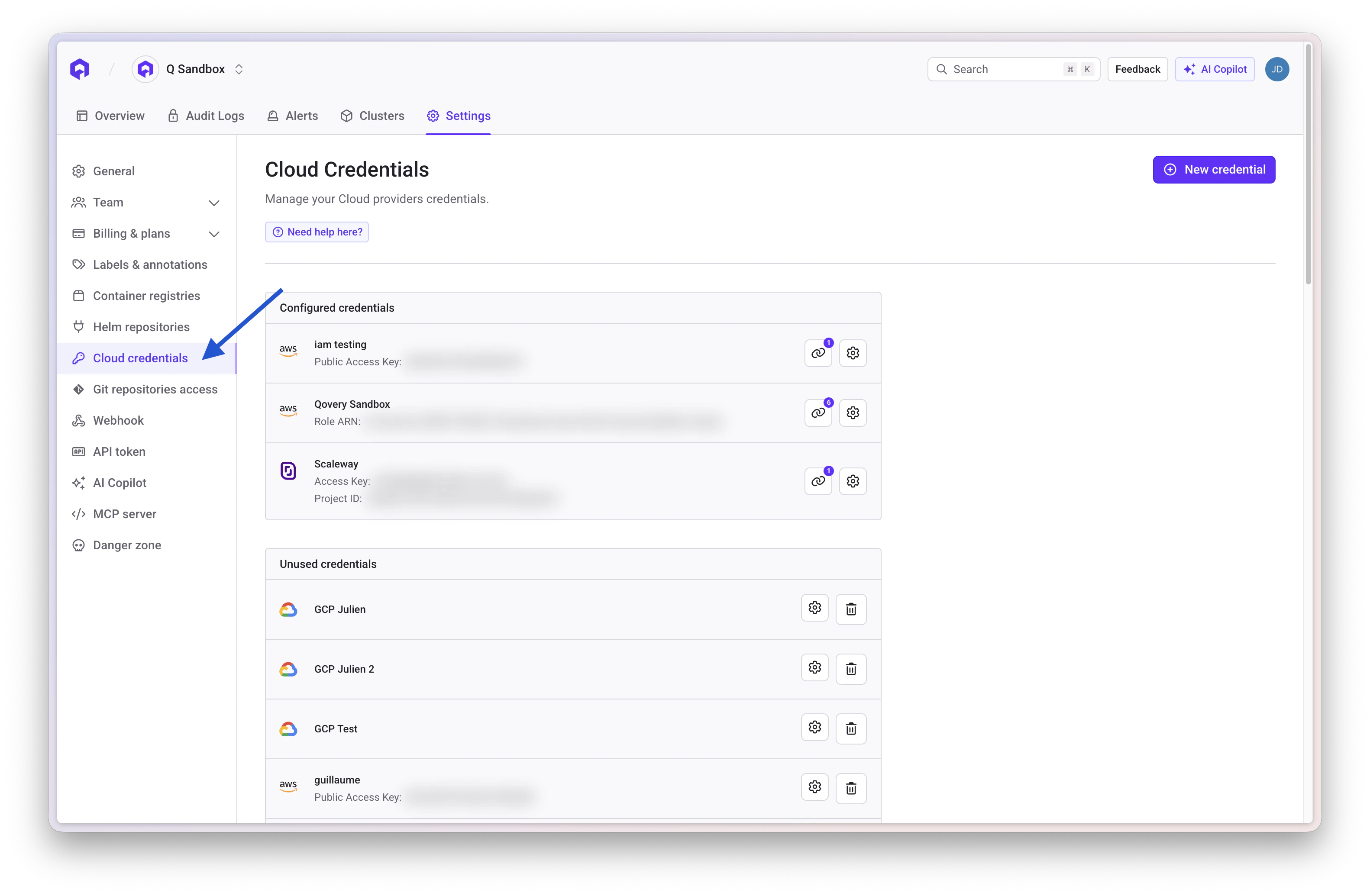
The **Cloud Credentials Management** interface provides a centralized location to view and manage all cloud provider credentials. These credentials are automatically listed when a cluster is provisioned.
This interface gives you visibility into all credentials, allows you to see which clusters are using them, and provides actions to update or delete them as needed.
 ## Viewing Credentials and Their Usage
Each cloud credential is displayed with details such as:
* Credential name
* Cloud provider (AWS, GCP, Azure, Scaleway)
* Public access key or ARN role
* Associated clusters
Next to each credential, you'll find a **View Associated Clusters** button. Clicking it opens a list of all clusters that are currently using the credential, helping you assess the impact before making changes.
## Editing a Credential
Locate the credential you want to modify and click the **Edit** button
Modify key properties such as:
* Access keys
* Secret keys
* Configuration settings
Click **Save** to apply the changes
Changes are saved and applied to the system immediately. Updated credentials will be used during the **next deployment** of each associated cluster.
## Deleting a Credential
Click **View Associated Clusters** to see which clusters use this credential
If the credential is linked to clusters, remove the association from those clusters first
Once no clusters are associated, click the **Delete** button
If a credential is still linked to one or more clusters, deletion won't be possible. You must first remove its association from those clusters.
## Best Practices
Always check associated clusters by clicking the **View Associated Clusters** button before editing or deleting credentials. This helps prevent disruptions during future deployments.
Assign clear, descriptive names to credentials for easier identification. Examples:
* `aws-prod-us-east-1`
* `gcp-staging-europe`
* `azure-dev-westus`
Periodically rotate cloud credentials for security:
1. Create new credentials in your cloud provider
2. Edit the credential in Qovery with new values
3. Deploy clusters to apply new credentials
4. Delete old credentials from your cloud provider
Regularly review and delete unused credentials to maintain a secure environment and reduce clutter.
For AWS, prefer IAM roles over access keys for better security:
* More secure (no long-lived credentials)
* Easier to manage and rotate
* Better audit trail in CloudTrail
## Related Resources
Learn about cluster configuration
AWS EKS integration guide
Google GKE integration guide
Azure AKS integration guide
## Viewing Credentials and Their Usage
Each cloud credential is displayed with details such as:
* Credential name
* Cloud provider (AWS, GCP, Azure, Scaleway)
* Public access key or ARN role
* Associated clusters
Next to each credential, you'll find a **View Associated Clusters** button. Clicking it opens a list of all clusters that are currently using the credential, helping you assess the impact before making changes.
## Editing a Credential
Locate the credential you want to modify and click the **Edit** button
Modify key properties such as:
* Access keys
* Secret keys
* Configuration settings
Click **Save** to apply the changes
Changes are saved and applied to the system immediately. Updated credentials will be used during the **next deployment** of each associated cluster.
## Deleting a Credential
Click **View Associated Clusters** to see which clusters use this credential
If the credential is linked to clusters, remove the association from those clusters first
Once no clusters are associated, click the **Delete** button
If a credential is still linked to one or more clusters, deletion won't be possible. You must first remove its association from those clusters.
## Best Practices
Always check associated clusters by clicking the **View Associated Clusters** button before editing or deleting credentials. This helps prevent disruptions during future deployments.
Assign clear, descriptive names to credentials for easier identification. Examples:
* `aws-prod-us-east-1`
* `gcp-staging-europe`
* `azure-dev-westus`
Periodically rotate cloud credentials for security:
1. Create new credentials in your cloud provider
2. Edit the credential in Qovery with new values
3. Deploy clusters to apply new credentials
4. Delete old credentials from your cloud provider
Regularly review and delete unused credentials to maintain a secure environment and reduce clutter.
For AWS, prefer IAM roles over access keys for better security:
* More secure (no long-lived credentials)
* Easier to manage and rotate
* Better audit trail in CloudTrail
## Related Resources
Learn about cluster configuration
AWS EKS integration guide
Google GKE integration guide
Azure AKS integration guide