> ## Documentation Index
> Fetch the complete documentation index at: https://www.qovery.com/docs/llms.txt
> Use this file to discover all available pages before exploring further.
# Environment Variables
> Manage environment variables and secrets for your services
## Overview
Environment variables are key-value pairs that configure your applications at runtime. Qovery provides comprehensive variable management with support for secrets, multiple scopes, interpolation, and file-based variables.
## Variable Types
Qovery supports two types of environment variables:
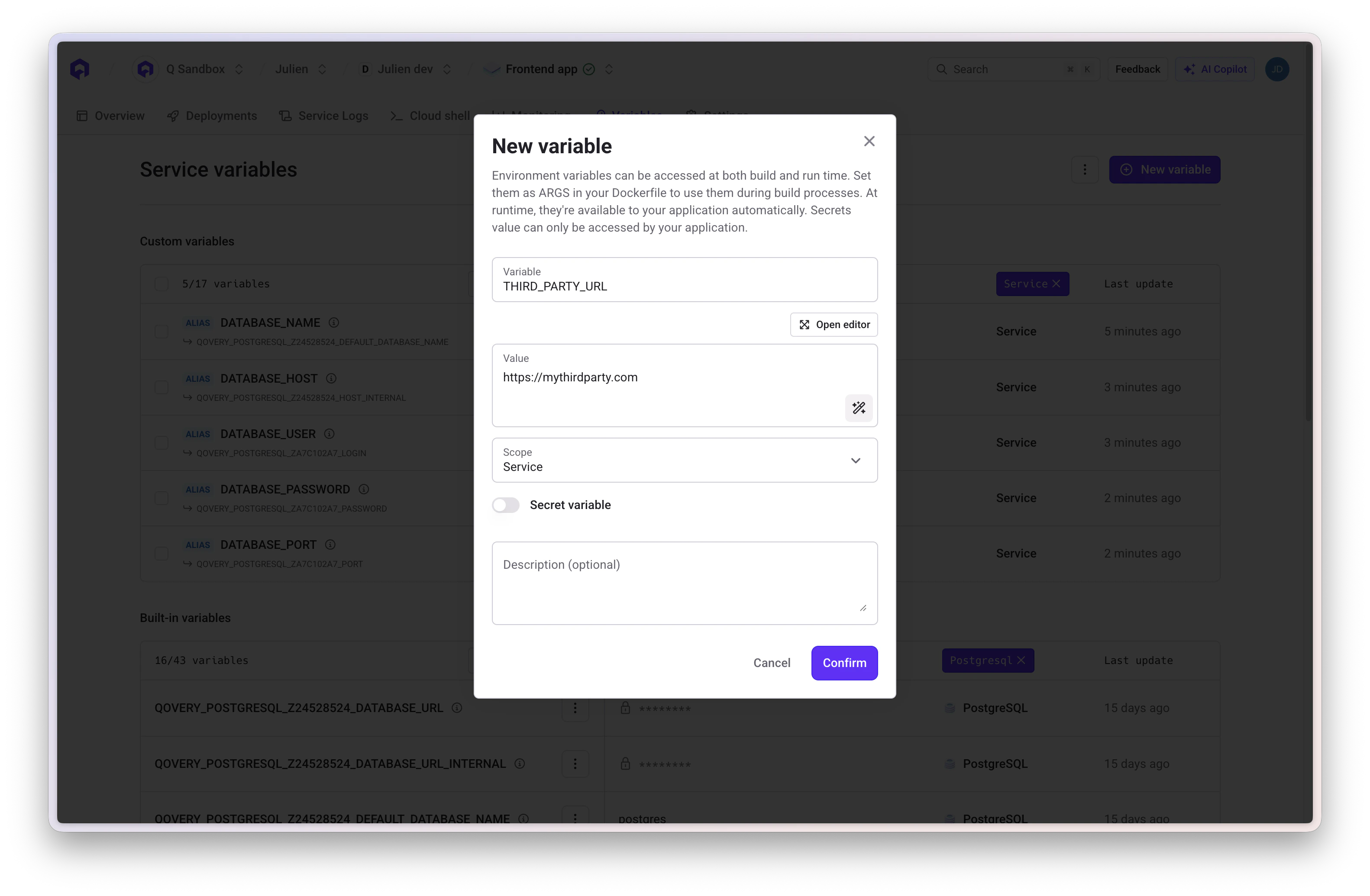
### Key/Value Variables
Standard environment variables accessible in your application:
```bash theme={null}
NODE_ENV=production
API_URL=https://api.example.com
MAX_CONNECTIONS=100
```
**In Application Code**:
```javascript theme={null}
const nodeEnv = process.env.NODE_ENV;
const apiUrl = process.env.API_URL;
```
 ### Variable as File
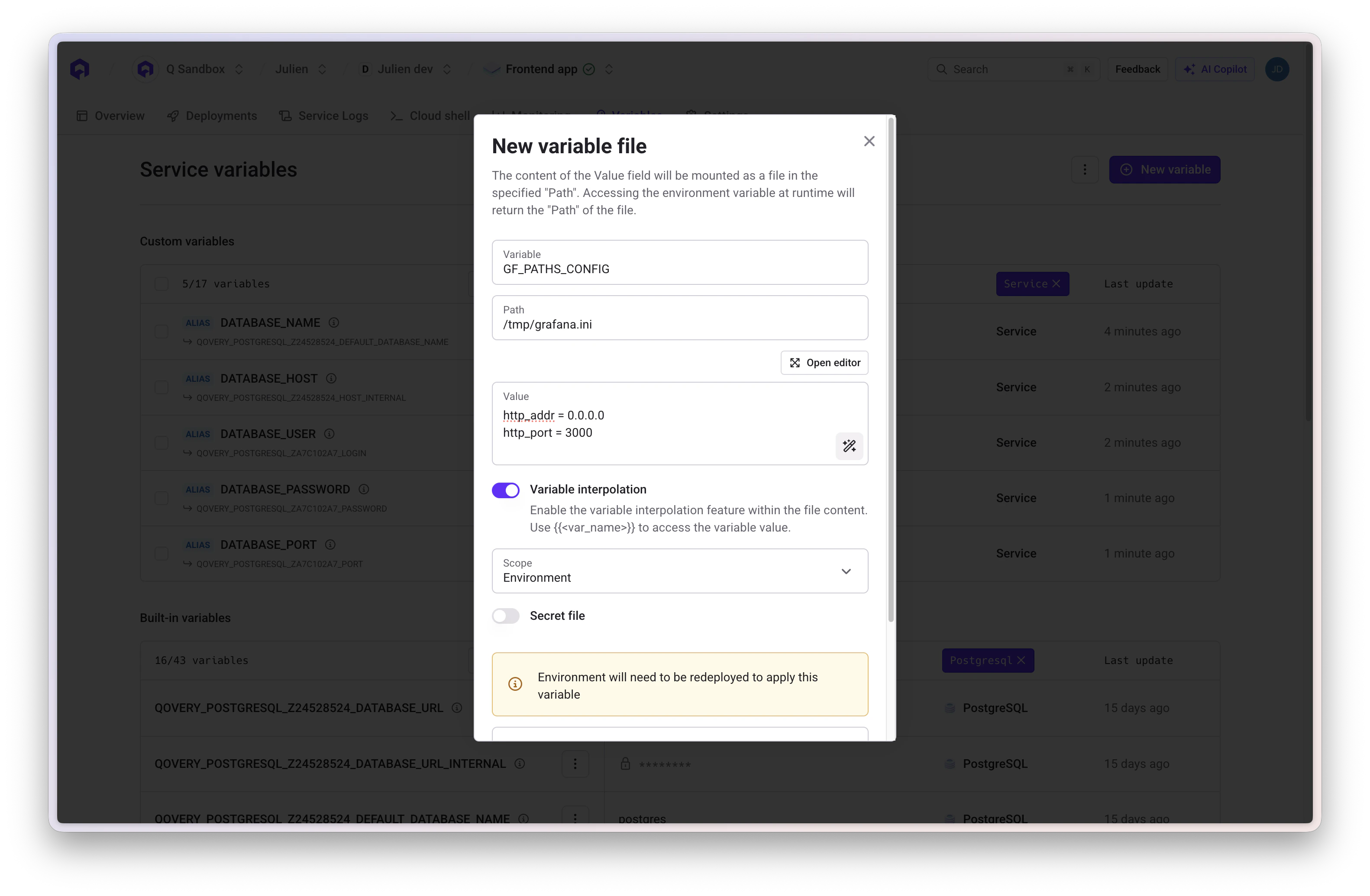
Store configuration files that are written to the filesystem at a specific path. The value is stored at the specified file path and accessible for applications or frameworks requiring file-based configuration.
**Configuration**:
* **Key**: Variable name
* **Value**: File content
* **Path**: Absolute path where file will be created (e.g., `/etc/config/app.yaml`)
### Variable as File
Store configuration files that are written to the filesystem at a specific path. The value is stored at the specified file path and accessible for applications or frameworks requiring file-based configuration.
**Configuration**:
* **Key**: Variable name
* **Value**: File content
* **Path**: Absolute path where file will be created (e.g., `/etc/config/app.yaml`)
 ## Secrets
Secrets are encrypted variables for sensitive data. They are encrypted at rest and in transit, and cannot be retrieved through the API.
**When to Use Secrets**:
* Database passwords
* API keys and tokens
* OAuth credentials
* Private keys and certificates
* Any sensitive authentication data
Always mark sensitive data as secrets. Secret values cannot be viewed in the console once created - you can only update or delete them.
## External Secrets
External secrets let you inject values stored in a third-party secrets manager directly into your services as environment variables, without copying them into Qovery. The secret value is fetched from your provider at deployment time.
**Supported providers**:
* AWS Secrets Manager
* AWS Parameter Store
* GCP Secret Manager
**When to use external secrets instead of built-in secrets**:
* Your secrets are already managed centrally in a secrets manager
* You need fine-grained access control at the secrets manager level
* You want a single source of truth across multiple tools and teams
Set up ESO and connect your cluster to AWS or GCP secrets providers
## Variable Scopes
Environment variables can be defined at three different scopes:
### Project Scope
**Available to**: All environments and services within the project
**Use Cases**: Organization-wide settings, shared API keys, common configuration
```bash theme={null}
COMPANY_NAME=Acme Corp
SUPPORT_EMAIL=support@acme.com
CDN_URL=https://cdn.acme.com
```
### Environment Scope
**Available to**: All services within a specific environment
**Use Cases**: Environment-specific configuration, shared database credentials, feature flags
```bash theme={null}
ENVIRONMENT=production
API_URL=https://api.production.com
ENABLE_DEBUG=false
```
### Service Scope
**Available to**: One specific service (application, job, database, etc.)
**Use Cases**: Service-specific configuration, application-unique settings
```bash theme={null}
PORT=8080
WORKERS=4
RATE_LIMIT=1000
```
### Scope Hierarchy
Variables defined at narrower scopes override those at broader scopes:
```
Service Scope (highest priority)
↓ overrides
Environment Scope
↓ overrides
Project Scope (lowest priority)
```
## Built-in Variables
Qovery automatically injects built-in variables for service interconnection and system information.
### System Variables
```bash theme={null}
# Project and Environment
QOVERY_PROJECT_ID=
QOVERY_ENVIRONMENT_ID=
QOVERY_ENVIRONMENT_NAME=production
# Service Information
QOVERY_APPLICATION_ID=
QOVERY_APPLICATION_NAME=my-api
# Infrastructure
QOVERY_CLOUD_PROVIDER=AWS
QOVERY_CLOUD_PROVIDER_REGION=us-east-1
QOVERY_KUBERNETES_CLUSTER_DOMAIN=
```
### Database Connection Variables
For each database, Qovery creates connection variables using the pattern:
`QOVERY_{DATABASE_TYPE}_{DATABASE_ID}_{PROPERTY}`
**Example - PostgreSQL Database "main-db"**:
```bash theme={null}
QOVERY_POSTGRESQL_{DATABASE_ID}_HOST_INTERNAL=z1a2b3c4-postgresql
QOVERY_POSTGRESQL_{DATABASE_ID}_PORT=5432
QOVERY_POSTGRESQL_{DATABASE_ID}_USERNAME=superuser
QOVERY_POSTGRESQL_{DATABASE_ID}_PASSWORD=
QOVERY_POSTGRESQL_{DATABASE_ID}_DEFAULT_DATABASE_NAME=postgres
QOVERY_POSTGRESQL_{DATABASE_ID}_DATABASE_URL_INTERNAL=postgresql://superuser:***@postgres-z1a2b3c4.internal:5432/postgres
```
### Application Connection Variables
Connect to other applications using the pattern:
`QOVERY_APPLICATION_{APP_ID}_{PROPERTY}`
```bash theme={null}
QOVERY_APPLICATION_{APP_ID}_HOST_INTERNAL=app-z1a2b3d5.frontend
QOVERY_APPLICATION_{APP_ID}_PORT=3000
```
Built-in variables are read-only and automatically managed by Qovery. Variable names are generated from service names with underscores replacing hyphens and converted to uppercase.
## Creating Variables
Select your application, job, or container from the environment
Click on **Variables** in the service menu
## Secrets
Secrets are encrypted variables for sensitive data. They are encrypted at rest and in transit, and cannot be retrieved through the API.
**When to Use Secrets**:
* Database passwords
* API keys and tokens
* OAuth credentials
* Private keys and certificates
* Any sensitive authentication data
Always mark sensitive data as secrets. Secret values cannot be viewed in the console once created - you can only update or delete them.
## External Secrets
External secrets let you inject values stored in a third-party secrets manager directly into your services as environment variables, without copying them into Qovery. The secret value is fetched from your provider at deployment time.
**Supported providers**:
* AWS Secrets Manager
* AWS Parameter Store
* GCP Secret Manager
**When to use external secrets instead of built-in secrets**:
* Your secrets are already managed centrally in a secrets manager
* You need fine-grained access control at the secrets manager level
* You want a single source of truth across multiple tools and teams
Set up ESO and connect your cluster to AWS or GCP secrets providers
## Variable Scopes
Environment variables can be defined at three different scopes:
### Project Scope
**Available to**: All environments and services within the project
**Use Cases**: Organization-wide settings, shared API keys, common configuration
```bash theme={null}
COMPANY_NAME=Acme Corp
SUPPORT_EMAIL=support@acme.com
CDN_URL=https://cdn.acme.com
```
### Environment Scope
**Available to**: All services within a specific environment
**Use Cases**: Environment-specific configuration, shared database credentials, feature flags
```bash theme={null}
ENVIRONMENT=production
API_URL=https://api.production.com
ENABLE_DEBUG=false
```
### Service Scope
**Available to**: One specific service (application, job, database, etc.)
**Use Cases**: Service-specific configuration, application-unique settings
```bash theme={null}
PORT=8080
WORKERS=4
RATE_LIMIT=1000
```
### Scope Hierarchy
Variables defined at narrower scopes override those at broader scopes:
```
Service Scope (highest priority)
↓ overrides
Environment Scope
↓ overrides
Project Scope (lowest priority)
```
## Built-in Variables
Qovery automatically injects built-in variables for service interconnection and system information.
### System Variables
```bash theme={null}
# Project and Environment
QOVERY_PROJECT_ID=
QOVERY_ENVIRONMENT_ID=
QOVERY_ENVIRONMENT_NAME=production
# Service Information
QOVERY_APPLICATION_ID=
QOVERY_APPLICATION_NAME=my-api
# Infrastructure
QOVERY_CLOUD_PROVIDER=AWS
QOVERY_CLOUD_PROVIDER_REGION=us-east-1
QOVERY_KUBERNETES_CLUSTER_DOMAIN=
```
### Database Connection Variables
For each database, Qovery creates connection variables using the pattern:
`QOVERY_{DATABASE_TYPE}_{DATABASE_ID}_{PROPERTY}`
**Example - PostgreSQL Database "main-db"**:
```bash theme={null}
QOVERY_POSTGRESQL_{DATABASE_ID}_HOST_INTERNAL=z1a2b3c4-postgresql
QOVERY_POSTGRESQL_{DATABASE_ID}_PORT=5432
QOVERY_POSTGRESQL_{DATABASE_ID}_USERNAME=superuser
QOVERY_POSTGRESQL_{DATABASE_ID}_PASSWORD=
QOVERY_POSTGRESQL_{DATABASE_ID}_DEFAULT_DATABASE_NAME=postgres
QOVERY_POSTGRESQL_{DATABASE_ID}_DATABASE_URL_INTERNAL=postgresql://superuser:***@postgres-z1a2b3c4.internal:5432/postgres
```
### Application Connection Variables
Connect to other applications using the pattern:
`QOVERY_APPLICATION_{APP_ID}_{PROPERTY}`
```bash theme={null}
QOVERY_APPLICATION_{APP_ID}_HOST_INTERNAL=app-z1a2b3d5.frontend
QOVERY_APPLICATION_{APP_ID}_PORT=3000
```
Built-in variables are read-only and automatically managed by Qovery. Variable names are generated from service names with underscores replacing hyphens and converted to uppercase.
## Creating Variables
Select your application, job, or container from the environment
Click on **Variables** in the service menu
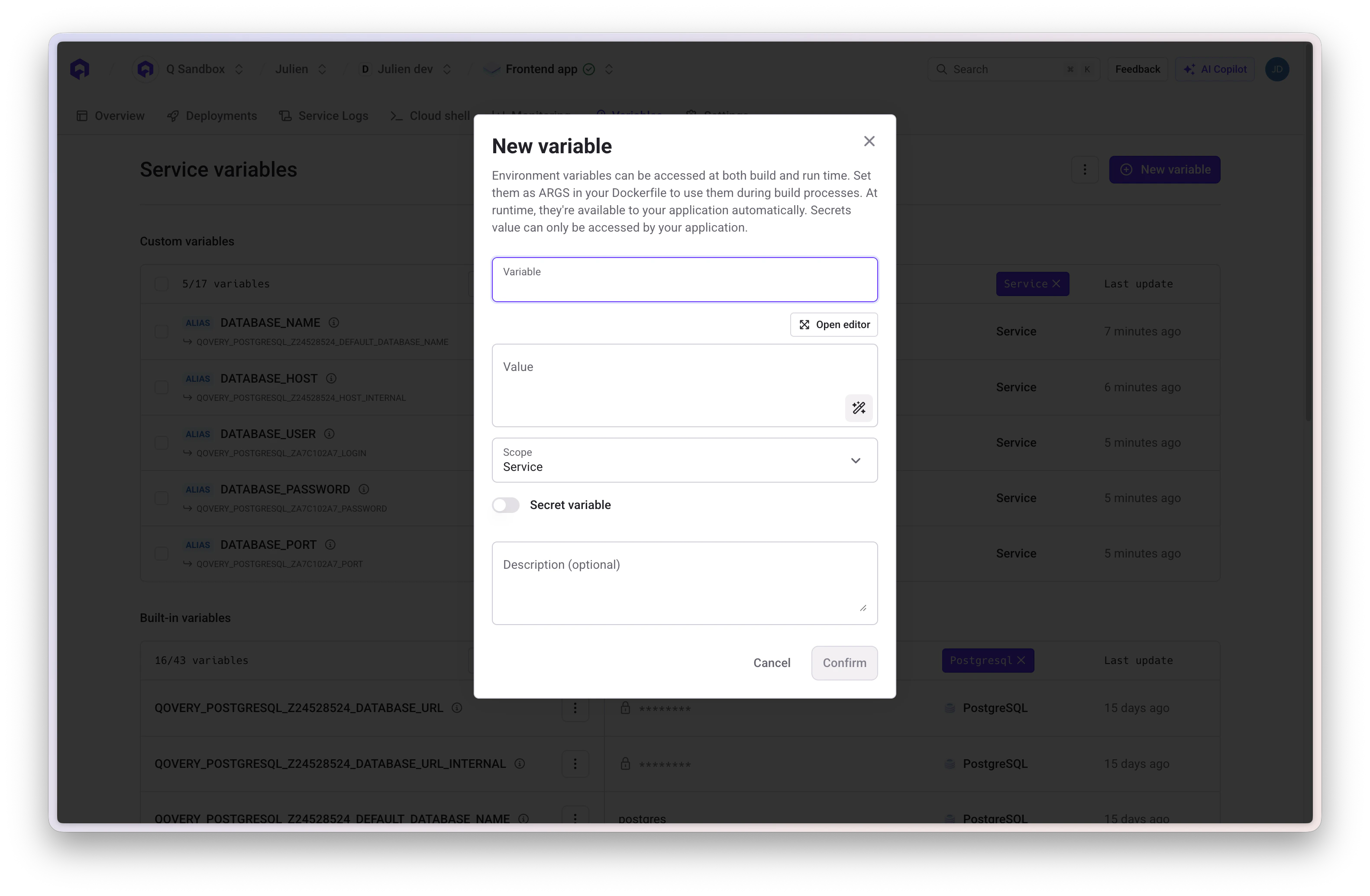
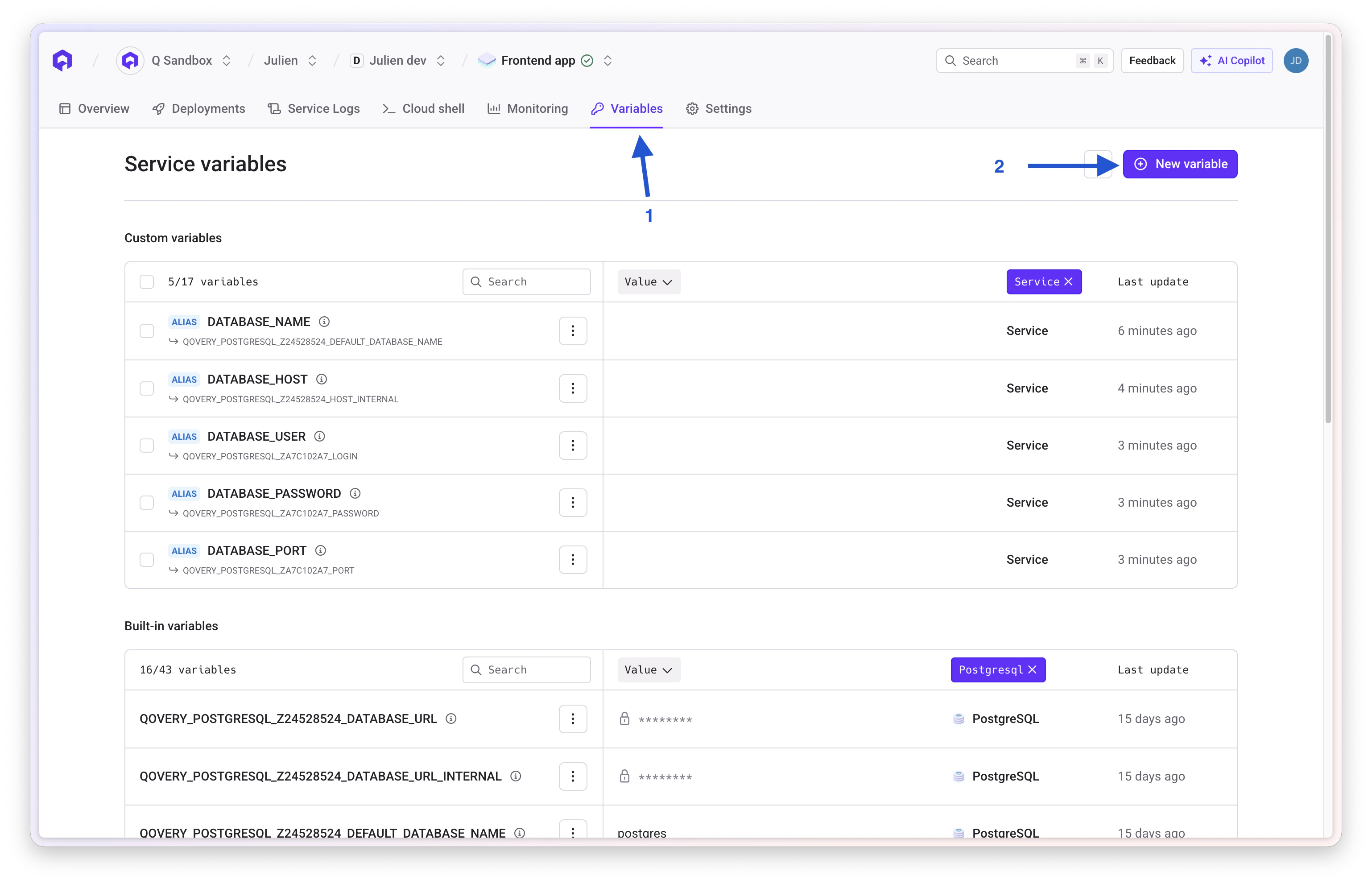 Click **Add Variable** and configure:
* **Scope**: Project, Environment, or Service level
* **Key**: Variable name
* **Value**: Variable value or file content
* **Type**: Variable or Secret
* **Variable Type**: Standard or File (specify path if file)
Click **Add Variable** and configure:
* **Scope**: Project, Environment, or Service level
* **Key**: Variable name
* **Value**: Variable value or file content
* **Type**: Variable or Secret
* **Variable Type**: Standard or File (specify path if file)
 Save the variable and redeploy services to apply changes
### Variable Naming Rules
**Allowed**:
* Alphanumeric characters (A-Z, 0-9)
* Underscores (\_)
* Must start with a letter
* Uppercase recommended
**Not Allowed**:
* Cannot start with `QOVERY_` (reserved for built-in variables)
* Cannot start with `__` (double underscore)
* No hyphens or special characters
* No spaces
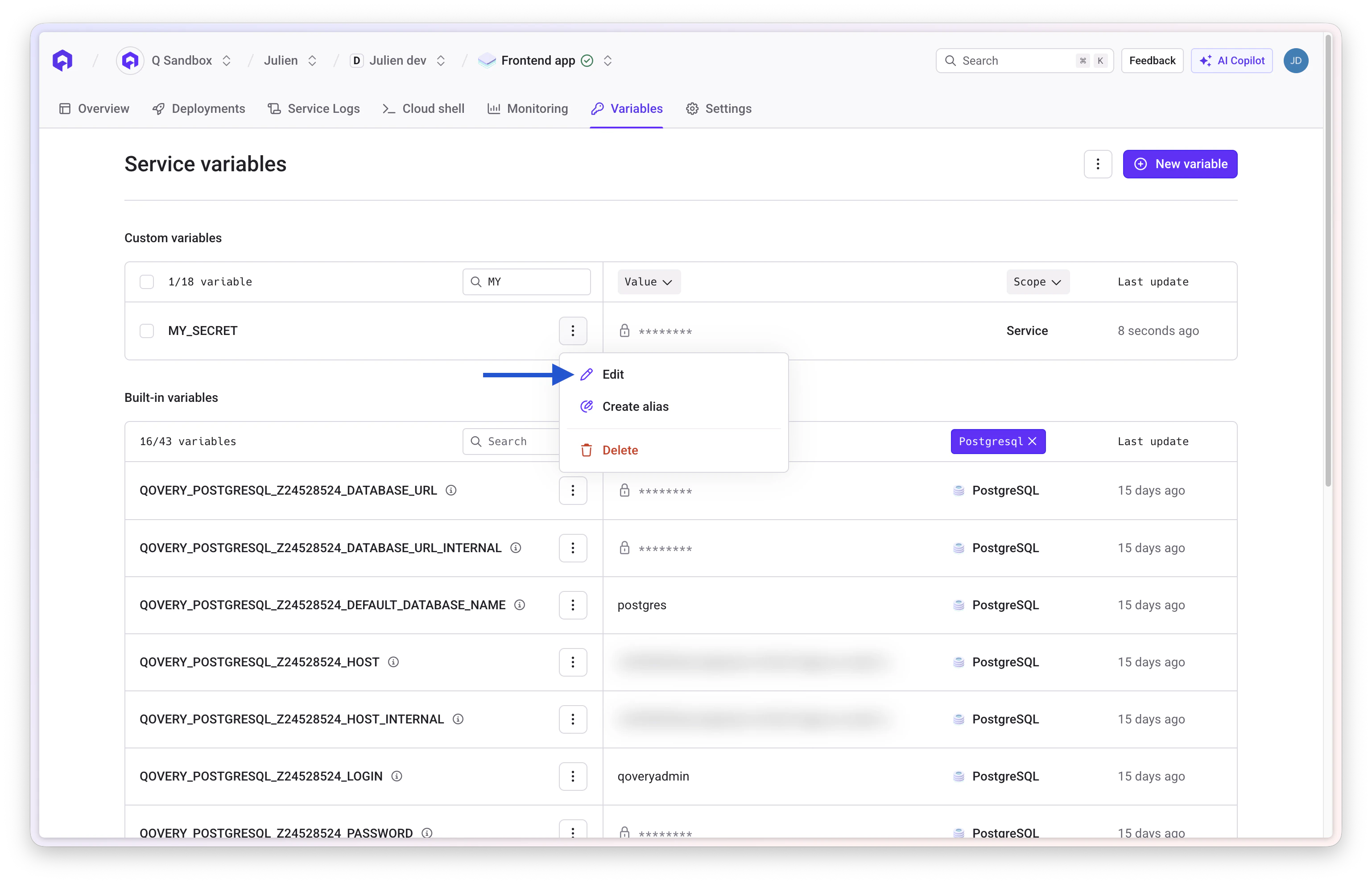
## Editing and Deleting Variables
### Editing
1. Locate variable in the **Variables** section
2. Click edit icon
3. Update value or settings
4. Save and redeploy
Save the variable and redeploy services to apply changes
### Variable Naming Rules
**Allowed**:
* Alphanumeric characters (A-Z, 0-9)
* Underscores (\_)
* Must start with a letter
* Uppercase recommended
**Not Allowed**:
* Cannot start with `QOVERY_` (reserved for built-in variables)
* Cannot start with `__` (double underscore)
* No hyphens or special characters
* No spaces
## Editing and Deleting Variables
### Editing
1. Locate variable in the **Variables** section
2. Click edit icon
3. Update value or settings
4. Save and redeploy
 For secrets, you cannot view the current value. You can only set a new value for security reasons.
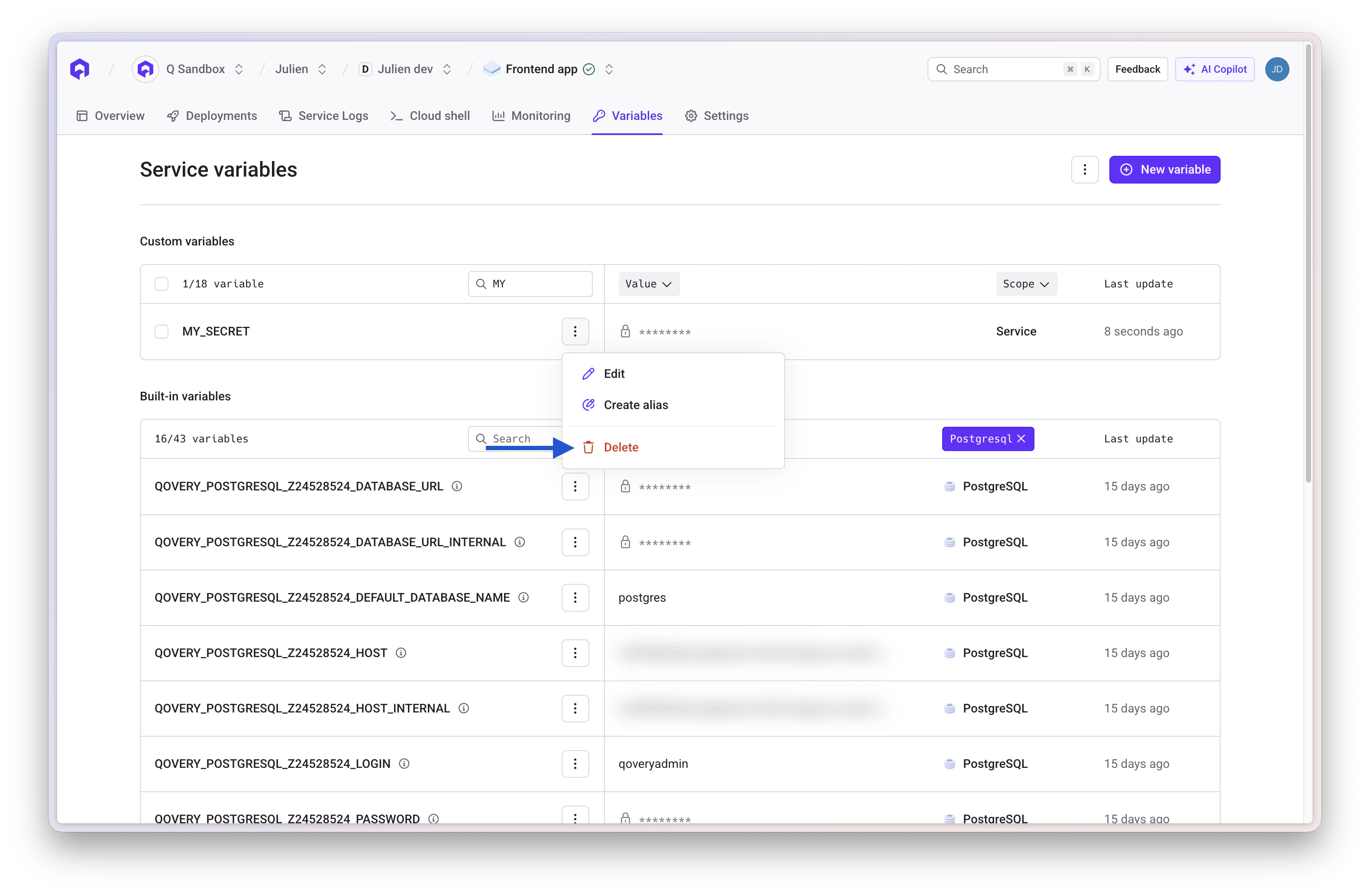
### Deleting
1. Select variable to remove
2. Click delete icon and confirm
3. Redeploy services
For secrets, you cannot view the current value. You can only set a new value for security reasons.
### Deleting
1. Select variable to remove
2. Click delete icon and confirm
3. Redeploy services
 ## Variable Interpolation
Reference other variables within variable values using `{{VARIABLE_NAME}}` syntax.
### Basic Interpolation
```bash theme={null}
# Define base variables
DATABASE_HOST=postgres.internal
DATABASE_PORT=5432
DATABASE_NAME=myapp
# Compose connection string
DATABASE_URL={{DATABASE_HOST}}:{{DATABASE_PORT}}/{{DATABASE_NAME}}
# Result: postgres.internal:5432/myapp
```
### With Built-in Variables
```bash theme={null}
# Use Qovery built-in variables
MY_DATABASE_URL=postgresql://{{QOVERY_DATABASE_MAIN_DB_HOST}}:{{QOVERY_DATABASE_MAIN_DB_PORT}}/{{QOVERY_DATABASE_MAIN_DB_DATABASE}}
# Compose service URLs
BACKEND_API={{QOVERY_APPLICATION_API_HOST_INTERNAL}}:{{QOVERY_APPLICATION_API_PORT}}
```
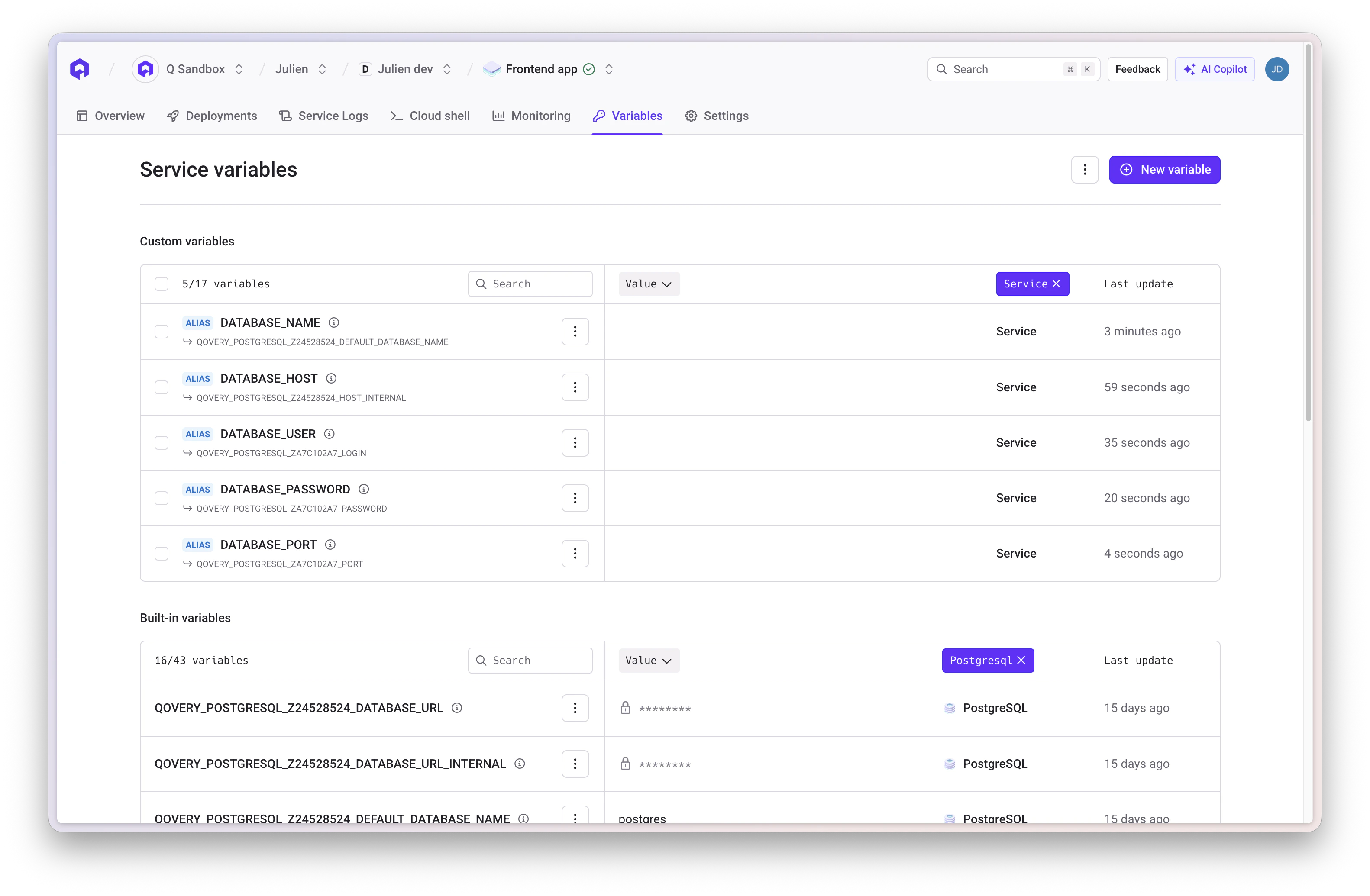
## Aliases
Create aliases to rename built-in variables to match your application's expected variable names.
### Database Aliases
If your application expects specific variable names, create aliases:
## Variable Interpolation
Reference other variables within variable values using `{{VARIABLE_NAME}}` syntax.
### Basic Interpolation
```bash theme={null}
# Define base variables
DATABASE_HOST=postgres.internal
DATABASE_PORT=5432
DATABASE_NAME=myapp
# Compose connection string
DATABASE_URL={{DATABASE_HOST}}:{{DATABASE_PORT}}/{{DATABASE_NAME}}
# Result: postgres.internal:5432/myapp
```
### With Built-in Variables
```bash theme={null}
# Use Qovery built-in variables
MY_DATABASE_URL=postgresql://{{QOVERY_DATABASE_MAIN_DB_HOST}}:{{QOVERY_DATABASE_MAIN_DB_PORT}}/{{QOVERY_DATABASE_MAIN_DB_DATABASE}}
# Compose service URLs
BACKEND_API={{QOVERY_APPLICATION_API_HOST_INTERNAL}}:{{QOVERY_APPLICATION_API_PORT}}
```
## Aliases
Create aliases to rename built-in variables to match your application's expected variable names.
### Database Aliases
If your application expects specific variable names, create aliases:
 ```bash theme={null}
# Application expects DATABASE_URL
# Create alias from built-in variable:
DATABASE_URL = {{QOVERY_DATABASE_MAIN_DB_CONNECTION_URI}}
```
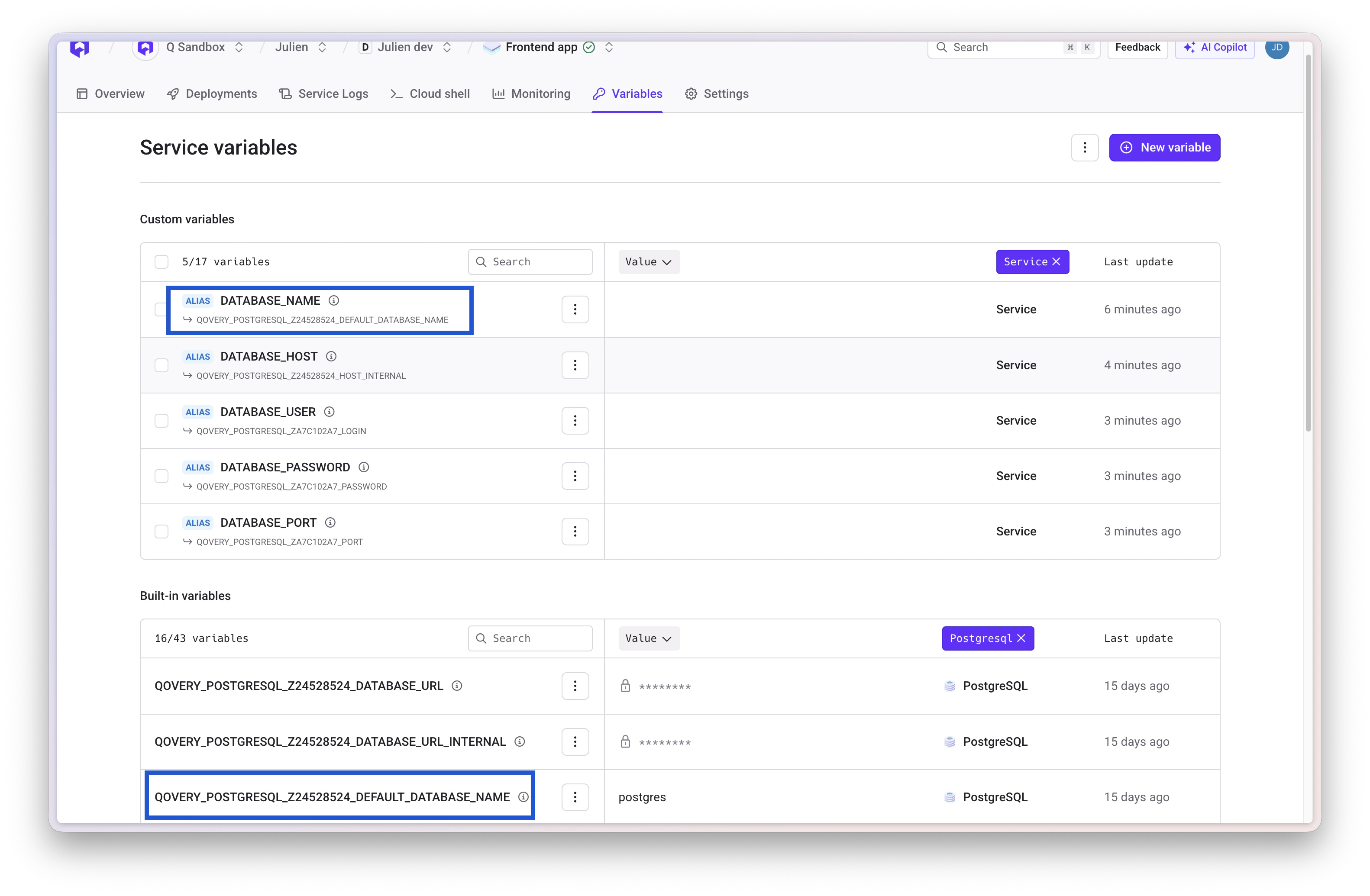
### Application Host Aliases
Create friendly names for service communication:
```bash theme={null}
# Application expects DATABASE_URL
# Create alias from built-in variable:
DATABASE_URL = {{QOVERY_DATABASE_MAIN_DB_CONNECTION_URI}}
```
### Application Host Aliases
Create friendly names for service communication:
 ```bash theme={null}
# Simple aliases for services
API_HOST = {{QOVERY_APPLICATION_API_HOST_INTERNAL}}
REDIS_HOST = {{QOVERY_CONTAINER_REDIS_HOST_INTERNAL}}
POSTGRES_HOST = {{QOVERY_DATABASE_MAIN_DB_HOST}}
```
## Overrides
When variables are defined at multiple scopes, narrower scopes override broader ones:
```bash theme={null}
# Project Scope
LOG_LEVEL=warn
# Environment Scope (overrides project)
LOG_LEVEL=info
# Service Scope (overrides environment)
LOG_LEVEL=debug
# Result: Service sees LOG_LEVEL=debug
```
## Import and Export
Import and export variables in bulk using `.env` file format.
### Exporting
1. Open the **Variables** section
2. Click **Export** to download as `.env` file
3. Secret values are exported as `***` for security
### Importing
Create a `.env` file with key-value pairs:
```bash theme={null}
NEW_VAR_1=value1
NEW_VAR_2=value2
FEATURE_FLAG=true
```
Click **Import** and select your `.env` file
Qovery shows which variables will be:
* Created (new)
* Updated (existing)
* Skipped (conflicts)
Review and confirm the import
**Import Restrictions**:
* Cannot import built-in variables (starting with `QOVERY_`)
* Cannot overwrite existing secrets (must delete first)
* Cannot import variables with invalid names
Existing non-secret variables at the same scope will be updated during import. Use carefully to avoid overwriting configuration.
## Service Interconnection
Use environment variables to connect services within your environment.
### Database Connection
```javascript theme={null}
// Using built-in variables
const { Client } = require('pg');
const client = new Client({
host: process.env.QOVERY_DATABASE_MAIN_DB_HOST,
port: process.env.QOVERY_DATABASE_MAIN_DB_PORT,
database: process.env.QOVERY_DATABASE_MAIN_DB_DATABASE,
user: process.env.QOVERY_DATABASE_MAIN_DB_USERNAME,
password: process.env.QOVERY_DATABASE_MAIN_DB_PASSWORD,
});
// Or use connection URI
const client = new Client({
connectionString: process.env.QOVERY_DATABASE_MAIN_DB_CONNECTION_URI
});
```
### Application-to-Application Communication
```javascript theme={null}
// Internal service communication
const backendUrl = `http://${process.env.QOVERY_APPLICATION_API_HOST_INTERNAL}:${process.env.QOVERY_APPLICATION_API_PORT}`;
const response = await fetch(`${backendUrl}/api/data`);
```
## Best Practices
* **Security**: Always mark sensitive data as secrets
* **Naming**: Use UPPER\_CASE\_WITH\_UNDERSCORES and descriptive names
* **Organization**: Use appropriate scopes (Project for shared, Environment for env-specific, Service for unique)
* **Rotation**: Periodically rotate sensitive credentials
* **Documentation**: Document variable purposes and expected values
* **Cleanup**: Remove unused variables regularly
## Related Resources
Configure applications with environment variables
Connect databases using built-in variables
Deploy with configured variables
Use environment variables for database connections
```bash theme={null}
# Simple aliases for services
API_HOST = {{QOVERY_APPLICATION_API_HOST_INTERNAL}}
REDIS_HOST = {{QOVERY_CONTAINER_REDIS_HOST_INTERNAL}}
POSTGRES_HOST = {{QOVERY_DATABASE_MAIN_DB_HOST}}
```
## Overrides
When variables are defined at multiple scopes, narrower scopes override broader ones:
```bash theme={null}
# Project Scope
LOG_LEVEL=warn
# Environment Scope (overrides project)
LOG_LEVEL=info
# Service Scope (overrides environment)
LOG_LEVEL=debug
# Result: Service sees LOG_LEVEL=debug
```
## Import and Export
Import and export variables in bulk using `.env` file format.
### Exporting
1. Open the **Variables** section
2. Click **Export** to download as `.env` file
3. Secret values are exported as `***` for security
### Importing
Create a `.env` file with key-value pairs:
```bash theme={null}
NEW_VAR_1=value1
NEW_VAR_2=value2
FEATURE_FLAG=true
```
Click **Import** and select your `.env` file
Qovery shows which variables will be:
* Created (new)
* Updated (existing)
* Skipped (conflicts)
Review and confirm the import
**Import Restrictions**:
* Cannot import built-in variables (starting with `QOVERY_`)
* Cannot overwrite existing secrets (must delete first)
* Cannot import variables with invalid names
Existing non-secret variables at the same scope will be updated during import. Use carefully to avoid overwriting configuration.
## Service Interconnection
Use environment variables to connect services within your environment.
### Database Connection
```javascript theme={null}
// Using built-in variables
const { Client } = require('pg');
const client = new Client({
host: process.env.QOVERY_DATABASE_MAIN_DB_HOST,
port: process.env.QOVERY_DATABASE_MAIN_DB_PORT,
database: process.env.QOVERY_DATABASE_MAIN_DB_DATABASE,
user: process.env.QOVERY_DATABASE_MAIN_DB_USERNAME,
password: process.env.QOVERY_DATABASE_MAIN_DB_PASSWORD,
});
// Or use connection URI
const client = new Client({
connectionString: process.env.QOVERY_DATABASE_MAIN_DB_CONNECTION_URI
});
```
### Application-to-Application Communication
```javascript theme={null}
// Internal service communication
const backendUrl = `http://${process.env.QOVERY_APPLICATION_API_HOST_INTERNAL}:${process.env.QOVERY_APPLICATION_API_PORT}`;
const response = await fetch(`${backendUrl}/api/data`);
```
## Best Practices
* **Security**: Always mark sensitive data as secrets
* **Naming**: Use UPPER\_CASE\_WITH\_UNDERSCORES and descriptive names
* **Organization**: Use appropriate scopes (Project for shared, Environment for env-specific, Service for unique)
* **Rotation**: Periodically rotate sensitive credentials
* **Documentation**: Document variable purposes and expected values
* **Cleanup**: Remove unused variables regularly
## Related Resources
Configure applications with environment variables
Connect databases using built-in variables
Deploy with configured variables
Use environment variables for database connections