> ## Documentation Index
> Fetch the complete documentation index at: https://www.qovery.com/docs/llms.txt
> Use this file to discover all available pages before exploring further.
# Blueprints
> Provision managed cloud infrastructure and add-on services from Qovery's catalog, no Terraform or Helm required
## Overview
A **Blueprint** is a versioned, ready-to-use template for a single piece of cloud infrastructure or a Kubernetes add-on service — a managed database, an object storage bucket, a cache, or a message broker. Instead of writing Terraform or Helm from scratch, you browse Qovery's catalog, pick a blueprint and version, fill in a short form, and Qovery provisions the resource as a fully managed service inside one of your environments.
Blueprints turn infrastructure provisioning into governed self-service. The platform team curates which templates are available, and [role-based access control](/docs/configuration/organization/members-rbac) governs who can deploy them. Developers — and AI agents working through the API — provision what they need without a review queue, and without direct access to the underlying cloud account.
Behind the scenes, a blueprint materializes as a standard Qovery **Terraform (or OpenTofu) service** or **Helm service**. The service stays linked to the blueprint, so Qovery can later tell you when a newer version of the template is available, show you the diff, and apply the upgrade.
The catalog is maintained by Qovery in the public [`Qovery/service-catalog`](https://github.com/Qovery/service-catalog) repository and grows over time.
"Blueprint" is used for a few different things in Qovery. This page is about **catalog-based infrastructure and service templates**. It is not the same as:
* The **Blueprint Environment** used by [Preview Environments](/docs/configuration/environment#blueprint-environment) — an environment cloned per pull request.
* The **Blueprint** in the [AI Builder Portal](/docs/rde/admin/blueprint-management) — a workspace template.
### What's in the catalog
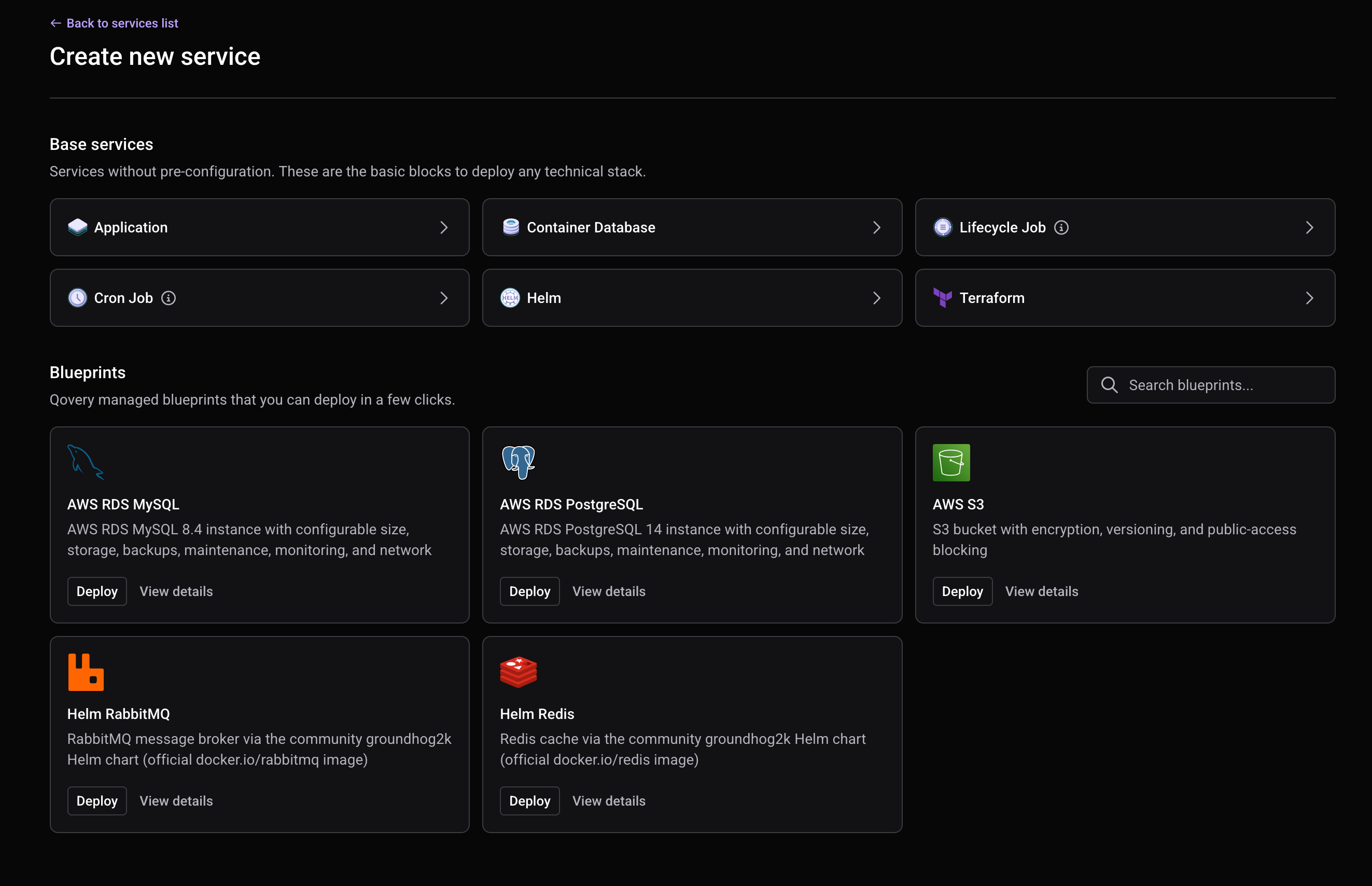
The catalog is expanding. Blueprints available today include:
Managed PostgreSQL on Amazon RDS (major versions 14–17), with configurable size, storage, backups, monitoring, and networking.
Managed MySQL on Amazon RDS with configurable size, storage, backups, maintenance, and monitoring.
An S3 bucket with encryption, versioning, and public-access blocking.
Scaleway Managed Database for PostgreSQL, with configurable node type, storage, backups, and network ACLs.
Scaleway Managed Database for MySQL, with configurable node type, storage, backups, and network ACLs.
A Scaleway Object Storage bucket.
A Redis cache, deployed via a community Helm chart on your cluster.
A RabbitMQ message broker, deployed via a community Helm chart on your cluster.
## How Blueprints Work
When you create a blueprint service, you fill in a short form built from the blueprint's template: the **variables** it exposes (with defaults, dropdowns, and validation), while read-only **context variables** such as the cluster region and name are resolved automatically. Qovery then provisions the resource on your cluster as a managed **Terraform (or OpenTofu) service** or **Helm service** and links it to the blueprint.
Once deployed, the service publishes its **outputs** — endpoints, ports, credentials — so other services in the same environment can consume them, just like any other Qovery service.
Blueprints are versioned: you pick a version when you create the service, and Qovery flags when a newer one is available (see [Updating a Blueprint](#updating-a-blueprint)).
## Browsing the Catalog
In the Qovery Console, open the environment where you want the resource, then start creating a new service and choose **Blueprint** (create from catalog).
Browse the catalog by provider and category (database, storage, cache, messaging) and select the blueprint you need.
Select the major version (for example PostgreSQL 17). Qovery uses the latest released tag for that major version.
 Each blueprint ships with a README describing the resource it provisions and its variables. Read it before deploying so you know which inputs are required.
## Creating a Blueprint Service
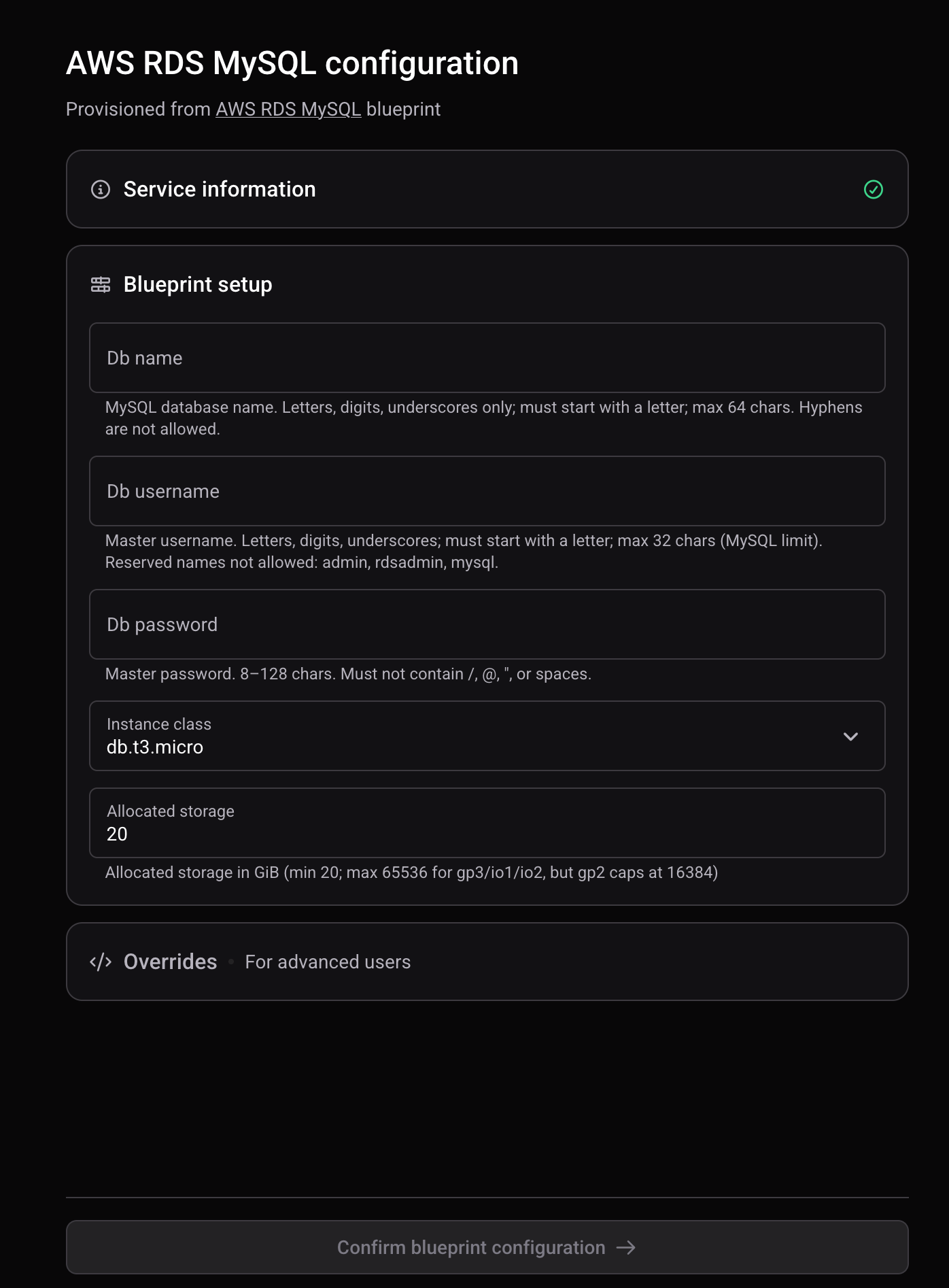
Complete the form generated from the blueprint's manifest. Required variables are marked; optional ones fall back to their defaults. Variables constrained to a set of values render as dropdowns, and secret variables (passwords, keys) render as password fields and are stored encrypted.
Context variables such as the cluster region and name are filled in automatically from the target environment's cluster — you don't set them.
Some blueprints let you override engine-level settings the template author marked as overridable — for example the Terraform/OpenTofu version, credentials mode, state backend, or compute resources. See [Variables & Engine Reference](#variables--engine-reference). If a setting is not overridable, the blueprint's default applies.
Create the blueprint service. You can create it and deploy immediately, or create it first and deploy later from the service like any other Qovery service.
Each blueprint ships with a README describing the resource it provisions and its variables. Read it before deploying so you know which inputs are required.
## Creating a Blueprint Service
Complete the form generated from the blueprint's manifest. Required variables are marked; optional ones fall back to their defaults. Variables constrained to a set of values render as dropdowns, and secret variables (passwords, keys) render as password fields and are stored encrypted.
Context variables such as the cluster region and name are filled in automatically from the target environment's cluster — you don't set them.
Some blueprints let you override engine-level settings the template author marked as overridable — for example the Terraform/OpenTofu version, credentials mode, state backend, or compute resources. See [Variables & Engine Reference](#variables--engine-reference). If a setting is not overridable, the blueprint's default applies.
Create the blueprint service. You can create it and deploy immediately, or create it first and deploy later from the service like any other Qovery service.
 ## Variables & Engine Reference
### Variables
Variables are the editable inputs a blueprint exposes. Each is described in the manifest and rendered in the form.
| Field | Description |
| ------------------ | ------------------------------------------------------------------------------------------------ |
| **Name** | The variable key (for example `db_name`, `instance_class`). |
| **Type** | `string`, `number`, or `bool`. |
| **Required** | Whether a value must be provided. Optional variables use their default. |
| **Secret** | Secret values are entered as password fields and stored encrypted. |
| **Default** | Pre-filled value when the variable is optional. |
| **Allowed values** | When set, the field is a dropdown limited to these values. |
| **Validation** | Optional constraints: regex `pattern`, `minLength`/`maxLength` (strings), `min`/`max` (numbers). |
### Context variables
Context variables are **read-only** and resolved automatically from the target environment's cluster. You cannot edit them.
| Example | Sourced from |
| -------------- | ---------------- |
| `region` | `cluster.region` |
| `cluster_name` | `cluster.name` |
### Engine & advanced settings
The engine block defines how the resource is provisioned. Which settings you can override is controlled by the blueprint author (via `overridable` and `allowed_values` in the manifest).
| Setting | Applies to | Description |
| ----------------- | -------------------- | --------------------------------------------------------------------------------------------------------- |
| **Engine** | all | `terraform`, `opentofu`, or `helm` — the tool used to provision the resource. |
| **Version** | Terraform / OpenTofu | Engine version. Editable only if the author marked it overridable, and constrained to the allowed values. |
| **Credentials** | Terraform / OpenTofu | `cluster` (use the cluster's cloud credentials) or `env` (use environment-scoped credentials). |
| **State backend** | Terraform / OpenTofu | `qovery` (Qovery-managed state) or `user_provided` (bring your own backend, e.g. S3/GCS/Azure). |
| **Resources** | all | CPU, RAM, and storage allocated to the provisioning job (for example `500m`, `512Mi`, `1Gi`). |
| **Timeout** | all | Maximum duration, in seconds, for the provisioning run. |
| **Chart** | Helm | Chart repository, name, and version (fixed by the blueprint). |
For Helm blueprints, engine version, credentials, and state backend do not apply — the chart and its version are defined by the blueprint.
## Updating a Blueprint
When Qovery maintains a newer version of a blueprint's template, the linked service surfaces an available update. Qovery compares your current tag to the latest catalog tag and reports exactly what changed:
* **New variables** — added as optional or required.
* **Now-required variables** — previously optional variables that are now required.
* **Updated variables** — changed defaults, allowed values, or constraints.
* **Removed variables** — no longer used by the template.
* **Engine changes** — version or resource changes.
* **New major versions** — a newer major version of the underlying service (for example PostgreSQL 16 → 17).
Upgrading is a two-step, safe workflow:
Run a **preview** — a dry run that produces a `terraform plan`-style diff of the actual infrastructure and streams it into the Console. Preview makes no changes.
## Variables & Engine Reference
### Variables
Variables are the editable inputs a blueprint exposes. Each is described in the manifest and rendered in the form.
| Field | Description |
| ------------------ | ------------------------------------------------------------------------------------------------ |
| **Name** | The variable key (for example `db_name`, `instance_class`). |
| **Type** | `string`, `number`, or `bool`. |
| **Required** | Whether a value must be provided. Optional variables use their default. |
| **Secret** | Secret values are entered as password fields and stored encrypted. |
| **Default** | Pre-filled value when the variable is optional. |
| **Allowed values** | When set, the field is a dropdown limited to these values. |
| **Validation** | Optional constraints: regex `pattern`, `minLength`/`maxLength` (strings), `min`/`max` (numbers). |
### Context variables
Context variables are **read-only** and resolved automatically from the target environment's cluster. You cannot edit them.
| Example | Sourced from |
| -------------- | ---------------- |
| `region` | `cluster.region` |
| `cluster_name` | `cluster.name` |
### Engine & advanced settings
The engine block defines how the resource is provisioned. Which settings you can override is controlled by the blueprint author (via `overridable` and `allowed_values` in the manifest).
| Setting | Applies to | Description |
| ----------------- | -------------------- | --------------------------------------------------------------------------------------------------------- |
| **Engine** | all | `terraform`, `opentofu`, or `helm` — the tool used to provision the resource. |
| **Version** | Terraform / OpenTofu | Engine version. Editable only if the author marked it overridable, and constrained to the allowed values. |
| **Credentials** | Terraform / OpenTofu | `cluster` (use the cluster's cloud credentials) or `env` (use environment-scoped credentials). |
| **State backend** | Terraform / OpenTofu | `qovery` (Qovery-managed state) or `user_provided` (bring your own backend, e.g. S3/GCS/Azure). |
| **Resources** | all | CPU, RAM, and storage allocated to the provisioning job (for example `500m`, `512Mi`, `1Gi`). |
| **Timeout** | all | Maximum duration, in seconds, for the provisioning run. |
| **Chart** | Helm | Chart repository, name, and version (fixed by the blueprint). |
For Helm blueprints, engine version, credentials, and state backend do not apply — the chart and its version are defined by the blueprint.
## Updating a Blueprint
When Qovery maintains a newer version of a blueprint's template, the linked service surfaces an available update. Qovery compares your current tag to the latest catalog tag and reports exactly what changed:
* **New variables** — added as optional or required.
* **Now-required variables** — previously optional variables that are now required.
* **Updated variables** — changed defaults, allowed values, or constraints.
* **Removed variables** — no longer used by the template.
* **Engine changes** — version or resource changes.
* **New major versions** — a newer major version of the underlying service (for example PostgreSQL 16 → 17).
Upgrading is a two-step, safe workflow:
Run a **preview** — a dry run that produces a `terraform plan`-style diff of the actual infrastructure and streams it into the Console. Preview makes no changes.
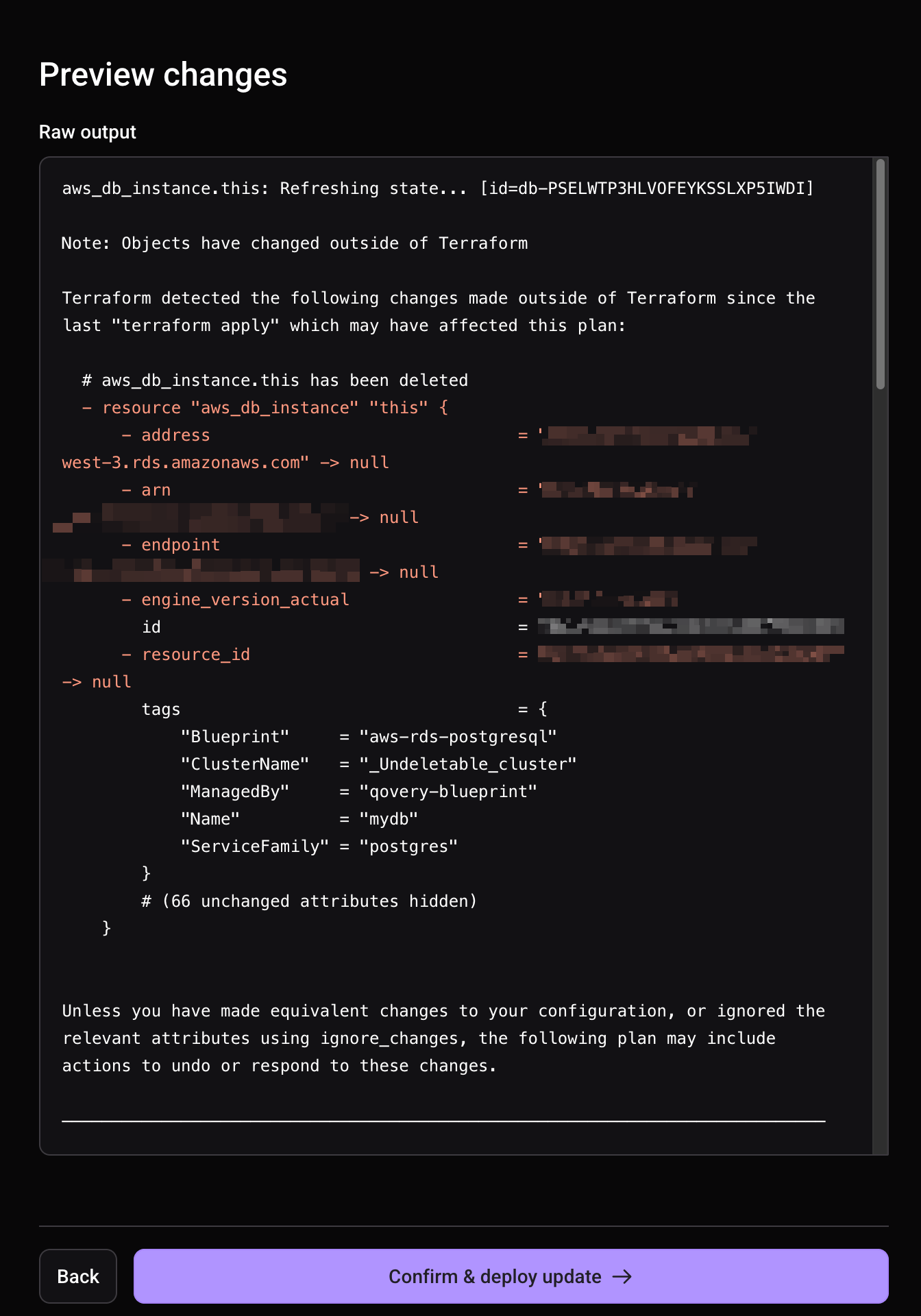 If the diff looks correct, **apply** the update. Qovery deploys the linked service with the new configuration.
Applying an update changes live infrastructure. Always review the preview diff before applying — some changes (for example a storage or instance-class change on a managed database) can be disruptive.
## Migrating a Managed Database to a Blueprint
An existing Qovery **managed database** can be migrated to blueprint-backed provisioning: the underlying cloud resource (for example the RDS instance) becomes owned by a service-catalog blueprint, while Qovery continues to manage the connection environment variables your applications rely on.
This applies to existing managed databases only. New resources are created directly from the catalog as described above. If you're considering a migration for a production database, review the preview diff carefully and back up your data first.
## Permissions
Creating, updating, and deploying a blueprint requires the **Manager** role on the target environment. Access follows Qovery's standard role-based access control — see [Members & RBAC](/docs/configuration/organization/members-rbac).
## Best Practices
When creating a new blueprint service, use the latest released version so you start on a supported, up-to-date template.
Run a preview and read the diff before applying any blueprint update. It's the only way to see exactly what will change in your live infrastructure.
Use the Qovery-managed Terraform backend unless you have a specific reason to bring your own. Qovery handles state storage, locking, and safety for you.
Mark passwords, tokens, and keys as secret variables so they're stored encrypted and hidden in the Console.
For anything the catalog covers, a blueprint gives you a maintained, versioned template with a built-in upgrade path — less to write and less to keep current yourself.
## API Reference
Blueprints are fully scriptable through the Qovery API. The relevant endpoints are grouped under the **Blueprint** tags and cover listing the catalog, reading a blueprint's README and manifest, creating a blueprint in an environment, checking for and previewing updates, and deploying. See the [API Reference](/docs/api-reference/introduction).
## Next Steps
Compare blueprint-provisioned databases with Qovery's container and managed database options.
Learn about object storage on Qovery.
Understand the Terraform service that backs a blueprint.
Control who can create and manage blueprints.
If the diff looks correct, **apply** the update. Qovery deploys the linked service with the new configuration.
Applying an update changes live infrastructure. Always review the preview diff before applying — some changes (for example a storage or instance-class change on a managed database) can be disruptive.
## Migrating a Managed Database to a Blueprint
An existing Qovery **managed database** can be migrated to blueprint-backed provisioning: the underlying cloud resource (for example the RDS instance) becomes owned by a service-catalog blueprint, while Qovery continues to manage the connection environment variables your applications rely on.
This applies to existing managed databases only. New resources are created directly from the catalog as described above. If you're considering a migration for a production database, review the preview diff carefully and back up your data first.
## Permissions
Creating, updating, and deploying a blueprint requires the **Manager** role on the target environment. Access follows Qovery's standard role-based access control — see [Members & RBAC](/docs/configuration/organization/members-rbac).
## Best Practices
When creating a new blueprint service, use the latest released version so you start on a supported, up-to-date template.
Run a preview and read the diff before applying any blueprint update. It's the only way to see exactly what will change in your live infrastructure.
Use the Qovery-managed Terraform backend unless you have a specific reason to bring your own. Qovery handles state storage, locking, and safety for you.
Mark passwords, tokens, and keys as secret variables so they're stored encrypted and hidden in the Console.
For anything the catalog covers, a blueprint gives you a maintained, versioned template with a built-in upgrade path — less to write and less to keep current yourself.
## API Reference
Blueprints are fully scriptable through the Qovery API. The relevant endpoints are grouped under the **Blueprint** tags and cover listing the catalog, reading a blueprint's README and manifest, creating a blueprint in an environment, checking for and previewing updates, and deploying. See the [API Reference](/docs/api-reference/introduction).
## Next Steps
Compare blueprint-provisioned databases with Qovery's container and managed database options.
Learn about object storage on Qovery.
Understand the Terraform service that backs a blueprint.
Control who can create and manage blueprints.